1. Introducció
Welcome to your JBL J777 Wireless In-Ear Headphones. This manual provides detailed instructions to help you get the most out of your device, ensuring proper setup, operation, and maintenance. Please read this manual thoroughly before using your headphones.
2. Producte acabatview
The JBL J777 headphones are designed for wireless audio playback and hands-free calling, offering convenience and quality sound.
2.1 Components
- In-ear earbuds with silicone tips
- Flexible neckband cable
- Inline remote control with integrated microphone
- USB charging port (typically located on the remote)
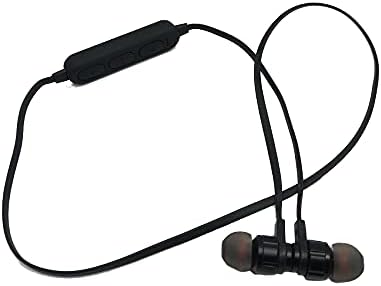
This image displays the complete JBL J777 wireless in-ear headphones. It features two black earbuds connected by a flexible cable, with an inline remote control positioned on the cable. The design is intended for comfortable wear around the neck.
2.2 Controls
The inline remote control provides easy access to various functions:
- Botó d'engegada/multifunció: Used for powering on/off, play/pause music, and answering/ending calls.
- Botó per pujar el volum: Increases volume, also used for skipping to the next track.
- Botó per baixar el volum: Decreases volume, also used for skipping to the previous track.

Un detallat view of the inline remote control for the JBL J777 headphones. It shows three distinct buttons for power/multi-function, volume up, and volume down, along with a small microphone opening for hands-free calls.
3. Configuració
3.1 Càrrega dels auriculars
- Connect the micro-USB charging cable to the charging port on the inline remote control.
- Connecteu l'altre extrem del cable a una font d'alimentació USB (per exemple, un port USB de l'ordinador o un adaptador de paret USB).
- The LED indicator will typically show red during charging and turn off or blue when fully charged.
- The integrated 90mAh lithium battery provides wireless operation.
3.2 Vinculació Bluetooth
To connect your JBL J777 headphones to a Bluetooth-enabled device:
- Assegureu-vos que els auriculars estiguin apagats.
- Manteniu premut el botó Power/Multi-function button for approximately 5-7 seconds until the LED indicator flashes red and blue alternately. This indicates the headphones are in pairing mode.
- On your mobile phone or Bluetooth-enabled device, go to the Bluetooth settings and enable Bluetooth.
- Cerca available devices and select "JBL J777" from the list.
- Once paired, the LED indicator will typically flash blue slowly or remain solid blue.
- The headphones have an operation distance of up to 10 meters (33 feet) in an open environment.
4. Instruccions de funcionament
4.1 Encès/Apagat
- Per encendre: Manteniu premut el botó Power/Multi-function button for 3 seconds. The LED will flash blue.
- Per apagar: Manteniu premut el botó Power/Multi-function button for 3 seconds. The LED will flash red and then turn off.
4.2 Reproducció de música
- Reproduir/pausa: Premeu el botó Power/Multi-function botó una vegada.
- Pista següent: Manteniu premut el botó Puja el volum botó.
- Pista anterior: Manteniu premut el botó Baixa el volum botó.
- Pujar el volum: Premeu el botó Puja el volum botó breument.
- Baixar el volum: Premeu el botó Baixa el volum botó breument.
4.3 Gestió de trucades
- Respondre/Finalitzar la trucada: Premeu el botó Power/Multi-function botó una vegada.
- Rebutja la trucada: Manteniu premut el botó Power/Multi-function botó durant 2 segons.
- Torna a marcar l'últim número: Premeu dues vegades el botó Power/Multi-function botó.
4.4 Cancel·lació activa del soroll
The JBL J777 headphones feature active noise cancellation to reduce ambient noise for a more immersive listening experience. This feature operates automatically or is controlled via the multi-function button, depending on the specific model variant.
5. Manteniment
Proper care ensures the longevity and optimal performance of your headphones.
- Neteja: Gently wipe the earbuds and cable with a soft, dry cloth. Do not use harsh chemicals or abrasive materials.
- Emmagatzematge: Store the headphones in a cool, dry place away from direct sunlight and extreme temperatures. Avoid tangling the cable.
- Cura de la bateria: Per allargar la durada de la bateria, eviteu descarregar-la completament amb freqüència. Carregueu els auriculars regularment, fins i tot si no els feu servir durant períodes prolongats.
6. Solució De Problemes
If you encounter any issues with your JBL J777 headphones, refer to the following common problems and solutions:
- Els auriculars no s'encenen: Assegureu-vos que la bateria estigui carregada. Connecteu-la a una font d'alimentació i torneu-ho a provar.
- No es pot emparellar amb el dispositiu:
- Assegureu-vos que els auriculars estiguin en mode d'emparellament (parpellejant en vermell i blau).
- Assegureu-vos que el Bluetooth estigui habilitat al vostre dispositiu.
- Acosta els auriculars al dispositiu.
- Turn off and on both the headphones and your device, then try pairing again.
- Sense so:
- Comproveu el nivell de volum tant dels auriculars com del dispositiu connectat.
- Assegureu-vos que els auriculars estiguin correctament emparellats i connectats.
- Prova de reproduir àudio des d'una altra aplicació o font.
- Mala qualitat de so o connexió intermitent:
- Assegureu-vos que no hi hagi obstacles entre els auriculars i el dispositiu.
- Allunyeu-vos d'altres dispositius sense fil que puguin causar interferències.
- Torna a emparellar els auriculars amb el dispositiu.
7. Especificacions
Detailed technical specifications for the JBL J777 Wireless In-Ear Headphones:
| Marca | JBL |
| Número de model | J777 |
| Tipus | Auriculars sense fil intraorella |
| Connectivitat | Sense fil (Bluetooth 4.2) |
| Bluetooth Profiles | HFP, A2DP, AVCTP, AVDTP, AVRCP |
| Distància d'operació | Fins a 10 metres (33 peus) |
| Potència de transmissió | Classe 2 |
| Interval de freqüència | 2.402 - 2.480 GHz |
| Diàmetre de l'altaveu | Ø15mm |
| Impedància | 32Ω |
| Micròfon | Integrat |
| Control de soroll | Cancel·lació activa del soroll |
| Bateria | Rechargeable Lithium, 90mAh |
| Compatible amb | Telèfons mòbils |
| Suport de la targeta TF | 128MB - 32GB |
| Components inclosos | Coixinets per a les orelles |

This image shows the rear side of the JBL J777 product packaging. It clearly lists technical specifications such as Bluetooth version, supported profiles, operation distance, transmitting power, frequency range, speaker size, impedance, and battery capacity. It also indicates TF card support.
8. Garantia i Suport
For warranty information regarding your JBL J777 Wireless In-Ear Headphones, please refer to the documentation provided at the time of purchase. This information is typically included in the product packaging or available on the official JBL weblloc.
For further assistance, technical support, or to inquire about service, please visit the official JBL support page or contact their customer service department directly. Keep your proof of purchase handy for any warranty claims.


