Introducció
Gràcies per la compraasing the Marvo Scorpion HG9055 USB Gaming Headset. This manual provides detailed instructions for setup, operation, maintenance, and troubleshooting to ensure optimal performance and longevity of your device. Please read this manual thoroughly before using the headset.
Informació de seguretat
- Avoid exposing the headset to extreme temperatures, humidity, or dust.
- Do not disassemble or attempt to repair the headset yourself. This may void the warranty and cause damage.
- Clean the headset with a soft, dry cloth. Do not use liquid cleaners.
- Prolonged listening at high volume levels may cause hearing damage. Adjust volume to a comfortable level.
- Mantingueu els auriculars fora de l'abast dels nens i les mascotes.
Contingut del paquet
Si us plau, comproveu el contingut del paquet en desembalar-lo. Si falta algun article o hi ha algun dany, poseu-vos en contacte amb el vostre distribuïdor.
- Marvo Scorpion HG9055 USB Gaming Headset
- Manual d'usuari (aquest document)
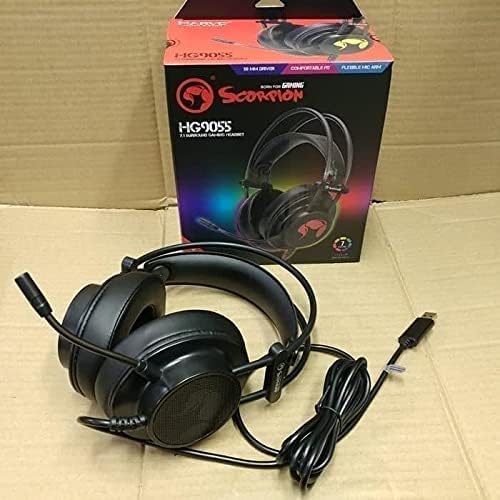
Image: The Marvo Scorpion HG9055 headset displayed next to its retail packaging, showing the product and its box.
Producte acabatview
The Marvo Scorpion HG9055 is a USB gaming headset designed for PC and laptop use, featuring 7.1 virtual surround sound, 50mm drivers, and a noise-cancelling microphone.

Image: A promotional view of the Marvo Scorpion HG9055 headset, detailing its 7.1 surround sound, USB connection, and customizable 7-color lighting features.
Components clau:
- Diadema ajustable: Per a un ajustament còmode.
- Over-Ear Earcups: Padded for comfort during extended use.
- Micròfon flexible: Noise-cancelling for clear communication.
- Connector USB: For digital audio and power.
Instruccions de configuració
- Connecteu els auriculars: Plug the USB connector of the HG9055 headset into an available USB port on your PC or laptop.
- Instal·lació del controlador: The operating system (Windows/macOS) should automatically detect and install the necessary drivers. Allow a few moments for this process to complete.
- Verify Audio Output:
- Windows: Right-click the speaker icon in the system tray, select "Sound Settings" or "Playback devices." Ensure "Marvo Scorpion HG9055" or a similar device name is selected as the default playback device.
- macOS: Go to "System Preferences" > "Sound" > "Output." Select "Marvo Scorpion HG9055" as the output device.
- Verify Microphone Input:
- Windows: In "Sound Settings" or "Recording devices," ensure "Marvo Scorpion HG9055" is selected as the default recording device.
- macOS: In "System Preferences" > "Sound" > "Input," select "Marvo Scorpion HG9055" as the input device.
- Ajustar l'ajust: Adjust the headband and earcups for a comfortable and secure fit. Position the microphone approximately 2-3 cm from your mouth for optimal voice clarity.

Image: The Marvo Scorpion HG9055 headset resting on a stand, demonstrating its over-ear design and flexible microphone, ready for use.
Instruccions de funcionament
Reproducció d'àudio:
Once connected and configured, the headset will function as your primary audio output device.
- Control de volum: Adjust the volume using the in-line control wheel on the headset cable or through your operating system's sound settings.
- So envoltant virtual 7.1: The headset supports 7.1 virtual surround sound. This feature may require specific software or settings within your game or audio application for full utilization. Refer to your game's audio settings for configuration.
Ús del micròfon:
- Microphone Activation: The microphone is active by default when connected. Use the in-line microphone mute switch (if present) to toggle the microphone on/off.
- Cancel·lació de soroll: The integrated noise-cancelling microphone reduces background noise for clearer voice communication. Ensure the microphone is positioned correctly near your mouth.
- Volum del micròfon: Adjust microphone sensitivity through your operating system's sound settings (Input/Recording devices).
Manteniment
- Neteja: Use a soft, dry, lint-free cloth to wipe the earcups and headband. Do not use abrasive cleaners, alcohol, or solvents.
- Emmagatzematge: When not in use, store the headset in a clean, dry place, away from direct sunlight and extreme temperatures. Avoid tangling the cable.
- Cura del cable: Do not pull on the cable to disconnect the headset. Always grasp the USB plug.
Resolució de problemes
| Problema | Solució |
|---|---|
| No hi ha so dels auriculars. |
|
| El micròfon no funciona. |
|
| La qualitat del so és deficient o distorsionada. |
|
Especificacions
| Nom del model | HG9055 |
| Connectivitat | USB (per cable) |
| Factor de forma dels auriculars | Sobre l'orella |
| Conductors | 50 MM |
| So envoltant | 7.1 So envoltant virtual |
| Micròfon | Noise Cancellation, Included |
| Control de soroll | Cancel·lació activa de soroll (micròfon) |
| Compatible amb | PC, ordinador portàtil |
| Color | Negre |
| Material | Plàstic |
| Fabricant | Marvo |
Garantia i Suport
For warranty information and technical support, please refer to the warranty card included with your product or visit the official MARVO weblloc web. Conserveu el comprovant de compra per a qualsevol reclamació de garantia.
Fabricant: Marvo
Model: HG9055


