Introducció
This manual provides essential instructions for the installation, operation, and maintenance of your Compustar 2WT11R-SS 3-Mile LCD Remote, ANT-2WDSS Antenna, and FT-Temp Sensor kit. This kit is designed to upgrade or replace components of compatible Compustar remote start systems.
The kit includes the 2WT11R-SS LCD remote, the ANT-2WDSS antenna, a 4-6 pin connecting cable, and the FT-Temp temperature sensor.
Compatibilitat: This remote and antenna set is compatible with the following Compustar controllers:
- CM6200
- CM900
- CM7200
- CM7000
- CM7300
- CM-DC3
- CMX-LC
- CM2400
Important: Professional installation is highly recommended for this product to ensure proper functionality and to maintain warranty validity.
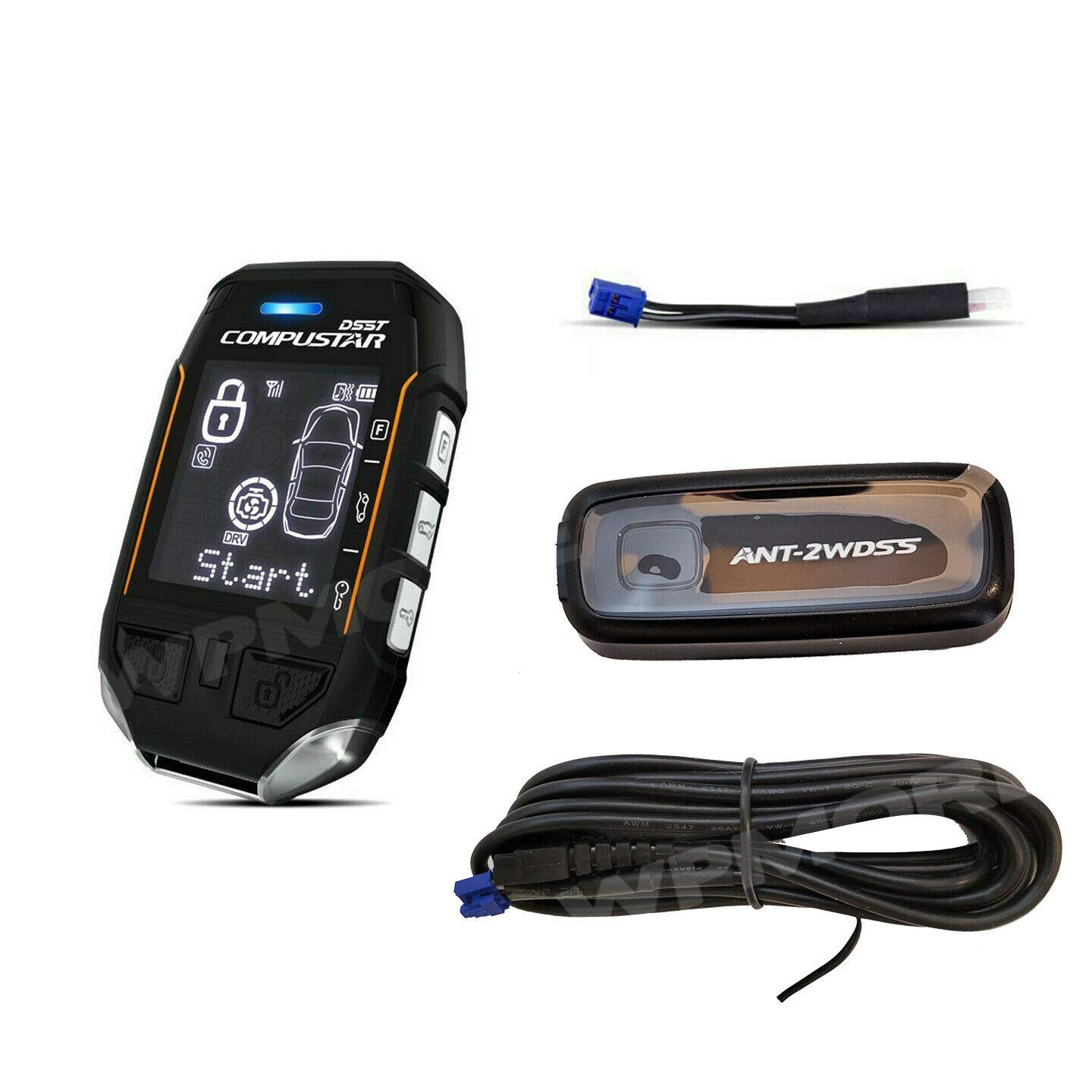
This image displays the main components included in the Compustar remote upgrade kit: the 2WT11R-SS LCD remote, the ANT-2WDSS antenna, the connecting cable, and the FT-Temp temperature sensor.
Configuració i instal·lació
This kit is an upgrade or replacement for an existing Compustar remote start system. It is not a complete remote start kit. Installation involves connecting the ANT-2WDSS antenna and FT-Temp sensor to a compatible Compustar control module using the provided cable, and then programming the 2WT11R-SS remote to the system.
Due to the complexity of vehicle electronics and the specific programming requirements for Compustar systems, professional installation by an authorized Firstech dealer is strongly advised. Incorrect installation can lead to system malfunction or damage to your vehicle's electrical system.
Antenna and Sensor Connection
- Connect the ANT-2WDSS antenna to the control module using the 4-6 pin cable. Ensure the connection is secure.
- Connect the FT-Temp sensor to the designated port on the control module. The sensor's lead is designed for internal vehicle temperature monitoring.
Programació a distància
After physical installation, the 2WT11R-SS remote must be programmed to your Compustar control module. This process typically involves specific button sequences on the remote and/or the control module. Refer to your specific Compustar control module's manual or consult with a professional installer for detailed programming instructions.
Operating the 2WT11R-SS Remote
The 2WT11R-SS is a 2-way LCD remote, providing visual confirmation of commands and vehicle status.
Funcions bàsiques
- Inici remot: Typically activated by double-tapping the key button. The remote will display confirmation and remaining run time.
- Bloquejar/Desbloquejar: Use the designated lock/unlock buttons. The LCD will confirm the action.
- Alliberament del tronc: A dedicated button or combination press usually activates the trunk release.
- Funcions auxiliars: Additional functions may be available depending on your control module's programming.
LCD Screen and Indicators
- Activació de la pantalla: Pressing a specific button (often the side button) will turn on the screen without activating functions.
- Visualització d'estat: The LCD shows vehicle status (locked, unlocked, started), run time remaining, and internal vehicle temperature (from FT-Temp sensor).
- Run Time LED: An LED indicator on the remote provides a quick visual of remaining run time:
- Blue: 10-15 minutes remaining
- Purple: 5-9 minutes remaining
- Red: Less than 5 minutes remaining
- Visualització de la temperatura: The remote can display the temperature inside the vehicle via the FT-Temp sensor. Note that initial readings might reflect dashboard temperature until the interior equalizes.
Funcions avançades
- Sound/Vibrate Toggle: Hold a specific button (often the side button) to switch between sound alerts and vibrate alerts. Volume adjustment may also be available.
- Bloqueig del botó: Lock the remote buttons to prevent accidental activation while in a pocket.
- Mode valet: This mode disables remote start functionality. Useful when servicing the vehicle or leaving it with a valet.
- Built-in Clock & Scheduled Start: The remote features a clock and can be configured for scheduled vehicle starts, if supported by your control module. Regular clock adjustments may be necessary for accuracy.
Interval
The remote is advertised with a 3-mile range. Actual range can vary significantly based on environmental factors such as obstructions (buildings, terrain), radio interference, and vehicle location. While long-range operation is possible, expect reduced range in urban or obstructed areas.
Manteniment
Càrrega del comandament a distància
The 2WT11R-SS remote is rechargeable. Connect it to a suitable USB power source using the appropriate charging cable. Charge indicators on the remote will show charging status.
Canvi de bateria
Over time, the internal rechargeable battery may degrade. Replacing the battery can be challenging, and official replacement parts or services might be restricted to authorized dealers. Consult with an authorized Compustar dealer for battery replacement options.
Neteja
Wipe the remote and antenna with a soft, dry cloth. Avoid using harsh chemicals or abrasive cleaners, which can damage the finish or electronic components.
Resolució de problemes
If you encounter issues with your Compustar remote kit, consider the following troubleshooting steps:
- Remote Screen Not Turning On: This is a known issue reported by some users. Ensure the remote is fully charged. If the issue persists, it may indicate a hardware fault.
- Remote Not Communicating with Control Module:
- Check the remote's battery level.
- Ensure you are within range and there are no significant obstructions.
- Verify that the antenna cable is securely connected to the control module.
- If the vehicle is started remotely but the remote still shows it as off, wait a short period as communication can sometimes be delayed.
- Ensure the system is not in Valet Mode.
- Lectures de temperatura inexactes: The FT-Temp sensor's lead length may result in it being installed in a location that reflects dashboard temperature rather than ambient cabin temperature. Allow time for temperatures to equalize, especially after the vehicle has been off for a while.
- Abast reduït: Environmental factors such as buildings, hills, and radio interference can significantly reduce the effective range. Try operating the remote from a different location.
If troubleshooting steps do not resolve the issue, contact an authorized Compustar dealer for assistance. Attempting unauthorized repairs may void your warranty.
Especificacions
| Pes de l'article | 5.3 unces |
| Dimensions del paquet | 7.05 x 3.9 x 1.69 polzades |
| Número de model de l'article | 2WT11R-SS + ANT-2WDSS + FT-TEMP |
| Mida de la pantalla | 3 polzades |
| Comandament de veu | Botons |
| Tipus de servei del vehicle | Cotxe, camió |
| Mida de la pantalla | 3 polzades |
| Característica especial | Ergonòmic |
| Tecnologia de connectivitat | Freqüència de ràdio |
| Tipus de visualització | Pantalla en color |
| Data de primera disponibilitat | 9 d'abril de 2021 |
Informació de la garantia
This product comes with a 1-year manufacturer warranty through WPMORE. Please retain your proof of purchase for warranty claims.
Important: The manufacturer's warranty may be voided if the system is not installed by an authorized Firstech dealer. This condition applies to both standard remotes and this specific 2-way remote.
Suport
For technical support, advanced programming, or warranty service, please contact an authorized Compustar dealer. You can find a list of authorized dealers on the official Compustar weblloc.
For general inquiries, refer to the official Compustar weblloc o poseu-vos en contacte amb el seu servei d'atenció al client.


