1. Introducció
Thank you for choosing the INPHIC I16 Wireless Earbuds. These earbuds are designed to provide a superior audio experience with high-fidelity sound, comfortable wear, and advanced features like Bluetooth 5.1 connectivity and IPX7 waterproofing. This manual will guide you through the setup, operation, and maintenance of your new earbuds.
2. Producte acabatview
Què hi ha a la caixa
- 1 x Pair of INPHIC I16 Wireless Earbuds
- 1 x funda de càrrega
- 1 x Charging Cable (USB / Type C)
- 1 x manual de producte

Image: INPHIC I16 Wireless Earbuds and Charging Case.

Image: Packaging and included components of the INPHIC I16 Earbuds.
3. Configuració
Càrrega dels auriculars i la funda
Before first use, ensure both the earbuds and the charging case are fully charged. Use the provided USB / Type C charging cable to connect the charging case to a power source. The indicator light on the case will show charging status. Once fully charged, the light will change or turn off.
- Col·loca els auriculars a l'estoig de càrrega per carregar-los.
- The charging case can fully charge the earbuds multiple times, extending your listening time.
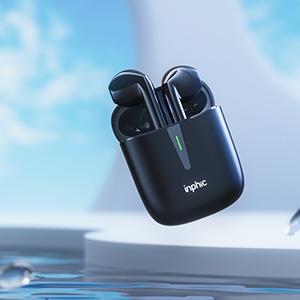
Image: The INPHIC I16 charging case with earbuds inside, indicating charging status.
Vinculació amb el dispositiu
The INPHIC I16 earbuds feature one-step pairing for convenience.
- Open the charging case and take out both earbuds. They will automatically power on and connect to each other.
- Al dispositiu (telèfon intel·ligent, tauleta, ordinador portàtil), activeu el Bluetooth i cerqueu els dispositius disponibles.
- Select "I16" from the list of found devices to complete the pairing process.
- After the first successful pairing, the earbuds will automatically connect to your device when taken out of the case, provided Bluetooth is enabled on your device.

Image: Earbuds and phone screen demonstrating the one-step pairing process.

Image: Close-up of the Bluetooth 5.1 chip, highlighting the advanced connectivity technology.
4. Instruccions de funcionament
Portant els auriculars
The I16 earbuds are designed with an ergonomic shape to fit various ear types securely and comfortably. Insert the earbuds gently into your ears until they feel stable. This ensures optimal sound quality and prevents them from falling out during activities.

Image: A person running, demonstrating the stable fit of the ergonomic wireless earbuds.

Image: A woman smiling while wearing the INPHIC I16 earbuds, highlighting comfortable use.
Controls tàctils
The I16 earbuds feature intuitive touch controls for easy management of your audio and calls.
- Double-touch Left Earbud: Play/Pause music, Answer/Hang up calls.
- Triple-touch Left Earbud: Cançó anterior.
- Double-touch Right Earbud: Play/Pause music, Answer/Hang up calls.
- Triple-touch Right Earbud: Següent Cançó.
- Hold 3 seconds: Activa l'Assistent de veu.
- Hold 8 seconds: Apagar.
- Hold 8 seconds: Encès.

Image: Diagram illustrating the various touch control functions on the INPHIC I16 earbuds.
Qualitat del so
Equipped with a high-fidelity chip, the I16 earbuds deliver HD quality sound with strong bass performance, providing an immersive music experience across various genres.

Image: Diagram showcasing the internal components responsible for Hi-Fi sound quality.
Durada de la bateria
The I16 earbuds offer extended playtime. A single full charge provides up to 8 hours of listening. With the portable charging case, you can get an additional 4 full charges, totaling up to 40 hours of playtime.

Image: Graphic illustrating the ultra-long playtime of 8 hours on a single charge and 32 hours from the charging case.
IPX7 impermeable
The I16 wireless headphones are IPX7 waterproof, making them resistant to sweat and rain. This feature makes them an ideal choice for sports and outdoor activities, allowing you to enjoy your music without worrying about water damage.

Image: Earbuds with water droplets, demonstrating their IPX7 waterproof rating.
5. Manteniment
To ensure the longevity and optimal performance of your INPHIC I16 Wireless Earbuds, follow these maintenance guidelines:
- Neteja: Regularly wipe the earbuds and charging case with a soft, dry, lint-free cloth. For stubborn dirt, a slightly damp cloth can be used, but ensure no moisture enters the charging ports or speaker grilles.
- Emmagatzematge: When not in use, store the earbuds in their charging case to protect them from dust and physical damage. Keep them in a cool, dry place away from extreme temperatures.
- Càrrega: Use only the provided charging cable or a certified equivalent. Avoid using damaged cables or chargers.
- Exposició a l'aigua: While IPX7 waterproof, avoid prolonged submersion in water or exposure to strong jets of water. Dry the earbuds thoroughly before placing them back in the charging case if they get wet.
6. Solució De Problemes
If you encounter any issues with your INPHIC I16 Wireless Earbuds, please refer to the following common solutions:
| Problema | Causa possible | Solució |
|---|---|---|
| Els auriculars no es combinen amb el dispositiu | Bluetooth desactivat, auriculars no en mode d'emparellament, interferències. | Ensure Bluetooth is on. Place earbuds in case, then take them out to re-enter pairing mode. Forget "I16" from your device's Bluetooth list and re-pair. |
| Només un auricular reprodueix so | Earbuds not connected to each other, low battery. | Place both earbuds back in the charging case, close the lid for 5 seconds, then take them out again. Ensure both are charged. |
| Touch controls are too sensitive or unresponsive | Improper touch, environmental factors (e.g., wind), software glitch. | Ensure you are touching the correct area. Try cleaning the touch sensor. Restart earbuds by placing them in the case and taking them out. |
| Els auriculars es desconnecten aleatòriament | Out of range, interference, low battery. | Keep your device within 10 meters of the earbuds. Charge the earbuds. Avoid strong electromagnetic interference. |
| Voice prompts change language | Accidental language change command. | Disconnect from Bluetooth, then triple-tap the touch sensor on either earbud to cycle through languages until English is selected. |
| Poor sound quality / No bass | Improper fit, low battery, audio source quality. | Adjust the earbuds for a secure fit in your ear. Ensure earbuds are fully charged. Try a different audio source. |
7. Especificacions
| Característica | Especificació |
|---|---|
| Nom del model | I16 |
| Tecnologia de connectivitat | Sense fil |
| Tecnologia de comunicació sense fils | Bluetooth 5.1 |
| Nivell de resistència a l'aigua | IPX7 impermeable |
| Durada de la bateria (càrrega única) | 8 hores |
| Temps de reproducció total (amb estoig de càrrega) | 40 hores |
| Mètode de control | Toca |
| Material | Plàstic |
| Pes de l'article | 1.13 unces (32 grams) |
| Dimensions del producte | 2.17 x 1.77 x 0.83 polzades |
| Resposta de freqüència | 20 kHz |
8. Garantia i assistència
INPHIC provides a 2 anys de garantia sense preocupacions for your I16 Wireless Earbuds. Our professional after-sale service team is available 24/7 to assist you with any questions or concerns.
For support, please refer to the contact information provided in your product packaging or visit the official INPHIC weblloc.


