1. Introducció
Thank you for choosing the PowerLocus Bluetooth Headphones Model pwl-p2. These headphones are designed to provide a high-quality audio experience with versatile connectivity options. This manual will guide you through the features, setup, and operation to ensure optimal performance.

Image 1.1: PowerLocus Bluetooth Headphones Model pwl-p2 and its protective carry case.
2. Producte acabatview
2.1 Contingut del paquet
- PowerLocus Bluetooth Headphones (Model pwl-p2)
- Cable de càrrega USB
- Cable d'àudio de 3.5 mm
- Funda protectora de transport
- Manual d'usuari (aquest document)

Image 2.1: The package includes the headphones, charging cable, audio cable, and a protective case.
2.2 Headphone Features
- Bluetooth 5.0: For stable and fast wireless connection.
- Micròfon integrat: Per trucades mans lliures.
- Disseny plegable: For portability and easy storage.
- Soft Memory Foam Earmuffs: Designed for comfort and sound isolation.
- Suport multimodal: Bluetooth, 3.5mm AUX wired, Micro SD/TF card, and FM Radio.
- Controladors d'àudio d'40 mm: Delivering Hi-Fi stereo sound with deep bass.
- Llarga vida útil de la bateria: Fins a 22.5 hores de joc.
- Càrrega ràpida: Fast battery replenishment.

Imatge 2.2: acabatview of the headphone's key features including Bluetooth, multiple playback modes, and design elements.
2.3 Controls i ports
Familiarize yourself with the buttons and ports on your headphones:
- Botó d'encesa: Activat/Desactivat, Reprodueix/Pausa, Respon/Finalitza trucada.
- Puja el volum (+): Augmentar el volum, Pista següent (pressió llarga).
- Baixar el volum (-): Baixar el volum, pista anterior (pressió llarga).
- Botó de mode (M): Switch between Bluetooth, FM Radio, and Micro SD modes.
- Port de càrrega micro USB: Per carregar els auriculars.
- Port AUX de 3.5 mm: Per a connexió d'àudio amb cable.
- Ranura per a targetes Micro SD/TF: For playing music directly from a memory card.
- Indicador LED: Displays connection and charging status.
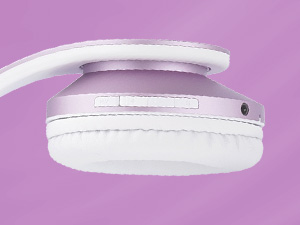
Imatge 2.3: Detallada view of the control buttons and ports on the headphone earcup.
3. Configuració
3.1 Càrrega dels auriculars
- Connect the small end of the USB charging cable to the Micro USB port on the headphones.
- Connect the larger end of the USB charging cable to a USB power source (e.g., computer USB port, wall adapter).
- The LED indicator will illuminate during charging. It will change color or turn off once fully charged (approximately 2.5 hours).
Nota: Assegureu-vos que els auriculars estiguin completament carregats abans del primer ús per a una durada òptima de la bateria.
3.2 Encès/Apagat
- Per encendre: Press and hold the Power Button for approximately 3 seconds until the LED indicator flashes.
- Per apagar: Premeu i manteniu premut el botó d'engegada durant aproximadament 3 segons fins que l'indicador LED s'apagui.
3.3 Vinculació Bluetooth
- Assegureu-vos que els auriculars estiguin apagats.
- Press and hold the Power Button for about 5-7 seconds until the LED indicator flashes blue and red alternately, indicating pairing mode.
- Al dispositiu (telèfon intel·ligent, tauleta, PC), activeu el Bluetooth i cerqueu els dispositius disponibles.
- Select 'PowerLocus pwl-p2' from the list of devices.
- Un cop emparellat, l'indicador LED parpellejarà lentament en blau.
Nota: Els auriculars intentaran tornar a connectar-se automàticament amb l'últim dispositiu emparellat quan s'engeguin.

Image 3.1: Visual representation of connecting the headphones via Bluetooth to a mobile device.
3.4 Connexió per cable (mode AUX)
If the battery is depleted or you prefer a wired connection:
- Connecteu un extrem del cable d'àudio de 3.5 mm al port AUX dels auriculars.
- Connecteu l'altre extrem del cable d'àudio de 3.5 mm a la presa de sortida d'àudio del vostre dispositiu.
- Els auriculars canviaran automàticament al mode amb cable.

Image 3.2: The headphones can be used in wired mode with the included 3.5mm audio cable.
4. Instruccions de funcionament
4.1 Controls d'àudio bàsics
- Reproduir/pausa: Premeu breument el botó d'engegada.
- Pujar el volum: Premeu breument el botó '+'.
- Baixar el volum: Premeu breument el botó '-'.
- Pista següent: Premeu llargament el botó '+'.
- Pista anterior: Premeu llargament el botó '-'.
4.2 Controls de trucades telefòniques
- Respondre/Finalitzar la trucada: Premeu breument el botó d'engegada.
- Rebutja la trucada: Premeu llargament el botó d'engegada.
- Torna a marcar l'últim número: Premeu dues vegades el botó d'engegada.
4.3 Canvi de modes
Press the 'M' (Mode) button to cycle through the available modes:
- Mode Bluetooth
- Mode de ràdio FM
- Micro SD/TF Card Mode
4.4 Micro SD/TF Card Mode
- Insert a Micro SD/TF card (with MP3 audio files) into the card slot.
- Switch to Micro SD/TF Card Mode using the 'M' button.
- Playback will begin automatically. Use the basic audio controls for playback.
4.5 Mode de ràdio FM
- Switch to FM Radio Mode using the 'M' button.
- Long press the Power Button to automatically scan and save available FM stations.
- Use the '+' and '-' buttons to navigate between saved stations.

Image 4.1: The headphones support multiple playback options including Bluetooth, wired, Micro SD, and FM radio.
5. Manteniment
5.1 Neteja
- Netegeu els auriculars amb un drap suau i sec.
- No utilitzeu netejadors abrasius ni dissolvents.
- Mantingueu el port de càrrega i el connector d'àudio lliures de pols i deixalles.
5.2 Emmagatzematge
- When not in use, store the headphones in the provided protective carry case.
- Eviteu exposar els auriculars a temperatures extremes, humitat o llum solar directa.
- Emmagatzemar en un lloc fresc i sec.

Image 5.1: The foldable design and included carry case make the headphones easy to store and transport.
6. Solució De Problemes
| Problema | Causa possible | Solució |
|---|---|---|
| Els auriculars no s'engeguen. | Bateria baixa. | Carregueu els auriculars completament. |
| No es pot emparellar per Bluetooth. | Auriculars no en mode d'emparellament; Bluetooth del dispositiu desactivat; massa lluny del dispositiu. | Ensure headphones are in pairing mode (flashing blue/red). Turn on device Bluetooth. Move headphones closer to device (within 36 feet). |
| Sense so. | Volume too low; incorrect mode; wired cable not fully inserted. | Increase volume. Check if headphones are in the correct mode (Bluetooth, AUX, SD, FM). Ensure 3.5mm cable is fully inserted in both devices. |
| El micròfon no funciona. | Not connected via Bluetooth; device settings. | Assegureu-vos que els auriculars estiguin connectats per Bluetooth. Comproveu la configuració del micròfon al dispositiu connectat. |
| FM Radio not receiving stations. | Poor signal; stations not scanned. | Move to an area with better FM reception. Long press the Power Button in FM mode to auto-scan and save stations. |
7. Especificacions
| Característica | Especificació |
|---|---|
| Número de model | pwl-p2 |
| Tecnologia de connectivitat | Sense fil (Bluetooth 5.0), amb cable (connector de 3.5 mm) |
| Mida del controlador d'àudio | 40 mm |
| Interval de freqüència | 20 Hz - 20,000 Hz |
| Impedància | 32 ohms |
| Sensibilitat | 105 dB |
| Interval Bluetooth | Fins a 36 peus (12 metres) |
| Durada de la bateria | Fins a 22.5 hores |
| Temps de càrrega | Aproximadament 2.5 hores |
| Pes | 5.1 unces |
| Característiques especials | Foldable, Built-in Microphone, Micro SD/TF Card Slot, FM Radio, Sound Isolation |
| Dispositius compatibles | iOS, Android, PC, Laptops, TV, Tablets, devices with 3.5mm audio jack or Bluetooth connectivity |
8. Garantia i Suport
8.1 Informació de la garantia
PowerLocus provides a 24 mesos de garantia completa for the Model pwl-p2 headphones. This warranty covers manufacturing defects and ensures your smooth purchase experience. Please retain your proof of purchase.
8.2 Atenció al client
For any questions, concerns, or warranty claims regarding your PowerLocus Bluetooth Headphones, please contact our friendly support team. Refer to the contact information provided in your product packaging or visit the official PowerLocus weblloc d'assistència.


