Producte acabatview
The Enermax Liqmax III 240 White A-RGB AIO CPU Liquid Cooler is an all-in-one liquid cooling solution designed for both Intel and AMD CPU platforms. It features addressable RGB lighting that can synchronize with popular motherboard software such as ASUS Aura Sync, Gigabyte RGB FUSION, MSI Mystic Light Sync, ASRock Polychrome, and Razer Chroma, offering 16.8 million colors and dynamic lighting effects. Its dual-chamber water block design, combined with Central Coolant Inlet (CCI) structure and Shunt-Channel Technology (SCT), ensures efficient heat transfer by targeting the hottest spots and shortening the coolant path. The cooler is equipped with dual-convex blade fans engineered to generate high air pressure and volume for optimal cooling performance.
Contingut del paquet
Abans de començar la instal·lació, comproveu que tots els components siguin presents al paquet:
- 1x radiador de 240 mm
- 2 ventiladors ARGB PWM de 120 mm
- 1x CPU Water Block with Integrated Pump
- Mounting Hardware for Intel Sockets (LGA2066, LGA2011-v3, LGA2011, LGA1700, LGA1200, LGA1151, LGA1150, LGA1156, LGA1155)
- Maquinari de muntatge per a sòcols AMD (AM5, AM4, AM3+, AM3, AM2+, AM2, FM2+, FM2, FM1)
- Pasta tèrmica
- Manual d'usuari (aquest document)
Configuració i instal·lació
For detailed step-by-step installation instructions, please refer to the official Manual d'instal·lació (PDF) provided by Enermax. Below is a general overview and key considerations.
Preinstal·lació
- Assegureu-vos que el vostre sistema estigui apagat i desconnectat.
- Identify your CPU socket type (Intel or AMD) to select the correct mounting hardware.
- Prepare your PC case for radiator mounting (top or front, depending on case compatibility).
AMD Installation Overview
For AMD platforms, the installation typically utilizes the existing AMD stock backplate that comes with your motherboard. Secure the appropriate AMD mounting brackets to the water block, then align and secure the cooler to the CPU socket using the provided standoffs and screws.

Figure 1: Diagram illustrating the AMD CPU cooler installation process, showing the water block, mounting brackets, and the use of the AMD stock backplate.
Intel Installation Overview
For Intel platforms, install the universal backplate behind the motherboard, then attach the correct Intel mounting brackets to the water block. Apply thermal paste to the CPU, then carefully place the water block onto the CPU and secure it with the provided screws.
Fan and Radiator Mounting
Mount the two 120mm ARGB PWM fans to the 240mm radiator using the long screws. Ensure the fans are oriented to push or pull air through the radiator in your desired airflow configuration. Then, mount the assembled radiator and fan unit to your PC case.

Figure 2: The Enermax Liqmax III 240 White A-RGB AIO CPU Liquid Cooler, showcasing the radiator, two ARGB fans, and the water block.
Connexions de cable
- Connecteu el cable d'alimentació de la bomba al capçalera CPU_FAN o AIO_PUMP de la placa base.
- Connect the fan PWM cables to the CPU_FAN or SYS_FAN headers on your motherboard.
- Connect the ARGB lighting cables from the fans and water block to a 3-pin 5V ARGB header on your motherboard. Ensure correct pin alignment (5V-D-G) to prevent damage.

Figure 3: Illustration of the 3-pin 5V ARGB header connection on a motherboard, essential for synchronizing the cooler's lighting effects.
Instruccions de funcionament
Fan Control and Performance
The included 120mm ARGB PWM fans operate within a speed range of 500 to 1600 RPM. This Pulse Width Modulation (PWM) control allows your motherboard to dynamically adjust fan speed based on CPU temperature, providing optimal cooling performance when needed and quieter operation at idle. The dual-convex blade design enhances both air pressure (max. 1.98mmH2O) and high-volume airflow (max. 72.1CFM).
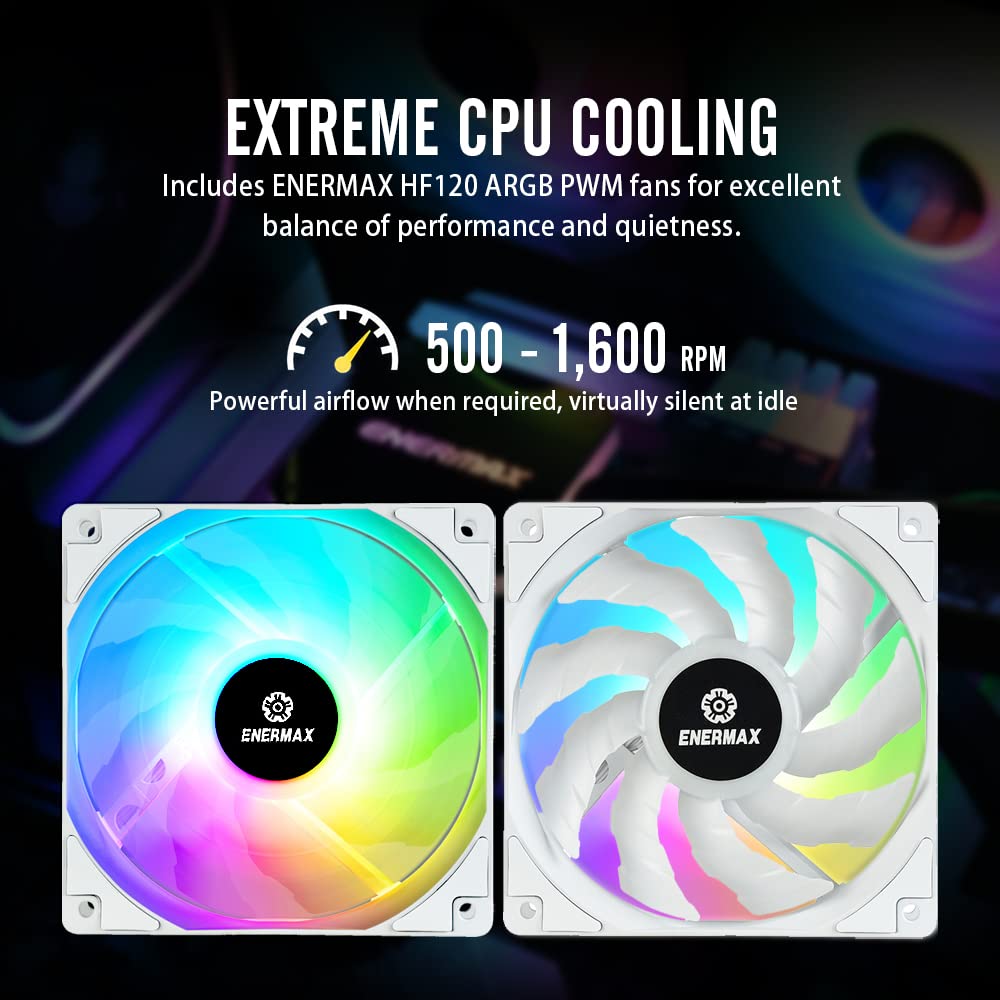
Figura 4: Primer pla view of the Enermax HF120 ARGB PWM fans, highlighting their design for balanced performance and quietness.

Figure 5: Diagram illustrating the powerful airflow generated by the dual-convex blade design, showing air pressure and volume metrics.
ARGB Lighting Synchronization
Once connected to a compatible 3-pin 5V ARGB motherboard header, the cooler's lighting can be controlled and synchronized using your motherboard's RGB software (e.g., ASUS Aura Sync, Gigabyte RGB FUSION, MSI Mystic Light Sync, ASRock Polychrome). This allows for customization of colors and dynamic lighting effects across your system.
Manteniment
Un manteniment regular ajuda a garantir la longevitat i el rendiment òptim del vostre refrigerador de líquid.
- Neteja de pols: Periodically clean dust from the radiator fins and fan blades using compressed air. Accumulated dust can impede airflow and reduce cooling efficiency.
- Gestió de cables: Assegureu-vos que tots els cables estiguin ben encaminats i que no obstrueixin el flux d'aire dins de la carcassa.
- Monitorització del sistema: Use system monitoring software to regularly check CPU temperatures and pump/fan speeds to ensure they are operating within normal parameters.
- Comprovació del refrigerant: As this is a closed-loop AIO system, no coolant refilling is typically required. However, be vigilant for any signs of leaks around the tubing or water block.
Resolució de problemes
If you encounter issues with your Enermax Liqmax III 240 cooler, consider the following troubleshooting steps:
- Sense alimentació/Els ventiladors no giren:
- Check all power connections to the pump and fans. Ensure they are securely plugged into the correct motherboard headers.
- Verify that the CPU_FAN header is enabled in your motherboard's BIOS/UEFI settings.
- Temperatures altes de la CPU:
- Ensure the water block is making proper contact with the CPU. Re-seat if necessary, applying fresh thermal paste.
- Check fan orientation on the radiator for optimal airflow.
- Netegeu qualsevol acumulació de pols a les aletes del radiador.
- Verify pump operation (listen for a faint hum or check RPM in monitoring software).
- ARGB Lighting Not Working/Incorrect Colors:
- Confirm the ARGB cable is connected to a 3-pin 5V ARGB header, not a 4-pin 12V RGB header. Connecting to a 12V header can damage the LEDs.
- Ensure the ARGB header is enabled in your motherboard's BIOS/UEFI.
- Use your motherboard's RGB software to control the lighting. Update the software if issues persist.
- Soroll excessiu:
- Check fan speeds; higher RPMs will generate more noise. Adjust fan curves in BIOS/software if desired.
- Ensure no cables are interfering with fan blades.
- A gurgling sound might indicate air bubbles in the loop. Gently tilt your PC case to help move air bubbles to the pump.

Figure 6: Chart illustrating the low noise level of the cooler, optimized for quiet operation.
Especificacions
| Característica | Especificació |
|---|---|
| Número de model | ELC-LMT240-W-ARGB |
| Mida del radiador | 240 mm |
| Mida del ventilador | 120 mm |
| Tipus de ventilador | ARGB PWM Fan |
| Velocitat del ventilador | 500 - 1600 RPM (Max. Rotational Speed) |
| Capacitat de cabal d'aire | 72.1 CFM (Peus cúbics per minut) |
| Pressió de l'aire | 1.98 mm H2O |
| Nivell de soroll | 14 dB |
| Mètode de refrigeració | Aigua |
| Material | Alumini |
| Voltage | 5 Volts |
| Tipus de connector d'alimentació | 4-Pin (PWM) |
| Dispositius compatibles | Escriptori |
| Dimensions del producte (L x A x A) | 10.79 x 2.09 x 4.72 polzades (27.4 x 5.3 x 12 cm) |
| Pes | 3.97 lliures (1.8 kg) |
| Intel CPU Socket Support | LGA2066, LGA2011-v3, LGA2011, LGA1700, LGA1200, LGA1151, LGA1150, LGA1156, LGA1155 |
| AMD CPU Socket Support | AM5, AM4, AM3+, AM3, AM2+, AM2, FM2+, FM2, FM1 |
Informació de la garantia
The Enermax Liqmax III 240 White A-RGB AIO CPU Liquid Cooler comes with a 5 anys de garantia. This warranty covers defects in materials and workmanship under normal use. For specific terms, conditions, and to initiate a warranty claim, please refer to the official Enermax website or contact Enermax customer support directly.
Suport i Contacte
For further assistance, technical support, or inquiries regarding your Enermax product, please visit the official Enermax weblloc web o la seva botiga de marca Amazon:
- Enermax Official Weblloc: www.enermaxusa.com (Si us plau, tingueu en compte: URL és un example, refer to product packaging or official sources for exact URL)
- Enermax Amazon Store: Visit Enermax Store on Amazon
You may also find additional resources and FAQs on their support pages.
Vídeos oficials de productes
No official product videos with 'Seller' as creator type were found in the provided data to embed directly into this manual. Please refer to the Enermax official website or their YouTube channel for any available product videos.