Introducció
The Libratone Zipp Mini is a versatile and portable smart speaker designed to deliver immersive 360° sound. Featuring both Wi-Fi and Bluetooth connectivity, it supports Airplay2 and Spotify Connect, and is compatible with Alexa for voice control. Its compact design and 12-hour playtime make it ideal for use throughout your home or on the go. The speaker also allows for multi-room pairing, enabling up to 6 speakers to create a seamless audio experience.
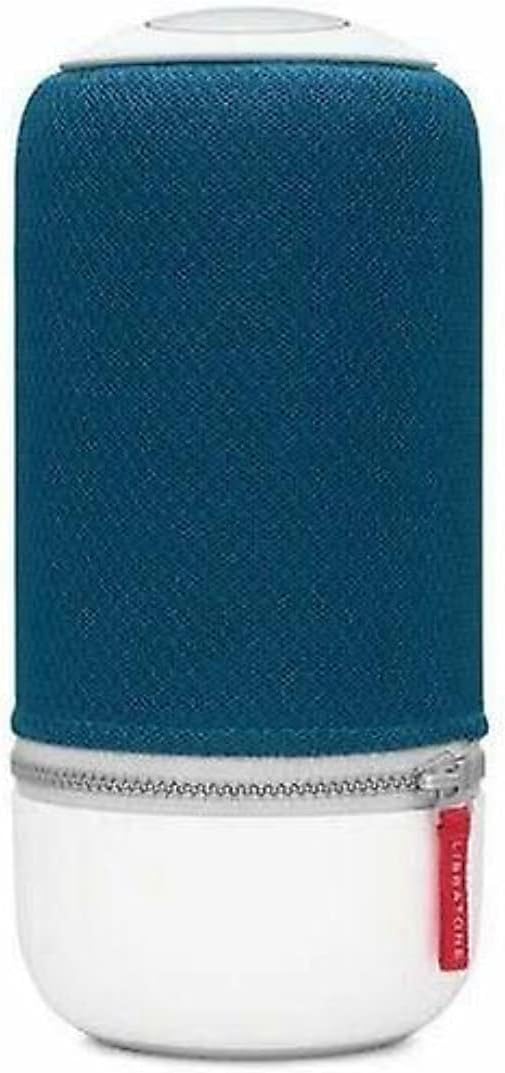
Image: The Libratone Zipp Mini Smart Speaker, showcasing its cylindrical design with a blue fabric cover and white base.
Contingut del paquet
Si us plau, verifiqueu que tots els elements siguin presents al paquet:
- Libratone Zipp Mini Smart Speaker
- Control remot
- Adaptador de corrent (amb cable elèctric)
- Guia d'inici ràpid (no inclosa en aquest manual)
- Safety and Warranty Information (not included in this manual)
Informació de seguretat
To ensure safe operation and prolong the life of your Libratone Zipp Mini speaker, please observe the following safety guidelines:
- No resistent a l'aigua: Aquest altaveu és no waterproof. Avoid exposure to water, rain, or moisture.
- Temperatura: Do not expose the speaker to extreme temperatures (hot or cold) or direct sunlight for extended periods.
- Ventilació: Assegureu-vos que hi hagi una ventilació adequada al voltant de l'altaveu. No bloquegeu cap obertura de ventilació.
- Neteja: Feu servir un drap suau i sec per netejar. No utilitzeu netejadors líquids ni aerosols.
- Desmuntatge: Do not attempt to disassemble, repair, or modify the speaker yourself. Refer all servicing to qualified service personnel.
- Font d'alimentació: Utilitzeu només l'adaptador d'alimentació subministrat.
Configuració
1. Carregant l’altaveu
Before first use, fully charge your Libratone Zipp Mini speaker. Connect the provided power adapter to the speaker's charging port and plug it into a wall outlet. The indicator light will show charging status and turn off when fully charged.
2. Engegada inicial
Press and hold the power button located on the top of the speaker until you hear an audible cue or see the indicator lights illuminate.
3. Connecting via Wi-Fi (for Smart Features)
For full smart speaker functionality, including Airplay2, Spotify Connect, and Alexa compatibility, connect your Zipp Mini to your home Wi-Fi network. Download the official Libratone app on your smartphone (compatible with iOS and Android). Follow the in-app instructions to connect your speaker to Wi-Fi and configure smart features.
4. Connexió mitjançant Bluetooth
To connect a device via Bluetooth:
- Assegureu-vos que l'altaveu estigui encès.
- Press the Bluetooth button on the speaker (refer to the speaker's top panel for button layout). The indicator light will flash, indicating pairing mode.
- On your smartphone or Bluetooth-enabled device, go to Bluetooth settings and select "Libratone Zipp Mini" from the list of available devices.
- Un cop connectat, l'indicador lluminós es mantindrà fix.

Image: The Libratone Zipp Mini Smart Speaker shown with its integrated carrying strap, highlighting its portability.
Instruccions de funcionament
Controls bàsics
The Libratone Zipp Mini features intuitive touch controls on its top panel for music playback, volume adjustment, and other functions. Specific controls include:
- Reproduir/pausa: Tap the center of the touch interface.
- Volum: Swipe clockwise or counter-clockwise around the edge of the touch interface.
- Omet la pista: Llisca cap a l'esquerra o cap a la dreta.
- Hush Gesture: Place your hand over the top of the speaker to temporarily mute the audio.
- Control de veu: Activate your voice assistant (e.g., Alexa) by voice command or a dedicated button if available.
- Presets: Configure up to 5 presets for playlists or radio stations via the Libratone app for quick access.
Multi-Room Pairing (SoundSpace Link)
The Zipp Mini supports Libratone's SoundSpace Link technology, allowing you to connect up to 6 speakers for a synchronized audio experience across multiple rooms. Use the Libratone app to group speakers and manage your multi-room setup.
FullRoom Technology
The speaker utilizes FullRoom technology to project rich, 360° sound in all directions, ensuring consistent audio quality regardless of the speaker's placement or your listening position.

Imatge: Una altra view of the Libratone Zipp Mini Smart Speaker, emphasizing its sleek design and portability.
Manteniment
Proper maintenance ensures the longevity and optimal performance of your Libratone Zipp Mini speaker.
Neteja
Gently wipe the speaker's surface with a soft, dry, lint-free cloth. Do not use abrasive cleaners, solvents, or chemical sprays, as these can damage the speaker's finish or internal components.
Cura de la bateria
The Zipp Mini features a built-in rechargeable battery. To maximize battery life:
- Eviteu descarregar completament la bateria amb freqüència.
- Guardeu l'altaveu en un lloc fresc i sec quan no l'utilitzeu durant períodes prolongats.
- Si l'emmagatzemeu durant molt de temps, carregueu la bateria al 50% aproximadament abans de guardar-la.
Resolució de problemes
If you encounter issues with your Libratone Zipp Mini, refer to the following common problems and solutions:
| Problema | Causa possible | Solució |
|---|---|---|
| L'altaveu no s'encén. | La bateria està esgotada. | Connect the speaker to the power adapter and allow it to charge for at least 30 minutes before attempting to power on. |
| No hi ha so de l'altaveu. | Volume is too low or muted; incorrect input source; device not connected. | Increase volume on both the speaker and the connected device. Ensure the correct input (Bluetooth/Wi-Fi) is selected. Re-establish Bluetooth or Wi-Fi connection. |
| Bluetooth connection unstable or drops. | Device is out of range; interference; pairing issue. | Move the connected device closer to the speaker. Avoid obstacles. Disconnect and re-pair the Bluetooth device. Turn off other Bluetooth devices nearby. |
| Problemes de connectivitat Wi-Fi. | Incorrect Wi-Fi password; router issues; speaker too far from router. | Verify Wi-Fi password. Restart your Wi-Fi router. Move the speaker closer to the router. Reconfigure Wi-Fi settings via the Libratone app. |
| Alexa compatibility not working. | Speaker not properly linked to Alexa account; outdated firmware. | Ensure your Libratone account is correctly linked to your Amazon Alexa account through the Libratone app. Check for and install any available firmware updates for the speaker. Note that some older Zipp Mini models may not support Alexa. |
| L'altaveu no respon. | Error temporal de programari. | Perform a soft reset by holding the power button until the speaker turns off, then power it back on. If issues persist, a factory reset may be necessary (refer to Libratone support for specific instructions). |
Especificacions
| Característica | Detall |
|---|---|
| Nom del model | Zipp Mini |
| Número de model de l'article | 5710957012449 |
| Tipus d'altaveu | Multi Room, Subwoofer |
| Característica especial | Portàtil |
| Tecnologia de connectivitat | Bluetooth, WiFi |
| Tecnologia de comunicació sense fils | Bluetooth, WiFi |
| Mode de sortida d'àudio | estèreo |
| Configuració del canal de so envoltant | 2.0 |
| Potència de sortida màxima dels altaveus | 75 watts |
| Resposta de freqüència | 60 Hz |
| Mètode de control | veu |
| Font d'alimentació | Elèctric amb cable |
| Material | Plàstic |
| Color | Blau Atlàntic |
| Pes de l'article | 3.82 lliures |
| Dimensions del paquet | 11.15 x 6.86 x 6.38 polzades |
| Nivell de resistència a l'aigua | No resistent a l'aigua |
| Components inclosos | Remot |
Informació de la garantia
The Libratone Zipp Mini Smart Speaker comes with a Garantia limitada. Specific terms and conditions of the warranty, including coverage period and claim procedures, are typically provided with the product packaging or available on the official Libratone weblloc web. Si us plau, conserveu el comprovant de compra per a reclamacions de garantia.
Atenció al client
For further assistance, technical support, or to inquire about service, please visit the official Libratone website or contact their customer support channels. Up-to-date contact information and FAQs can typically be found on their support pages.
You can visit the Libratone Store on Amazon for more information: Libratone Store


