1. Introducció
This manual provides instructions for the setup, operation, and maintenance of your Nixplay 10.1 inch Smart Digital Photo Frame (Model W10J). Please read this manual thoroughly before using your device to ensure proper functionality and longevity.
2. Producte acabatview
The Nixplay Smart Digital Photo Frame allows you to display photos and videos from your connected accounts or directly uploaded content. It features Wi-Fi connectivity for easy content management.
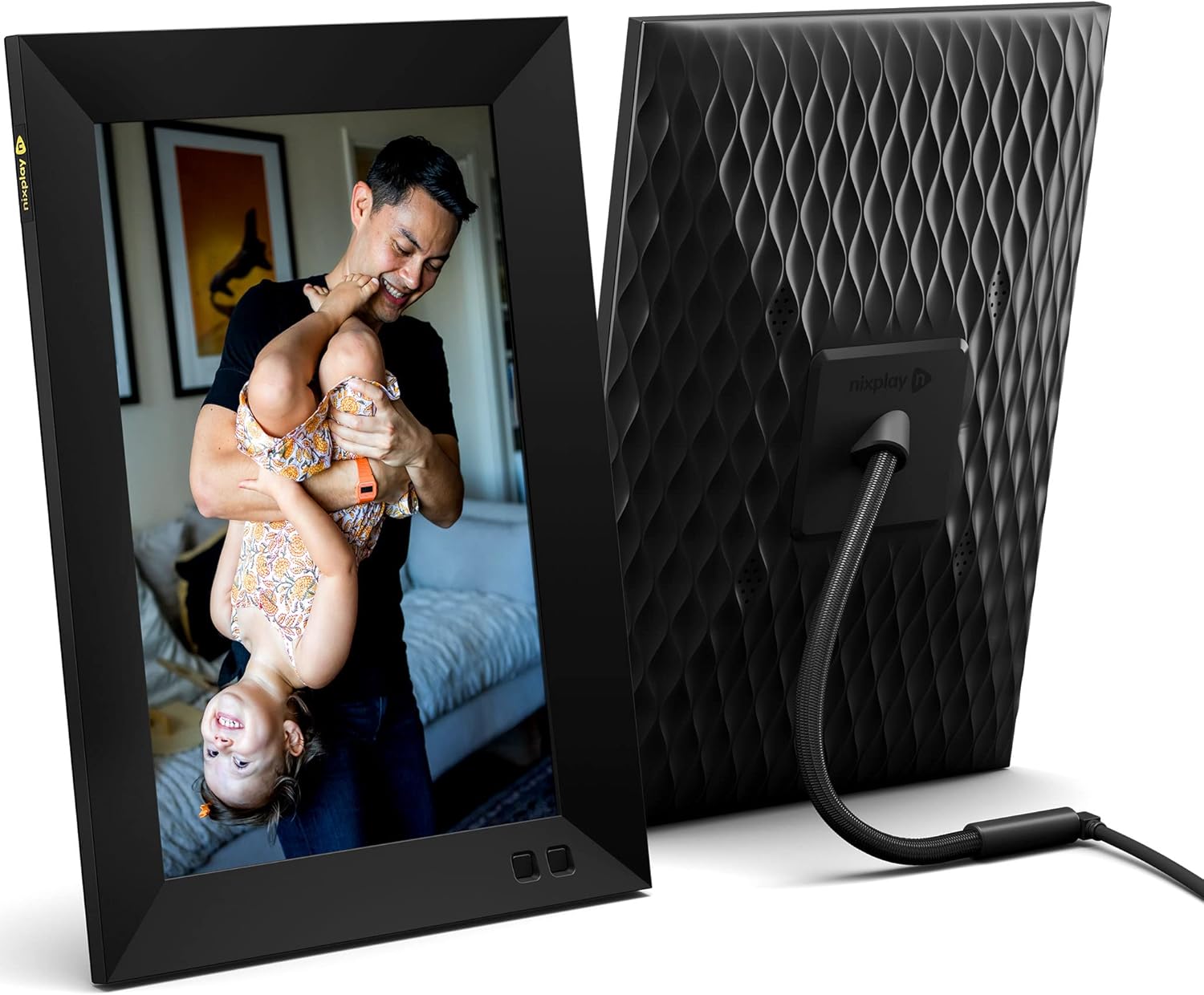
Figura 2.1: Davant i posterior view of the Nixplay 10.1 inch Smart Digital Photo Frame. The front displays an image of a person holding a child, while the rear shows the textured back panel and power cable connection.
2.1 Contingut del paquet

Figura 2.2: Contents of the Nixplay Smart Digital Photo Frame package. Includes the frame, power adapter, remote control, wall mounting guide, screws, and a brief guide.
En desembalar, comproveu que hi hagi tots els elements:
- Nixplay 10.1 inch Smart Digital Photo Frame
- Adaptador d'alimentació
- Control remot
- Wall Mounting Guide and Hardware
- Guia d'inici ràpid
3. Configuració
3.1 Engegar el marc
- Connect the power adapter to the frame's power port.
- Connecteu l'adaptador de corrent a una presa de corrent.
- The frame will automatically power on and display the Nixplay logo.
3.2 Initial Wi-Fi and Account Setup
Follow the on-screen prompts to connect your frame to a Wi-Fi network and create or log in to your Nixplay account. This process typically involves:
- Selecting your Wi-Fi network and entering the password.
- Downloading the Nixplay app on your smartphone or tablet.
- Pairing your frame with your Nixplay account using the app.

Figura 3.1: The Nixplay app displayed on a smartphone, illustrating how to share photos and videos instantly. The digital frame is shown displaying a family photo.
4. Instruccions de funcionament
4.1 Managing Content with the Nixplay App
The Nixplay app is the primary tool for managing your frame's content. It allows you to upload photos and videos, create playlists, and invite others to share content.
- Càrrega de fotos/vídeos: Use the app to select media from your device or linked cloud services (e.g., Google Photos, Dropbox) and upload them to your Nixplay account.
- Creació de llistes de reproducció: Organize your uploaded media into playlists. You can assign specific playlists to your frame.
- Compartint: Invite family and friends to contribute photos and videos to your frame via email or the Nixplay app.

Figura 4.1: The Nixplay app interface displaying various playlists, including "Google Photos family," "Christmas Playlist," and "Wedding." This demonstrates the app's content organization features.
4.2 Ús del comandament a distància
The included remote control allows for basic navigation and settings adjustments directly on the frame. Functions typically include:
- Navigating through menus.
- Adjusting volume (for videos).
- Pausing/playing slideshows.
- Accessing frame settings.
4.3 Funcionalitat del sensor de moviment
The frame features a motion sensor that can be configured to turn the display on when motion is detected and off after a period of inactivity, conserving energy.
5. Manteniment
5.1 Neteja del marc
- Use a soft, dry, lint-free cloth to clean the screen and frame exterior.
- Eviteu utilitzar netejadors abrasius, dissolvents o aerosols, ja que poden danyar la superfície.
- Per a marques persistents a la pantalla, fregueu lleugeramentampen the cloth with water, then wipe gently.
5.2 Actualitzacions de programari
Ensure your frame's software is up to date for optimal performance and new features. The frame typically updates automatically when connected to Wi-Fi, or you may be prompted to install updates via the Nixplay app.
6. Solució De Problemes
| Problema | Possible solució |
|---|---|
| El marc no s'encén. | Assegureu-vos que l'adaptador de corrent estigui connectat correctament tant al marc com a una presa de corrent que funcioni. Proveu una altra presa de corrent. |
| No es pot connectar a la Wi-Fi. | Verify the Wi-Fi password. Ensure the frame is within range of your router. Restart your router and the frame. |
| Photos are not appearing on the frame. | Check your Nixplay app to confirm photos are uploaded and assigned to the correct playlist for your frame. Ensure the frame is connected to Wi-Fi. |
| El control remot no funciona. | Ensure there are no obstructions between the remote and the frame. Replace the remote control battery if necessary. |
7. Especificacions
- Número de model: W10J
- Mida de la pantalla: 10.1 polzades
- Resolució: 1280 x 800
- Color: Negre
- Dimensions del producte: 8.54 x 35 x 0.99 polzades
- Pes de l'article: 2.86 lliures
- Dispositius compatibles: Smartphone, tauleta
- Bateries: 1 Lithium Metal battery (included, for remote control)
- Fabricant: Nixplay
- ASIN: B09364Y1QJ
8. Garantia i Suport
For warranty information and technical support, please refer to the documentation included with your product or visit the official Nixplay support weblloc web. La informació de contacte del servei d'atenció al client normalment es pot trobar al lloc web del fabricant. weblloc.


