Instruccions importants de seguretat
Please read all instructions carefully before using the Tronsmart Mega Pro speaker. Keep this manual for future reference.
- Do not expose this product to rain, moisture, or any liquids.
- No desmunteu ni modifiqueu l'altaveu.
- Mantingueu l'altaveu lluny de temperatures extremes.
- Do not use harsh chemicals or detergents to clean the speaker.
- Assegureu-vos que el port de càrrega estigui sec abans de connectar el cable de càrrega.
- Dispose of batteries responsibly, following local regulations.
Contingut del paquet
The Tronsmart Mega Pro package includes the following items:
- 1 x Mega Pro Indoor Speaker
- 1 x Targeta de garantia
- 1 x Manual d'usuari
- 1 x bossa d'emmagatzematge
- 1 x cable de càrrega tipus C
- 1 cable d'àudio de 3.5 mm
Producte acabatview
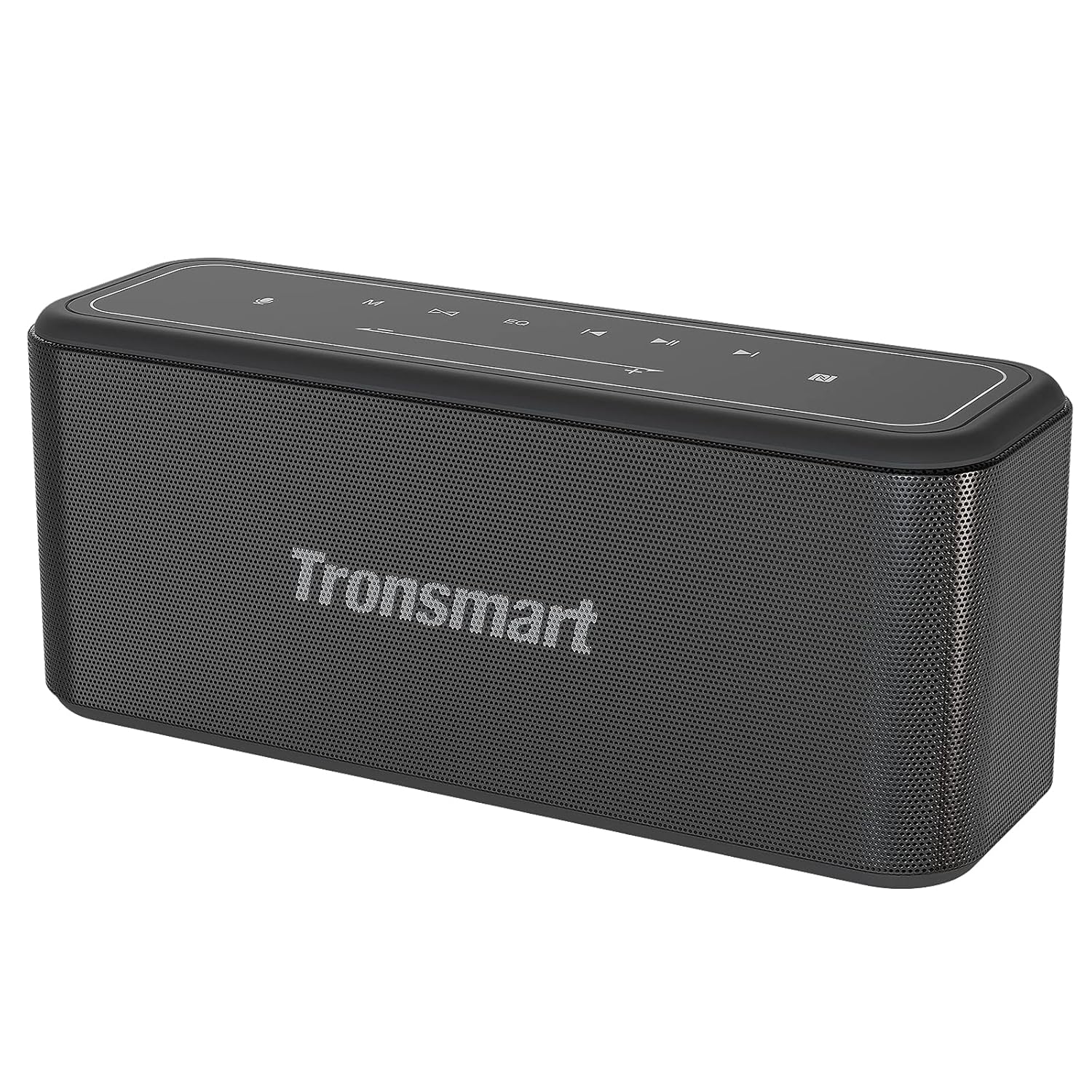
Davant view of the Tronsmart Mega Pro speaker, showcasing its sleek design and mesh grille.

Top panel of the Tronsmart Mega Pro speaker with touch controls for power, volume, playback, EQ, and mode selection.
Funcions del tauler de control
- Botó d'encesa: Mantingueu premut per activar o desactivar l'altaveu.
- Botó de mode: Switch between Bluetooth, AUX, and TF Card modes.
- Baixar el volum (-): Baixa el volum. Prem i mantén premut per anar a la pista anterior.
- Botó Reproduir/Pausa: Reprodueix o pausa l'àudio. Respon/finalitza trucades.
- Puja el volum (+): Augmenta el volum. Prem i mantén premut per a la següent pista.
- Botó EQ: Cycle through Deep Bass, Vocal, and 3D sound effects.
- Botó TWS: Inicia l'emparellament estèreo sense fil veritable.
- Botó d'assistent de veu: Activa l'assistent de veu del teu dispositiu.
Configuració
Carregant l'altaveu
Before first use, fully charge the speaker. Connect the provided Type-C charging cable to the speaker's charging port and a USB power adapter (not included). The LED indicator will show charging status. A full charge takes approximately 3 hours and provides up to 10 hours of playtime at 50% volume.
Encès/Apagat
Press and hold the Power button on the top panel for 2-3 seconds to turn the speaker on or off.
Emparellament Bluetooth
- Turn on the Tronsmart Mega Pro speaker. It will automatically enter Bluetooth pairing mode, indicated by a flashing blue LED.
- Activa el Bluetooth al teu dispositiu (telèfon intel·ligent, tauleta, etc.).
- Cerca 'Tronsmart Mega Pro' in your device's Bluetooth list and select it to connect.
- Un cop connectat, l'indicador LED s'il·luminarà de color blau fix i sentireu una confirmació audible.
- The speaker offers a stable and fast connection within 66 feet (20 meters).
Emparellament NFC
If your device supports NFC, enable NFC on your device and gently tap it against the NFC area on the speaker (usually indicated by an NFC logo) to establish a connection.
Connexió AUX
Connect one end of the 3.5mm audio cable to the speaker's AUX port and the other end to your audio device's headphone jack. The speaker will automatically switch to AUX mode.
Reproducció de targetes TF
Insert a TF/Micro SD card (with pre-loaded music) into the designated slot on the speaker. The speaker will automatically switch to TF Card mode and begin playing music.
Instruccions de funcionament
Ajust del volum i la reproducció
- Volum: Press the '+' button to increase volume, and '-' button to decrease volume.
- Reproduir/pausa: Premeu el botó Reproduir/Pausa una vegada per reproduir o posar en pausa la música.
- Pista següent: Premeu i manteniu premut el botó '+' durant 2 segons.
- Pista anterior: Premeu i manteniu premut el botó '-' durant 2 segons.
Modes EQ

Visual representation of the three switchable EQ modes: Deep Bass, Vocal, and 3D.
The Mega Pro offers three distinct equalizer sound effects to suit your listening preference. Press the EQ button on the top panel to cycle through the modes:
- Baix profund: Enhanced bass for powerful low-end sound (default).
- Vocal: Optimized for clear vocal reproduction.
- 3D: Creates a spacious, immersive sound experience.
Vinculació True Wireless Stereo (TWS).
You can pair two Tronsmart Mega Pro speakers together to achieve a powerful 120 Watt 3D stereo sound experience.
- Assegureu-vos que tots dos altaveus estiguin encesos i no connectats a cap altre dispositiu Bluetooth.
- En un altaveu (aquest serà l'altaveu principal), premeu el botó TWS button. It will emit a prompt sound.
- The two speakers will automatically connect to each other. Once connected, the LED indicator on the primary speaker will flash blue, and the secondary speaker's LED will be solid blue.
- Connecta el dispositiu a l'altaveu principal mitjançant Bluetooth.
Activació de l'Assistent de veu
With a simple button tap, you can activate your device's voice assistant (Siri, Google Assistant, Cortana) directly from the speaker. Press the Assistent de veu button on the top panel to initiate the voice assistant function.
Built-in Power Bank Function
The Tronsmart Mega Pro features a built-in 10,400mAh battery that can also function as an emergency power bank for your mobile devices. Connect your device to the speaker's USB-A output port using a compatible charging cable.
Manteniment
Neteja
Netegeu l'altaveu amb un suau, damp drap. No utilitzeu productes de neteja abrasius ni dissolvents. Assegureu-vos que tots els ports estiguin secs abans d'utilitzar-los o carregar-los.
Emmagatzematge
Guardeu l'altaveu en un lloc fresc i sec, allunyat de la llum solar directa i de temperatures extremes. Si l'emmagatzemeu durant un període prolongat, carregueu la bateria aproximadament al 50% cada pocs mesos per mantenir-la en bon estat.
Impermeabilització (IPX5)

The Tronsmart Mega Pro is rated IPX5, protecting it from water splashes and small water jets.
The Tronsmart Mega Pro is IPX5 rated, meaning it is protected against low-pressure water jets from any direction. This makes it suitable for use outdoors or near water, but it should not be submerged in water.
Resolució de problemes
| Problema | Causa possible | Solució |
|---|---|---|
| L'altaveu no s'encén. | Bateria baixa. | Carregueu l'altaveu completament. |
| No es pot emparellar amb un dispositiu Bluetooth. | Speaker is already connected to another device; Bluetooth is off on your device; Speaker is out of range. | Disconnect from other devices; Ensure Bluetooth is enabled; Move speaker closer to device (within 66ft/20m). |
| Sense so. | El volum és massa baix; Mode d'entrada incorrecte; El dispositiu no reprodueix àudio. | Increase volume; Press Mode button to select correct input (Bluetooth, AUX, TF Card); Check audio playback on your device. |
| L'emparellament TWS falla. | Els altaveus estan massa separats; un altaveu ja està connectat a un dispositiu. | Ensure speakers are close to each other; Disconnect any Bluetooth devices from both speakers before TWS pairing. |
Especificacions
| Característica | Detall |
|---|---|
| Nom del model | Mega Pro |
| Tipus d'altaveu | Portàtil |
| Tipus de muntatge | Autònom |
| Material | Plastic or Metal Alloy |
| Característiques especials | Built-in Microphone, Built-In Powerbank |
| Usos recomanats | Music, Indoors |
| Dispositius compatibles | Gaming Console, Laptop, Personal Computer, Projector, Smartphone |
| Diàmetre del subwoofer | 5 polzades |
| Tipus de controlador | Bluetooth/NFC |
| Configuració del canal de so envoltant | 2.0 |
| Color | Negre |
| Durada de la bateria | Fins a 10 hores (a un 50% de volum) |
| Capacitat de la bateria | 10400 milionsamp Hores |
| Temps de càrrega | 3 hores |
| Interval màxim | 65 peus (20 metres) |
| Dimensions del producte | 25.2P x 10.5A x 8.4H centímetres |
| Pes de l'article | 1.78 kg |
| Classificació impermeable | IPX5 |
| Resposta de freqüència | 20Hz-20000Hz |
| Interval de potència RMS | 60 watts |
| Potència de sortida màxima dels altaveus | 80 watts |
| Tecnologia de connectivitat | Bluetooth |
| Mode de sortida d'àudio | estèreo |
| Entrada Voltage | 5 Volts |
Garantia i Suport
The Tronsmart Mega Pro speaker comes with a warranty card included in the package. Please refer to the warranty card for specific terms and conditions of your product's warranty.
For technical support, troubleshooting assistance, or warranty claims, please contact Tronsmart customer service through their official weblloc web o la informació de contacte que apareix a la targeta de garantia.


