Introducció
Welcome to the user manual for your White Shark Shinobi 60% Mechanical Keyboard. This guide provides essential information for setting up, operating, maintaining, and troubleshooting your new gaming keyboard. Please read this manual thoroughly to ensure optimal performance and longevity of your device.
Contingut del paquet
Abans de continuar, comproveu que tots els elements estiguin presents al vostre paquet:
- White Shark Shinobi 60% Mechanical Keyboard
- Cable USB-C a USB-A
- Manual d'usuari (aquest document)
Configuració
Follow these steps to set up your White Shark Shinobi 60% Mechanical Keyboard:
- Connecteu el teclat: Locate the USB-C port on the back or side of the keyboard. Insert the smaller end of the provided USB-C to USB-A cable into this port.
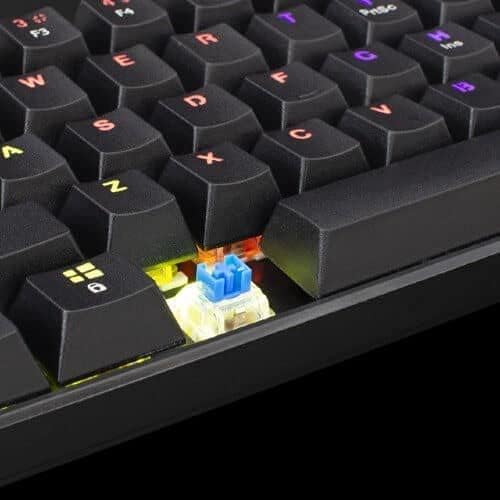
Image: Connecting the USB-C cable to the keyboard's port.
- Connexió a l'ordinador: Inseriu l'extrem USB-A més gran del cable a un port USB disponible de l'ordinador.
- Instal·lació del controlador: The keyboard is plug-and-play. Your operating system (Windows, macOS, Linux) should automatically detect and install the necessary drivers. No manual driver installation is typically required.
- Engegada inicial: Once connected, the keyboard's backlight should illuminate, indicating it is powered on and ready for use.
Instruccions de funcionament
The White Shark Shinobi 60% Mechanical Keyboard features a compact layout. Many functions are accessed via function (Fn) key combinations.
Disposició i funcions de les tecles

Imatge: Més deview of the Shinobi 60% keyboard layout.
The 60% layout means some standard keys are accessed through a secondary function layer, typically by holding the Fn clau.
Control de la llum de fons
El teclat té retroil·luminació RGB personalitzable.
- Canvia el mode d'il·luminació: Ús Fn + \ | to cycle through various lighting effects.
- Ajusta la brillantor: Ús Fn + ] } (augment) i Fn + [ { (decrease) to adjust backlight brightness.
- Ajustar velocitat: Ús Fn + ; : (augment) i Fn + ' " (decrease) to adjust the speed of dynamic lighting effects.
- Canvia el color: Ús Fn + Intro to change the color of static lighting modes.
Tecles multimèdia i de funció
Access multimedia controls and other functions using the Fn key in combination with other keys. Refer to the keycaps for secondary legends.
| Combinació de tecles | Funció |
|---|---|
| Fn+A | Reproduir/Pausa |
| Fn + S | Pista anterior |
| Fn + D | Pista següent |
| Fn + F | Baixa el volum |
| Fn + G | Puja el volum |
| Fn + H | Silenciar |
| Fn + J | El meu ordinador |
| Fn + K | Navegador |
| Fn + L | Correu electrònic |
| Fn + W | Intercanvia les tecles WASD i de fletxa |
| Fn + barra espaiadora | Lock/Unlock Fn key (for continuous access to secondary functions) |
Manteniment
Proper maintenance ensures the longevity and performance of your mechanical keyboard.
Neteja del teclat
- Eliminació de pols: Use compressed air to blow away dust and debris from between the keycaps.
- Neteja de superfícies: Gently wipe the keycaps and keyboard surface with a soft, lint-free cloth slightly dampnetejar amb aigua o una solució de neteja suau i no abrasiva. Eviteu la humitat excessiva.
- Neteja profunda (tecles): For a deeper clean, keycaps can be carefully removed using a keycap puller (not included). Wash them with mild soap and water, rinse thoroughly, and ensure they are completely dry before reattaching.

Image: Detail of a mechanical switch under a keycap.
Emmagatzematge
Quan no l'utilitzeu durant períodes prolongats, guardeu el teclat en un lloc fresc i sec, allunyat de la llum solar directa i de temperatures extremes.
Resolució de problemes
If you encounter issues with your White Shark Shinobi keyboard, refer to the following common solutions:
El teclat no respon
- Comproveu la connexió del cable: Ensure the USB-C cable is securely plugged into both the keyboard and the computer. Try unplugging and re-plugging it.
- Prova un port USB diferent: Connect the keyboard to a different USB port on your computer.
- Reinicieu l'ordinador: A simple computer restart can often resolve connectivity issues.
- Prova en un altre ordinador: If possible, test the keyboard on another computer to determine if the issue is with the keyboard or your original computer's setup.
La retroiluminació no funciona o és incorrecta
- Comprova la brillantor: Assegureu-vos que la brillantor no estigui configurada al nivell més baix mitjançant Fn + ] }.
- Modes de cicle: Prova de canviar els modes d'il·luminació alternant amb Fn + \ |.
- Restabliment de fàbrica: Some keyboards have a factory reset combination (e.g., Fn + Esc for 3-5 seconds). Refer to specific product documentation if available, or try this common combination.
Claus que no es registren o que es teclegen dues vegades
- Neteja sota les tecles: Dust or debris under the keycap or switch can cause issues. Refer to the "Maintenance" section for cleaning instructions.
- Interferència de programari: Ensure no conflicting software (e.g., macro programs, other keyboard drivers) is running.
Especificacions
Key technical specifications for the White Shark Shinobi 60% Mechanical Keyboard:
| Característica | Detall |
|---|---|
| Nom del model | Shinobi 60% |
| Marca | Tauró blanc |
| Tecnologia de connectivitat | USB per cable |
| Descripció del teclat | Jocs, Mecànica |
| Característica especial | Retroil·luminat (RGB) |
| Nombre de claus | 61 |
| Tipus de canvi | Tactile (Blue Switches) |
| Dispositius compatibles | Ordinador portàtil, ordinador de sobretaula |
| ASIN | B093C63NSG |

Image: Product packaging indicating blue switches.
Informació de la garantia
Specific warranty terms and conditions for the White Shark Shinobi 60% Mechanical Keyboard may vary by region and retailer. Please retain your proof of purchase for warranty claims. For detailed warranty information, refer to the official White Shark weblloc web o poseu-vos en contacte amb el vostre punt de venda.
Suport
For further assistance, technical support, or frequently asked questions, please visit the official White Shark support weblloc.
Oficial Weblloc: While a direct link is not provided, search for "White Shark Gaming" to find their official support page.


