1. Introducció
Gràcies per la compraasing the Technical Pro SPARK8GNEON Portable Bluetooth Speaker. This manual provides essential information for the safe and efficient operation of your device. Please read it thoroughly before use and retain it for future reference.
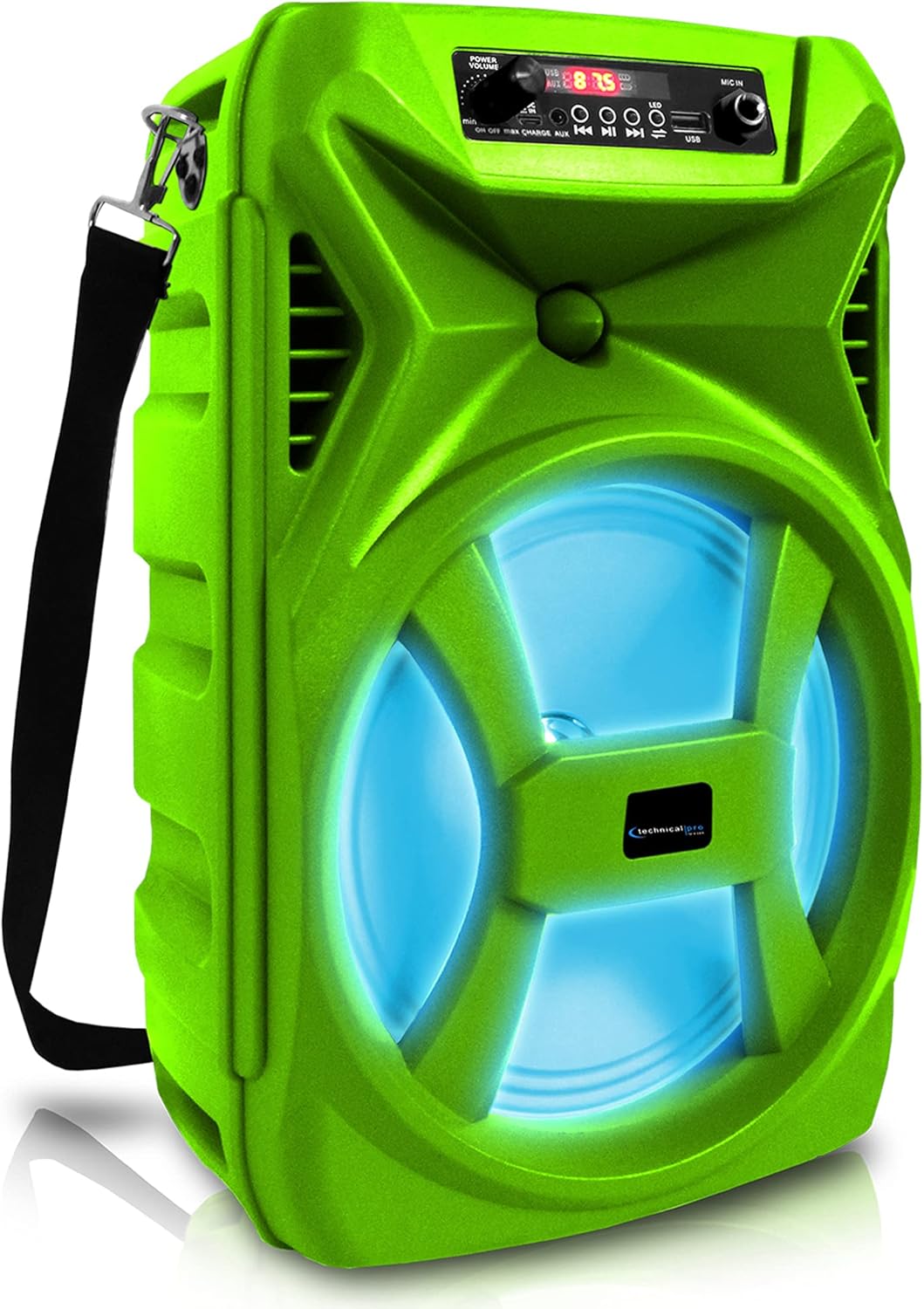
Davant view of the Technical Pro SPARK8GNEON portable Bluetooth speaker, showcasing its vibrant green casing, illuminated woofer, and the top-mounted control panel.
2. Informació de seguretat
- No exposeu l'altaveu a temperatures extremes, humitat ni llum solar directa.
- Eviteu deixar caure o sotmetre l'altaveu a forts impactes.
- No intenteu desmuntar ni modificar l'altaveu. Això anul·larà la garantia.
- Mantingueu l'altaveu lluny de l'aigua i altres líquids.
- Feu servir només el cable de càrrega proporcionat o un equivalent certificat.
- Assegureu-vos que hi hagi una ventilació adequada quan feu servir l'altaveu.
3. Contingut del paquet
Si us plau, comproveu que tots els elements siguin presents al paquet:
- Technical Pro SPARK8GNEON Portable Bluetooth Speaker
- Cable de càrrega USB
- Corretja d'espatlla
- Manual d'usuari (aquest document)
4. Producte acabatview
Familiaritzeu-vos amb els components i els controls de l'altaveu.

An infographic detailing the main features of the Technical Pro SPARK8GNEON speaker, such as its built-in rechargeable battery, True Wireless Stereo (TWS) capability, Bluetooth compatibility, USB and card inputs, durable ABS plastic construction, and support for A2DP & AVRCP stereo Bluetooth devices.
Tauler de control (superior) View)
- Botó d'encesa: Premeu i manteniu premut per encendre/apagar l'altaveu.
- Botó de mode: Short press to switch between Bluetooth, USB, TF Card, and AUX modes.
- Botó Reproduir/Pausa: Premeu per reproduir o posar en pausa l'àudio.
- Botó Anterior/Baixar volum: Premeu curt per a la pista anterior, premeu llargament per baixar el volum.
- Botó Següent/Pujar volum: Premeu curt per a la següent pista, premeu llargament per augmentar el volum.
- Botó de llum LED: Press to cycle through LED light modes or turn them off.
- Port USB: Per a la reproducció des d'una unitat flaix USB.
- Ranura per a targetes TF: Per a la reproducció amb targeta TF (MicroSD).
- Entrada AUX: Presa de 3.5 mm per a dispositius d'àudio externs.
- Port de càrrega: Per connectar el cable de càrrega USB.
5. Configuració
5.1 Càrrega inicial
- Abans del primer ús, carregueu completament l'altaveu durant 8-10 hores.
- Connect the USB charging cable to the speaker's charging port and the other end to a USB power adapter (not included) or a computer's USB port.
- El llum indicador de càrrega s'il·luminarà durant la càrrega i s'apagarà quan estigui completament carregat.
5.2 Engegada/apagada
- To power ON, press and hold the Power Button until the display illuminates.
- To power OFF, press and hold the Power Button again until the display turns off.
6. Instruccions de funcionament
6.1 Vinculació Bluetooth
- Turn on the speaker. It will automatically enter Bluetooth pairing mode, indicated by a flashing Bluetooth icon on the display.
- Al dispositiu mòbil (telèfon intel·ligent, tauleta, etc.), activeu el Bluetooth i cerqueu els dispositius disponibles.
- Select "SPARK8GNEON" from the list of devices.
- Once paired, the speaker will emit a confirmation tone, and the Bluetooth icon will stop flashing.
- Ara pots reproduir àudio des del teu dispositiu a través de l'altaveu.
Reproducció de targetes USB/TF de 6.2
- Insert a USB flash drive or TF (MicroSD) card into the respective port.
- The speaker will automatically switch to USB or TF Card mode and begin playing audio files. If not, press the Mode Button to select the correct mode.
- Feu servir els botons Reprodueix/Pausa, Anterior i Següent per controlar la reproducció.
6.3 Entrada AUX
- Connect one end of a 3.5mm audio cable (not included) to the speaker's AUX input port.
- Connecteu l'altre extrem a la sortida d'àudio del vostre dispositiu extern (per exemple, reproductor MP3, ordinador portàtil).
- Press the Mode Button to select AUX mode.
- Controla la reproducció i el volum des del teu dispositiu extern.
6.4 Emparellatge estèreo sense fil veritable (TWS)
The TWS function allows you to connect two SPARK8GNEON speakers wirelessly for a stereo sound experience.

Illustration demonstrating the True Wireless Stereo (TWS) feature, showing two Technical Pro SPARK8GNEON speakers wirelessly connected to a single smartphone for synchronized audio playback.
- Ensure both SPARK8GNEON speakers are powered on and in Bluetooth mode, but not yet paired with any device.
- On one of the speakers (this will be the primary speaker), press and hold the TWS button (if available, or a specific button designated for TWS pairing, otherwise assume it's initiated by a long press of the Mode button or a dedicated TWS button not explicitly listed but implied by feature).
- The speakers will attempt to connect to each other. A confirmation tone will sound once connected.
- Ara, connecteu el dispositiu mòbil a l'altaveu principal mitjançant Bluetooth tal com es descriu a la secció 6.1.
- L'àudio ara es reproduirà en estèreo a tots dos altaveus.
6.5 llums LED
Press the LED Light Button on the control panel to cycle through various light modes or to turn the LED lights off.
7. Manteniment
- Neteja: Feu servir un drap suau i sec per netejar l'exterior de l'altaveu. No utilitzeu productes de neteja abrasius ni dissolvents.
- Emmagatzematge: Quan no l'utilitzeu durant períodes prolongats, guardeu l'altaveu en un lloc fresc i sec, allunyat de la llum solar directa.
- Cura de la bateria: Per allargar la durada de la bateria, carregueu completament l'altaveu abans de guardar-lo durant períodes llargs i recarregueu-lo cada 3-6 mesos.
8. Solució De Problemes
| Problema | Causa possible | Solució |
|---|---|---|
| L'altaveu no s'encén. | La bateria està esgotada. | Carregueu l'altaveu completament. |
| Sense so. | El volum és massa baix; s'ha seleccionat un mode incorrecte; el dispositiu no està connectat. | Increase volume on speaker and connected device; press Mode button to select correct input; ensure Bluetooth/AUX connection is established. |
| El dispositiu Bluetooth no es pot emparellar. | L'altaveu no està en mode d'emparellament; el dispositiu és massa lluny; interferències. | Ensure speaker is in Bluetooth pairing mode (flashing icon); move device closer to speaker; turn off other Bluetooth devices nearby. |
| L'emparellament TWS falla. | Speakers are too far apart; one speaker already paired to a device. | Ensure speakers are within close proximity; disconnect any Bluetooth devices from both speakers before initiating TWS pairing. |
9. Especificacions
- Model: SPARK8GNEON
- Potència de sortida: 500 watts (pic)
- Mida de l'altaveu: 8 Inch Woofer & Tweeter
- Connectivitat: Bluetooth, USB, TF Card, AUX (3.5mm)
- Versió Bluetooth: (Not specified, assuming standard)
- Bateria: 1 bateria de ions de liti (inclosa)
- Durada de la bateria: (Not specified, varies with usage)
- Temps de càrrega: 8-10 hours (initial charge)
- Dimensions del producte (L x A x A): 8.86 x 7.48 x 14.17 polzades
- Pes de l'article: 4 lliures
- Impedància: 3 ohms
- UPC: 817802016296

Diagram illustrating the physical dimensions of the Technical Pro SPARK8GNEON speaker, measuring 14.17 inches in height, 8.86 inches in width, and 7.48 inches in depth.
10. Garantia i Suport
Per obtenir informació sobre la garantia o assistència tècnica, consulteu la targeta de garantia inclosa amb el producte o visiteu el lloc web oficial de Technical Pro. website. You may also contact Technical Pro customer service directly for assistance.
Weblloc: Botiga Technical Pro a Amazon


