Introducció
Thank you for choosing the Mahli Smart Robotic 3-in-1 Vacuum Cleaner. This manual provides important information on the safe use, operation, and maintenance of your device. Please read it thoroughly before first use and keep it for future reference.

Figure 1: Mahli Smart Robotic 3-in-1 Vacuum Cleaner and Remote Control
This image displays the Mahli Smart Robotic 3-in-1 Vacuum Cleaner in white, accompanied by its remote control. The vacuum cleaner is round with a power button on top, and the remote control is rectangular with navigation and function buttons.
Instruccions de seguretat
- Llegiu totes les instruccions abans d'utilitzar l'aparell.
- Do not operate the vacuum cleaner in wet environments or near water.
- Mantingueu els cabells, la roba solta, els dits i totes les parts del cos lluny de les obertures i les parts mòbils.
- Feu servir només tal com es descriu en aquest manual. Utilitzeu només els accessoris recomanats pel fabricant.
- No l'utilitzeu amb un cable o endoll danyats. Si l'aparell no funciona com hauria de fer, s'ha deixat caure, s'ha fet malbé, s'ha deixat a l'aire lliure o s'ha caigut a l'aigua, torneu-lo a un centre de servei.
- No estireu ni porteu el cable, no utilitzeu el cable com a nansa, no tanqueu una porta al cable ni estireu el cable per vores o cantonades afilades. No feu passar l'aparell per sobre del cable. Mantingueu el cable lluny de les superfícies escalfades.
- No desconnecteu estirant del cable. Per desconnectar, agafa l'endoll, no el cable.
- No manipuleu l'endoll o l'aparell amb les mans mullades.
- No introduïu cap objecte a les obertures. No utilitzar amb cap obertura bloquejada; mantenir lliure de pols, pelusa, cabells i qualsevol cosa que pugui reduir el flux d'aire.
- Apagueu tots els controls abans de desconnectar.
- Tingueu molta cura quan netegeu les escales.
- No l'utilitzeu per recollir líquids inflamables o combustibles, com ara la gasolina, ni l'utilitzeu en zones on puguin estar presents.
- No agafeu res que estigui cremant o fumant, com ara cigarrets, llumins o cendres calentes.
- No l'utilitzeu sense la bossa de pols i/o els filtres al seu lloc.
- Eviteu l'arrencada no intencionada. Assegureu-vos que l'interruptor estigui a la posició apagada abans de connectar-lo a la bateria, agafar o transportar l'aparell.
- Recarregueu només amb el carregador especificat pel fabricant.
- No modifiqueu ni intenteu reparar l'aparell o la bateria.
Components del producte
The Mahli Smart Robotic 3-in-1 Vacuum Cleaner comes with the following components:
- Main Robotic Vacuum Unit
- Control remot
- Cable de càrrega USB
- Raspalls laterals (2x)
- Drap de fregona (1x)
- Cleaning Brush (1x)
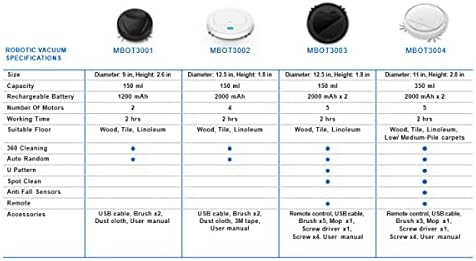
Figura 2: Components inclosos
This image shows the Mahli Smart Robotic 3-in-1 Vacuum Cleaner along with its accessories: two side brushes, a mop cloth, a USB charging cable, and a small cleaning brush.
Configuració
1. Càrrega de l'aspiradora
- Connect the USB charging cable to the charging port on the vacuum cleaner.
- Connecteu l'altre extrem del cable USB a un adaptador de corrent USB compatible (no inclòs) o a un port USB de l'ordinador.
- L'indicador lluminós de càrrega s'il·luminarà. Una càrrega completa triga aproximadament 3 hores.
- Once fully charged, the indicator light may change or turn off. Disconnect the vacuum cleaner from the power source.
2. Attaching Side Brushes
Gently press the side brushes onto the designated posts on the underside of the vacuum cleaner until they click into place.
3. Attaching the Mop Cloth (Optional)
If using the mopping function, attach the mop cloth to the designated area on the bottom of the vacuum cleaner. Ensure it is securely fastened.
Instruccions de funcionament
1. Encès / apagat
- To power on, press the power switch on the side or bottom of the vacuum cleaner. Alternatively, for some models, simply touch the power button on the top surface after ensuring the main power switch is on.
- To power off, press the power switch again or hold the power button on the top surface.
2. Modes de neteja
The vacuum cleaner features intelligent omni-directional and auto-route technology for efficient cleaning.
- Neteja automàtica: Once powered on, the vacuum cleaner will automatically begin cleaning, navigating around obstacles and covering the floor area.
- Operació de control remot: Use the provided remote control for manual direction changes or to start/stop cleaning.
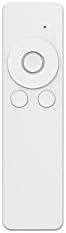
Figura 3: Comandament a distància
This image shows the white remote control for the Mahli Smart Robotic 3-in-1 Vacuum Cleaner. It features a circular directional pad at the top, with two smaller circular buttons below it.
3. Funció de fregar
If the mop cloth is attached, the vacuum cleaner will perform mopping simultaneously with sweeping and vacuuming. Ensure the mop cloth is clean and slightly damp per obtenir els millors resultats.
Manteniment
1. Buidar la paperera
Regularly empty the dustbin to maintain optimal cleaning performance. Locate the dustbin compartment, open it, and dispose of collected debris. Clean the dustbin with the provided cleaning brush or a soft cloth.
2. Neteja dels raspalls laterals
Check the side brushes for tangled hair or debris. Remove any obstructions carefully. If brushes are worn, they may need replacement.
3. Neteja del drap de la mopa
After each use, remove the mop cloth and wash it thoroughly. Allow it to air dry completely before reattaching.
4. Neteja dels sensors
Wipe the anti-fall sensors and other optical sensors on the bottom and front of the vacuum cleaner with a clean, dry cloth to ensure proper navigation.
Resolució de problemes
| Problema | Causa possible | Solució |
|---|---|---|
| L'aspiradora no s'encén. | Battery is low or depleted. Main power switch is off. | Charge the vacuum cleaner. Ensure the main power switch is in the ON position. |
| Vacuum cleaner stops unexpectedly. | Dustbin is full. Obstruction detected. Battery is low. | Empty the dustbin. Remove any obstructions. Recharge the vacuum cleaner. |
| Mal rendiment de neteja. | Dustbin is full. Side brushes are tangled or worn. Sensors are dirty. | Empty the dustbin. Clean or replace side brushes. Clean all sensors. |
| Vacuum cleaner gets stuck frequently. | Too many obstacles in the cleaning area. Sensors are dirty. | Clear the cleaning area of excessive clutter. Clean all sensors. |
Especificacions
| Característica | Detall |
|---|---|
| Model | MBOT3002 |
| Funció | Sweeping, Vacuuming, Mopping (3-in-1) |
| Capacitat de la bateria | 2000 mAh |
| Temps de càrrega | Aprox. 3 hores |
| Temps de treball | Aprox. 2 hores |
| Voltage | 3.7 V |
| Soroll de treball | 55 dB |
| Dimensions | Diàmetre: 12.5 polzades, Alçada: 1.8 polzades |
| Suitable Floor Types | Wood, Tile, Linoleum |
| Característiques especials | Intelligent Omni-Directional, Auto Route Technology, Smart Navigation, 360 Motion, Advanced Sensors, Anti-Fall Sensors |
| Components inclosos | Sweeper, 2x Brush, 1x Mop, 1x USB Charging Cable, 1x Cleaning Brush, Remote Control |
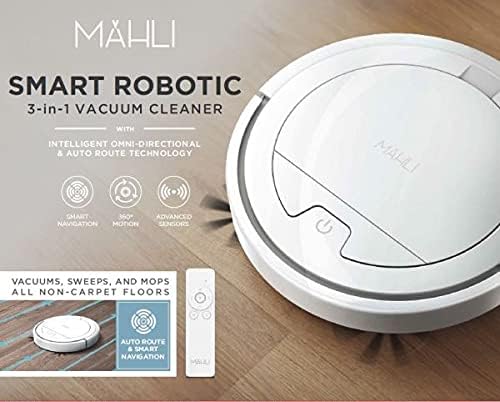
Figure 4: Robotic Vacuum Specifications Overview
This image displays a table comparing specifications for various Mahli robotic vacuum models (MBOT3001, MBOT3002, MBOT3003, MBOT3004). Key specifications include size, capacity, battery, motors, working time, suitable floor, cleaning patterns, sensors, remote, and accessories.
Garantia i Suport
For warranty information and customer support, please refer to the contact details provided on the product packaging or the official Mahli weblloc web. Conserveu el rebut de compra com a comprovant de compra.
For technical assistance or troubleshooting beyond this manual, please contact Mahli customer service.