1. Introducció
Thank you for choosing the PROXTEND X502 Full HD Webcam. This manual provides detailed instructions to help you set up, operate, and maintain your webcam for optimal performance. The X502 is designed to deliver clear 1080p video at 30 frames per second, featuring an omni-directional microphone and automatic low light correction for various lighting conditions.
2. Contingut del paquet
Si us plau, verifiqueu que tots els elements siguin presents al vostre paquet:
- PROXTEND X502 Full HD Webcam (PX-CAM007)
- Integrated Universal Mounting Clip
- Manual d'usuari (aquest document)
3. Configuració
Follow these steps to set up your PROXTEND X502 Weblleva:
- Muntatge del Weblleva:
El webcam features an integrated universal mounting clip. You can place the webcam on top of your computer monitor, laptop screen, or a flat surface. Adjust the clip to securely hold the webcam in position. The webcam also supports mini tripod mounting (tripod not included).
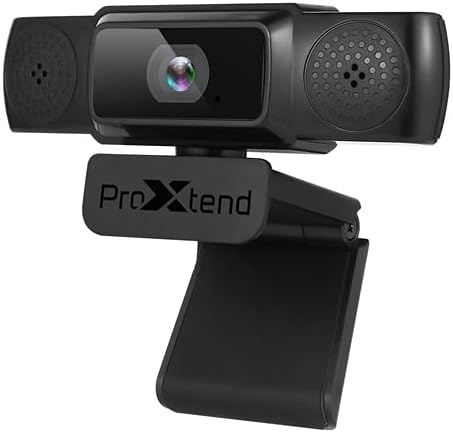
Image: The PROXTEND X502 Full HD Webcam shown with its universal mounting clip, suitable for monitors or flat surfaces.
- Connexió al vostre ordinador:
Connecteu el cable USB des del webva entrar a un port USB disponible de l'ordinador. El webcam is plug-and-play, meaning your operating system should automatically detect and install the necessary drivers. No additional software installation is typically required.
- Driver Installation Verification:
After connecting, allow a few moments for your computer to recognize the device. You can verify successful installation in your operating system's Device Manager (Windows) or System Information (macOS) under 'Cameras' or 'Imaging Devices'.
4. Instruccions de funcionament
Un cop el webcam is set up, you can begin using it with various applications:
- Seleccionant el Weblleva:
Open your preferred video conferencing, streaming, or recording application (e.g., Zoom, Microsoft Teams, Skype, OBS Studio). Navigate to the application's video and audio settings. Select "PROXTEND X502" as your camera and microphone input device.

Imatge: Frontal view of the PROXTEND X502 Full HD Webcam, highlighting the lens and integrated microphones.
- Qualitat del vídeo:
El webcam automatically adjusts for optimal image quality, including auto-focus and auto low light correction. Ensure adequate lighting for the best video performance. The 1920x1080p resolution at 30fps provides clear and smooth video.
- Qualitat d'àudio:
The integrated omni-directional microphone captures sound from all directions. Position yourself appropriately to ensure your voice is clearly picked up. Most applications allow you to adjust microphone input levels in their audio settings.
5. Característiques
Key features of the PROXTEND X502 Full HD Webcam include:
- Sensor d’imatge CMOS d’1 / 2.7 ”
- 2 megapíxels
- Resolution: 1920x1080 at 30 frames per second
- Micròfon omnidireccional
- Clip de muntatge universal
- Mini Tripod Support
- Correcció automàtica de poca llum
6. Especificacions
Detailed technical specifications for the PROXTEND X502 Full HD Weblleva:

Image: A visual representation of the PROXTEND X502 Full HD Webcam's key features and technical specifications.
| Característica | Especificació |
|---|---|
| Sensor d'imatge | 1/2.7" CMOS Image Sensor |
| Megapíxels | 2 MP |
| Resolució màxima | 1920 x 1080 |
| Resolució de vídeo | 1920 x 1080 |
| FPS màx | 30 fps |
| Format de descodificació de vídeo | H.264/MJPG |
| Mode d’exposició | Automàtic |
| Balanç de blancs | Automàtic |
| Guanyar | Automàtic |
| Compensació de poca llum | Automàtic |
| Viewangle ing | 77° |
| Distància focal | 10 cm a l'infinit |
| Tipus d'enfocament | Automàtic |
| Micròfon | Omni-direccional |
| Àudio SampTarifa ling | 1 canal 16 bits 16 k 32 k 44.1 k 48 k |
| Format d'àudio | PCM, UAC 1.0 compatible |
| Interfície | USB 2.0 |
| Longitud del cable | 1.5 m |
| Sistema operatiu compatible | Windows XP, Windows 7 (32bit/64bit), Windows 8, Windows 10, Android V5.0 or higher OS, MAC OS 10.6 or higher |
| Dimensions del producte | 12.7 x 7.62 x 5.08 cm |
| Pes del producte | 453.59 g |
7. Solució De Problemes
If you encounter issues with your PROXTEND X502 Webcàmera, prova les solucions següents:
- Sense imatge/vídeo:
- Assegureu-vos que el cable USB estigui connectat correctament a tots dos webla càmera i el teu ordinador.
- Proveu un port USB diferent a l'ordinador.
- Reinicieu l'ordinador.
- Check your application's settings to ensure the PROXTEND X502 is selected as the video input.
- Verify that no other application is currently using the weblleva.
- Sense àudio/Micròfon no funciona:
- Ensure the PROXTEND X502 is selected as the microphone input in your application's audio settings.
- Check your computer's sound settings to ensure the microphone is enabled and not muted.
- Adjust the microphone input level in your system or application settings.
- Poca qualitat de vídeo:
- Ensure sufficient lighting in your environment.
- Netegeu el webcam lens gently with a soft, lint-free cloth.
- Check your internet connection speed if streaming, as bandwidth can affect video quality.
8. Manteniment
Per garantir la longevitat i el rendiment òptim del vostre weblleva:
- Neteja: Netegeu suaument el webcam lens with a soft, dry, lint-free cloth. Avoid using harsh chemicals or abrasive materials.
- Emmagatzematge: Quan no s’utilitzi, emmagatzemeu el fitxer webguardeu-ho en un lloc net i sec, allunyat de temperatures extremes i de la llum solar directa.
- Manipulació: Eviteu la caiguda de webcam or subjecting it to strong impacts.
9. Garantia i Suport
The PROXTEND X502 Full HD Webla càmera ve amb una 7 any de garantia, ensuring peace of mind regarding your purchase. For warranty claims, technical support, or any inquiries not covered in this manual, please refer to the contact information provided with your product packaging or visit the official PROXTEND weblloc.
10. Informació de compliment
This device complies with relevant regulatory standards for electronic equipment. For detailed compliance information, please refer to the product packaging or the official PROXTEND weblloc.


