1. Introducció
This manual provides detailed instructions for the proper use and maintenance of your RunCam ScopeCam2 4K Zoom Action Camera with a 25mm lens. Please read this manual thoroughly before operating the device to ensure optimal performance and longevity.
The RunCam ScopeCam2 4K is designed for capturing high-quality video in various action-oriented environments. Key features include:
- Ultra HD 4K Resolution for clear video recording.
- Instant-on Record Switch with vibration indication for easy operation.
- IP64 Waterproof and Shock Resistant aluminum body.
- Built-in 1400mAh rechargeable battery supporting up to 160 minutes of continuous 4K30fps recording.
- Compatibility with standard NATO/Picatinny rails for mounting.

Figure 1: RunCam ScopeCam2 4K Zoom Action Camera (25mm Lens).
2. Producte acabatview
2.1 Components de la càmera
Familiarize yourself with the various parts of your ScopeCam2 4K camera:
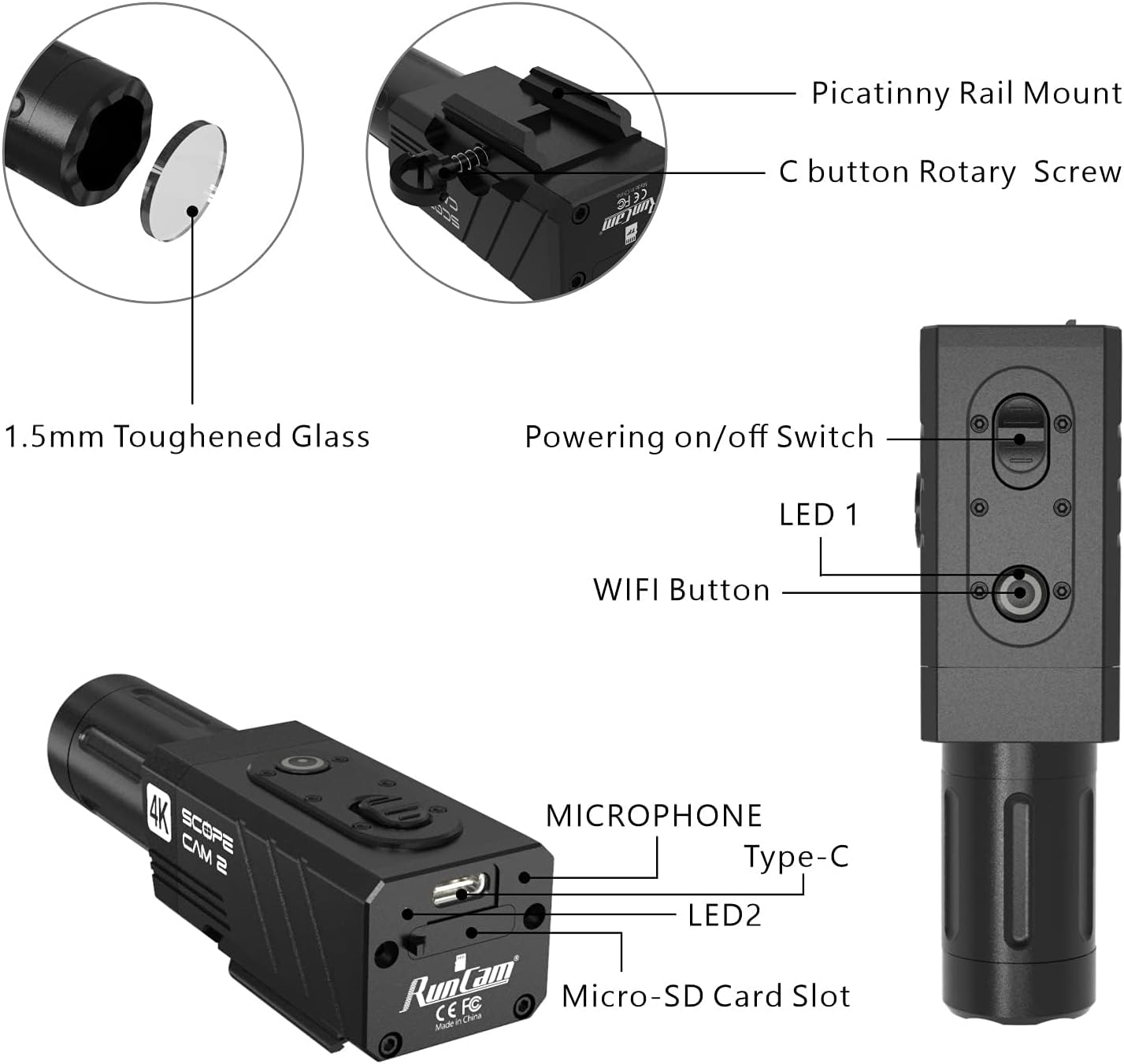
Figura 2: Detallada view of the camera's external features and ports.
- Picatinny Rail Mount: For attaching the camera to compatible rails.
- C button Rotary Screw: Secures the camera to the mount.
- 1.5mm Toughened Glass: Protective lens cover.
- Powering on/off Switch: Controls the camera's power state.
- LED 1: Llum indicador d'estat.
- Botó WiFi: Activates/deactivates Wi-Fi for app connection.
- Micròfon: Captura àudio.
- Port de tipus C: Per a càrrega i transferència de dades.
- LED 2: Additional status indicator light.
- Ranura per a targetes microSD: Per inserir la targeta de memòria.
2.2 Contingut del paquet
El paquet estàndard inclou els següents elements:
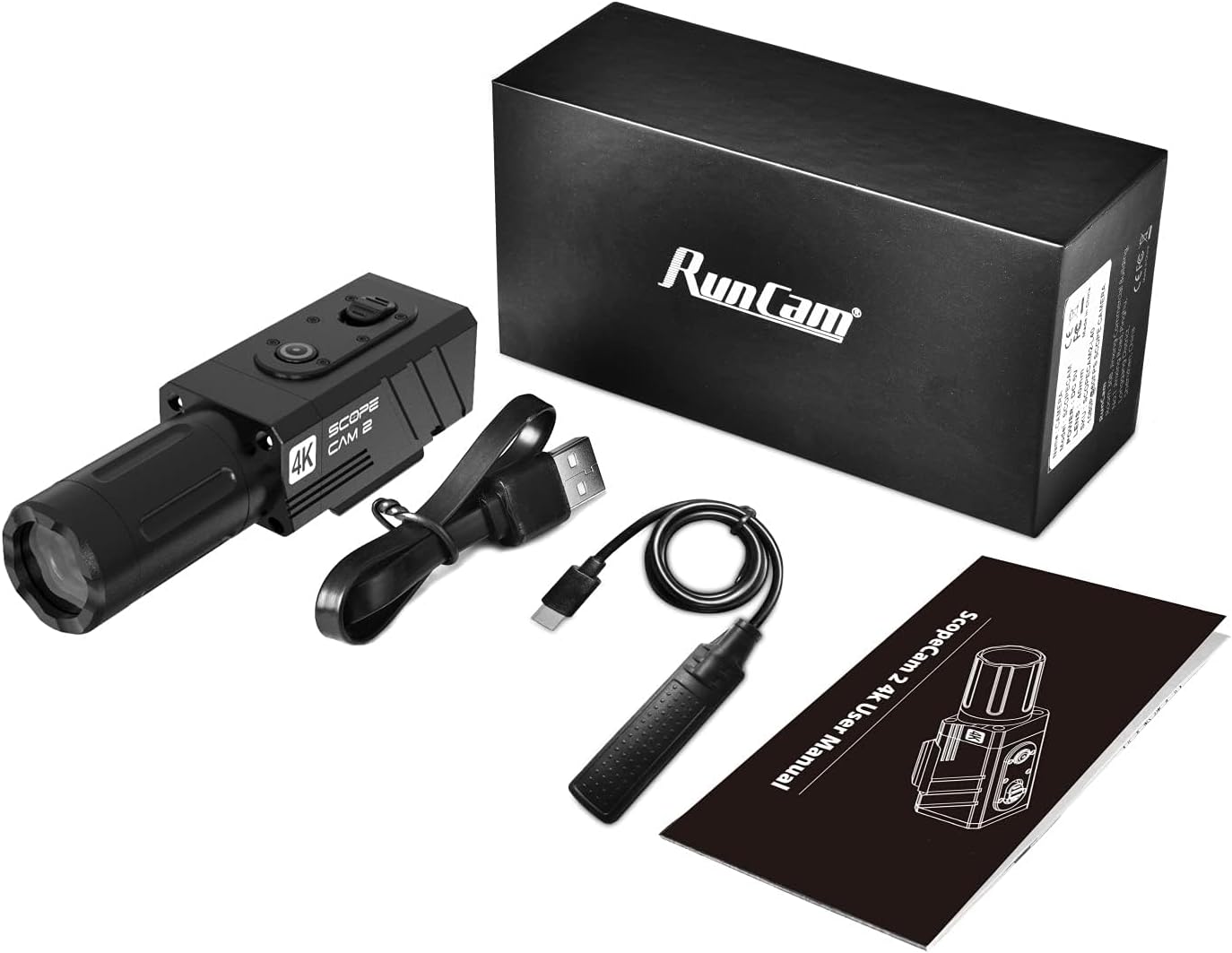
Figure 3: Items included in the product box.
- RunCam ScopeCam2 4K Camera (25mm Lens)
- Cable USB-Type C
- Recording Switch Cable
- Manual d'usuari
3. Configuració
3.1 Càrrega de la bateria
- Connect the provided USB Type-C cable to the camera's Type-C port.
- Connecteu l'altre extrem del cable USB a un adaptador de corrent USB de 5 V (no inclòs) o a un port USB de l'ordinador.
- The LED indicator will show charging status. A full charge provides up to 160 minutes of 4K30fps recording.
3.2 Inserció d'una targeta Micro SD
A Micro SD card (not included) is required for recording. Ensure the card is Class 10 or higher for optimal performance.
- Locate the Micro-SD Card Slot on the side of the camera.
- Gently insert the Micro SD card into the slot with the contacts facing down until it clicks into place.
- Per treure-la, torneu a prémer la targeta fins que surti.
3.3 Muntatge de la càmera
The ScopeCam2 4K features an integrated Picatinny rail mount for secure attachment.

Figure 4: Camera mounted on a Picatinny rail.
- Align the camera's Picatinny rail mount with a compatible rail on your equipment.
- Slide the camera onto the rail.
- Tighten the C button Rotary Screw to secure the camera firmly in place.
3.4 Rotació de la lent
The lens can be rotated 90-270 degrees to accommodate various mounting orientations.

Figure 5: Lens rotation procedure.
- Traieu la tapa de la lent.
- Carefully remove the fixing screws of the lens mount.
- Rotate the lens assembly 90 degrees to the left or right as needed.
- Reinstall the screws and the lens cap.
4. Funcionament
4.1 Encès/Apagat
- To power on, slide the Powering on/off Switch to the 'On' position. The LED indicator will illuminate.
- To power off, slide the Powering on/off Switch to the 'Off' position. The LED indicator will turn off.
4.2 Gravació de vídeo
The camera features an instant-on record switch for quick activation.
Figure 6: The instant-on record switch.
- To start recording, slide the record button. The camera will vibrate to indicate recording has begun.
- To stop recording, pull the record button. The camera will vibrate again to confirm recording has stopped.
4.3 Pre-Recording Function
The pre-recording function captures footage before you press the record button, ensuring you don't miss critical moments. This function is only available when using the recording switch cable.
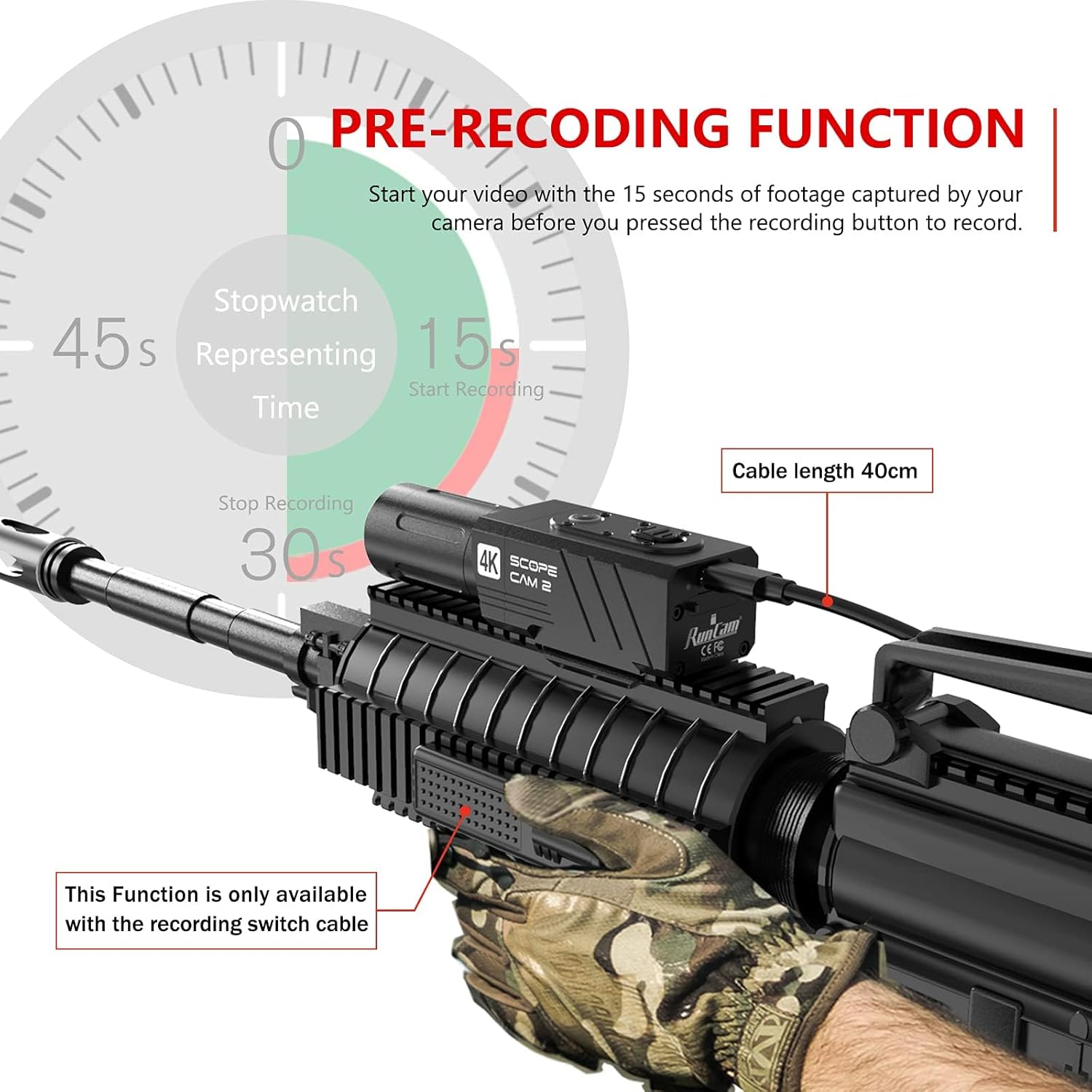
Figure 7: Pre-recording function overview.
- When the camera is powered on and the recording switch cable is connected, the camera continuously buffers video.
- Upon pressing the record button, the camera saves the buffered footage (typically 15 seconds) along with the new recording.
4.4 Connexió Wi-Fi i d'aplicacions
Connect your camera to a smartphone for video preview, settings adjustment, and easy sharing.

Figure 8: Smartphone app interface for camera control.
- Press the WiFi Button on the camera to activate Wi-Fi. The LED indicator will change to show Wi-Fi is active.
- Al teu telèfon intel·ligent, descarrega i instal·la el RunCam Legacy aplicació des de la teva botiga d'aplicacions.
- Connect your smartphone to the camera's Wi-Fi network (SSID and password typically found on the camera or in the app).
- Open the RunCam Legacy app to access live preview, adjust settings, and manage recordings.
4.5 Zoom digital
The camera supports 1X-4X digital zoom, allowing you to adjust the field of view.
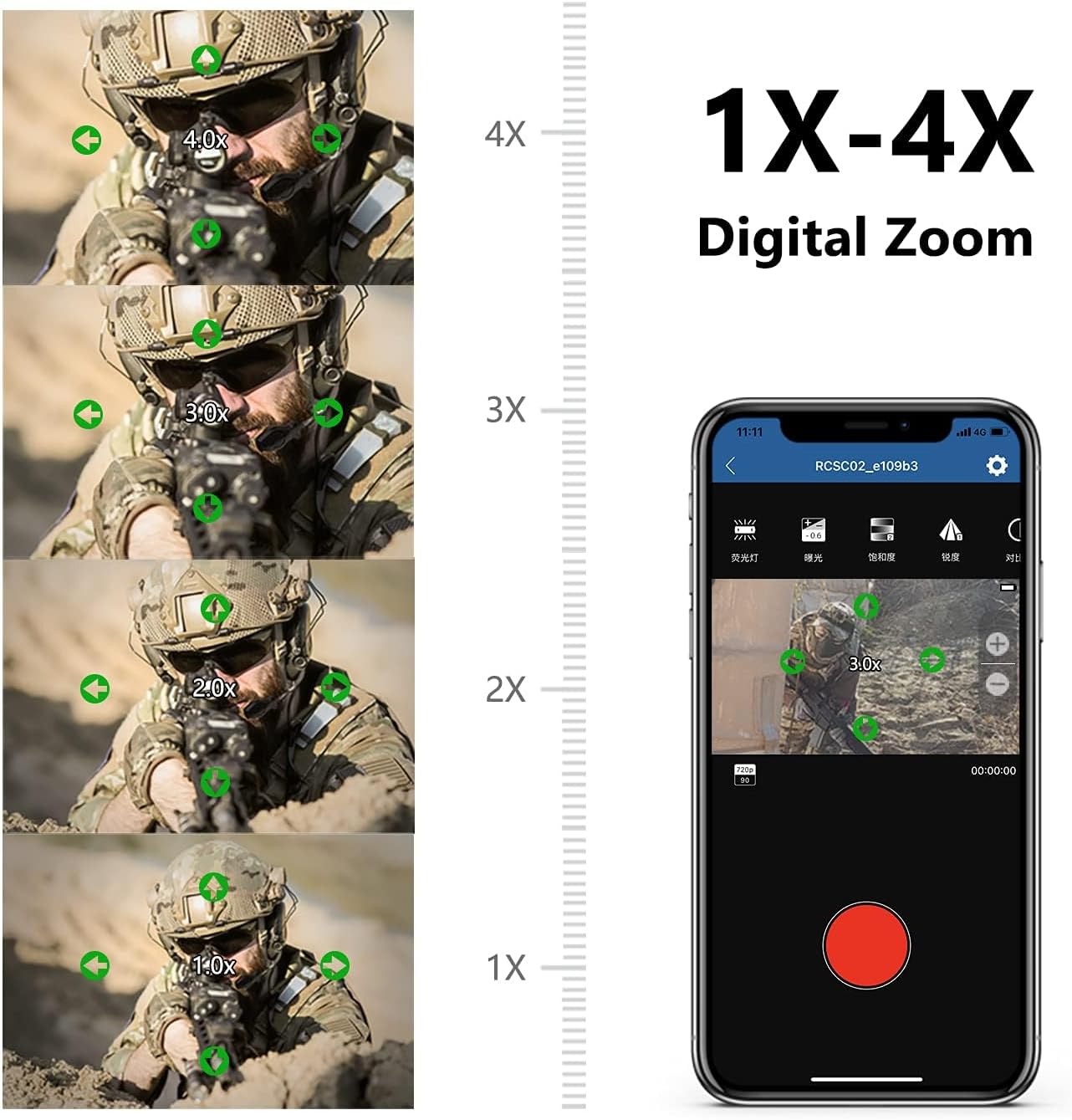
Figure 9: Digital zoom capabilities.
- Digital zoom settings can be adjusted via the RunCam Legacy smartphone app.
- Select your desired zoom level (1X, 2X, 3X, 4X) within the app's settings.
5. Manteniment
5.1 Neteja
- Feu servir un drap suau i sec per netejar el cos de la càmera.
- Per a la lent, feu servir un drap i una solució especials per netejar lents per evitar ratllades.
- No utilitzeu productes químics o materials abrasius.
5.2 Impermeabilització
The camera has an IP64 waterproof rating, protecting it from splashes and dust. It is not designed for submersion.
- Ensure all ports (Type-C, Micro-SD slot) are properly sealed before exposure to moisture.
- Avoid prolonged exposure to heavy rain or direct water jets.
5.3 Emmagatzematge
- Guardeu la càmera en un lloc fresc i sec, allunyat de la llum solar directa.
- Remove the Micro SD card if storing for extended periods.
- Charge the battery periodically (every 3-6 months) to maintain battery health if not in regular use.
6. Solució De Problemes
- La càmera no s'encén: Assegureu-vos que la bateria estigui carregada. Connecteu-la a una font d'alimentació i comproveu l'indicador de càrrega.
- Problemes de gravació: Verify that a Micro SD card is inserted correctly and has sufficient free space. Ensure the card is Class 10 or higher. Try formatting the SD card (via the app or a computer) if issues persist.
- App connection problems: Ensure Wi-Fi is enabled on the camera and your smartphone. Confirm you have downloaded the RunCam Legacy app, not other RunCam apps. Restart both the camera and your smartphone, then attempt to reconnect.
- Vídeo files unreadable: This can sometimes occur due to improper shutdown or SD card issues. Ensure the camera is powered off correctly after recording. Try formatting the SD card.
- No audio in recordings: Check if the microphone port is obstructed. Note that some camera configurations or settings might affect audio capture.
7. Especificacions
| Característica | Especificació |
|---|---|
| Marca | RunCam |
| Número de model | ScopeCam2 |
| Resolució de captura de vídeo | 4K |
| Pes de l'article | 5.1 unces |
| Dimensions del producte | 3.66 x 1.26 x 1.42 polzades |
| Bateries | 1 bateria de ions de liti (inclosa) |
| Característiques especials | Impermeable (IP64) |
| Tipus de memòria flash | Micro SD |
| Format de captura de vídeo | MP4 |
| Format d'àudio compatible | AAC, MP3 |
| Tecnologia de connectivitat | USB, Wi-Fi |
8. Garantia i Suport
For detailed warranty information, please refer to the official RunCam website or the warranty card included with your product. If you encounter any issues not covered in this manual, please contact RunCam customer support.
Una versió electrònica d'aquest manual d'usuari està disponible per a la seva descàrrega:


