Introducció
This manual provides detailed instructions for the operation and maintenance of your iTOMA CKS207 Alarm Clock Radio. Please read this manual thoroughly before using the product to ensure proper function and to maximize your user experience. Keep this manual for future reference.
Característiques del producte
- Càrrega sense fil ultraràpida de 15 W: Conveniently charge compatible smartphones and devices by placing them on the top charging pad.
- Ports de càrrega duals: Includes a USB-A port and a Type-C port for wired charging of additional devices.
- Dimmable 1.4-inch Cyan LED Display: Large, clear time display with 5-level dimmer control for optimal visibility day or night.
- Cyan LED Night Light: Built-in 2-level night light for ambient illumination.
- Dual Alarm with 4 Week Modes: Set two independent alarms with options for everyday, single day, weekdays, or weekends.
- Ràdio FM: Digital FM tuner with memory storage for up to 20 programmable radio stations (87.5-108 MHz).
- Connectivitat Bluetooth: Seamlessly stream audio from Bluetooth-enabled devices.
- Sleep Timer & Snooze Function: Features for customizable sleep and temporary alarm pause.
Contingut del paquet
- iTOMA CKS207 Alarm Clock Radio Unit
- Adaptador de corrent alterna
- Manual d'usuari
Product Layout and Controls

Figura 1: global view of the iTOMA CKS207 Alarm Clock Radio with a smartphone wirelessly charging on top and another connected via USB.

Figura 2: Primer pla view of the top control panel of the iTOMA CKS207, highlighting buttons for time setting, alarm, snooze, volume, FM/Bluetooth mode, and dimmer.
The iTOMA CKS207 features an intuitive control panel located on the top of the unit. Key buttons include:
- SNOOZE/VOL- / VOL+ Dial: Press for snooze, rotate for volume adjustment.
- Botó ON/OFF: Encén o apaga la unitat.
- Botó DIMMER: Ajusta la brillantor de la pantalla.
- Botó LED: Controls the night light.
- Botó FM: Switches to FM radio mode.
- Botó BT: Switches to Bluetooth mode.
- Botons AL1 / AL2: Set and activate Alarm 1 and Alarm 2.
- Botó CONFIGURACIÓ DEL RELLOTGE: Entra al mode de configuració de l'hora.
- SLEEP/TIME ZONE Button: Activates sleep timer or adjusts time zone.
- Botons TUNE- / TUNE+: Adjusts radio frequency or navigates settings.
- FM MEM./BT PAIR Button: Saves FM presets or initiates Bluetooth pairing.
Configuració
- Connexió d'alimentació: Connect the supplied AC power adapter to the DC IN jack on the back of the unit, then plug the adapter into a standard wall outlet. The unit will power on and the display will light up.
- Backup Battery (Optional): The unit requires 1 Lithium Metal battery (not included) for backup. Install the battery in the compartment on the bottom of the unit. This battery preserves time and alarm settings during a power outage.
Instruccions de funcionament
Establiment de l'hora
- Manteniu premut el botó CONJUNT DE RELLOTGE botó. Els dígits de l'hora parpellejaran.
- Gira el SNOOZE/VOL dial to adjust the hour. Press CONJUNT DE RELLOTGE per confirmar.
- The minute digits will flash. Rotate the SNOOZE/VOL dial to adjust the minutes. Press CONJUNT DE RELLOTGE per confirmar.
- Continue to set the year, month, and day using the SNOOZE/VOL dial and CONJUNT DE RELLOTGE botó.
- To switch between 12/24-hour format, press the TUNE+ or TUNE- buttons during time setting.
Setting Alarms (AL1/AL2)

Figure 3: The iTOMA CKS207 supports dual alarms for flexible scheduling.
- Manteniu premut el botó AL1 or AL2 botó. Els dígits de l'hora de l'alarma parpellejaran.
- Gira el SNOOZE/VOL dial to set the desired alarm hour. Press the respective AL botó per confirmar.
- The alarm minute digits will flash. Rotate the SNOOZE/VOL dial to set the desired alarm minutes. Press the respective AL botó per confirmar.
- Select the alarm source (FM radio or buzzer) by rotating the SNOOZE/VOL dial. Press the respective AL botó per confirmar.
- Select the alarm week mode (Every Day, Single Day, Weekdays, Weekends) by rotating the SNOOZE/VOL dial. Press the respective AL botó per confirmar.
- Per activar/desactivar una alarma, premeu breument el botó AL1 or AL2 botó. Apareixerà/desapareixerà una icona d'alarma a la pantalla.
Ús de la ràdio FM
- Premeu el botó FM botó per canviar al mode de ràdio FM.
- To manually tune, press the TUNE+ or TUNE- botons.
- Per cercar emissores automàticament, manteniu premut el botó TUNE+ or TUNE- buttons. The radio will scan and stop at the next strong station.
- Per desar una predefinició: Sintonitzeu l'emissora desitjada i, a continuació, premeu i manteniu premut el botó FM MEM./BT PAIR button until the preset number flashes. Rotate the SNOOZE/VOL dial to select a preset number (1-20), then press FM MEM./BT PAIR de nou per salvar.
- Per recuperar una predefinició: premeu breument la tecla FM MEM./BT PAIR botó i, a continuació, gireu el SNOOZE/VOL dial to select the desired preset.
Vinculació i reproducció Bluetooth

Figure 4: Bluetooth connectivity allows wireless audio streaming from your smartphone.
- Premeu el botó BT button to switch to Bluetooth mode. The Bluetooth indicator on the display will flash.
- On your Bluetooth-enabled device, search for "iTOMA CKS207" in the Bluetooth settings and select it to pair.
- Un cop emparellat, l'indicador Bluetooth deixarà de parpellejar i romandrà fix. Ara pots reproduir àudio des del dispositiu a la ràdio rellotge.
- Gira el SNOOZE/VOL dial to adjust the playback volume.
Wireless and Wired Charging
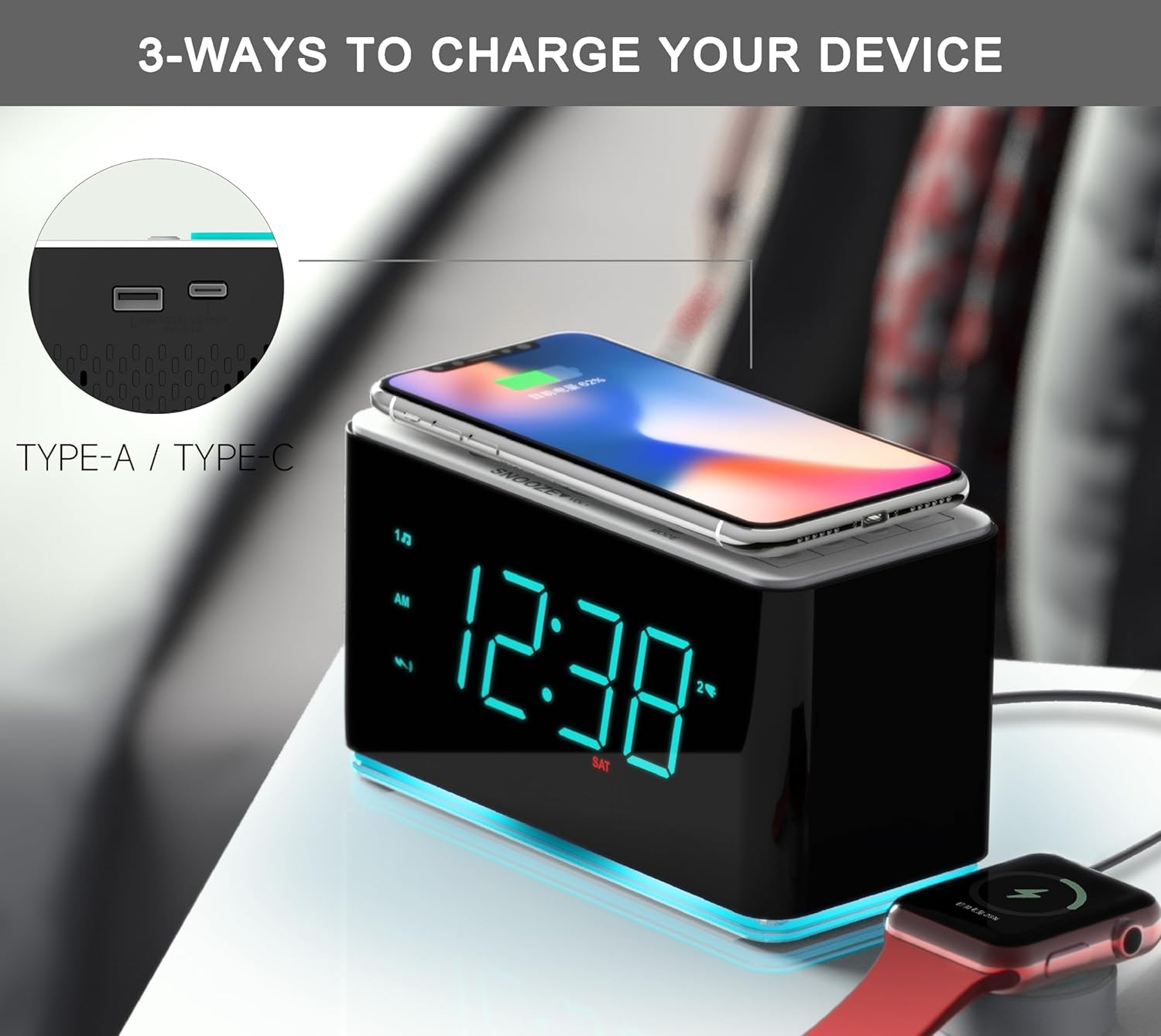
Figure 5: The iTOMA CKS207 offers versatile charging options for multiple devices.
- Càrrega sense fils: Place your Qi-compatible smartphone or device centered on the wireless charging pad located on top of the unit. The charging indicator will illuminate to confirm charging.
- USB-A and Type-C Charging: Connect your device's charging cable to the USB-A or Type-C port on the side of the unit. Charging will begin automatically.
Display Dimmer and Night Light

Figure 6: Adjust the display brightness to your preference with the dimmer function.
- Atenuador: Premeu el botó DIMMER button repeatedly to cycle through 5 levels of display brightness (Bright, Dim, Invisible, Off).
- Llum nocturna: Premeu el botó LED button repeatedly to cycle through 2 levels of night light brightness or turn it off.
Temporitzador de dormir
Premeu el botó SOM/ZONA HORÀRIA button repeatedly to set the sleep timer duration (e.g., 15, 30, 60, 90 minutes, or OFF). The unit will automatically turn off after the selected time.
Funció de posposar
Quan soni una alarma, premeu el botó SNOOZE/VOL dial to temporarily silence the alarm for approximately 9 minutes. The alarm will sound again after the snooze period. To cancel the alarm completely, press the ON/OFF botó.
Manteniment
- Neteja: Disconnect the power adapter before cleaning. Use a soft, dry cloth to wipe the unit. Do not use liquid cleaners or abrasive materials.
- Emmagatzematge: If storing the unit for an extended period, disconnect it from power and remove any backup batteries. Store in a cool, dry place.
- Medi ambient: Eviteu exposar la unitat a temperatures extremes, llum solar directa, pols o humitat.
Resolució de problemes
| Problema | Causa possible | Solució |
|---|---|---|
| La unitat no s'encén. | L'adaptador de corrent no està connectat o està defectuós. | Assegureu-vos que l'adaptador de corrent estigui connectat correctament a la unitat i a una presa de corrent que funcioni. |
| La pantalla està tènue o apagada. | Dimmer setting is too low or off. | Premeu el botó DIMMER botó per ajustar la brillantor. |
| L'alarma no sona. | L'alarma no està activada o està configurada incorrectament. | Ensure the alarm is set and activated (alarm icon visible). Check alarm volume. |
| Mala recepció de ràdio FM. | Antena no estesa o interferències. | Extend the FM wire antenna fully. Reposition the unit to reduce interference. |
| La càrrega sense fil no funciona. | Device not Qi-compatible or not positioned correctly. | Ensure your device supports Qi wireless charging. Reposition the device centrally on the charging pad. Remove thick phone cases. |
| L'aparellament de Bluetooth falla. | Device too far or not in pairing mode. | Ensure the unit is in Bluetooth pairing mode (flashing BT icon). Keep devices within range (approx. 10 meters). |
Especificacions
| Característica | Detall |
|---|---|
| Marca | iTOMA |
| Model | CKS 207 |
| Tipus de visualització | LED (Cyan) |
| Sortida de càrrega sense fils | 15W |
| Wired Charging Ports | USB-A, USB-C |
| Interval de freqüència FM | 87.5-108 MHz |
| Versió Bluetooth | Not specified (assumed standard) |
| Font d'alimentació | Elèctric amb cable |
| Bateria de seguretat | 1 Lithium Metal battery (required, not included) |
| Dimensions del producte | 7.5 x 3.81 x 9 cm |
| Tipus de material | Plàstic |
Garantia i Suport
iTOMA products are designed for reliability and performance. For any issues or questions not covered in this manual, please refer to the official user guide or contact iTOMA customer support.
Guia d'usuari oficial (PDF): Descarrega aquí


