1. Introducció
Thank you for choosing the Liectroux 1-X009A Robot Vacuum Cleaner. This manual provides essential information for the safe operation, maintenance, and troubleshooting of your device. Please read this manual thoroughly before using the product and retain it for future reference.
Instruccions importants de seguretat
- Always operate the robot vacuum on dry surfaces.
- No permeteu que els nens facin servir el robot aspirador.
- Mantingueu els cabells, la roba solta, els dits i totes les parts del cos lluny de les obertures i les parts mòbils.
- Do not pick up large objects, liquids, burning or smoking materials.
- Assegureu-vos que la base de càrrega estigui col·locada contra una paret sobre una superfície plana.
- Unplug the charging dock when not in use for extended periods.
- Només feu servir l'adaptador de corrent i la base de càrrega originals que s'inclouen amb el dispositiu.
2. Producte acabatview
Familiarize yourself with the components of your Liectroux 1-X009A Robot Vacuum Cleaner.
A dalt View
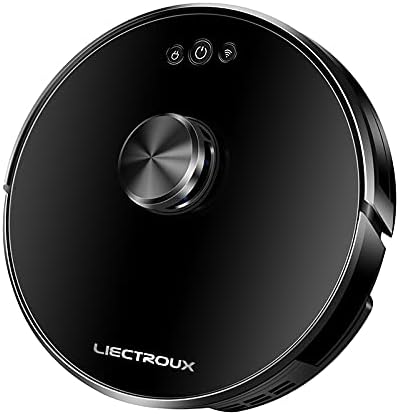
Imatge 2.1: A dalt view of the Liectroux 1-X009A Robot Vacuum Cleaner. It features a sleek black circular design with a central metallic knob (likely a navigation sensor) and three touch-sensitive buttons: Power, Start/Pause, and Wi-Fi indicator.
- Central Navigation Module: For intelligent mapping and navigation.
- Botó d'encesa: Premeu per activar/desactivar.
- Botó d'inici/pausa: Premeu per iniciar o posar en pausa la neteja.
- Indicador de Wi-Fi: Mostra l'estat de la connexió.
A baix View

Imatge 2.2: A baix view of the Liectroux 1-X009A Robot Vacuum Cleaner, showing the cleaning mechanisms. This includes two rotating side brushes, a central main roller brush, large drive wheels, and a removable mopping pad attachment at the rear.
- Side Brushes (L & R): Escombra les restes cap al camí principal del raspall.
- Raspall de rodet principal: Collects dirt and dust from the floor.
- Rodes motrius: Allow the robot to move across various surfaces.
- Contactes de càrrega: Connects to the charging dock.
- Sensors de penya-segats: Detects drops to prevent falls.
- Mopping Pad Attachment: Per a neteja en humit.
Paperera i dipòsit d'aigua

Imatge 2.3: lateral view of the Liectroux 1-X009A, illustrating the integrated dustbin and water tank. The transparent blue tank shows volume markings (100ml, 200ml, 300ml) for water, indicating its mopping capability.
- Polvorí: Collects dry debris. Capacity: 0.6 Litre.
- Dipòsit d'aigua: Reté aigua per a la funció de fregar.
- Filtre: Atrapa partícules fines de pols.
3. Configuració
3.1 Desembalatge i preparació inicial
- Traieu amb cura tots els components de l'embalatge.
- Traieu totes les pel·lícules o adhesius protectors del robot i de la base de càrrega.
- Attach the side brushes by pressing them onto their respective posts on the bottom of the robot until they click into place.
3.2 Col·locació de la base de càrrega
- Place the charging dock against a wall in an open area, ensuring at least 0.5 meters (1.6 feet) of clear space on either side and 1.5 meters (5 feet) in front.
- Connecteu l'adaptador de corrent a la base de càrrega i endolleu-lo a una presa de corrent.
- Assegureu-vos que l'indicador d'engegada de la base de càrrega s'il·lumina.
3.3 Càrrega inicial
Place the robot vacuum onto the charging dock, aligning its charging contacts with those on the dock. The robot will begin charging automatically. For first-time use, allow the robot to charge completely (approximately 4-6 hours) before its initial cleaning cycle.
3.4 Connecting to Wi-Fi (App Control)
To utilize advanced features and remote control, download the Liectroux app from your smartphone's app store. Follow the in-app instructions to connect your robot vacuum to your home Wi-Fi network. This typically involves:
- Creating an account.
- Selecting your robot model.
- Putting the robot into pairing mode (usually by pressing and holding the Wi-Fi button).
- Connecting your phone to the robot's temporary Wi-Fi hotspot, then selecting your home Wi-Fi network.
4. Funcionament del robot aspirador
4.1 Inici d'un cicle de neteja
- Inici manual: Press the Start/Pause button on the robot's top panel. The robot will begin cleaning in Auto mode.
- Inici de l'aplicació: Open the Liectroux app and select the desired cleaning mode (Auto, Spot, Edge) or initiate a full cleaning cycle.
4.2 Pausa i represa
Press the Start/Pause button on the robot or in the app to pause a cleaning cycle. Press it again to resume.
4.3 Tornar a la base de càrrega
The robot will automatically return to its charging dock when its battery is low or when a cleaning cycle is complete. You can also manually send it back via the app or by pressing and holding the Start/Pause button on the robot (refer to specific model instructions for button functions).
4.4 Funció de fregar
Per utilitzar la funció de fregar:
- Remove the combined dustbin/water tank.
- Fill the water tank with clean water (do not use cleaning solutions unless specified by the manufacturer).
- Attach a clean mopping pad to the designated slot on the bottom of the water tank.
- Reinsert the combined unit into the robot.
- Inicia un cicle de neteja. El robot aspirarà i fregarà simultàniament.
Nota: Remove the mopping pad and empty the water tank after each mopping session to prevent mildew and odors.
5. Manteniment
Un manteniment regular garanteix un rendiment òptim i allarga la vida útil del teu robot aspirador.
5.1 Buidar el contenidor d'escombraries
- Press the dustbin release button (refer to your robot's specific design) and pull out the combined dustbin/water tank.
- Obriu la tapa de la paperera i buideu-ne el contingut en una paperera.
- Tap the dustbin gently to dislodge any stuck debris.
- Reinsert the dustbin/water tank until it clicks into place.
Freqüència: After each cleaning cycle or when full.
5.2 Neteja dels filtres
- Traieu la paperera.
- Take out the primary filter and HEPA filter.
- Brush off dust from the filters using a cleaning tool or a soft brush. Do not wash HEPA filters with water unless explicitly stated in the product documentation.
- Ensure filters are completely dry before reinserting.
Freqüència: Weekly, or more often if used frequently or in dusty environments. Replace filters every 3-6 months.
5.3 Cleaning the Main Roller Brush
- Doneu la volta al robot.
- Remove the brush guard by pressing the release tabs.
- Lift out the main roller brush.
- Use the provided cleaning tool (if available) or scissors to cut and remove any hair or debris tangled around the brush.
- Reinsert the main brush and secure the brush guard.
Freqüència: Setmanalment.
5.4 Cleaning the Side Brushes
- Gently pull the side brushes upwards to remove them.
- Traieu els cabells o les restes enredats.
- If brushes are bent or damaged, replace them.
- Press the clean brushes back onto their posts.
Freqüència: Bi-weekly. Replace every 3-6 months.
5.5 Neteja dels sensors i els contactes de càrrega
Wipe the cliff sensors (located on the bottom of the robot) and the charging contacts (on both the robot and the charging dock) with a clean, dry cloth. This ensures proper navigation and charging.
Freqüència: Mensualment.
5.6 Mopping Pad Care
Remove the mopping pad after each use. Wash it with water and mild detergent, then allow it to air dry completely before storing or reusing.
6. Solució De Problemes
Si el vostre robot aspirador té algun problema, consulteu els problemes i solucions habituals següents.
| Problema | Causa possible | Solució |
|---|---|---|
| El robot no s'encén. | Bateria baixa; botó d'engegada no premut. | Place robot on charging dock; Press and hold the Power button for 3 seconds. |
| El robot no es carrega. | Contactes de càrrega bruts; la base de càrrega no està alimentada. | Clean charging contacts on robot and dock; Ensure charging dock is plugged in and powered. |
| El robot es queda encallat sovint. | Obstacles (cables, rugs); Sensors dirty. | Elimineu els obstacles del camí de neteja; Netegeu els sensors de penya-segats. |
| Mal rendiment de neteja. | Dustbin full; Brushes tangled; Filters clogged. | Empty dustbin; Clean main and side brushes; Clean/replace filters. |
| No es pot connectar a la Wi-Fi. | Incorrect Wi-Fi password; Router issues; Robot not in pairing mode. | Verify password; Restart router; Put robot in pairing mode as per app instructions. |
If the problem persists, please refer to the warranty and support section for further assistance.
7. Especificacions
| Característica | Detall |
|---|---|
| Model | 1-X009A |
| Marca | Liectroux |
| Color | Negre |
| Capacitat de la paperera | 0.6 litres |
| Font d'alimentació | Rechargeable Battery (Wired Charging Dock) |
| Tipus de navegació | Intelligent Mapping |
| Modes de neteja | Vacuum, Mop, Vacuum & Mop |
| Connectivitat | Wi-Fi (for App Control) |
8. Garantia i Suport
For warranty information, please refer to the warranty card included with your product packaging or visit the official Liectroux website. For technical support, troubleshooting assistance beyond this manual, or to order replacement parts, please contact Liectroux customer service through their official channels.
Conserveu el rebut de compra com a comprovant de compra per a reclamacions de garantia.


