1. Introducció
Thank you for choosing the Diswoe 3.5mm Wired Over-Ear Gaming Headset. This manual provides detailed instructions for setting up, operating, and maintaining your headset to ensure optimal performance and longevity. Please read this manual thoroughly before using the product.
2. Producte acabatview
The Diswoe Gaming Headset is designed for an immersive audio experience across various gaming platforms. It features a comfortable over-ear design, a high-quality microphone, and convenient controls.
Característiques principals:
- So d'alta qualitat: Built-in powerful 40mm magnetic neodymium drivers for immersive audio.
- Micròfon amb cancel·lació de soroll: High-sensitive omnidirectional microphone with noise reduction technology for clear communication.
- Controls en línia: Easy-to-use volume adjustment and one-key microphone mute switch.
- Compatibilitat universal: Compatible with PlayStation 4, Xbox One/Ones, Nintendo Switch/3DS, PC, Laptops, and Smartphones via 3.5mm jack. Includes a 2-in-1 adapter for PC.
- Ultra-Comfortable Design: Skin-friendly protein leather earcups with memory foam, and an adjustable headband for extended wear.
Components del producte:

Figure 2.1: Diswoe Gaming Headset, showing the overall design with earcups, headband, and microphone.

Figure 2.2: Illustration highlighting the 3D surround sound and deep bass capabilities of the headset.

Figura 2.3: Detallada view of headset components including leatherette ear cushions, in-line volume and mic control, 3.5mm jack, and the 160-degree rotatable microphone.

Figure 2.4: Visual representation of comfort features such as the retractable headband, soft memory-protein earmuffs, and over-ear design.
3. Instruccions de configuració
Follow these steps to connect your Diswoe Gaming Headset to your device.
3.1 Connecting to PlayStation 4, Xbox One/Ones, Nintendo Switch/3DS, Laptop, or Smartphone:
- Locate the 3.5mm audio jack on your device.
- Plug the 3.5mm connector from the headset directly into the device's audio jack.
- For Xbox One controllers without a 3.5mm jack, a Microsoft adapter (not included) may be required.
3.2 Connecting to PC (Desktop Computers):
- Identify the audio output (headphone) and microphone input jacks on your PC. These are typically colored green and pink, respectively, or marked with headphone and microphone icons.
- Connect the included 2-in-1 adapter to the 3.5mm jack of your headset.
- Plug the green connector of the adapter into your PC's headphone jack and the pink connector into your PC's microphone jack.

Figure 3.1: The headset connected to the PC splitter cable for separate audio and microphone inputs.
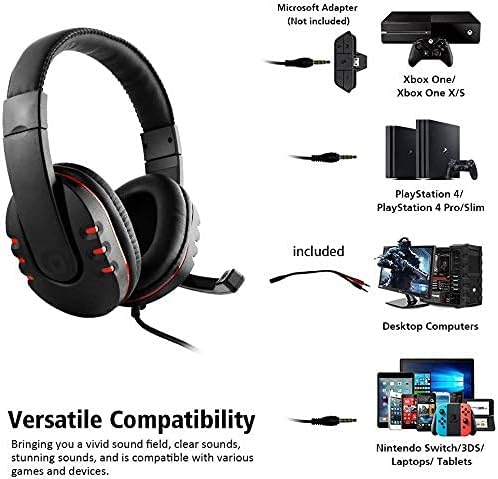
Figure 3.2: Diagram illustrating the versatile compatibility of the headset with different gaming consoles and devices.
4. Instruccions de funcionament
4.1 Adjusting Volume:
Use the in-line volume control wheel located on the headset cable to increase or decrease the audio volume. Rotate the wheel upwards to increase volume and downwards to decrease it.
4.2 Microphone Mute Function:
To mute the microphone, slide the mute switch on the in-line control unit. Slide it back to unmute the microphone.
4.3 Positioning the Microphone:
The microphone arm can be rotated up to 160 degrees. Adjust its position for optimal voice pickup, ensuring it is close to your mouth but not directly in front of it to avoid breath noises.
4.4 Adjusting the Headband:
The headband is retractable. Gently pull or push the earcups to adjust the headband size for a comfortable and secure fit on your head.
5. Manteniment
Una cura adequada allargarà la vida útil dels auriculars.
- Neteja: Feu servir un drap suau i sec per netejar els auriculars i la diadema. Per a la brutícia persistent, netegeu lleugerament.amp Es pot fer servir un drap, però assegureu-vos que no entri humitat a les reixetes de l'altaveu ni al micròfon.
- Emmagatzematge: Store the headset in a clean, dry place away from extreme temperatures and direct sunlight. Avoid placing heavy objects on the headset.
- Cura del cable: Do not pull the cable forcefully or wrap it too tightly, as this can damage the internal wires.
6. Solució De Problemes
If you encounter any issues with your headset, please refer to the following solutions:
- Issue: Humming current or static noise in headphones.
- Solució: Adjust the volume level of the voice adjustment in your device's settings. It is recommended to set it to the sixth level to minimize humming. Ensure all connections are secure.
- Issue: No sound from the headset.
- Solució:
- Check if the 3.5mm jack is fully inserted into the device.
- Ensure the in-line volume control is turned up.
- Verify that the audio output settings on your device are configured to use the headset.
- If using the PC adapter, ensure both green and pink jacks are correctly connected.
- Issue: Microphone is not working.
- Solució:
- Check if the microphone mute switch on the in-line control is in the "unmute" position.
- Ensure the microphone is properly positioned and not too far from your mouth.
- Verify that the microphone input settings on your device are configured to use the headset's microphone.
- If using the PC adapter, ensure the pink jack is correctly connected to the microphone input.
7. Especificacions
| Marca | Diswoe |
| Número de model (ASIN) | B095S998KG |
| Tecnologia de connectivitat | Amb cable |
| Conector d'auriculars | 3.5 mm Jack |
| Factor de forma | Sobre l'orella |
| Mida del controlador | Neodimi de 40 mm |
| Material | Pell (auriculars) |
| Tipus de control | Control de volum |
| Característiques especials | Microphone Included, Noise Cancellation |
| Pes de l'article | 1.05 lliures (aprox. 476 g) |
| Dimensions del paquet | 7.3 x 7.2 x 3 polzades (aprox. 18.5 x 18.3 x 7.6 cm) |
8. Garantia i Suport
This product is offered as an Amazon Renewed item. As such, it is eligible for replacement or refund under the Garantia renovada d'Amazon if you are not satisfied with your purchase. Please refer to the Amazon Renewed program terms and conditions for full details.
For further assistance or inquiries, please contact Amazon Customer Service or the Amazon Renewed program support.