Introducció
The Cellularline Clip Pro is a mono Bluetooth® earbud designed for convenience and portability. It features a unique charging base with an integrated clip, allowing you to easily attach it to clothing. The earbud itself is wireless and its capsule can be rotated for comfortable use in either the right or left ear. This manual provides detailed instructions for setting up, operating, and maintaining your Clip Pro earbud.

Image: The Cellularline Clip Pro earbud detached from its charging base, showcasing its compact design and the charging contacts.
Contingut del paquet
Si us plau, comproveu el paquet per veure si hi ha els elements següents:
- Cellularline Clip Pro Mono Headset
- Cable de càrrega
- Orelles de recanvi
- Manual d'instruccions (aquest document)
Producte acabatview
Familiarize yourself with the components of your Cellularline Clip Pro:

Imatge: Superior view of the Clip Pro charging base with the earbud securely docked. A blue indicator light is visible on the earbud.
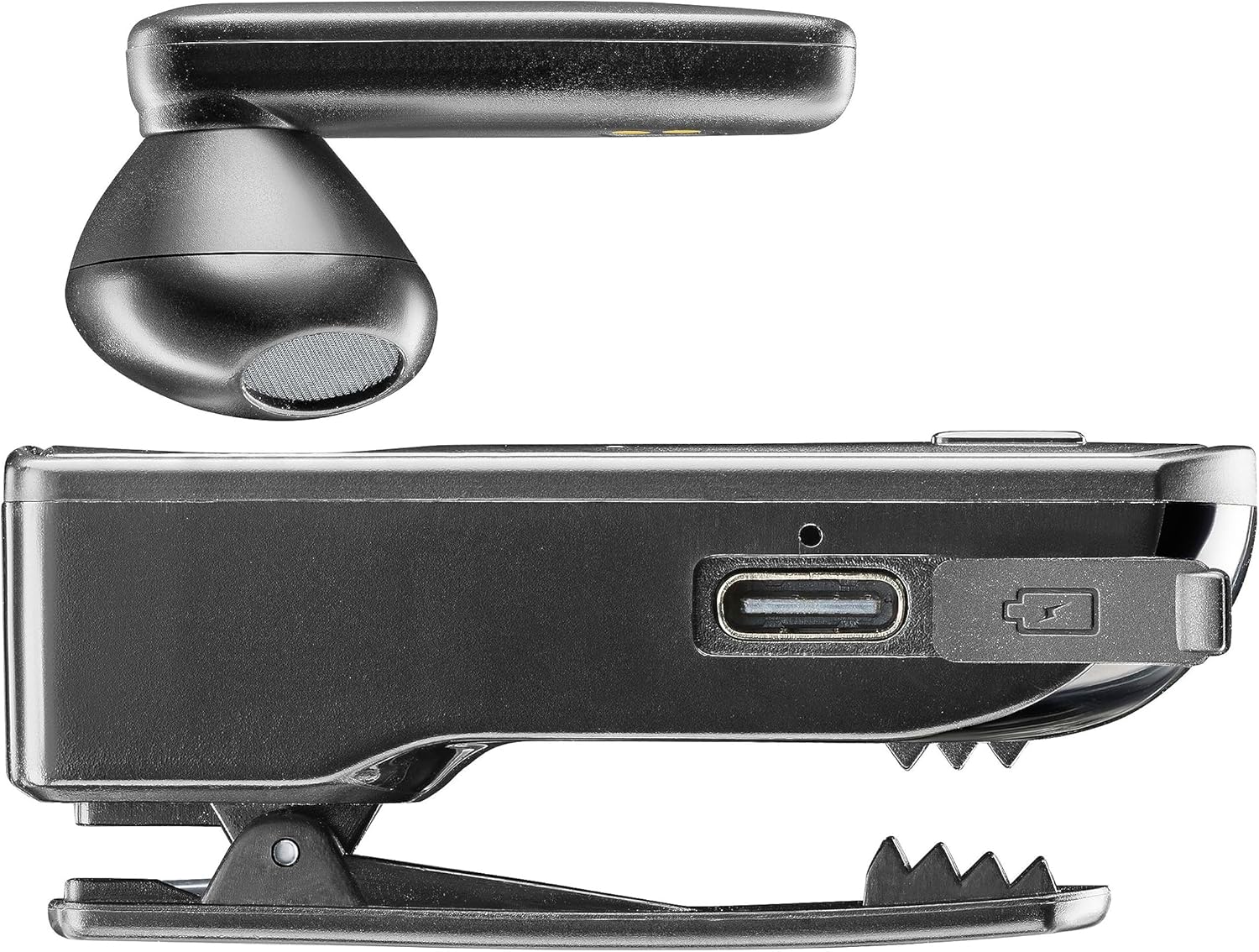
Imatge: Lateral view of the Clip Pro charging base, highlighting the USB-C charging port and the integrated clip mechanism.

Imatge: Detallada view of the earbud's inner surface, showing the two gold charging contacts and the speaker mesh.
Configuració
1. Càrrega del dispositiu
Before first use, fully charge your Cellularline Clip Pro. The charging base provides additional power for the earbud.
- Connect the provided charging cable to the USB-C port on the charging base.
- Connecteu l'altre extrem del cable a una font d'alimentació USB compatible (per exemple, un adaptador de paret, un port USB de l'ordinador).
- Place the earbud into the charging base. Ensure the charging contacts align.
- The charging indicator light on the earbud will show charging status. A full charge takes approximately 1.5 hours.
2. Vinculació amb un dispositiu Bluetooth
To use the earbud, you must first pair it with your smartphone or other Bluetooth-enabled device.
- Assegureu-vos que els auriculars estiguin carregats i apagats.
- Remove the earbud from the charging base. It will automatically enter pairing mode (indicator light will flash).
- On your device (e.g., smartphone), go to the Bluetooth settings and enable Bluetooth.
- Cerca available devices. Select "Cellularline Clip Pro" from the list.
- Once connected, the earbud's indicator light will stop flashing and remain solid or turn off, depending on the model.
- The earbud is now ready for use. It will automatically reconnect to the last paired device when powered on and within range.
Instruccions de funcionament
Encès/Apagat
- Encès: Remove the earbud from the charging base. It will automatically power on. Alternatively, press and hold the multifunction button on the earbud for a few seconds.
- Apagar: Place the earbud back into the charging base. It will automatically power off. Alternatively, press and hold the multifunction button on the earbud for a few seconds until the indicator light turns off.
Gestió de trucades
- Respondre/Finalitzar la trucada: Premeu el botó multifunció una vegada.
- Rebutja la trucada: Premeu i manteniu premut el botó multifunció durant aproximadament 2 segons.
- Torna a marcar l'últim número: Premeu dues vegades el botó multifunció.
- Vibrator Feature: The charging base will vibrate when you receive an incoming call, even if the earbud is docked.
Control de volum
The charging base features dedicated volume adjustment buttons.
- Augmenta el volum: Press the '+' button on the charging base.
- Disminueix el volum: Press the '-' button on the charging base.
Wearing the Earbud
The earbud capsule is rotatable, allowing for comfortable use in either the right or left ear.
- Gently rotate the earbud capsule to align with your preferred ear.
- Insert the earbud into your ear canal. Adjust for a secure and comfortable fit.

Image: A man wearing the Cellularline Clip Pro earbud, with the charging base clipped to his shirt collar, demonstrating its hands-free use.
Manteniment
To ensure the longevity and optimal performance of your Cellularline Clip Pro, follow these maintenance guidelines:
- Neteja: Use a soft, dry cloth to clean the earbud and charging base. Do not use abrasive cleaners or solvents.
- Puntes d'orelles: Regularly check and clean the eartips. Replace them if they become worn or damaged.
- Emmagatzematge: When not in use, store the earbud in its charging base to protect it and keep it charged. Store in a cool, dry place away from direct sunlight and extreme temperatures.
- Resistència a l'aigua: This device is not waterproof. Avoid exposure to water, moisture, or excessive humidity.
Resolució de problemes
If you encounter issues with your Cellularline Clip Pro, try the following solutions:
| Problema | Possible solució |
|---|---|
| Els auriculars no s'encén. | Ensure the earbud is charged. Place it in the charging base for at least 15 minutes. |
| No es pot emparellar amb el dispositiu. | Make sure Bluetooth is enabled on your device. Ensure the earbud is in pairing mode (flashing indicator light). Try forgetting the device in your phone's Bluetooth settings and re-pairing. |
| Sense so o amb un volum baix. | Check the volume levels on both the earbud (using the charging base buttons) and your connected device. Ensure the earbud is properly seated in your ear. |
| Charging base not vibrating for calls. | Ensure the earbud is correctly docked in the charging base and the base itself has sufficient power. |
| Earbud disconnects frequently. | Ensure your device is within the Bluetooth range (typically 10 meters/33 feet) and there are no significant obstructions. Fully charge both the earbud and the charging base. |
Especificacions
- Nom del model: BTCLIPPROK
- Marca: Línia cel·lular
- Tecnologia de connectivitat: Bluetooth sense fil
- Factor de forma: Earbud (Capsule)
- Col·locació de les orelles: A l'orella
- Color: Negre
- Material: PC + plàstic ABS
- Pes de l'article: 94 grams
- Temps de càrrega: 1.5 hores
- Composició de la bateria: Ió de liti (1 inclòs)
- Bateria recarregable: Sí
- Característiques especials: Multifunction answer button, Volume adjustment buttons, Vibrating charging base
- Dispositius compatibles: iPhone, Samsung, Huawei, Xiaomi, and all Bluetooth-enabled devices
- Tipus de control: Media control, Volume control, Touch
Informació de seguretat
Si us plau, llegiu i seguiu aquestes precaucions de seguretat per evitar danys al dispositiu o lesions personals:
- No exposeu el dispositiu a temperatures extremes, llum solar directa ni humitat elevada.
- Eviteu deixar caure o sotmetre el dispositiu a forts impactes.
- Do not attempt to disassemble, repair, or modify the device yourself. Contact authorized service personnel for assistance.
- Mantingueu el dispositiu allunyat dels nens i de les mascotes.
- Desfeu-vos del dispositiu i de la bateria de manera responsable d'acord amb la normativa local.
- Do not use the earbud at excessively high volumes for prolonged periods, as this may cause hearing damage.
Garantia i Suport
For warranty information and customer support, please refer to the official Cellularline weblloc web o poseu-vos en contacte amb el vostre distribuïdor. Conserveu el comprovant de compra per a reclamacions de garantia.


