1. Introducció
This manual provides comprehensive instructions for the safe and effective use of the C-LOGIC 580 Smart Digital Multimeter. Please read this manual thoroughly before operation and retain it for future reference.
The C-LOGIC 580 is a smart digital multimeter designed for accurate and efficient electrical measurements. Its smart technology allows for automatic recognition of measurement parameters, reducing potential errors for amateur users and saving time for professionals.
2. Informació de seguretat
Always observe safety precautions when using electrical testing equipment. Failure to do so may result in injury or damage to the device.
- No supereu els valors d'entrada màxims especificats per a cada funció.
- Ensure the test leads are properly connected and the function switch is in the correct position before making any measurements.
- Extremeu les precaucions quan treballeu amb circuits actius.
- No utilitzeu el multímetre si sembla que està danyat o si els cables de prova estan compromesos.
- Refer to the CAT III 600V and MAX 600V markings on the device for voltage límits.
3. Característiques del producte
- Tecnologia intel·ligent: Automatic recognition of measurement parameters.
- Error Reduction: Designed to minimize errors for amateur users.
- Estalvi de temps: Streamlines measurement processes for professional users.
- Pantalla digital: Clear and easy-to-read digital readout.
- Funcions múltiples: Capable of measuring various electrical parameters.
4. Contingut del paquet
Verifiqueu que tots els elements siguin presents i no estiguin danyats en obrir el paquet.
- C-LOGIC 580 Smart Digital Multimeter
- Cables de prova (vermell i negre)
- Manual d'usuari
5. Configuració
5.1 Instal·lació de la bateria
The C-LOGIC 580 is battery powered. Ensure batteries are correctly installed before first use.
- Localitzeu la tapa del compartiment de la bateria a la part posterior del multímetre.
- Utilitzeu un tornavís per obrir el compartiment de la bateria.
- Introduïu les piles necessàries, respectant la polaritat correcta (+ i -).
- Substituïu la tapa del compartiment de la bateria i fixeu-la.
5.2 Connexió dels cables de prova
Proper connection of test leads is crucial for accurate and safe measurements.
- Inseriu el cable de prova negre a la presa d'entrada "COM" (comú).
- Insert the red test lead into the "VHz%" input jack for voltage, frequency, and duty cycle measurements.
- Assegureu-vos que les connexions siguin fermes i segures.
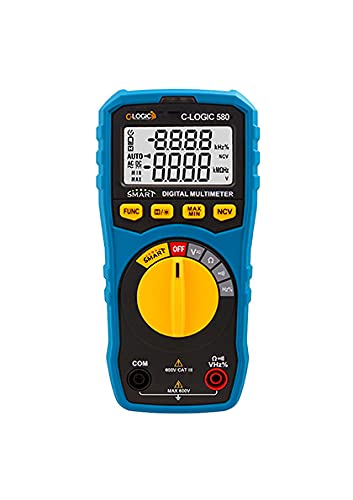
Figura 1: Frontal view of the C-LOGIC 580 Smart Digital Multimeter, showing the display, rotary switch, function buttons, and input jacks (COM and VHz%). The display shows "-8.8.8.8" and "0.0.0.0" with indicators for AUTO, AC/DC, kHz%, NCV, MAX, MIN, and V. The rotary switch is set to OFF. The input jacks are labeled "COM" and "VHz%".
6. Instruccions de funcionament
6.1 Engegada/apagada
To power on the multimeter, rotate the central yellow dial from the "OFF" position to any desired measurement function. To power off, rotate the dial back to "OFF".
6.2 Smart Measurement Mode
The C-LOGIC 580 features a smart mode that automatically identifies the type of measurement (e.g., AC voltage, DC voltage, resistance) when the leads are connected to a circuit. This simplifies operation by eliminating the need to manually select the measurement type.
6.3 Botons de funció
The multimeter includes several function buttons below the display:
- FUNCIÓ: Used to cycle through different measurement modes within a single rotary switch setting (e.g., AC/DC voltage, resistència/continuïtat).
- (Diode/Continuity): Activates diode test or continuity check.
- MÀXIM / MÍN: Toggles between maximum and minimum value hold during a measurement.
- NCV: Activates Non-Contact Voltage detecció.
6.4 Mesures bàsiques
VoltagMesura (CA/CC):
- Set the rotary switch to the 'V' position.
- Connect the black test lead to the 'COM' jack and the red test lead to the 'VHz%' jack.
- Connecteu els cables de prova en paral·lel al circuit o component que s'ha de mesurar.
- The multimeter will automatically detect AC or DC voltage. Use the FUNC button if manual selection is needed.
Mesura de la resistència:
- Set the rotary switch to the 'Ω' position.
- Connect the black test lead to the 'COM' jack and the red test lead to the 'VHz%' jack.
- Assegureu-vos que el circuit estigui desenergitzat abans de mesurar la resistència.
- Connecteu els cables de prova al component que s'ha de mesurar.
Prova de continuïtat:
- Set the rotary switch to the 'Ω' position.
- Premeu el botó (Diode/Continuity) button to select continuity mode.
- Connect the test leads across the circuit or component. A beep indicates continuity.
Vol. Sense contactetagDetecció de e (NCV):
- Set the rotary switch to the 'NCV' position.
- Move the top part of the multimeter near a live conductor. The device will indicate the presence of AC voltagi sense contacte directe.
7. Manteniment
7.1 Neteja
Netegeu el multímetre casing amb anunciamp cloth and mild detergent. Do not use abrasives or solvents. Ensure the device is dry before storage or use.
7.2 Substitució de la bateria
Quan aparegui l'indicador de bateria baixa a la pantalla, substituïu les piles immediatament per garantir lectures precises. Seguiu els passos d'instal·lació de la bateria a la Secció 5.1.
7.3 Emmagatzematge
Guardeu el multímetre en un lloc fresc i sec, allunyat de la llum solar directa i de temperatures extremes. Si l'emmagatzemeu durant períodes prolongats, traieu les piles per evitar fuites.
8. Solució De Problemes
| Problema | Causa possible | Solució |
|---|---|---|
| El multímetre no s'encén. | Piles gastades o instal·lades incorrectament. | Comproveu la polaritat de la bateria o substituïu les bateries. |
| Lectures inexactes. | Incorrect function selected; poor test lead connection; low battery. | Ensure correct function is selected (if not in smart mode); check test lead connections; replace batteries. |
| No hi ha cap bip de continuïtat. | Circuit is open; continuity mode not selected. | Verify circuit integrity; press FUNC button to select continuity mode. |
9. Especificacions
| Paràmetre | Detall |
|---|---|
| Marca | C-LÒGICA |
| Model | 580 |
| Font d'alimentació | Funciona amb bateria |
| Tipus de mesura | Multímetre |
| Fabricant | C-LÒGICA |
| ASIN | B0967VMK1W |
| UPC | 810053671603 |
| Data de primera disponibilitat | 31 de maig de 2021 |
10. Garantia i Suport
For warranty information or technical support regarding your C-LOGIC 580 Smart Digital Multimeter, please contact C-LOGIC customer service. Refer to the product packaging or the official C-LOGIC weblloc per obtenir dades de contacte.
Nota: Els termes de la garantia específics poden variar segons la regió i el distribuïdor. Conserveu el comprovant de compra.


