1. Introducció
Welcome to the user manual for your new SilverStone SST-NT06-PRO-V2 Nitrogon CPU Cooler. This manual provides comprehensive instructions for the installation, operation, and maintenance of your CPU cooler. Please read this manual thoroughly before installation to ensure proper setup and optimal performance. For additional support, please visit the official SilverStone weblloc.
2. Producte acabatview
The SilverStone SST-NT06-PRO-V2 Nitrogon is a high-performance CPU cooler designed to efficiently dissipate heat from your processor, ensuring stable and reliable system operation. Its compact design and advanced heat pipe technology make it suitable for various PC builds.
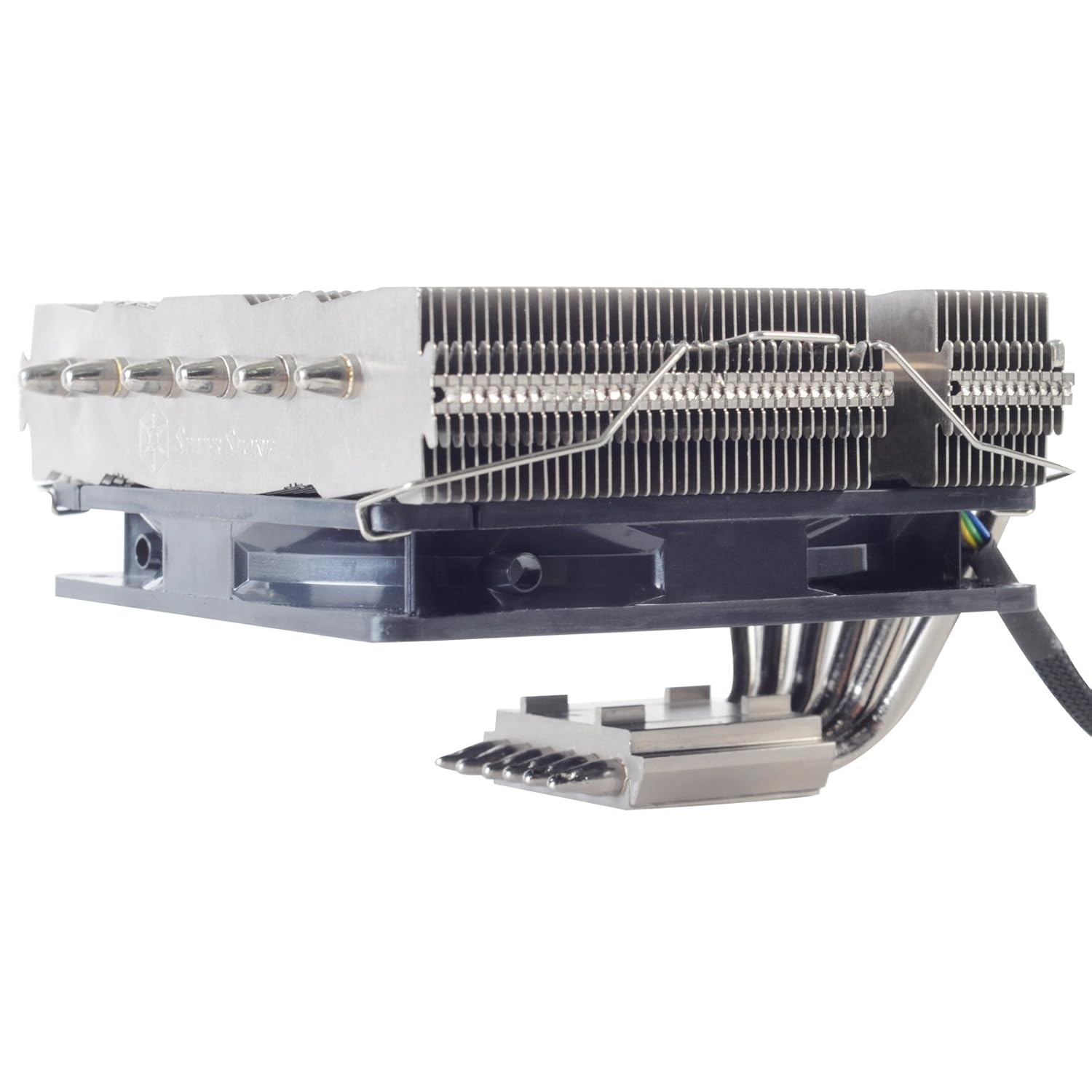
Figura 2.1: lateral view of the SilverStone SST-NT06-PRO-V2 Nitrogon CPU Cooler, showcasing its heatsink fins and heat pipes.

Figura 2.2: De dalt a baix view of the heatsink, highlighting the dense fin array for efficient heat dissipation.
3. Característiques
- Refrigeració d'alt rendiment: Designed for superior heat dissipation to maintain optimal CPU temperatures.
- Disseny compacte: Optimized dimensions for compatibility with various PC cases and motherboard layouts.
- Advanced Heat Pipe Technology: Utilizes multiple heat pipes for efficient heat transfer from the CPU to the heatsink fins.
- Construcció duradora: Made with high-quality aluminum for longevity and effective thermal conductivity.
- Àmplia compatibilitat: Supports a wide range of Intel and AMD CPU sockets (specific compatibility depends on mounting kit).

Figure 3.1: Product packaging highlighting key features and multi-language descriptions.
4. Especificacions
| Atribut | Valor |
|---|---|
| Número de model | SST-NT06-PRO-V2 |
| Marca | SilverStone |
| Dimensions del producte | 19.69 x 19.69 x 11.02 polzades |
| Pes de l'article | 2.2 lliures |
| Cooler Heatsink Material | Alumini |
| Data de primera disponibilitat | 5 de juny de 2021 |
5. Contingut del paquet
Please verify that all components listed below are present in your package before proceeding with installation. If any items are missing or damaged, please contact SilverStone customer support.
- SilverStone SST-NT06-PRO-V2 CPU Cooler Heatsink
- Suports de muntatge per a sòcols Intel i AMD
- Placa posterior
- Mounting Screws and Spacers
- Fan Clips (for optional fan installation)
- Thermal Paste Tube
- Manual d'usuari (aquest document)

Figura 5.1: Mésview of all included accessories and mounting hardware.
6. Configuració i instal·lació
Before beginning installation, ensure your system is powered off and unplugged. It is recommended to work on a clean, static-free surface.
6.1 Prepare Your Motherboard
- Remove any existing CPU cooler and clean off old thermal paste from the CPU and motherboard.
- Identify the correct mounting brackets for your CPU socket type (Intel or AMD).
- Install the appropriate backplate onto the rear of your motherboard, aligning it with the CPU socket holes.
6.2 Aplicar pasta tèrmica
- Apply a small amount of thermal paste (included) to the center of your CPU's integrated heat spreader (IHS). A pea-sized dot is usually sufficient.
- No esteneu la pasta manualment; la pressió del refrigerador la distribuirà uniformement.
6.3 Mount the Cooler
- Carefully place the CPU cooler onto the CPU, aligning the mounting holes on the cooler's base with the standoffs or screws on the motherboard.
- Secure the cooler using the provided screws, tightening them in a diagonal pattern to ensure even pressure. Do not overtighten.
- If using an optional fan (not included with this heatsink-only model), attach it to the heatsink using the provided fan clips.
- Connect the fan's power cable to the appropriate CPU_FAN header on your motherboard.

Figura 6.1: Detallada view of the heat pipe arrangement, crucial for efficient heat transfer during operation.
7. Instruccions de funcionament
Once installed, the SilverStone SST-NT06-PRO-V2 Nitrogon CPU Cooler operates automatically in conjunction with your motherboard's fan control settings (if a fan is attached). Ensure your BIOS/UEFI settings are configured for optimal fan curves to balance cooling performance and noise levels.
- Arrencada inicial: After installation, power on your system and monitor CPU temperatures using monitoring software.
- Configuració de la BIOS/UEFI: Access your motherboard's BIOS/UEFI to verify fan detection and adjust fan speed profiles si cal.
- Monitorització tèrmica: Use third-party software (e.g., HWMonitor, Core Temp) to keep an eye on CPU temperatures during idle and load conditions.
8. Manteniment
Un manteniment regular ajuda a garantir la longevitat i el rendiment òptim del refrigerador de la CPU.
- Eliminació de pols: Periodically clean dust from the heatsink fins using compressed air or a soft brush. Dust accumulation can significantly reduce cooling efficiency.
- Fan Inspection (if applicable): If you have an attached fan, check its blades for dust buildup and ensure it spins freely without obstruction.
- Reaplicació de pasta tèrmica: While not frequently required, consider reapplying thermal paste every few years or if you notice a significant increase in CPU temperatures.
9. Solució De Problemes
Si teniu problemes amb el refrigerador de la CPU, consulteu els següents problemes i solucions habituals:
| Problema | Possible causa/solució |
|---|---|
| Temperatures altes de la CPU |
|
| Fan Noise (if applicable) |
|
| Cooler Not Fitting |
|
10. Garantia i Suport
The SilverStone SST-NT06-PRO-V2 Nitrogon CPU Cooler comes with a standard manufacturer's warranty. For specific warranty terms and conditions, please refer to the warranty card included in your product packaging or visit the official SilverStone weblloc.
For technical support, troubleshooting assistance, or to inquire about replacement parts, please contact SilverStone customer service through their official weblloc: www.silverstonetek.com.
Política de devolució: This product has a return policy of 30 days from the date of purchase for refund or replacement, as per the seller's terms.


