Introducció
This manual provides essential instructions for the safe and effective use of your Ricoh GR III Street Edition Digital Camera. Please read this manual thoroughly before using the camera and retain it for future reference.
Contingut del paquet
Verifiqueu que tots els elements siguin presents al paquet:
- Ricoh GR III Street Edition Digital Camera Body
- Bateria recarregable de ions de liti
- Cable USB-Type C
- Adaptador d'alimentació
- Corretja
- Manual d'instruccions (aquest document)
Nota: Els accessoris específics poden variar segons la regió o el paquet.
Càmera acabadaview
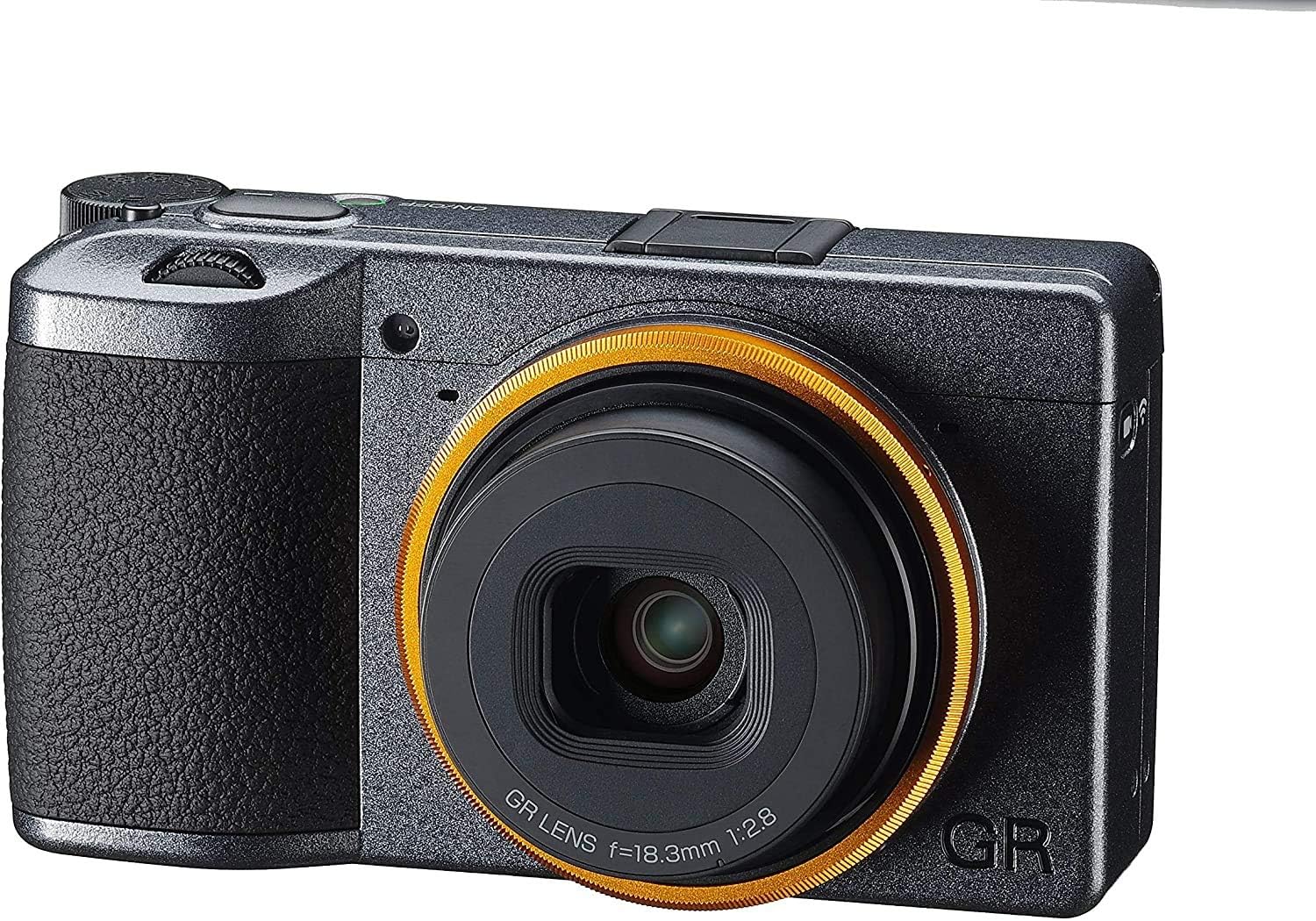
Figura 1: Frontal View. This image displays the front of the Ricoh GR III Street Edition camera. Key features visible include the GR lens with its distinctive orange-yellow accent ring, the metallic gray finish of the camera body, and the textured grip on the left side.

Figura 2: Esquena View. This image shows the rear of the Ricoh GR III Street Edition camera. Prominently featured is the LCD monitor, which displays the "GR III Street Edition" logo upon shutdown. Various control buttons are visible to the right of the screen, including the power button, ADJ lever, Fn button, ISO/OK/WB dial, and MENU/DISP buttons.
Configuració
1. Carregant la bateria
- Insert the provided Lithium-Ion battery into the camera.
- Connect the camera to a power source using the supplied USB Type-C cable and power adapter.
- The charging indicator light will illuminate during charging and turn off when complete.
2. Inserció d'una targeta de memòria
- Obriu la tapa de la ranura de la targeta de memòria.
- Insert a compatible SD card (not included) into the slot with the label facing the correct direction until it clicks into place.
- Tanqueu bé la tapa de la ranura de la targeta de memòria.
3. Engegada inicial i configuració bàsica
- Premeu el botó d'encesa per encendre la càmera.
- Seguiu les instruccions que apareixen a la pantalla per definir la data, l'hora i l'idioma.
Funcionament de la càmera
1. Modes bàsics de fotografia
The GR III offers various shooting modes, including Manual (M), Aperture Priority (Av), Shutter Priority (Tv), and Program (P). Select your desired mode using the mode dial or menu settings.
2. Enfocament
- Enfocament automàtic (AF): The camera utilizes a high-speed hybrid AF system combining contrast detection for accuracy. Half-press the shutter button to focus.
- Full-Press Snapshot: This feature allows you to focus and shoot at a pre-specified distance by fully pressing the shutter button at once, or by touching the image monitor. This is ideal for quick street photography.
- Enfocament manual (MF): For precise control, switch to manual focus and adjust the focus ring on the lens or use the camera's focus assist features.
3. Control de l'exposició
- Abertura: Adjust the aperture (F2.8-F5.6) to control depth of field.
- Velocitat d'obturació: The camera supports shutter speeds from 1/4000 sec. to 30 sec., with options for Timed Exposure, Bulb, and Time modes.
- Sensibilitat ISO: The expanded ISO range starts from 100. Adjust ISO to compensate for lighting conditions.
4. Estabilització d'imatge
The GR III features in-body image stabilization (IBIS) using digital, hybrid, and optical methods to reduce blur from camera shake, especially useful in low light or with slower shutter speeds.
5. Ús del flaix
The built-in flash supports Auto, On/Fill, and Slow Sync modes. Access flash settings through the camera menu.
6. Gravació de vídeo
The camera can capture video in MOV format with a maximum resolution of 2160p at 60 FPS. Switch to video mode and press the record button to start/stop recording.
7. Connectivitat sense fil (Wi-Fi)
Utilize the built-in Wi-Fi (IEEE 802.11b/g/n) to connect your camera to a smartphone or tablet for remote control, image transfer, and sharing. Refer to the camera's Wi-Fi settings menu for connection instructions.
Manteniment
1. Neteja de la càmera
- Lent: Feu servir un drap suau i sense borrissol dissenyat específicament per a lents òptiques. Per a taques difícils, feu servir una solució netejadora de lents amb moderació.
- Sensor: While the camera has a sealed design, dust can still accumulate. If dust spots appear on images, consult a professional service center for sensor cleaning. Avoid attempting to clean the sensor yourself unless you are experienced.
- Cos: Wipe the camera body with a soft, dry cloth. Do not use harsh chemicals or solvents.
2. Cura de la bateria
- Guardeu les piles en un lloc fresc i sec quan no les utilitzeu.
- Eviteu descarregar completament la bateria amb freqüència per allargar-ne la vida útil.
- Carregueu la bateria completament abans d'emmagatzemar-la durant un període prolongat.
3. Emmagatzematge
Quan guardeu la càmera durant períodes prolongats, traieu la bateria i la targeta de memòria. Guardeu la càmera en un entorn sec i sense pols, preferiblement en una bossa o estoig per a la càmera.
Resolució de problemes
- La càmera no s'encén: Assegureu-vos que la bateria estigui completament carregada i inserida correctament.
- Les imatges són borroses: Check focus settings, ensure sufficient light, and verify image stabilization is active if needed.
- Darkened edges (Vignetting): While some vignetting can be a characteristic of certain lenses, if it is excessively pronounced, ensure no accessories are obstructing the lens.
- Slow Autofocus: In very low light or with subjects lacking contrast, autofocus may be slower. Try using manual focus or focusing on a high-contrast area.
- Dust on Sensor: If dark spots appear consistently in your images, especially at smaller apertures, it may indicate dust on the sensor. Contact Ricoh service for professional cleaning.
- Problemes de connexió Wi-Fi: Ensure the camera's Wi-Fi is enabled and your smart device is within range. Refer to your smart device's Wi-Fi settings.
For further assistance, refer to the official Ricoh support resources.
Especificacions
| Característica | Detall |
|---|---|
| Nom del model | GR III |
| Mida del sensor fotogràfic | 23.5mm x 15.6mm (APS-C) |
| Tecnologia del sensor fotogràfic | CMOS |
| Resolució de fixes efectius | 24.2 MP |
| Tipus de lent | GR lens, 18.3mm (28mm equivalent in 35mm format), F2.8-F5.6 |
| Estabilització d'imatge | Digital, Hybrid, Optical (In-body) |
| ISO Mínim ampliat | 100 |
| Velocitat d'obturació mínima | 0.00025 segons (1/4000 segons) |
| Resolució de vídeo | 2160p (4K) |
| Velocitat de fotogrames | 60 FPS (for video) |
| Tecnologia sense fils | Wi-Fi (IEEE 802.11b/g/n) |
| Tipus de bateria | Ió de liti |
| Pes de l'article | 2.4 lliures |
| Dimensions de l'article (D x W x H) | 9 "P x 7" W x 5" H |
| UPC | 027075302808 |
Garantia i Suport
Informació de la garantia
Specific warranty terms and conditions for the Ricoh GR III Street Edition Digital Camera are provided with your purchase documentation. Please refer to the warranty card or the official Ricoh website for detailed information regarding coverage, duration, and service procedures.
Atenció al client
For technical support, service, or additional inquiries, please visit the official Ricoh support weblloc web o poseu-vos en contacte amb el seu departament d'atenció al client. Podeu trobar més informació i recursos a Ricoh Store on Amazon or the main Ricoh weblloc.


