1. Introducció
The eKids Fisher-Price Karaoke Machine (Model FP-550) is a portable Bluetooth speaker designed for children, featuring a wired microphone, built-in Mother Goose Club songs, and a USB audio player. This manual provides detailed instructions for safe and optimal use of the device.
2. Producte acabatview
Contingut del paquet:
- eKids Fisher-Price Karaoke Machine
- Micròfon per cable
- Cable de càrrega (USB)
Funcions del dispositiu:
- Altaveu Bluetooth portàtil
- Real Working Wired Microphone
- 24 Built-in Mother Goose Club Songs
- USB Audio Player for expanded content
- Conector d'auriculars
- Bateria recarregable incorporada
Davant View
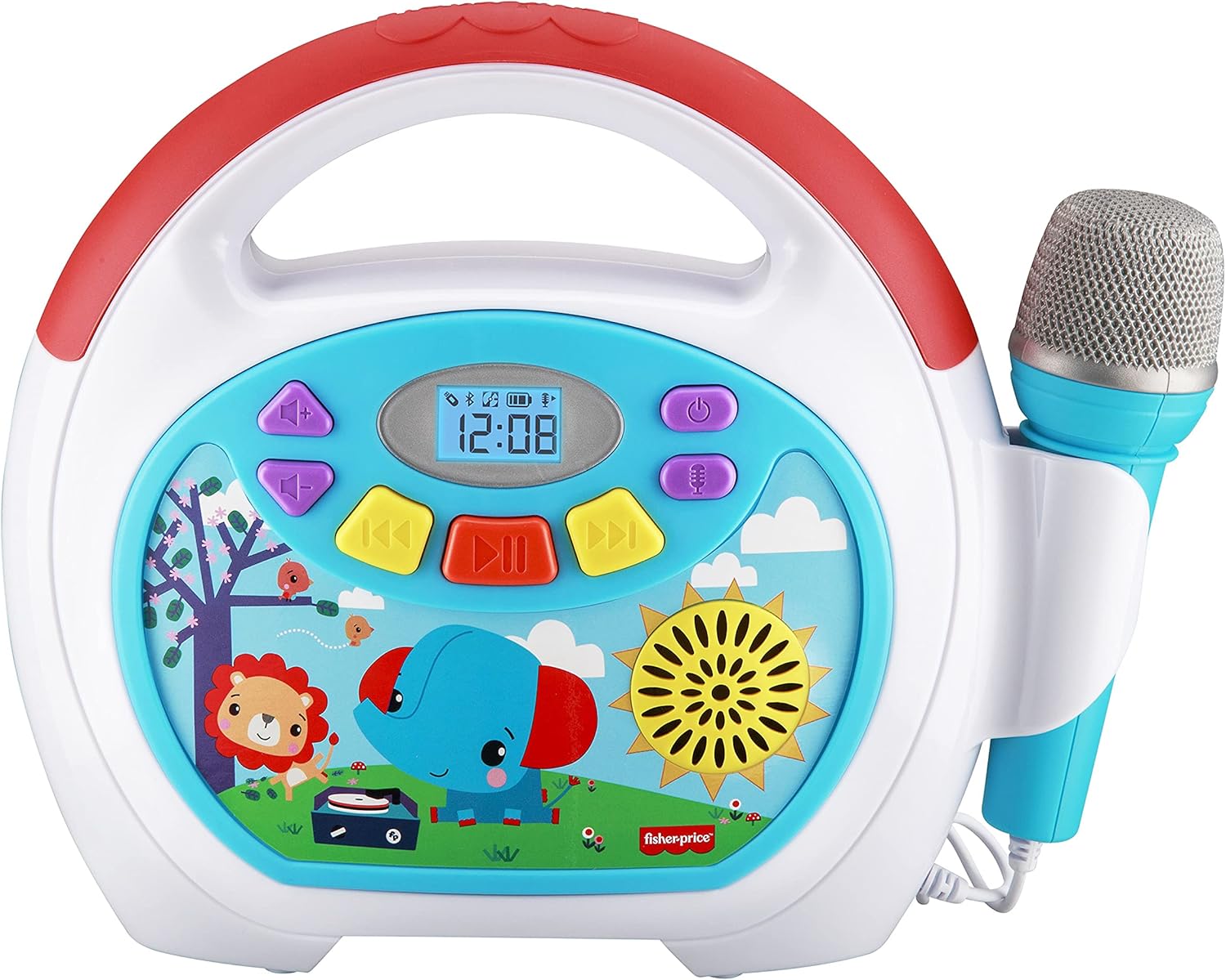
Image 2.1: The front panel displays the power button, volume controls, track navigation, play/pause button, and a digital display. The wired microphone is attached to the side.
posterior View i connexions

Image 2.2: The back of the unit features the volume knob, reset button, DC 5V charging port, headphone jack, and a USB-In port for playing audio from a USB drive. A compartment for cord storage is also visible.
3. Configuració
3.1 Càrrega del dispositiu
- Locate the DC 5V charging port on the rear of the karaoke machine.
- Connect the provided charging cable to the port and the other end to a standard USB power adapter (not included) or a computer USB port.
- The charging indicator will illuminate. Allow approximately 2-3 hours for a full charge. The indicator will change or turn off once charging is complete.
Nota: The device contains a built-in rechargeable Lithium Ion battery. Ensure the device is fully charged before first use for optimal battery life.
3.2 Connexió del micròfon
- The wired microphone is permanently attached to the unit.
- Ensure the microphone cable is untangled and positioned comfortably for use.
4. Instruccions de funcionament
4.1 Encès/Apagat
- Per encendre el dispositiu, premeu i manteniu premut el botó Botó d'encesa () located on the front panel.
- Per apagar-lo, manteniu premut el botó Botó d'encesa de nou.
4.2 Ajust del volum
- Utilitza el Maneta de volum on the rear of the unit to adjust the overall sound output.
- For microphone volume, use the dedicated microphone volume control if available, or adjust the main volume.
4.3 Playing Built-in Songs
- Upon powering on, the device may default to playing built-in songs.
- Utilitza el Pista anterior () i Pista següent () buttons to navigate through the 24 Mother Goose Club songs.
- Premeu el botó Botó Reproduir/Pausa () per iniciar o pausar la reproducció.
4.4 Vinculació Bluetooth

Image 4.1: The karaoke machine supports wireless audio streaming via Bluetooth from compatible devices.
- Ensure the karaoke machine is powered on.
- Activate Bluetooth on your external device (e.g., smartphone, tablet).
- Cerca available Bluetooth devices. The karaoke machine will appear as 'eKids FP-550' or similar.
- Select the device name to pair. A confirmation sound may indicate successful pairing.
- Once paired, you can stream audio wirelessly from your device to the karaoke machine.
Reproducció d'àudio USB 4.5

Image 4.2: The USB expansion slot allows playback of songs from a USB drive.
- Inseriu una unitat USB que contingui àudio MP3 files into the USB-In port on the rear of the unit.
- The device should automatically detect the USB drive and begin playing the audio files.
- Utilitza el Pista anterior i Pista següent buttons to navigate.
- Premeu el botó Botó Reproduir/Pausa per iniciar o pausar la reproducció.
4.6 Ús del micròfon

Image 4.3: The wired microphone allows users to sing along to music.
- The microphone is active when the unit is powered on.
- Sing into the microphone while playing built-in songs, Bluetooth audio, or USB audio.
- Adjust the main volume knob to control the microphone's output level.
4.7 Ús d'auriculars
- To listen privately, plug standard 3.5mm headphones (not included) into the headphone jack on the rear of the unit.
- Audio will be redirected to the headphones, muting the main speaker.
5. Manteniment
5.1 Neteja
- Apagueu sempre el dispositiu abans de netejar-lo.
- Feu servir un drap suau i sec per netejar les superfícies exteriors.
- Do not use liquid cleaners, abrasive pads, or chemical solvents, as these can damage the finish.
5.2 Emmagatzematge
- Guardeu el dispositiu en un lloc fresc i sec, allunyat de la llum solar directa i de temperatures extremes.
- Ensure the microphone cable is neatly wrapped and stored in the designated compartment on the back to prevent damage.
6. Solució De Problemes
| Problema | Causa possible | Solució |
|---|---|---|
| El dispositiu no s'encén. | La bateria està esgotada. | Carregueu el dispositiu amb el cable USB proporcionat. |
| No hi ha so de l'altaveu. | El volum és massa baix o està silenciat. Hi ha auriculars connectats. | Increase the volume using the knob. Disconnect headphones if plugged in. |
| El micròfon no funciona. | El volum del micròfon és massa baix. | Ensure the main volume is adequately adjusted. |
| El dispositiu Bluetooth no s'està emparellant. | El dispositiu està fora de l'abast. El Bluetooth no està activat al dispositiu extern. | Move devices closer. Ensure Bluetooth is active on your external device and search again. |
| USB audio not playing. | USB drive not properly inserted or contains unsupported file tipus. | Ensure USB drive is fully inserted. Verify audio fileestan en format MP3. |
7. Especificacions
- Número de model: FP-550
- Pes de l'article: 2.35 lliures
- Dimensions del producte: 10.72 x 3.64 x 8.67 polzades
- Bateria: 1 bateria de ions de liti (inclosa)
- Connectivitat: Bluetooth, USB
- Components inclosos: Micròfon
- Font d'alimentació: Funciona amb bateria
- Color: Multicolor
8. Garantia i Suport
This product is covered by a limited warranty. For specific warranty details, please refer to the documentation included with your purchase or contact eKids customer support. For technical assistance or further inquiries, please visit the official eKids weblloc o poseu-vos en contacte amb el seu departament d'atenció al client.
Per a més informació, podeu visitar el Botiga eKids a Amazon.


