1. Introducció
The INGCO DM200 Digital Multimeter is a versatile and essential tool designed for measuring various electrical parameters. It provides accurate readings for voltage, current, and resistance, making it suitable for a wide range of electrical testing and troubleshooting tasks. This manual provides detailed instructions for the safe and effective use of your DM200 multimeter.
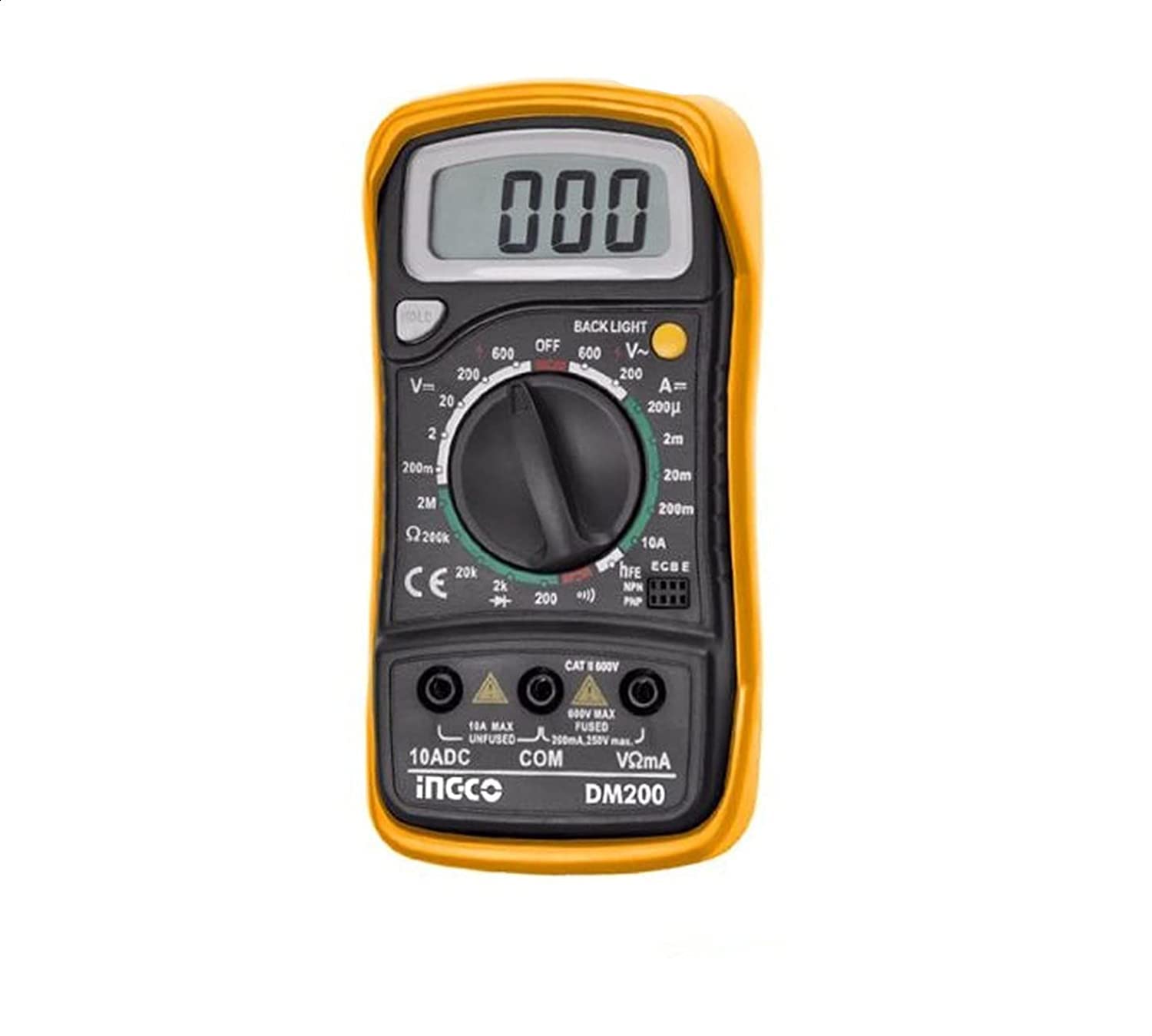
Figura 1: Frontal view of the INGCO DM200 Digital Multimeter. This image shows the device's display, rotary switch, and input jacks.
2. Informació de seguretat
Always adhere to basic safety precautions when using electrical test equipment to reduce the risk of fire, electric shock, or personal injury. Read and understand all instructions before use.
- Do not exceed the maximum input limits for any measurement range. The DM200 is rated for a maximum voltage de 200V.
- Inspeccioneu els cables de prova for damaged insulation or exposed metal before each use. Replace if damaged.
- Ensure the multimeter is set to the correct function and range before connecting to a circuit.
- Eviteu el contacte amb circuits actius when connecting or disconnecting test leads.
- Tingueu precaució quan treballeu amb voltagper sobre de 30 V CA RMS, 42 V pic o 60 V CC. Aquests voltagsuposen un risc de xoc.
- Do not operate the multimeter if it appears damaged or if it is not operating properly.
- Remove test leads from the circuit before changing functions or ranges.
3. Producte acabatview
The INGCO DM200 Digital Multimeter features a practical design for enhanced comfort and control. It includes a clear LCD display with backlight for easy reading of measurements, even in low-light conditions. The display shows up to 1999 counts.
Components clau:
- Pantalla LCD: Shows measurement readings, units, and other indicators. Features a backlight.
- Interruptor rotatiu: Used to select measurement functions (Voltage, Current, Resistance) and ranges.
- Preses d'entrada: Terminals for connecting test leads. Typically include COM (common), VΩmA, and 10A (for high current measurements).
- Cables de prova: Red and black probes for connecting the multimeter to the circuit under test.
4. Configuració
Before using your DM200 multimeter, follow these steps for initial setup:
- Instal·lació de la bateria: The multimeter requires batteries for operation. Open the battery compartment on the back of the device (usually secured with screws) and insert the required batteries, observing correct polarity. Close the compartment securely.
- Connecteu els cables de prova:
- Introduïu el cable de prova negre al COM (common) jack.
- Per a la majoria de mesures (voltage, resistance, low current), insert the red test lead into the VΩmA jack.
- For high current measurements (if applicable and within the device's capabilities), insert the red test lead into the dedicated 10A jack.
- Encès: Turn the rotary switch from the OFF position to the desired measurement function. The LCD display should illuminate.
5. Instruccions de funcionament
The DM200 can measure voltage, current, and resistance. Always ensure the multimeter is set to the correct function and range before connecting to a circuit.
5.1. Mesura de la tensió de CCtage (VDC)
- Turn the rotary switch to the desired DC Voltage (VDC) range. Start with the highest range if the voltage is unknown, then decrease as needed for better resolution. The maximum measurable voltage és 200V.
- Connecteu el cable de prova vermell al costat positiu (+) del circuit i el cable de prova negre al costat negatiu (-).
- Llegeix el voltage valor a la pantalla LCD.
5.2. Mesurar AC Voltage (VAC)
- Gireu l'interruptor rotatiu al volum de CA desitjattage (VAC) range. Start with the highest range if the voltage is unknown. The maximum measurable voltage és 200V.
- Connect the test leads across the component or circuit where you want to measure AC voltage. Polarity is not critical for AC measurements.
- Llegeix el voltage valor a la pantalla LCD.
5.3. Mesura de la resistència (Ω)
Avís: Ensure the circuit is completely de-energized before measuring resistance. Disconnect power and discharge any capacitors.
- Gireu l'interruptor rotatiu al rang de resistència (Ω) desitjat.
- Connecteu els cables de prova al component del qual voleu mesurar la resistència.
- Llegiu el valor de la resistència a la pantalla LCD.
5.4. Measuring DC Current (mA/A)
Avís: Current measurements require the multimeter to be connected in series with the circuit. Never connect the multimeter in parallel when measuring current, as this can damage the device and the circuit.
- Turn the rotary switch to the desired DC Current (mA or A) range.
- Desenergitzar el circuit.
- Open the circuit at the point where you want to measure current.
- Connect the multimeter in series: the red test lead to the higher potential side of the break, and the black test lead to the lower potential side.
- Reenergitzar el circuit.
- Llegiu el valor actual a la pantalla LCD.
- De-energize the circuit again before disconnecting the multimeter and restoring the circuit.
6. Manteniment
Proper maintenance ensures the longevity and accuracy of your DM200 multimeter.
- Neteja: Netegeu el cas amb l'anunciamp drap i detergent suau. No utilitzeu abrasius ni dissolvents.
- Substitució de la bateria: When the low battery indicator appears on the display, replace the batteries promptly to ensure accurate readings. Refer to the 'Setup' section for battery installation instructions.
- Substitució de fusibles: If the current measurement function stops working, the fuse may be blown. Refer to the device's internal diagram (if available) or contact customer support for fuse specifications and replacement instructions. Always replace with a fuse of the same type and rating.
- Emmagatzematge: If the multimeter will not be used for an extended period, remove the batteries to prevent leakage. Store in a cool, dry place.
7. Solució De Problemes
If you encounter issues with your DM200 multimeter, refer to the following common problems and solutions:
| Problema | Causa possible | Solució |
|---|---|---|
| Sense pantalla o pantalla tènue | Piles gastades o baixes | Substituïu les piles. |
| Lectures incorrectes | Incorrect function/range selected; Damaged test leads; Poor contact; Blown fuse (for current) | Select correct function/range; Inspect/replace test leads; Ensure good contact; Check/replace fuse. |
| La mesura de corrent no funciona | Blown fuse; Incorrect lead connection; Incorrect range | Check/replace fuse; Ensure red lead is in 10A jack for high current; Select appropriate current range. |
| Es mostra "OL" (sobrecàrrega) | Measurement exceeds selected range; Open circuit (for resistance/continuity) | Select a higher range; Check for open circuit. |
If the problem persists after attempting these solutions, contact INGCO customer support for further assistance.
8. Especificacions
The following specifications apply to the INGCO DM200 Digital Multimeter:
- Fabricant: INGCO
- Model: DM200
- Visualització: 1999 Counts, LCD with Backlight
- Tipus de mesura: Multimeter (Voltage, Current, Resistance)
- Volum màximtage Mesura: 200 Volts
- Resistance Measurement Range: Up to 200 Ohm (specific range may vary by model variant)
- Font d'alimentació: Corded Electric (This specification seems to be an error in the source data, as multimeters are typically battery-powered. Please refer to the product packaging for accurate power requirements.)
- Dimensions del producte: 10 x 20 x 37 cm
- Pes de l'article: 209 grams
- Color: Multi
9. Garantia i Suport
For warranty information and customer support, please refer to the documentation included with your product packaging or visit the official INGCO weblloc web. Conserveu el rebut de compra com a comprovant de compra per a qualsevol reclamació de garantia.
If you require technical assistance or have questions regarding the operation of your INGCO DM200 Digital Multimeter, please contact INGCO customer service.


