1. Introducció
Thank you for choosing the hohem iSteady X2 3-Axis Gimbal Stabilizer. This manual provides essential information for the safe and effective operation of your device. Please read it thoroughly before use and retain it for future reference.
Contingut del paquet
- hohem iSteady X2 Gimbal Stabilizer
- Comandament a distància sense fil
- Mini trípode
- Cable de càrrega USB-C
- Bossa d'emmagatzematge
- Manual d'usuari (aquest document)
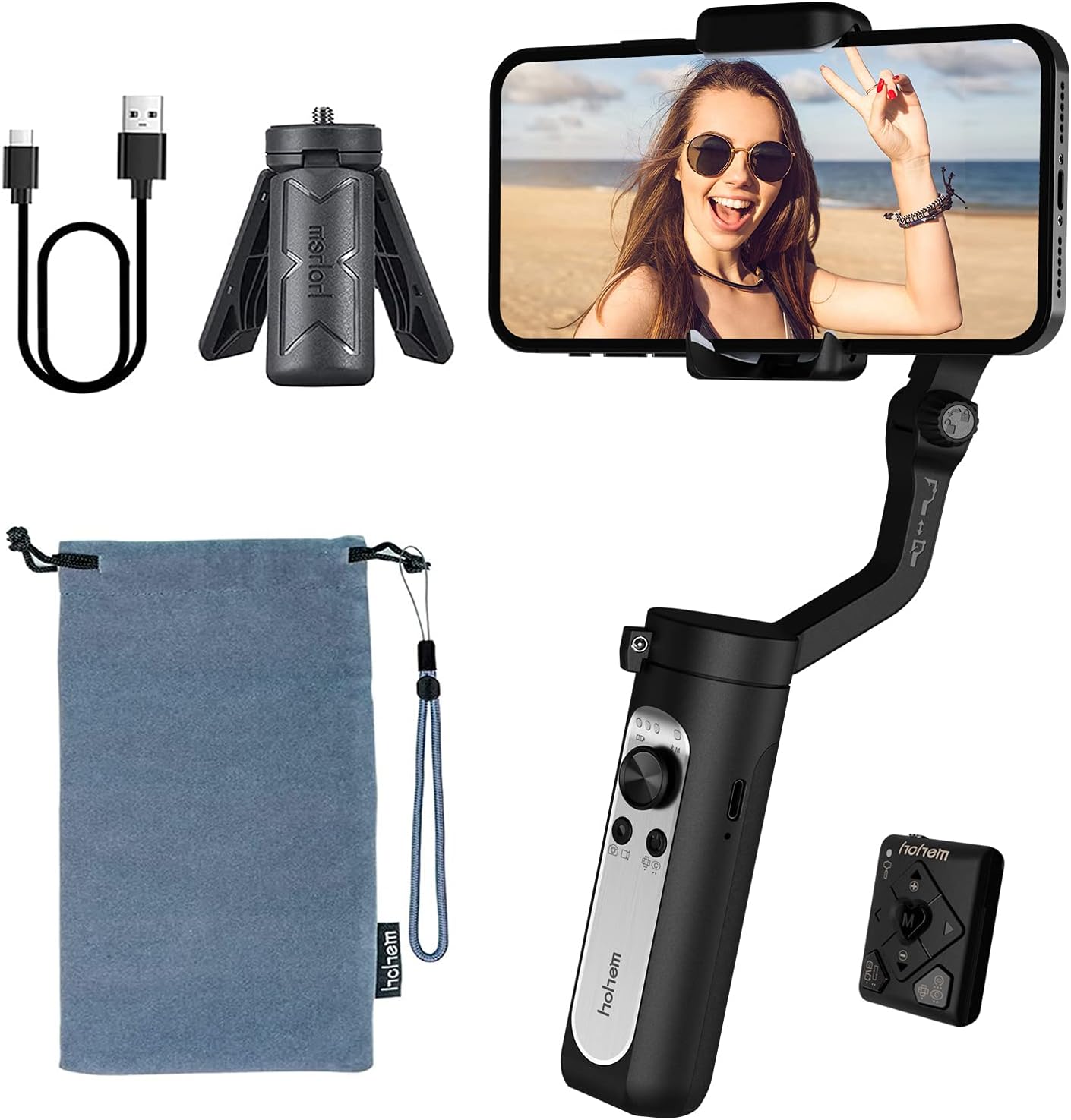
The image above displays the hohem iSteady X2 gimbal stabilizer along with its standard accessories. These include the main gimbal unit, a compact wireless remote control, a mini tripod for stable placement, a USB-C cable for charging, and a soft storage pouch for portability.
2. Informació de seguretat
To ensure safe operation and prevent damage to the device or injury to yourself or others, please observe the following safety precautions:
- Do not disassemble, repair, or modify the gimbal.
- Keep the gimbal away from water and other liquids.
- Avoid dropping or subjecting the gimbal to strong impacts.
- Do not expose the gimbal to extreme temperatures or direct sunlight for prolonged periods.
- Ensure your smartphone is securely mounted before powering on the gimbal.
- Keep fingers clear of moving parts during operation.
- Feu servir només el cable de càrrega proporcionat i un adaptador de corrent compatible.
3. Producte acabatview
The hohem iSteady X2 is a compact and lightweight 3-axis gimbal stabilizer designed for smartphones, offering enhanced stability and creative shooting modes. It features a foldable design for easy portability and comes with a wireless remote control.

This image illustrates the primary features of the hohem iSteady X2, including its ultralight design (259g), 3-axis stabilization for smooth footage, wireless remote control capability, advanced face tracking, various Moment Modes for creative shots, emergency power bank function for charging your phone, and a quick roll switch for easy orientation changes.
Components i controls
- Telèfon Clamp: Subjecta el teu telèfon intel·ligent de manera segura.
- Roll Axis Motor: Controls the roll movement for horizontal stability.
- Pan Axis Motor: Controls the pan movement for horizontal rotation.
- Tilt Axis Motor: Controls the tilt movement for vertical stability.
- Palanca de control: Controls pan and tilt movements manually.
- Botó de mode (M): Switches between different working modes.
- Botó d'encesa: Powers the gimbal on/off.
- Botó de l'obturador: Triggers photo/video recording via Bluetooth.
- Control lliscant de zoom: Controls digital zoom in the Hohem Pro app.
- Port USB-C: For charging the gimbal and emergency phone charging.
- Forat de cargol de 1/4 de polzada: For mounting the tripod or other accessories.

This image highlights some of the creative shooting modes accessible through the Hohem Pro app, including Inception Mode for rotating shots, Dolly Zoom for dramatic effects, Timelapse for accelerated video, and Panoramic for wide-angle captures. These modes enhance the versatility of the gimbal for various content creation needs.
4. Configuració
4.1 Desplegament del cardan
- Gently unfold the gimbal arm until it locks into place.
- Allargar la clavilla del telèfonamp.

The image above demonstrates the compact, folded state of the hohem iSteady X2, showing how easily it fits into a pocket. This highlights its lightweight design, weighing only 0.57 lbs, making it highly portable for on-the-go use.
4.2 Mounting and Balancing Your Smartphone
Proper balancing is crucial for optimal performance and battery life.
- Place your smartphone firmly into the phone clamp. Ensure the phone is centered and snug.
- Adjust the phone's position within the clamp until it remains level when the gimbal is powered off. If the phone tilts to one side, adjust its position slightly until it stays horizontal.

This image visually represents the 3-axis stabilization capability of the hohem iSteady X2. It shows a smartphone mounted on the gimbal, with arrows indicating the three axes of movement (pan, tilt, and roll) that work together using the 4.0 anti-shake algorithm system to ensure smooth and stable video footage, fins i tot durant moviments dinàmics.
4.3 App Installation (Hohem Pro)
For full functionality and advanced features, download the "Hohem Pro" app from your smartphone's app store (iOS App Store or Google Play Store).
- Cerca "Hohem Pro".
- Instal·leu l'aplicació i concediu els permisos necessaris.
5. Instruccions de funcionament
5.1 Engegada/apagada
- Encès: Manteniu premut el botó d'engegada durant 3 segons.
- Apagar: Manteniu premut el botó d'engegada durant 3 segons.
5.2 Connexió Bluetooth
- Ensure the gimbal is powered on.
- Activa el Bluetooth al teu telèfon intel·ligent.
- Open the Hohem Pro app. The app will automatically search for and connect to the gimbal.
- If prompted, confirm the pairing.
5.3 Modes del cardan
Press the Mode Button (M) to cycle through the following modes:
- Pan & Tilt Follow (PF): The pan and tilt axes follow your movements, while the roll axis remains locked.
- Seguiment panoràmic (PF): Only the pan axis follows your movements.
- All Lock (AL): All three axes are locked, keeping the camera pointing in a fixed direction.
- POV (Point of View): All three axes follow your movements, providing a first-person perspective.
- Mode inicial: Rotates the phone 360 degrees along the roll axis.
5.4 Control remot sense fils
The iSteady X2 comes with a dedicated wireless remote control for convenient operation.

This image highlights the convenience of the wireless remote control. It shows the gimbal set up with a smartphone, and a hand holding the remote, enabling users to capture photos or videos from a distance, perfect for group shots or when you need to be in the frame yourself.
- Botó d'encesa: Power on/off the remote.
- Botó de l'obturador: Fes fotos o inicia/atura la gravació de vídeo.
- Palanca de control: Control gimbal movement (pan/tilt).
- Botó de mode: Switch gimbal modes.
- Apropar/reduir: Control digital zoom.
5.5 Emergency Power Bank Function
The iSteady X2 features a built-in 2800mAh battery that can also serve as an emergency power bank for your smartphone via the USB-C port.

This image demonstrates the hohem iSteady X2's capability to act as an emergency power bank. It shows a smartphone connected to the gimbal via a USB-C cable, indicating that the gimbal's internal 2800mAh battery can provide power to charge your phone when needed, extending your shooting time.
5.6 Vídeo oficial del producte
The embedded video showcases the hohem iSteady X2, emphasizing its lightweight design and various functionalities. It demonstrates the gimbal's ease of use, portability, and some of its advanced features in action, providing a visual guide to its capabilities.
6. Manteniment
- Neteja: Use a soft, dry cloth to clean the gimbal. Do not use liquid cleaners or solvents.
- Emmagatzematge: Store the gimbal in its provided storage pouch in a cool, dry place away from direct sunlight.
- Cura de la bateria: For long-term storage, charge the battery to approximately 50-60% every three months to prevent over-discharge.
7. Solució De Problemes
| Problema | Causa possible | Solució |
|---|---|---|
| Gimbal not powering on. | Bateria baixa. | Charge the gimbal fully. |
| Gimbal unstable or vibrating. | Smartphone not balanced correctly. | Re-balance the smartphone in the clamp. |
| Problemes de connexió Bluetooth. | Bluetooth off on phone, app not open, interference. | Ensure Bluetooth is on, open Hohem Pro app, restart gimbal and phone. |
| El comandament a distància no funciona. | Remote battery low, not paired. | Ensure remote is charged/has fresh batteries, re-pair with gimbal. |
8. Especificacions
| Característica | Detall |
|---|---|
| Model | X2 |
| Dimensions del producte | 7.05 x 3.11 x 1.54 polzades (plegat) |
| Pes de l'article | 9.1 unces (aprox. 259 g) |
| Recomanació de pes màxim | 280 grams (0.62 lliures) |
| Tipus de bateria | Ió de liti |
| Capacitat de la bateria | 2800mAh (approx. 10 hours battery life) |
| Port de càrrega | USB-C (supports two-way charging) |
| Estabilització | 3-Axis (Pan, Tilt, Roll) with 4.0 anti-shake algorithm |
| Dispositius compatibles | iPhone 12/12mini/12pro/12pro max/11/11 pro max/Xs max/xs/x, Samsung Galaxy s10e/s10 plus/Note10, Huawei P40/P40+/P30/mate 30, Google Pixel 4/4XL |
| UPC | 673400922373 |
9. Garantia i Suport
hohem products are designed and manufactured to the highest quality standards. For warranty information and technical support, please refer to the official hohem weblloc web o contacteu directament amb el seu servei d'atenció al client.
- Oficial Weblloc: www.hohem.com
- Atenció al client: Refer to the contact information provided on the product packaging or official weblloc.
- Manual d'usuari (PDF): A downloadable PDF version of the user manual may be available at aquest enllaç.
Conserveu el vostre comprovant de compra per a reclamacions de garantia.


