1. Producte acabatview
The MAONOCASTER AU-AM100 is a portable, all-in-one podcast production studio designed to simplify audio mixing and recording for podcasts, radio shows, and live streams. It integrates multiple digital audio mixing functions into a single, user-friendly device, making it suitable for both beginners and experienced broadcasters.
This device features four channels for audio mixing, allowing easy connections for microphones, smartphones, and computers. It includes advanced controls for sound levels, live vocal effects, and sound effects, minimizing the need for extensive post-production.

Figura 1.1: Davant view of the Maonocaster AU-AM100, showcasinel seu disseny compacte i els seus controls principals.

Figura 1.2: De dalt a baix view of the Maonocaster AU-AM100, highlighting the various knobs, faders, and pads for audio control and effects.

Figura 1.3: posterior view of the Maonocaster AU-AM100, displaying the input and output ports for various connections.
2. Guia de configuració
Follow these steps to set up your MAONOCASTER AU-AM100 for optimal performance.
2.1 Alimentació del dispositiu
- The MAONOCASTER AU-AM100 features a built-in 5000mAh battery, providing up to 8 hours of continuous operation.
- To charge the device or power it directly, connect the included USB-C cable to the USB-C port on the rear of the unit and to a power source (e.g., computer USB port, USB wall adapter).
- Manteniu premut el botó PODER button located on the rear panel to turn the unit on or off.
2.2 Connexió de micròfons
- The unit supports two microphone inputs via XLR or 6.35mm (1/4") jacks. Connect your microphones to the ENTRADA DE MIC 1 i ENTRADA DE MIC 2 ports on the rear.
- For condenser microphones requiring phantom power, press the 48 V button located above each microphone's gain knob on the top panel. The indicator light will illuminate when 48V phantom power is active.
2.3 Connecting to a Computer (PC/Mac)
- Connect the MAONOCASTER AU-AM100 to your computer using the USB-C cable. The device will be recognized as an audio input/output device.
- Select "MAONOCASTER" as your input and output device in your computer's sound settings or your preferred recording/streaming software.
2.4 Connecting Smartphones and Other Audio Sources
- Phone Call Input: Use a 3.5mm TRRS cable to connect your smartphone to the PHONE INPUT port for integrating phone calls into your podcast.
- Entrada auxiliar: Connect external audio devices (e.g., music players) to the Entrada d’ajuda (3.5mm TRS) port.
- Sortida d'àudio: Use the two 3.5mm TRRS SORTIDA ports to send mixed audio to recording devices or other systems.
- Aux Speaker Output: Connecteu altaveus externs al AUX SPEAKER (3.5mm) port for monitoring.
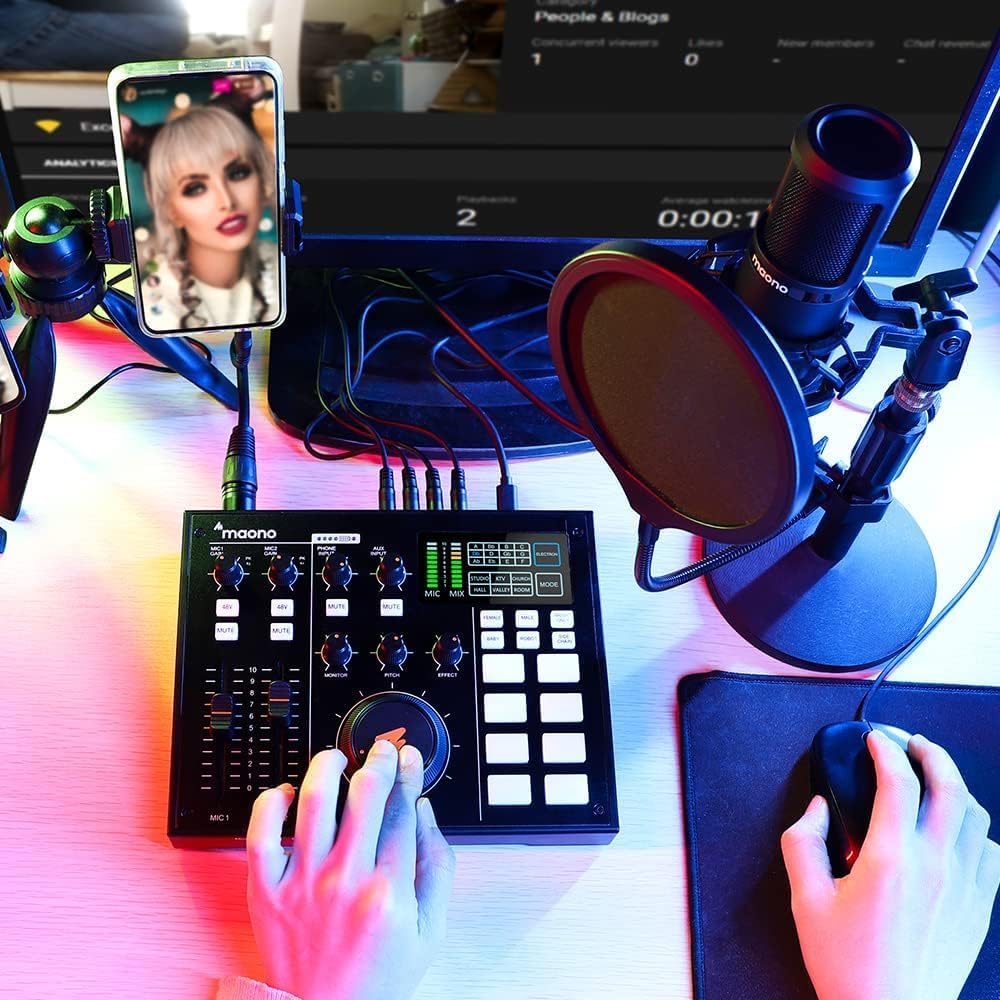
Figura 2.1: The Maonocaster AU-AM100 connected and in use for a podcast setup, demonstrating typical connectivity with a microphone and smartphone.
3. Instruccions de funcionament
This section details the functions of the MAONOCASTER AU-AM100's controls and how to use them effectively.
3.1 Controls i indicadors
- MIC GAIN Knobs: Adjust the input sensitivity for Microphone 1 and Microphone 2. Turn clockwise to increase gain, counter-clockwise to decrease.
- Botons de 48 V: Activates 48V phantom power for condenser microphones connected to the respective XLR inputs.
- MUTE Buttons: Mutes the corresponding microphone input.
- MIC Faders (MIC 1, MIC 2): Control the volume level of each microphone in the main mix.
- Botó MONITOR: Ajusta el volum de la sortida dels auriculars.
- PITCH Knob: Controls the pitch shift effect for vocal modulation.
- Bot d'efecte: Adjusts the intensity or type of the selected vocal effect (e.g., reverb).
- Botó MIX: Controls the overall output volume of the main mix.
- Vocal FX Buttons: Pre-programmed buttons for vocal effects suchs as pitch, gender-bend, robot, sidechain, and music only. Press to activate.
- Sound FX Pads: Four pre-programmed pads for sound effects like stinger, cheering, clapping, and suspense. Press to trigger.
- Coixinets programables: Three customizable pads where you can upload your own sound effects or jingles using the MAONOCASTER PC app.
- Cough/Bleep Button: Instantly mutes the microphone input for bleeping out expletives or coughing.
- Pantalla de visualització: Shows levels, selected effects, and other operational information.
3.2 Funcionament bàsic
- Adjusting Microphone Levels: Utilitza el GUANYA DEL MIC knobs and MIC Faders to set appropriate input levels for your microphones. Monitor the levels on the display to avoid clipping.
- Applying Vocal Effects: Select a vocal effect using the dedicated buttons (e.g., TERRA, GENDER-BEND). Adjust the intensity with the EFECTE perilla.
- Triggering Sound Effects: Premeu qualsevol dels Sound FX Pads to play pre-loaded or custom sound effects.
- Monitorització d'àudio: Connecteu els auriculars al MONITOR output and adjust the volume using the MONITOR knob to hear your mix.
- Controlling Overall Mix: Utilitzeu el gran BARCELONA knob to control the master output volume.
3.3 Funcions avançades
- Cadena lateral: This feature automatically lowers the volume of background music or other audio sources when a microphone signal is detected, ensuring clear vocal prominence.
- Mix-Minus: Prevents audio feedback during phone calls by removing the caller's own voice from their monitor mix.
- Cancel·lació de soroll: Reduces unwanted background noise from microphone inputs.
- Commutador de bucle: Allows the audio output from your computer to be routed back into the MAONOCASTER's mix, useful for playing computer audio during streams.
- Programmable Jingles: Use the MAONOCASTER PC/Mac application to upload and customize audio files for the three programmable pads.
4. Manteniment
Proper maintenance ensures the longevity and optimal performance of your MAONOCASTER AU-AM100.
- Neteja: Use a soft, dry cloth to clean the exterior of the unit. Avoid using abrasive cleaners, solvents, or waxes. Do not spray liquids directly onto the device.
- Cura de la bateria: To preserve battery life, avoid fully discharging the battery frequently. If storing the device for an extended period, charge it to approximately 50% before storage and recharge every few months.
- Emmagatzematge: Store the MAONOCASTER in a cool, dry place away from direct sunlight, extreme temperatures, and high humidity. Keep it free from dust.
- Manipulació: Handle the device with care. Avoid dropping it or subjecting it to strong impacts, which can damage internal components.
5. Solució De Problemes
If you encounter issues with your MAONOCASTER AU-AM100, refer to the following common problems and solutions.
| Problema | Causa possible | Solució |
|---|---|---|
| Sense sortida de so |
|
|
| Microphone not detected/no input signal |
|
|
| Àudio distorsionat |
|
|
| El dispositiu no s'encén |
|
|
6. Especificacions
| Número de model | AM100 |
| Tipus de bateria | 1 bateria de ions de liti (obligatòria) |
| Capacitat de la bateria | 5000 mAh (incorporat) |
| Durada de la bateria | Up to 8 hours (non-stop podcasting) |
| Connectivitat | USB-C, 3.5mm Aux Speaker, 2 x 3.5mm TRRS Audio Output, 3.5mm TRS Input Aux Audio, 3.5mm TRRS Link Phone Call to Podcast, 2 x XLR and 6.35mm 1/4" Input |
| Dimensions del paquet | 32.7 x 22.1 x 9 cm |
| Pes de l'article | 1.16 kg |
| País d'origen | Unió dels Emirats Àrabs |
7. Garantia i Suport
For detailed warranty information, please refer to the warranty card included with your product or visit the official MAONO website. If you require technical support or have questions regarding your MAONOCASTER AU-AM100, please contact MAONO customer service through their official channels.
Mantingueu a mà el rebut de compra i el número de sèrie del producte quan contacteu amb el servei d'assistència.


