1. Introducció
This manual provides detailed instructions for setting up, operating, maintaining, and troubleshooting your Mercusys MR30G AC1200 Wireless Dual Band WiFi Gigabit Router. Please read this guide thoroughly to ensure proper installation and optimal performance of your device.
2. Producte acabatview
2.1 Característiques clau
- AC1200 Dual Band WiFi: Delivers combined speeds of up to 1.2 Gbps (300 Mbps on 2.4 GHz and 867 Mbps on 5 GHz) for fast, reliable connections.
- Gigabit Wired Speeds: Equipped with full gigabit ports (1 WAN, 2 LAN) for high-speed wired connections to PCs, IPTVs, and game consoles.
- Tecnologia MU-MIMO: Communicates with multiple devices simultaneously, improving network efficiency and speed for connected devices.
- High-Gain Antennas with Beamforming: Four external 5 dBi antennas and Beamforming technology provide targeted, stable, and extended wireless coverage.
- Powerful Signal Ampelevadors: Strengthens signal transmissions and accelerates signal capture for improved range and full-signal strength throughout your home.
- Múltiples modes de funcionament: Supports Router, Access Point, and Range Extender modes.
- Funcionalitat WPS: Simplifica la configuració de la connexió sense fil segura.
2.2 Contingut del paquet
The Mercusys MR30G package typically includes:
- Mercusys MR30G AC1200 Wireless Dual Band WiFi Gigabit Router
- Adaptador d'alimentació
- Cable Ethernet
- Guia d'instal·lació ràpida

Image 1: Mercusys MR30G AC1200 Wireless Dual Band WiFi Gigabit Router with its retail packaging.

Imatge 2: Frontal inclinat view of the Mercusys MR30G router, highlighting its four external antennas.
3. Guia de configuració
Follow these steps for a simple and quick setup of your Mercusys MR30G router.
3.1 Connexió de maquinari
- Apagar: Disconnect the power from your modem (if applicable).
- Connecta el port WAN: Connect the Ethernet cable from your modem's LAN port to the blue WAN port on your MR30G router.
- Connect LAN Ports (Optional): For wired devices, connect an Ethernet cable from your computer or other network devices to one of the yellow LAN ports on the MR30G router.
- Encès: Connect the power adapter to the router and plug it into a power outlet. Wait for the router to fully boot up (the LED indicator should turn solid green).
- Engegar el mòdem: Reconnect power to your modem.
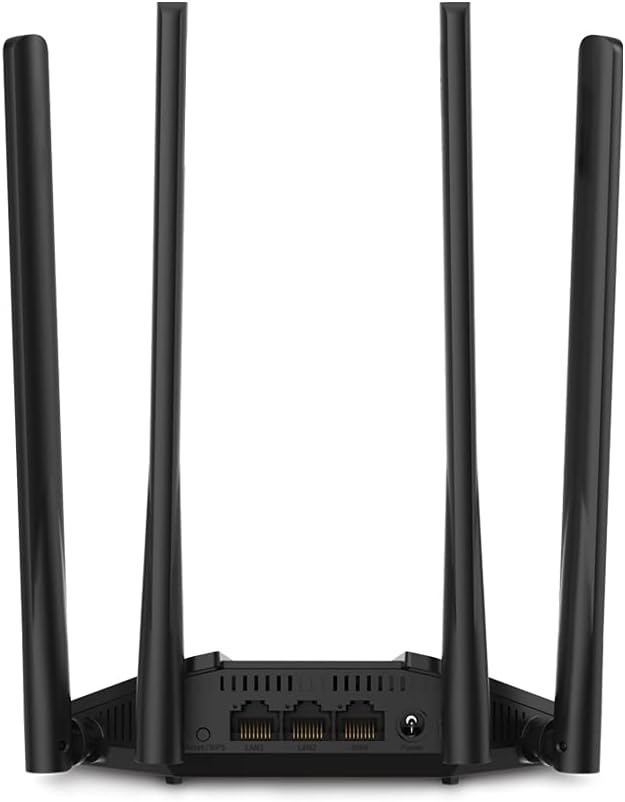
Imatge 3: posterior view of the Mercusys MR30G router, showing the WAN port (blue), LAN ports (yellow), power input, and reset button.
3.2 Configuració inicial
- Connecteu-vos al router: Connect your computer or mobile device to the router's default Wi-Fi network (SSID and password are usually printed on a label on the bottom of the router) or via an Ethernet cable to a LAN port.
- Accés Web Interfície: Obre a web navegador i introduïu l'adreça d'accés predeterminada (per exemple,
mwlogin.netor192.168.1.1) a la barra d'adreces. - Crea una contrasenya d'inici de sessió: Follow the on-screen instructions to create a strong login password for the router's management interface.
- Executa la configuració ràpida: The Quick Setup wizard will guide you through configuring your internet connection type, Wi-Fi network name (SSID), and password.
- Desa la configuració: Apply the settings and restart the router if prompted.
4. Instruccions de funcionament
4.1 Funcionament de doble banda
The MR30G operates on two frequency bands:
- Banda de 2.4 GHz: Provides wider coverage and better wall penetration, suitable for general internet browsing, email, and devices further from the router.
- Banda de 5 GHz: Offers faster speeds and lower interference, ideal for bandwidth-intensive tasks like HD video streaming, online gaming, and large file transferències.
You can connect your devices to either band based on your needs. The router may also offer a Smart Connect feature to automatically assign devices to the optimal band.
4.2 Funcions avançades
Accedir al router web management interface to configure advanced settings:
- Xarxa de convidats: Create a separate Wi-Fi network for guests to ensure the security of your main network.
- Mode de punt d'accés: Convert your router into an access point to extend your existing wired network with Wi-Fi capabilities.
- Suport IPv6: Utilize the latest internet protocol for enhanced network efficiency and future compatibility.
- WPS (Configuració protegida per Wi-Fi): Press the WPS button on the router and your WPS-enabled device to quickly establish a secure wireless connection without entering a password.
- Controls parentals: Manage and restrict internet access for specific devices.
- QoS (Qualitat de servei): Prioritize network traffic for certain applications or devices to ensure smooth performance.
5. Manteniment
Un manteniment regular ajuda a garantir la longevitat i el rendiment òptim del vostre encaminador.
- Actualitzacions de firmware: Consulteu periòdicament el formulari oficial de Mercusys weblloc web per a actualitzacions de firmware. L'actualització del firmware pot millorar el rendiment, afegir noves funcions i solucionar vulnerabilitats de seguretat.
- Reinici normal: Rebooting your router every few weeks can help clear its memory and resolve minor network issues. Simply unplug the power adapter, wait 10 seconds, and plug it back in.
- Col·locació òptima: Col·loqueu el router en un lloc central, allunyat d'obstacles, objectes metàl·lics grans i dispositius que emeten interferències electromagnètiques (per exemple, microones, telèfons sense fil).
- Neteja: Keep the router clean and free from dust. Use a soft, dry cloth to wipe the exterior. Do not use liquid cleaners.
- Seguretat: Regularly change your Wi-Fi password and router login password to strong, unique combinations.
6. Solució De Problemes
If you encounter issues with your router, refer to the following common solutions.
6.1 Sense accés a Internet
- Comproveu les connexions: Assegureu-vos que tots els cables Ethernet estiguin connectats correctament als ports correctes (WAN a mòdem, LAN a dispositius).
- Reiniciar dispositius: Power cycle your modem, then your router, and then your connected devices.
- Comproveu el LED de la WAN: Verify that the WAN LED on the router is lit, indicating an active internet connection.
- Estat del proveïdor d'Internet: Poseu-vos en contacte amb el vostre proveïdor de serveis d'Internet (ISP) per confirmar que no hi ha cap servei fora de servei.tagés a la teva zona.
- Configuració del router: Inicieu sessió al router web interface and check your internet connection settings (e.g., WAN connection type, IP address).
6.2 Velocitat Wi-Fi lenta o desconnexions freqüents
- Col·locació del router: Moveu el router a una ubicació més cèntrica, allunyada d'obstacles i fonts d'interferències.
- Interferència de canal: En el router web interface, try changing the Wi-Fi channel for both 2.4 GHz and 5 GHz bands to a less congested one.
- Selecció de la banda: For speed-critical devices, ensure they are connected to the 5 GHz band.
- Actualització del firmware: Assegureu-vos que el firmware del vostre encaminador estigui actualitzat.
- Massa dispositius: Reduce the number of active devices or bandwidth-intensive activities on your network.
6.3 No es pot accedir als encaminadors Web Interfície
- Verifica l'adreça IP: Ensure you are using the correct access address (e.g.,
mwlogin.netor192.168.1.1). - Comprova la connexió: Make sure your device is connected to the router's network (either via Wi-Fi or Ethernet).
- Esborra la memòria cau del navegador: Esborra el teu web la memòria cau i les galetes del navegador o proveu un altre navegador.
- Restableix l'encaminador: If all else fails, perform a factory reset by pressing and holding the reset button on the back of the router for about 5-10 seconds until the LEDs flash. Nota: A factory reset will erase all your custom settings, and you will need to reconfigure the router.
7. Especificacions
| Característica | Descripció |
|---|---|
| Model | MR30G |
| Marca | MERCUSI |
| Estàndards sense fil | IEEE 802.11a / b / g / n / ac |
| Velocitat de transferència de dades | AC1200 (300 Mbps a 2.4 GHz, 867 Mbps a 5 GHz) |
| Freqüència | 2.4 GHz & 5 GHz (Dual Band) |
| Antenes | 4x Fixed Omni-Directional Antennas |
| Ports Ethernet | 1 port WAN Gigabit, 2 ports LAN Gigabit |
| Dimensions (L x P x A) | 2.79 x 24.64 x 16.51 cm |
| Pes | 173 g |
| Entrada de potència | 220 Volts |
| Característiques especials | MU-MIMO, Beamforming, WPS |
| Dispositius compatibles | Computers, smartphones, tablets, game consoles, streaming devices, printers, security cameras, smart thermostats, smart TVs |
8. Garantia i Suport
Per obtenir informació sobre la garantia i assistència tècnica, consulteu la pàgina oficial de Mercusys. website or contact your local Mercusys support team. Keep your purchase receipt for warranty claims.
Mercusys Official Weblloc: www.mercusys.com


