Introducció
The Daewoo DIBT2626 is a compact and versatile wireless portable Bluetooth speaker designed for audio playback and hands-free communication. It features Bluetooth 5.0 connectivity, FM radio, an SD card slot for MP3 playback, a USB port, and an AUX input. The speaker is equipped with a 1200 mAh lithium-ion battery, providing up to 4 hours of playback on a 2-hour charge. Its robust design includes a metal speaker grille and protective rubber edges.
Informació de seguretat
Per garantir un funcionament segur i allargar la vida útil del dispositiu, tingueu en compte el següent:
- No exposeu l'altaveu a temperatures extremes, llum solar directa ni humitat elevada.
- Eviteu deixar caure o sotmetre l'altaveu a forts impactes.
- No intenteu desmuntar ni modificar l'altaveu. Això anul·larà la garantia i pot causar danys.
- Mantingueu l'altaveu lluny de l'aigua i altres líquids.
- Use only the provided USB charging cable or a certified equivalent.
- Netegeu l'altaveu amb un drap suau i sec. No utilitzeu productes de neteja abrasius ni dissolvents.
Contingut del paquet
- Daewoo DIBT2626 Wireless Portable Bluetooth Speaker
- Cable de càrrega USB
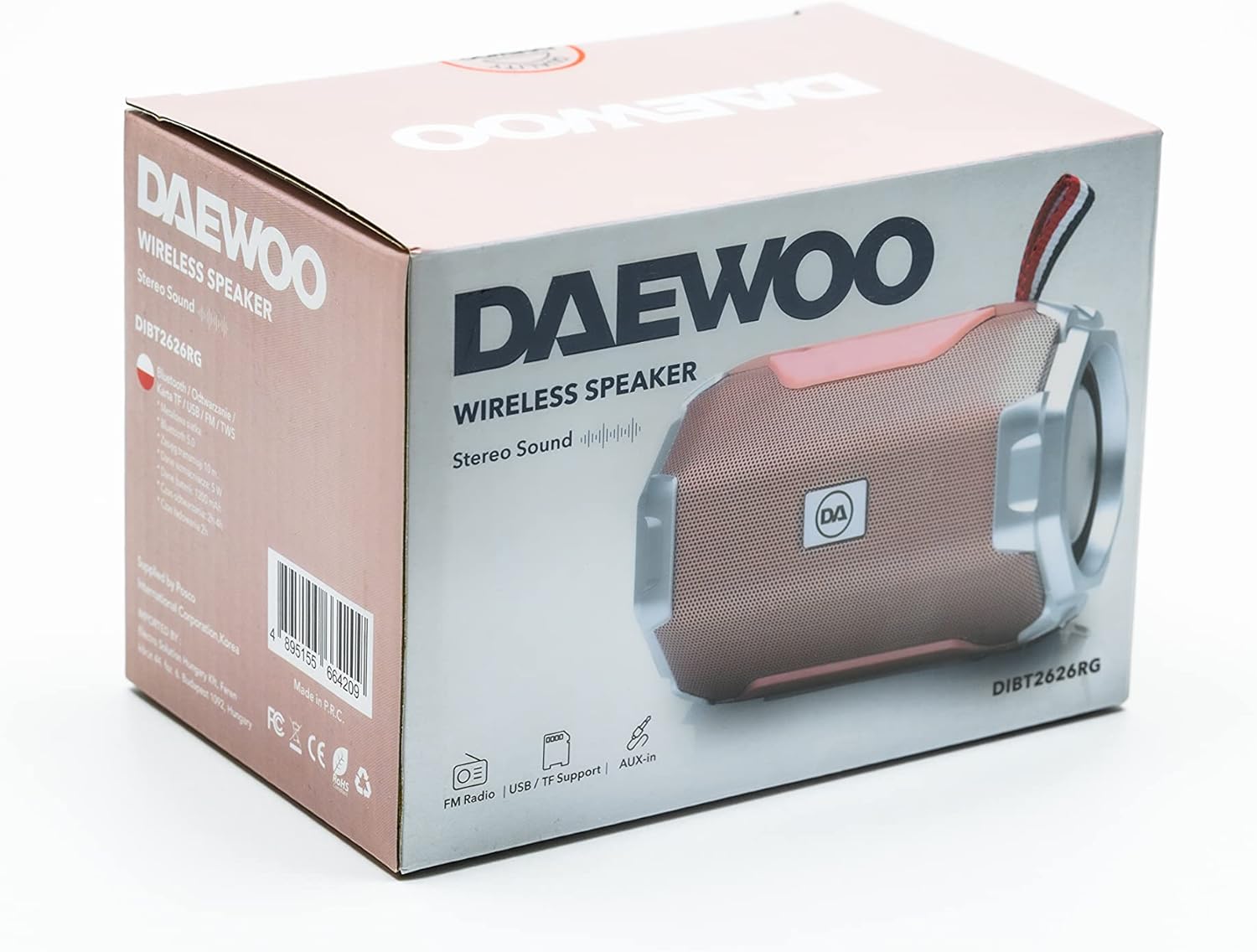
Image: The retail packaging box for the Daewoo DIBT2626 speaker, showing the product image and branding.
Producte acabatview
Familiarize yourself with the speaker's controls and ports.
Tauler de control
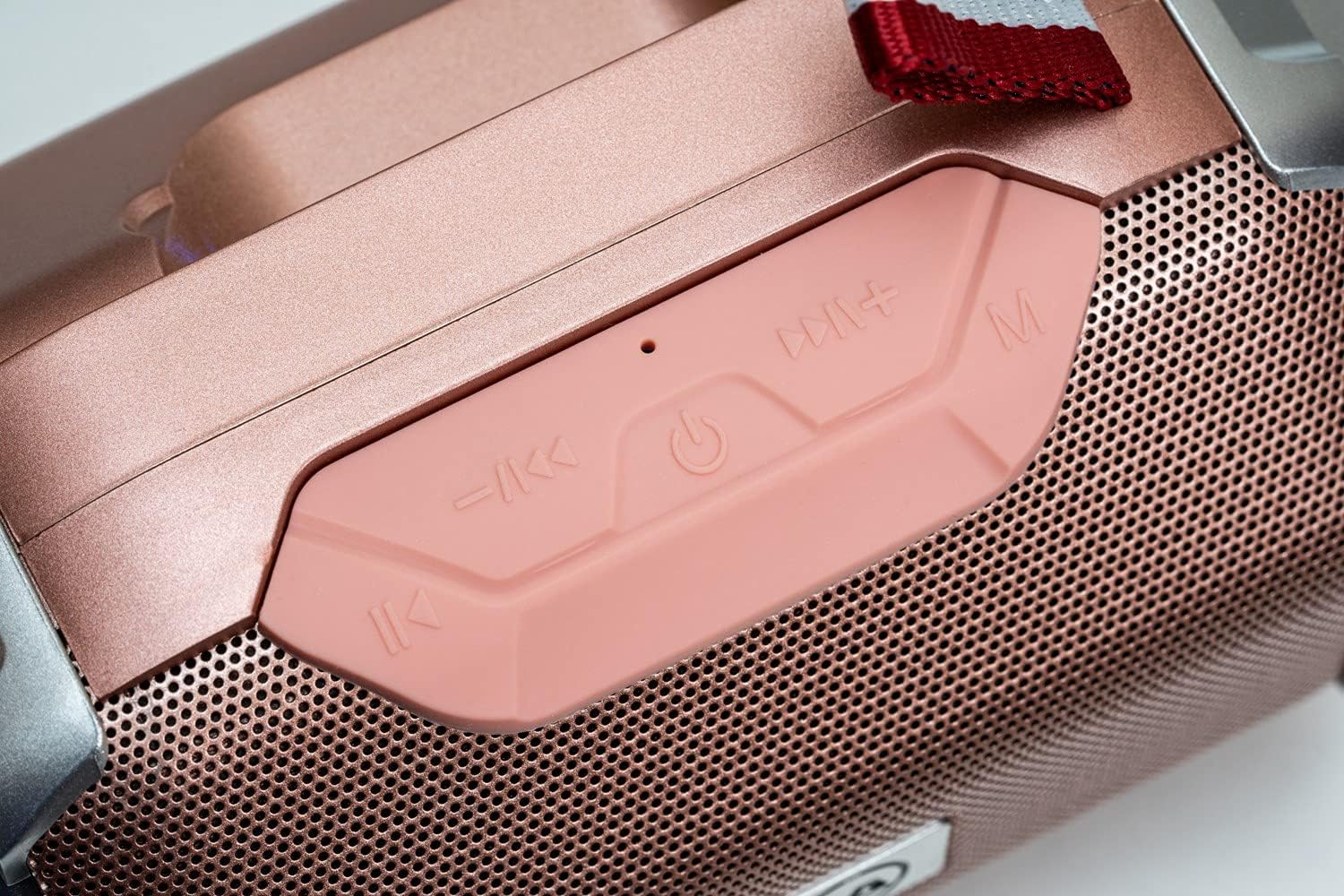
Imatge: Un primer pla view of the speaker's control panel, featuring four buttons and an LED indicator.
- Pista anterior / Baixada de volum: Short press for previous track, long press to decrease volume.
- Encendre / Reproduir / Pausa: Long press to power on/off. Short press to play/pause music. In call mode, short press to answer/end call.
- Següent seguiment / augment de volum: Short press for next track, long press to increase volume.
- Mode (M): Short press to switch between Bluetooth, FM Radio, SD Card, USB, and AUX modes.
- Indicador LED: Indicates power status, charging, and Bluetooth pairing.
Ports de connectivitat

Imatge: Una imatge detallada view of the speaker's rear panel, showing the AUX, USB, TF (SD card), and DC 5V charging ports.
- Port AUX: For connecting external audio devices via a 3.5mm audio cable.
- Port USB: For playing music from a USB flash drive.
- TF Card Slot (SD Card): Per reproduir MP3 files d'una targeta microSD.
- Port DC 5V: Micro USB port for charging the speaker.

Image: The Daewoo DIBT2626 speaker in rose gold, showcasing its front grille, control panel, and fabric hook.
Configuració
1. Carregant l’altaveu
- Connecteu el cable de càrrega USB proporcionat al port de 5 V CC de l'altaveu.
- Connecteu l'altre extrem del cable USB a un adaptador de corrent USB (no inclòs) o al port USB d'un ordinador.
- L'indicador LED s'il·luminarà durant la càrrega. Una càrrega completa triga aproximadament 2 hores.
- Un cop completament carregat, l'indicador LED pot canviar de color o apagar-se, segons el model. Desconnecteu el cable de càrrega.
A fully charged speaker provides up to 4 hours of playback time.
2. Encès / apagat
- Per encendre: Premeu llargament el botó Encendre / Reproduir / Pausa button until you hear an audible prompt or the LED indicator lights up.
- Per apagar: Premeu llargament el botó Encendre / Reproduir / Pausa button again until you hear an audible prompt or the LED indicator turns off.
Modes de funcionament
1. Mode Bluetooth
- Assegureu-vos que l'altaveu estigui encès. Entrarà automàticament en mode d'emparellament Bluetooth, cosa que indicarà un LED intermitent.
- Al dispositiu mòbil (telèfon intel·ligent, tauleta, ordinador portàtil), activeu el Bluetooth i cerqueu els dispositius disponibles.
- Select "DIBT2626" from the list of devices.
- Once paired, the LED indicator will stop flashing, and you will hear a confirmation sound.
- You can now play audio from your device through the speaker. Use the speaker's control buttons or your device to adjust volume, play/pause, and skip tracks.
2. Mode de ràdio FM
- Enceneu l'altaveu.
- Premeu el botó Mode (M) repetidament fins que entreu al mode de ràdio FM.
- To auto-scan and save available stations, short press the Encendre / Reproduir / Pausa botó. L'altaveu escanejarà i emmagatzemarà emissores automàticament.
- Utilitza el Pista anterior / Baixada de volum i Següent seguiment / augment de volum botons per navegar entre les emissores desades.
3. SD Card / USB Mode
- Insert a microSD card (TF card) with MP3 files into the TF Card slot or a USB flash drive into the USB port.
- Power on the speaker. It should automatically detect the storage device and switch to SD Card or USB mode, beginning playback. If not, press the Mode (M) botó per seleccionar el mode correcte.
- Use the speaker's control buttons to play/pause, skip tracks, and adjust volume.
4. Mode AUX
- Connecteu un extrem d'un cable d'àudio de 3.5 mm (no inclòs) al port AUX de l'altaveu.
- Connect the other end of the audio cable to the audio output jack of your external device.
- Power on the speaker. It should automatically switch to AUX mode. If not, press the Mode (M) botó per seleccionar el mode AUX.
- Controla la reproducció i el volum des del teu dispositiu extern.
5. Trucades mans lliures
- When connected via Bluetooth to your smartphone, the speaker can be used for hands-free calls.
- When an incoming call is received, short press the Encendre / Reproduir / Pausa botó per respondre la trucada.
- Per finalitzar una trucada, premeu breument la tecla Encendre / Reproduir / Pausa botó de nou.
Manteniment
- Mantingueu net l'altaveu netejant-lo amb un drap suau i sec.
- Eviteu utilitzar productes químics durs, dissolvents de neteja o detergents forts.
- Guardeu l'altaveu en un lloc fresc i sec quan no l'utilitzeu durant períodes prolongats.
- Charge the battery periodically if the speaker is stored for a long time to maintain battery health.
Resolució de problemes
| Problema | Causa possible | Solució |
|---|---|---|
| L'altaveu no s'encén. | La bateria està esgotada. | Carregueu l'altaveu durant almenys 2 hores. |
| Sense so. | El volum és massa baix o silenciat. S'ha seleccionat un mode incorrecte. | Increase volume on both the speaker and the connected device. Press the Mode (M) button to ensure the correct input mode is selected. |
| No es pot emparellar per Bluetooth. | Speaker is not in pairing mode. Bluetooth is off on device. Device is too far. | Ensure speaker is powered on and LED is flashing. Enable Bluetooth on your device. Move device closer to the speaker (within 10 meters). |
| La recepció de ràdio FM és deficient. | Senyal feble. | Mou l'altaveu a un lloc amb millor recepció. |
Especificacions
| Número de model | DIBT2626 |
| Marca | Daewoo Electronics |
| Dimensions | 14 x 9 x 9 cm |
| Pes | 350 g |
| Potència de sortida dels altaveus | 5 W |
| Tipus de bateria | 1200 mAh d'ions de liti |
| Temps de càrrega | Aproximadament 2 hores |
| Temps de reproducció | Fins a 4 hores |
| Versió Bluetooth | 5.0 |
| Opcions de connectivitat | Bluetooth, USB, TF (SD Card), AUX (3.5mm) |
| Dispositius compatibles | Telèfons intel·ligents, tauletes, ordinadors portàtils |
| Característiques especials | FM Radio, Hands-free Calling |
Garantia i Suport
For warranty information and technical support, please refer to the documentation provided with your purchase or visit the official Daewoo Electronics weblloc web. Conserveu el comprovant de compra per a qualsevol reclamació de garantia.


