Producte acabatview
The Poly Sync 60 USB/Bluetooth smart speakerphone is designed to provide clear audio for small to medium conference rooms. It features powerful twin speakers and a six-microphone array that focuses on voices while reducing background noise. This allows for natural conversations, even when multiple participants speak simultaneously. The device offers versatile connectivity options, including USB-A, USB-C, and Bluetooth, enabling connection to PCs, Macs, and smartphones. It is powered by an AC adapter, eliminating the need for battery charging during use. For larger spaces, two units can be wirelessly paired to expand voice pickup coverage.
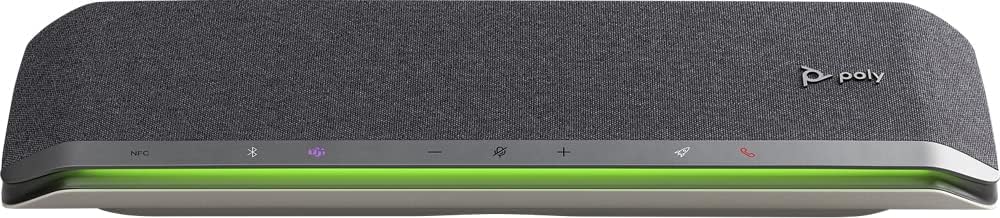
Imatge: Frontal view of the Poly Sync 60 Smart Speakerphone, showing the speaker grille, control buttons, and an illuminated LED light bar.
Contingut del paquet
- Poly Sync 60 Speakerphone
- Main power supply with global pin adapters
- USB cable with USB-A and USB-C connectors
Característiques clau
- Àudio avançat: Six-microphone steerable array for echo and noise reduction, ensuring clear voice pickup.
- Altaveus duals: High-performance speakers deliver rich, clear audio for all participants.
- Alimentat per CA: Operates continuously via AC power, eliminating battery concerns.
- Capacitat de cadena margarida: Wirelessly pair two units for extended coverage in larger meeting spaces.
- Connectivitat flexible: Connects to computers via combined USB-A/USB-C cable and to smartphones via Bluetooth.
- USB Video Camera Support: Connect a USB video camera to the speakerphone for combined audio and video with a single cable to the computer.
- Càrrega de dispositius mòbils: Two USB ports allow charging of up to two mobile phones simultaneously.
- Certificació de Microsoft Teams: Includes a dedicated Teams button for instant access to the Teams application.
Guia de configuració
1. Connexió d'alimentació
Connect the provided main power supply to the Poly Sync 60 and plug it into a wall outlet. The device requires AC power for operation.
2. Connecting to a Computer (PC/Mac)
Use the integrated USB cable to connect the Poly Sync 60 to your computer. The cable supports both USB-A and USB-C ports. Once connected, the device should be recognized automatically by your operating system.
3. Connecting to a Smartphone (Bluetooth)
- Manteniu premut el botó Botó Bluetooth on the Poly Sync 60 until the LED indicator flashes blue.
- On your smartphone, navigate to the Bluetooth settings and select "Poly Sync 60" from the list of available devices.
- Un cop emparellat, l'indicador LED es tornarà de color blau continu.
4. Daisy Chain Two Units (Optional)
For expanded audio coverage, two Poly Sync 60 units can be wirelessly paired. Refer to the official Poly support documentation for detailed instructions on how to enable this feature.
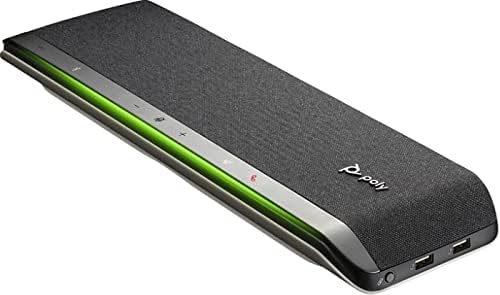
Imatge: Lateral view of the Poly Sync 60 Smart Speakerphone, highlighting the USB ports for charging mobile devices and connecting a video camera.
Instruccions de funcionament
Controls bàsics
- Pujar/baixar el volum: Utilitza el + i - buttons to adjust the speaker volume.
- Silencia/Activa el silenci: Premeu el botó microphone icon button to mute or unmute the microphone. The LED indicator will change color to show mute status.
- Resposta/Finalització de la trucada: Premeu el botó phone icon button per respondre o finalitzar una trucada.
- Microsoft Teams Button: Premeu el botó Teams icon button to launch or interact with the Microsoft Teams application (if certified version).
Càrrega de dispositius mòbils
Connect your mobile phone or other USB-powered device to one of the two USB ports on the Poly Sync 60 to charge it during a meeting.
Manteniment i cura
- Clean the Poly Sync 60 with a soft, dry, lint-free cloth.
- Do not use abrasive cleaners, solvents, or strong chemicals, as these may damage the device.
- Eviteu exposar el dispositiu a temperatures extremes, humitat o llum solar directa.
- Guardeu l'altaveu en un lloc fresc i sec quan no l'utilitzeu.
Resolució de problemes
- Sense àudio/Micròfon no funciona:
- Ensure the device is powered on and the AC adapter is securely connected.
- Verify that the speakerphone is not muted (check the mute button LED).
- Check the volume levels on both the Poly Sync 60 and your connected computer/smartphone.
- Confirm that the Poly Sync 60 is selected as the audio input/output device in your computer's sound settings or conferencing application.
- Connection Issues (USB):
- Proveu de connectar el cable USB a un port diferent de l'ordinador.
- Reinicieu l'ordinador.
- Connection Issues (Bluetooth):
- Ensure Bluetooth is enabled on your smartphone and the Poly Sync 60 is in pairing mode.
- Unpair and then re-pair the device from your smartphone's Bluetooth settings.
- Assegureu-vos que no hi hagi altres dispositius Bluetooth que causin interferències.
- Echo or Background Noise:
- Place the speakerphone centrally in the room, away from walls or highly reflective surfaces.
- Assegureu-vos que l'habitació estigui tranquil·la i lliure de soroll de fons excessiu.
Especificacions tècniques
| Característica | Especificació |
|---|---|
| Nom del model | Sincronització 60 |
| Número de model de l'article | 216873-01 |
| Tipus d'altaveu | Multimèdia |
| Tecnologia de connectivitat | Bluetooth, USB |
| Tecnologia de comunicació sense fils | Bluetooth |
| Interval Bluetooth | 3 metres |
| Font d'alimentació | Elèctric amb cable |
| Potència de sortida màxima dels altaveus | 60 watts |
| Mode de sortida d'àudio | estèreo |
| Configuració del canal de so envoltant | 2.0 |
| Mètode de control | Pulsador |
| Dimensions del producte | 1.5 "P x 15.5" W x 4.8" H |
| Pes de l'article | 2.2 lliures (1000 grams) |
| Usos recomanats | Office work, remote work, conference calls, personal entertainment, charging mobile devices |
| Tipus de muntatge | Muntatge de taula |
| Fabricant | Poli |
| UPC | 017229172517, 197029590572 |
Informació de la garantia
The Poly Sync 60 Smart Speakerphone comes with a full manufacturer's warranty. For detailed information regarding warranty terms, duration, and claim procedures, please refer to the official Poly weblloc web o la documentació de garantia inclosa amb la compra.
Suport
For further assistance, product updates, software downloads, or detailed guides, please visit the official Poly support website. You can also contact Poly customer service for technical support or service inquiries.
Official Poly Weblloc: www.poly.com