Introducció
Gràcies per la compraasing the OneDer V12 Bluetooth Speaker. This manual provides essential information for the safe and efficient use of your new device. Please read it thoroughly before operation and retain it for future reference.
Informació de seguretat
- No exposeu l'altaveu a temperatures extremes, humitat ni llum solar directa.
- Eviteu deixar caure o sotmetre l'altaveu a forts impactes.
- No desmunteu ni intenteu reparar l'altaveu vosaltres mateixos. Això anul·larà la garantia.
- Mantingueu l'altaveu lluny de l'aigua i altres líquids.
- Feu servir només el cable de càrrega especificat.
- Eliminar les bateries segons la normativa local.
Contingut del paquet
Si us plau, comproveu el paquet per veure si hi ha els elements següents:
- OneDer V12 Bluetooth Speaker
- Cable de càrrega USB
- Manual d'usuari (aquest document)
Producte acabatview
Familiarize yourself with the components of your OneDer V12 Bluetooth Speaker.
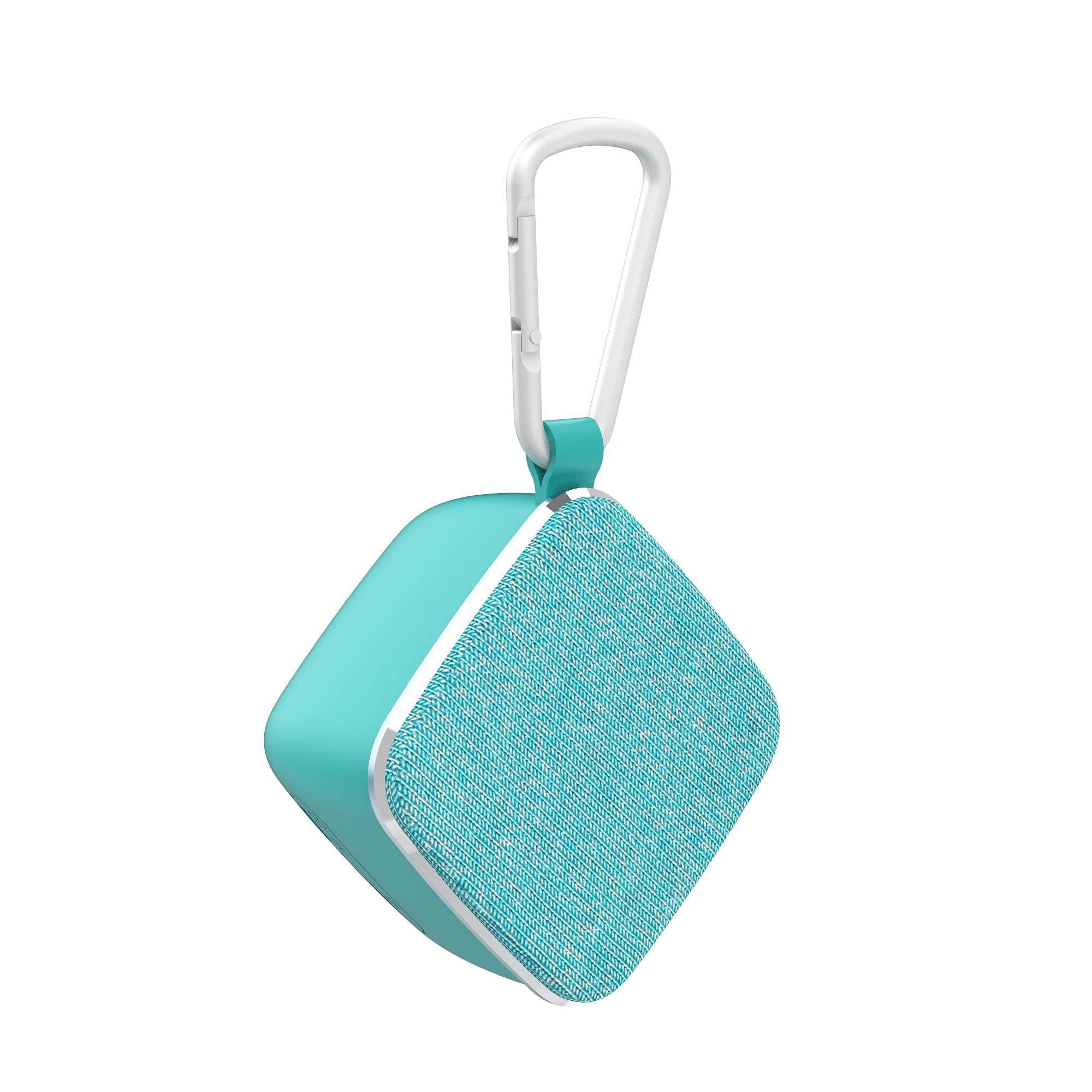
Figura 1: lateral view of the OneDer V12 Bluetooth Speaker, showing the compact blue design and the "OneDer" logo.

Figura 2: posterior view of the OneDer V12 Bluetooth Speaker, highlighting the charging port and the TF card slot.

Figura 3: A dalt view of the OneDer V12 Bluetooth Speaker, showing the control buttons for power, mode, volume, and track navigation.
Controls i ports:
- Botó d'encesa: Manteniu premut per activar/desactivar.
- Botó de mode (M): Short press to switch between Bluetooth and TF card modes.
- Botó Pujar volum / Pista següent (+): Premeu curt per a la següent pista, premeu llargament per pujar el volum.
- Botó per baixar el volum / pista anterior (-): Premeu curt per a la pista anterior, premeu llargament per baixar el volum.
- Play/Pause / Call Button: Short press to play/pause music, answer/end calls. Long press to reject calls.
- Ranura per a targetes TF: Insert a TF (MicroSD) card for local music playback.
- Port de càrrega: Connecteu el cable de càrrega USB aquí.
- Micròfon: Per a trucades amb mans lliures.
Configuració
1. Carregant l’altaveu
- Connecteu l'extrem petit del cable de càrrega USB al port de càrrega de l'altaveu.
- Connecteu l'extrem més gran del cable de càrrega USB a un adaptador de corrent USB (no inclòs) o al port USB d'un ordinador.
- El llum indicador de càrrega s'il·luminarà (el color pot variar) per indicar que l'altaveu s'està carregant.
- Once fully charged, the indicator light will turn off or change color. Disconnect the charging cable.
Note: Fully charge the speaker before first use for optimal battery life.
2. Encès / apagat
- Per encendre: Press and hold the Power button for approximately 3 seconds. You will hear an audible prompt.
- Per apagar: Press and hold the Power button for approximately 3 seconds. You will hear an audible prompt.
3. Emparellament Bluetooth
- Ensure the speaker is powered on and in Bluetooth mode. If not, short press the Mode (M) button to switch to Bluetooth mode. The indicator light will flash, indicating it's ready for pairing.
- Enable Bluetooth on your mobile device (smartphone, tablet, computer).
- Cerca dispositius Bluetooth disponibles.
- Seleccioneu "V12" de la llista de dispositius.
- Once paired, the speaker will emit an audible confirmation, and the indicator light will stop flashing and remain solid.
- L'altaveu es connectarà automàticament a l'últim dispositiu emparellat quan s'engegui, si el Bluetooth del dispositiu està actiu i dins del seu abast.
4. TF Card Usage
- With the speaker powered on, gently insert a TF (MicroSD) card into the TF card slot with the contacts facing down until it clicks into place.
- The speaker will automatically switch to TF card mode and begin playing music from the card. If it does not switch automatically, short press the Mode (M) button.
- To remove the TF card, gently push it in until it clicks, then release, and it will eject.
En funcionament
Music Playback (Bluetooth / TF Card)
- Reproduir/pausa: Premeu breument el botó Reproduir/Pausa.
- Pista següent: Premeu breument el botó d'apujar el volum (+).
- Pista anterior: Premeu breument el botó per baixar el volum (-).
- Pujar el volum: Premeu llargament el botó d'apujar el volum (+).
- Baixar el volum: Premeu llargament el botó per baixar el volum (-).
Trucades mans lliures
When connected to your phone via Bluetooth:
- Respon a la trucada: Premeu breument el botó Reproduir/Pausa quan soni una trucada entrant.
- Finalitzar la trucada: Premeu breument el botó Reproduir/Pausa durant una trucada.
- Rebutja la trucada: Premeu llargament el botó Reproduir/Pausa quan soni una trucada entrant.
Manteniment
- Neteja: Feu servir un drap suau i sec per netejar l'altaveu. No utilitzeu productes de neteja abrasius ni dissolvents.
- Emmagatzematge: Quan no l'utilitzeu durant períodes prolongats, guardeu l'altaveu en un lloc fresc i sec, allunyat de la llum solar directa i de temperatures extremes.
- Cura de la bateria: Per allargar la durada de la bateria, carregueu l'altaveu almenys un cop cada tres mesos si no l'utilitzeu regularment.
Resolució de problemes
| Problema | Possible solució |
|---|---|
| L'altaveu no s'encén. | Assegureu-vos que l'altaveu estigui carregat. Connecteu-lo a una font d'alimentació amb el cable USB. |
| No es pot emparellar amb un dispositiu Bluetooth. |
|
| Sense so o amb un volum baix. |
|
| La targeta TF no funciona. |
|
Especificacions
| Característica | Detall |
|---|---|
| Número de model | V12 |
| Marca | OneDer |
| Tecnologia de connectivitat | Sense fil (Bluetooth) |
| Mode de sortida d'àudio | estèreo |
| Tipus de muntatge | Muntatge de taula |
| Tipus d'altaveu | Altaveus Bluetooth |
| Dispositius compatibles | Múltiples |
| Color | Blau |
| Pes de l'article | 65 grams |
| Potència de sortida | Menys de 5 W |
| Característiques especials | TF Card Support, Built-in Microphone, Hands-free Function |
Garantia i Suport
This product comes with a standard manufacturer's warranty. Please refer to the warranty card included in your package for specific terms and conditions. For technical support or customer service, please contact your retailer or visit the official OneDer weblloc.
Note: Warranty details are subject to the region of purchase and local consumer laws.


