1. Producte acabatview
The Ricoh WG-7 is a robust digital camera designed for demanding outdoor conditions. It features a durable construction that is waterproof, dustproof, freeze-proof, and shock-resistant, making it suitable for a wide range of adventures. This manual provides essential information for setting up, operating, and maintaining your WG-7 camera.

Figura 1.1: Frontal view of the Ricoh WG-7 Digital Camera, showcasing its rugged design and lens.
Característiques principals:
- Impermeable: Operable up to 20 meters (65 feet) for two continuous hours.
- Resistent a cops: Withstands drops from heights of up to 2.1 meters (6.9 feet).
- Crushproof: Designed to endure forces up to 100 kilograms (220 pounds).
- Freeze-Proof: Functions reliably in temperatures as low as -10 degrees Celsius (14 degrees Fahrenheit).
- Imatges d'alta resolució: Equipped with approximately 20 million effective pixels.
- Zoom òptic: Features a 5x optical zoom lens.
- Gravació de vídeo 4K: Supports high-definition video capture.
2. Informació de seguretat
Please read these safety precautions carefully before using your Ricoh WG-7 camera to ensure safe and proper operation.
- Do not attempt to disassemble or modify the camera. This can cause electric shock or malfunction and will void the warranty.
- Keep the camera and accessories out of reach of small children to prevent accidents.
- Use only the specified battery and charger. Incorrect power sources can cause overheating, fire, or explosion.
- Ensure all covers (battery/card slot, USB/HDMI port) are securely closed before exposing the camera to water or dust. Failure to do so will compromise its waterproof and dustproof capabilities.
- Avoid exposing the camera to extreme temperatures, direct sunlight for prolonged periods, or high humidity.
- If the camera is dropped or subjected to a strong impact, inspect it for damage before further use, especially before exposing it to water.
3. Introducció (Configuració)
3.1. Inserció de la bateria i la targeta de memòria
- Open the battery/card compartment cover located on the side of the camera. Ensure the lock mechanism is fully disengaged.
- Insert the battery with the contacts facing the correct direction, as indicated inside the compartment. Push until it clicks into place.
- Insert an SD/SDHC/SDXC memory card into the card slot with the label facing the correct direction. Push until it clicks.
- Close the battery/card compartment cover firmly until it locks securely. A proper seal is crucial for the camera's waterproof integrity.
3.2. Engegada inicial i configuració
- Manteniu premut el botó ON/OFF button (located on the top of the camera) to power on the camera.
- La primera vegada que l'engegueu, és possible que se us demani que configureu la data, l'hora i l'idioma. Feu servir els botons direccionals i OK per navegar i confirmar les seleccions.
- Familiarize yourself with the camera's controls.

Figura 3.1: superior view of the Ricoh WG-7, showing the ON/OFF button, GPS indicator, and mode dial.
4. Funcionament bàsic
4.1. Fer fotos
- Turn the camera on using the ON/OFF botó.
- Rotate the mode dial to select your desired shooting mode (e.g., Auto, Program, Scene modes).
- Enquadra la foto amb el monitor LCD.
- Premeu el botó de l'obturador fins a la meitat per enfocar. El marc d'enfocament es tornarà verd quan s'hagi aconseguit enfocar.
- Premeu el botó de l'obturador completament per fer la foto.
4.2. Gravació de vídeos
- Enceneu la càmera.
- Premeu el botó dedicat Pel·lícula button (red dot icon) to start recording.
- Premeu el botó Pel·lícula botó de nou per aturar la gravació.
4.3. Operació de zoom
Use the zoom lever (often labeled 'W' for Wide and 'T' for Telephoto) to adjust the optical zoom. The WG-7 features a 5x optical zoom.
4.4. Using the Flash and Ring Light
The camera has a built-in flash and a ring light around the lens for macro photography. Access flash settings through the menu or a dedicated button, typically indicated by a lightning bolt icon. The ring light can be activated for close-up illumination.

Figura 4.1: Frontal view of the Ricoh WG-7 with the ring light around the lens illuminated, ideal for macro shots.
4.5. Reviewimatges i vídeos
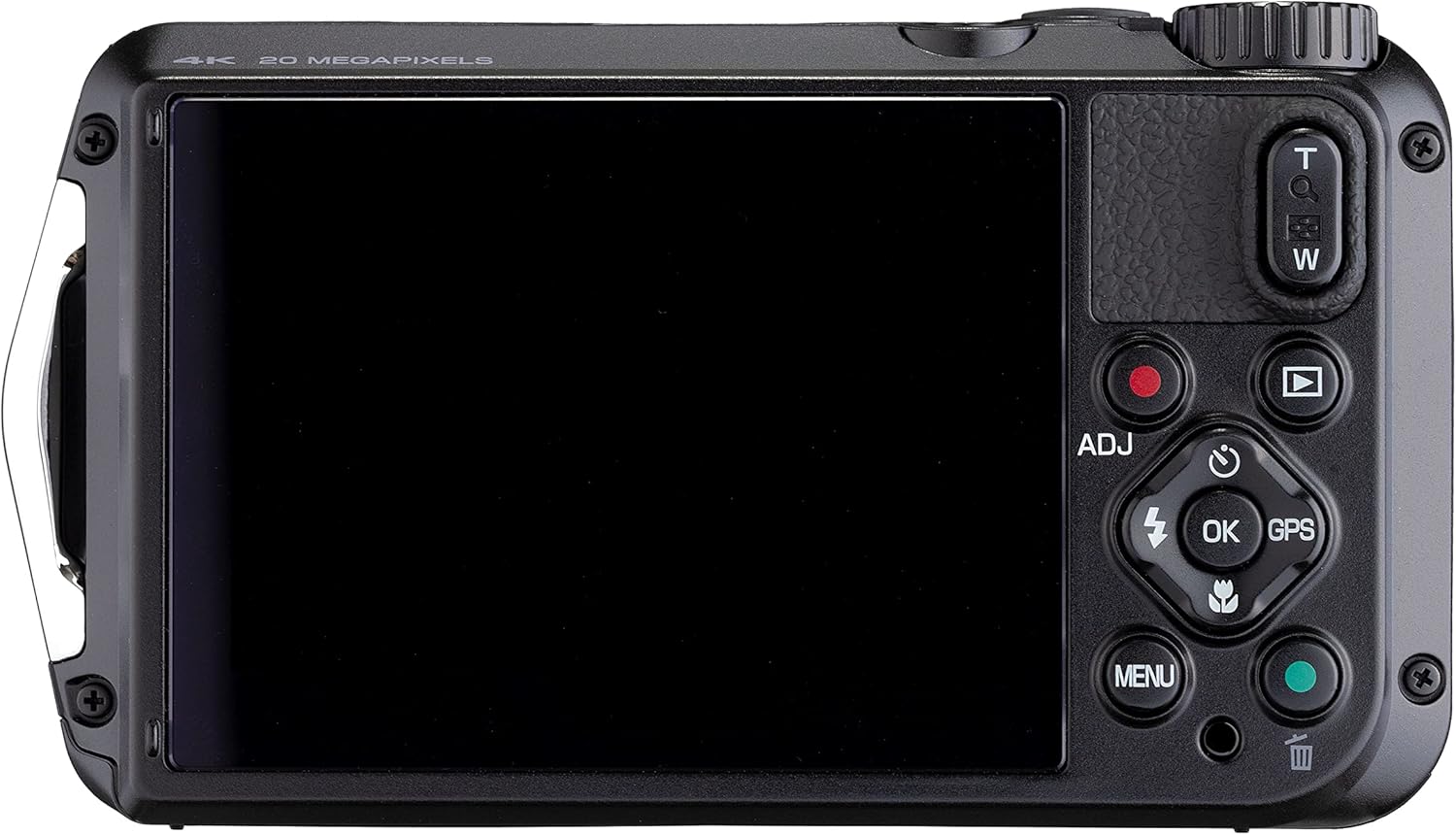
Figura 4.2: posterior view of the Ricoh WG-7, showing the LCD screen and playback controls.
Premeu el botó Reproducció button (triangle icon) to enter playback mode. Use the directional buttons to scroll through your photos and videos. Press OK a view details or play videos.
5. Manteniment i cura
5.1. Neteja de la càmera
- After use in water, rinse the camera with fresh water and wipe it dry with a soft cloth. Do not use detergents or organic solvents.
- Clean the lens and LCD screen with a soft, lint-free cloth specifically designed for optical surfaces. Avoid touching the lens directly.
- Ensure no sand or debris is lodged in the compartment seals.
5.2. Cura de la bateria
- Charge the battery fully before each use, especially for extended shooting sessions.
- Traieu la bateria si la càmera no s'utilitzarà durant un període prolongat.
- Guardeu les piles en un lloc fresc i sec.
5.3. Emmagatzematge
Store the camera in a dry, well-ventilated area away from direct sunlight and extreme temperatures. For long-term storage, remove the battery and memory card.
6. Solució De Problemes
If you encounter issues with your Ricoh WG-7, refer to the following common problems and solutions:
- La càmera no s'encén:
- Assegureu-vos que la bateria estigui completament carregada i inserida correctament.
- Prova d'utilitzar una bateria diferent, completament carregada, si en tens.
- Les imatges són borroses:
- Check if the lens is clean and free from smudges or water droplets.
- Ensure the camera is properly focused by pressing the shutter button halfway before fully pressing.
- In low light, use the flash or increase ISO settings (if in a manual mode).
- Fuga d'aigua:
- Immediately power off the camera and remove the battery and memory card.
- Inspect the battery/card compartment cover and USB/HDMI port cover for proper sealing. Ensure no foreign objects are trapped in the seals.
- If water has entered, contact customer support for service.
- Error de la targeta de memòria:
- Ensure the memory card is correctly inserted.
- Prova de formatar la targeta (això esborrarà totes les dades, així que fes-ne una còpia de seguretat primer).
- Try a different memory card.
7. Especificacions
| Característica | Especificació |
|---|---|
| Nom del model | WG-7 |
| Fabricant | Ricoh |
| Resolució del sensor fotogràfic | 20 MP |
| Zoom òptic | 5x |
| Distància focal màxima | 140 mil·límetres |
| Distància focal mínima | 28 mil·límetres |
| Resolució de vídeo | 2160p (4K) |
| Nivell de resistència a l'aigua | Impermeable |
| Profunditat de resistència a l'aigua | 65 peus (20 metres) |
| Tipus de bateria | Ió de liti (inclòs) |
| Durada mitjana de la bateria | 2 Hours (video recording) |
| Mida de la pantalla | 3 polzades |
| Estabilització d'imatge | Digital, Òptic |
| Admet File Format | JPEG |
| Tecnologia sense fils | Wi-Fi |
| Pes de l'article | 1.2 lliures |
8. Garantia i Suport
Your Ricoh WG-7 camera is covered by a manufacturer's warranty. Please refer to the warranty card included with your product for specific terms and conditions, including warranty period and coverage details.
For technical support, service, or further inquiries, please visit the official Ricoh Imaging weblloc web o poseu-vos en contacte amb el seu departament d'atenció al client. Normalment, podeu trobar la informació de contacte al fabricant weblloc o a l'embalatge del producte.


