Introducció
This manual provides comprehensive instructions for the safe and efficient use of your Tronsmart Apollo Air TWS Bluetooth Earphones. Please read this manual thoroughly before using the product and retain it for future reference.
Informació de seguretat:
- Do not expose the earphones or charging case to extreme temperatures, humidity, or corrosive environments.
- Eviteu deixar caure, colpejar o desmuntar el dispositiu.
- Mantenir allunyat de nens i animals de companyia.
- Feu servir només els cables de càrrega proporcionats o certificats.
- L'exposició prolongada a nivells de volum elevats pot causar danys auditius.
Producte acabatview
Contingut del paquet
- Tronsmart Apollo Air TWS Bluetooth Earphones (Left and Right)
- Estoig de càrrega
- Cable de càrrega USB
- Puntes per a les orelles (diverses mides)
- Manual d'usuari (aquest document)
Identificació de components
Familiarize yourself with the main components of your Tronsmart Apollo Air earphones and charging case.
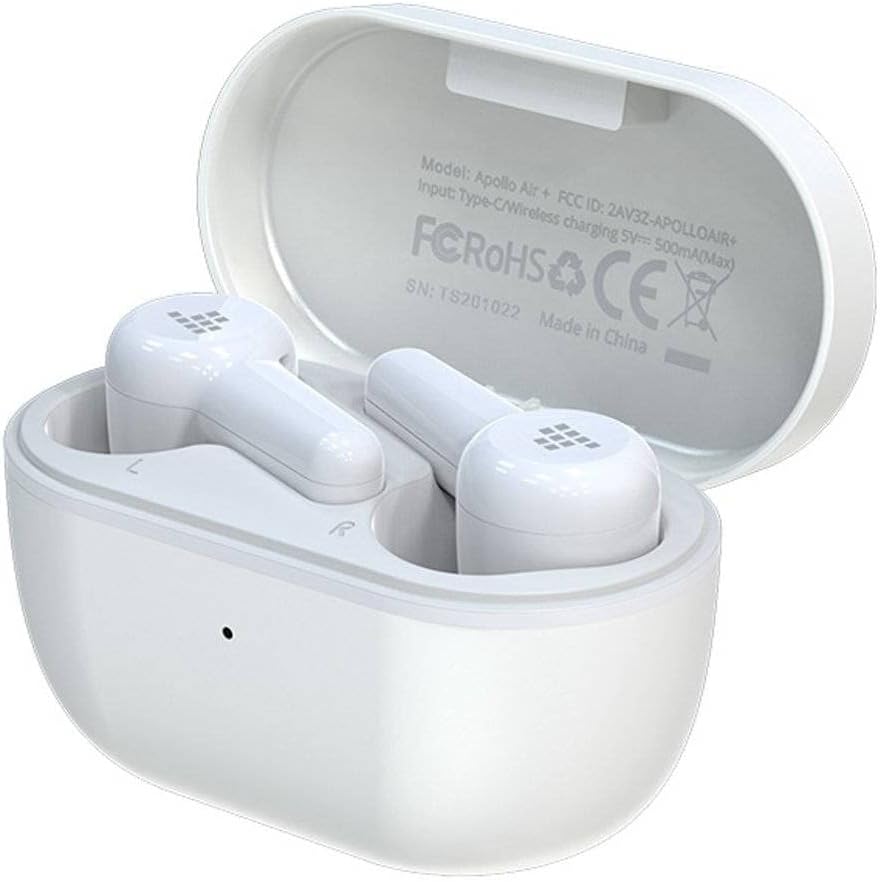
Image: Tronsmart Apollo Air TWS Earphones placed inside their open charging case. The case lid displays model information and certifications.

Image: Tronsmart Apollo Air TWS Earphones. One earbud is shown outside the charging case, highlighting its design and the charging contacts within the case.

Imatge: Un primer pla view of the two Tronsmart Apollo Air TWS Earbuds, showcasing their ergonomic shape, ear tips, and touch control areas.
Configuració
Càrrega dels auriculars i la funda
- Càrrega de la caixa: Connect the provided USB charging cable to the charging port on the case and to a USB power adapter (not included) or a computer's USB port. The indicator light on the case will show charging status.
- Càrrega dels auriculars: Place the earphones into the charging case. Ensure they are correctly seated in their respective slots (L for left, R for right). The earphones will automatically begin charging. The indicator lights on the earphones will show charging status.
- Fully charge the earphones and case before first use.
Emparellament Bluetooth
- Maridatge inicial: Open the charging case. The earphones will automatically enter pairing mode, indicated by flashing lights (refer to product for specific light patterns).
- Al dispositiu (telèfon intel·ligent, tauleta, etc.), activeu el Bluetooth i cerqueu els dispositius disponibles.
- Select "Tronsmart Apollo Air" from the list of found devices.
- Once connected, a voice prompt or indicator light will confirm successful pairing.
- Torna a emparellar: If the earphones do not connect automatically, ensure Bluetooth is enabled on your device and the earphones are charged. You may need to manually select "Tronsmart Apollo Air" from your device's Bluetooth menu.
Funcionament dels auriculars
Encès/Apagat
- Encès: Obriu l'estoig de càrrega o traieu els auriculars de l'estoig. S'encendran automàticament.
- Apagar: Torneu a col·locar els auriculars a l'estoig de càrrega i tanqueu la tapa. S'apagaran automàticament.
- Apagat manual: (If supported) Long press the touch control area on both earbuds for approximately 5 seconds until the indicator light turns off.
Touch Controls (General)
The Tronsmart Apollo Air earphones feature touch-sensitive controls. Specific functions may vary slightly, but common operations include:
- Reproduir/pausa: Un sol toc a qualsevol dels auriculars.
- Pista següent: Toqueu dues vegades l'auricular dret.
- Pista anterior: Toqueu dues vegades l'auricular esquerre.
- Respondre/Finalitzar la trucada: Un sol toc a qualsevol dels auriculars.
- Rebutja la trucada: Premeu llargament qualsevol dels auriculars durant 2 segons.
- Activa l'Assistent de veu: Toqueu tres vegades qualsevol dels auriculars.
- Control de volum: (If supported) Long press on the right earbud to increase volume, long press on the left earbud to decrease volume.
Note: Refer to the quick start guide included in your package for precise touch control mappings if different from above.

Image: A smartphone screen showing an equalizer application with various sound presets (e.g., Default, Deep Bass, Hi-Fi, Rock, Vocal). The Tronsmart Apollo Air earphones and charging case are visible in the background, suggesting compatibility with audio customization apps.
Manteniment
Neteja
- Netegeu suaument els auriculars i l'estoig de càrrega amb un drap suau, sec i sense borrissol.
- No utilitzeu netejadors abrasius, alcohol ni dissolvents químics.
- Traieu les puntes de les orelles i netegeu-les per separat amb aigua i sabó suau si cal, assegurant-vos que estiguin completament seques abans de tornar-les a col·locar.
- Ensure charging contacts on both the earphones and case are clean and free of debris.
Emmagatzematge
- Quan no els utilitzeu, guardeu sempre els auriculars a la seva funda de càrrega per protegir-los i mantenir-los carregats.
- Guardeu el dispositiu en un lloc fresc i sec, allunyat de la llum solar directa i de temperatures extremes.
Resolució de problemes
If you encounter issues with your Tronsmart Apollo Air earphones, please refer to the following common solutions:
Earphones not pairing or connecting
- Ensure both earphones are charged and taken out of the charging case.
- Desactiva i activa el Bluetooth al dispositiu.
- Delete "Tronsmart Apollo Air" from your device's Bluetooth list and attempt to re-pair.
- Try resetting the earphones (refer to product-specific reset instructions if available, otherwise, place them back in the case, close, then reopen).
Sense so ni volum baix
- Comproveu el nivell de volum tant al dispositiu connectat com als auriculars.
- Assegureu-vos que els auriculars estiguin correctament col·locats a les orelles.
- Confirm the earphones are connected to the correct audio output on your device.
- Netegeu qualsevol residu de les reixetes dels altaveus dels auriculars.
Problemes de càrrega
- Assegureu-vos que el cable de càrrega estigui connectat correctament tant a la carcassa com a la font d'alimentació.
- Verifiqueu que la font d'alimentació funciona correctament.
- Netegeu els contactes de càrrega dels auriculars i de l'interior de la funda.
- Prova un altre cable de càrrega USB o adaptador de corrent.
Especificacions
| Característica | Detall |
|---|---|
| Marca | Tronsmart |
| Nom del model | Apol·lo Air |
| Número de model de l'article | 372452 |
| Connectivitat | Bluetooth, Sense fil |
| Color | Blanc |
| Factor de forma | In-Ear, Basic Case |
| Material | Cautxú |
| Pes de l'article | 100 g |
| Dimensions del producte | 10 x 5 x 3 cm |
| Nivell de resistència a l'aigua | No resistent a l'aigua |
| Models de telèfon compatibles | Please check description (Generally compatible with most Bluetooth-enabled devices) |

Image: Technical diagram illustrating the precise dimensions of the Tronsmart Apollo Air charging case and individual earbuds in millimeters and inches.
Garantia i Suport
Tronsmart products are designed and manufactured to the highest quality standards. For detailed warranty information, please refer to the warranty card included with your purchase or visit the official Tronsmart weblloc.
For technical support, troubleshooting assistance, or to inquire about replacement parts, please contact Tronsmart customer service through their official channels. Contact information can typically be found on the product packaging or the official Tronsmart weblloc.


