Introducció
Thank you for choosing the Continu.us R230D2 Master TV Remote. This remote control is specifically designed to provide comprehensive control over RCA and Continu.us brand televisions, including access to commercial menus. Its intuitive layout ensures ease of use for all essential TV functions.

Figura 1: Frontal view of the R230D2 Master TV Remote, showing all buttons.
Configuració
Before using your new remote, you will need to install batteries.
Instal·lació de la bateria
- Localitzeu el compartiment de la bateria a la part posterior del comandament a distància.
- Feu lliscar la tapa del compartiment de la bateria cap avall i aixequeu-la.
- Introduïu dues (2) piles AA, assegurant-vos que els terminals positiu (+) i negatiu (-) estiguin alineats amb les marques de l'interior del compartiment.
- Torneu a col·locar la tapa del compartiment de la bateria fent-la lliscar fins que faci clic de manera segura.

Figura 2: Esquena view of the R230D2 Master TV Remote, illustrating the battery compartment.
Ús inicial
The R230D2 Master TV Remote is pre-programmed for RCA and Continu.us televisions and typically requires no code entry or complex synchronization. Simply point the remote at your television and press the PODER button. If the TV responds, the remote is ready for use.
Instruccions de funcionament
This section details the functions of the buttons on your R230D2 remote control.
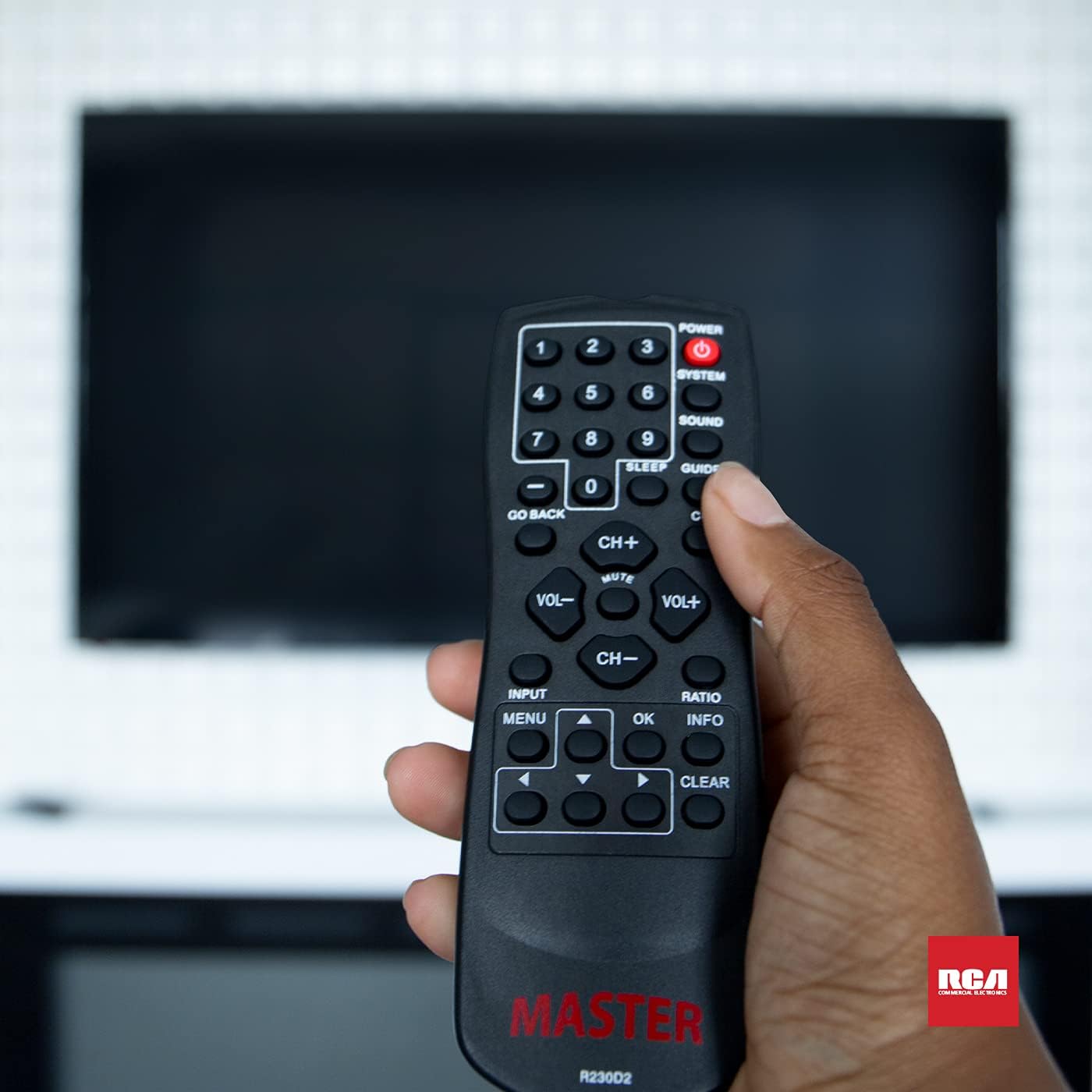
Figure 3: Using the R230D2 Master TV Remote with a television.
- PODER: Encén o apaga el televisor.
- SISTEMA: Accesses system-specific functions or menus.
- SO: Adjusts sound modes or settings.
- GUIA: Mostra la guia electrònica de programes (EPG).
- DORMIR: Sets a timer for the TV to automatically turn off.
- CC (Subtítols): Toggles closed captions on or off.
- TORNAR: Returns to the previous channel or menu screen.
- Botons numèrics (0-9): Directly input channel numbers.
- CH+ / CH-: Canvia els canals amunt o avall.
- VOL + / VOL-: Augmenta o disminueix el volum.
- MUT: Mutes or unmutes the television sound.
- ENTRADA: Selecciona la font d'entrada (per exemple, HDMI 1, AV).
- MENÚ: Opens the television's main menu.
- OK: Confirma una selecció o entra en un submenú.
- INFO: Mostra informació sobre el programa o l'entrada actual.
- RELACIÓ: Adjusts the screen aspect ratio.
- CLAR: Clears input or exits certain functions.
- Fletxes de navegació (amunt, avall, esquerra, dreta): Navega pels menús i les opcions.
Accessing Commercial Menus
The R230D2 remote is designed to access commercial menus on compatible RCA and Continu.us televisions. The specific button or sequence to access these menus may vary by TV model. Typically, this function is integrated within the SISTEMA or MENÚ buttons, or a combination thereof. Refer to your television's specific user manual for detailed instructions on accessing its commercial menu features.
Manteniment
Per garantir la longevitat i el rendiment òptim del comandament a distància, seguiu aquestes senzilles pautes de manteniment:
- Neteja: Wipe the remote with a soft, dry cloth. For stubborn dirt, slightly dampNetegeu el drap amb aigua o un netejador suau i no abrasiu. No utilitzeu productes químics agressius ni submergiu el comandament a distància en líquids.
- Substitució de la bateria: Replace batteries when the remote's response becomes sluggish or stops working. Always replace both batteries at the same time with new AA batteries. Do not mix old and new batteries, or different types of batteries.
- Emmagatzematge: Guardeu el comandament a distància en un lloc fresc i sec, allunyat de la llum solar directa, de temperatures extremes i d'alta humitat.
- Eviteu les gotes: Protegiu el comandament a distància d'impactes físics, ja que les caigudes poden danyar els components interns.
Resolució de problemes
If you encounter issues with your R230D2 remote, try the following solutions:
- El comandament a distància no respon:
- Comproveu si les piles estan inserides correctament amb la polaritat correcta.
- Substituïu les piles per unes de noves.
- Assegureu-vos que no hi hagi obstacles entre el comandament a distància i el sensor d'infrarojos del televisor.
- Make sure you are within the effective range of the TV's IR receiver.
- TV Not Turning On/Off:
- Confirm the TV is plugged into a working power outlet.
- Try turning the TV on/off using its physical power button.
- Funcions específiques que no funcionen:
- Some functions may require the TV's menu to be open or a specific input selected.
- Assegureu-vos que el comandament a distància estigui apuntant directament al televisor.
- Remote Still Not Working:
- Si el comandament a distància ha caigut recentment o ha estat exposat a la humitat, és possible que s'hagin produït danys interns.
- Contacteu amb l'assistència al client per obtenir més ajuda.
Especificacions
| Característica | Detall |
|---|---|
| Marca | Continua.us |
| Número de model | R230D2 |
| Dispositius compatibles | RCA and Continu.us Televisions |
| Tecnologia de connectivitat | infrarojos |
| Font d'alimentació | 2 piles AA (no incloses) |
| Pes de l'article | 1.76 unces |
| Dimensions del producte | 6 x 2 x 1 polzades |
| Nombre màxim de dispositius compatibles | 1 |
Garantia i Suport
Continu.us products are designed and tested to high standards. We pride ourselves on offering excellent customer support.
Atenció al client
If you require assistance with your R230D2 Master TV Remote, our support and technical team are available to help. Please reach out via phone or email for any pressing issues or questions.
For the most up-to-date contact information, please visit the official Continu.us weblloc web o consulteu l'embalatge del producte.
Informació de la garantia
Specific warranty details for the R230D2 remote are typically provided with the product packaging or can be found on the Continu.us official weblloc web. Si us plau, conserveu el comprovant de compra per a reclamacions de garantia.