Introducció
Thank you for choosing the Altec Lansing Shockwave Wireless Party Speaker. This manual provides essential information for setting up, operating, and maintaining your speaker to ensure optimal performance and longevity. Please read these instructions carefully before using the product.

Imatge: Frontal view of the Altec Lansing Shockwave speaker, highlighting its LED lights, 150W peak power, 10 hours play time, True Wireless Pairing, and multi-light party modes. A microphone is also shown as an included accessory.
Característiques principals:
- Sortida d'àudio potent: 150W peak power for clear and crisp sound.
- Llums LED dinàmiques: Built-in LED lights with 7 modes that sync with your music.
- Connectivitat versàtil: Bluetooth 5.0 for stable wireless connection, USB, and AUX inputs.
- Temps de joc ampliat: Rechargeable battery provides up to 10 hours of audio playback.
- USB Smartphone Charger: Integrated USB port to charge your mobile devices.
- Entrada de micròfon: Supports microphone for karaoke or public speaking.
- Vinculació sense fil real: Connect two Shockwave speakers for a stereo experience.
Guia de configuració
1. Carregant l’altaveu
Before first use, fully charge the speaker. Connect the provided power adapter to the DC IN port on the speaker and plug it into a standard wall outlet. The charging indicator light will illuminate. Once fully charged, the indicator may change color or turn off, depending on the model. A full charge provides up to 10 hours of playtime.
2. Encès / apagat
Manteniu premut el botó Botó d'encesa located on the control panel to turn the speaker on or off. You will hear an audible prompt indicating the power status.

Image: Close-up of the speaker's top control panel, showing inputs for MIC1, MIC2, USB-OUT, AUX, DC IN, and various control buttons including FM/AUX, BT/PAIR, LIGHTS, VOLUME-, VOLUME+, and Power.
3. Emparellament Bluetooth
- Assegureu-vos que l'altaveu estigui encès.
- The speaker will automatically enter Bluetooth pairing mode, indicated by a flashing Bluetooth indicator light.
- Al dispositiu mòbil, activeu el Bluetooth i cerqueu els dispositius disponibles.
- Selecciona "Altec Lansing Shockwave" de la llista.
- Once paired, the Bluetooth indicator light will become solid, and you will hear a confirmation tone.
4. Connecting a Microphone
Connect a microphone to either the MIC1 or MIC2 input on the control panel. Adjust the microphone volume using the MIC VOL+ i MIC VOL- controls.
Instruccions de funcionament
1. Reproducció d'àudio
- Bluetooth: Once paired, play audio from your connected device.
- Entrada AUX: Connect an audio device using a 3.5mm AUX cable to the AUX port. Press the FM/AUX botó per canviar al mode AUX.
- Ràdio FM: Premeu el botó FM/AUX button to cycle to FM radio mode. Use the volume buttons to scan for stations.
2. Ajust de volum
Utilitza el VOLUM+ i VOLUM- buttons on the control panel to adjust the speaker's master volume.
3. Modes de llum LED
Premeu el botó LLUMS button to cycle through the 7 available LED light modes. The lights will pulse and strobe with your music.
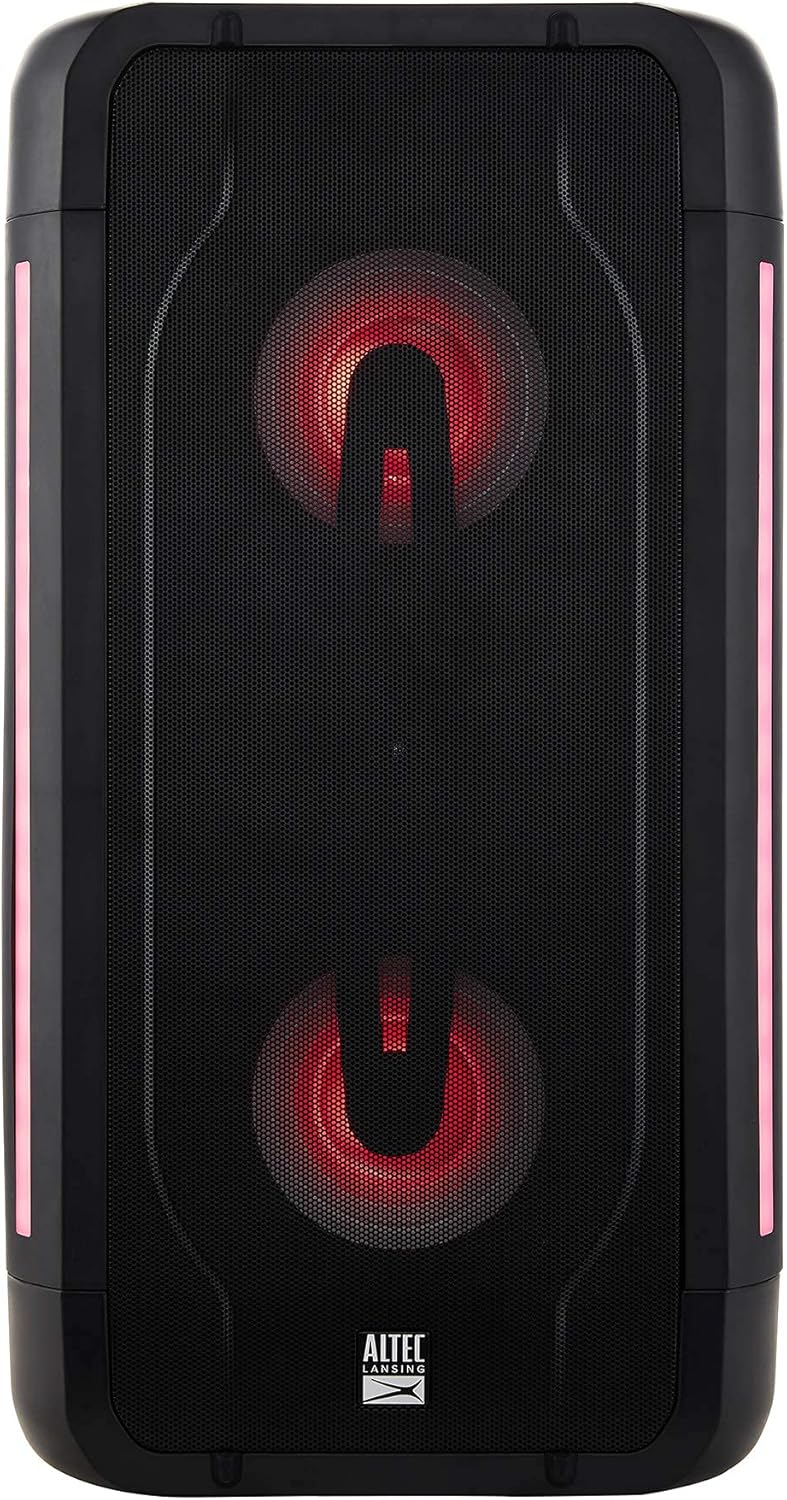
Image: The Altec Lansing Shockwave speaker illuminated with red LED lights, demonstrating one of its multi-light party modes.
4. True Wireless Pairing (TWS)
To connect two Altec Lansing Shockwave speakers for a stereo sound experience:
- Assegureu-vos que tots dos altaveus estiguin encesos i no connectats a cap dispositiu Bluetooth.
- En un altaveu, premeu i manteniu premut el botó BT / PARELL button until you hear a pairing tone.
- The speakers will automatically connect to each other. Once connected, you will hear a confirmation.
- Connect your mobile device to the primary speaker via Bluetooth as described in the "Bluetooth Pairing" section.
5. USB Smartphone Charging
Connect your smartphone or other USB-powered device to the USB-OUT (5V 1A) port on the control panel to charge it. This feature is active when the speaker is powered on.
Manteniment
- Neteja: Feu servir un drap suau i sec per netejar l'exterior de l'altaveu. No utilitzeu productes de neteja abrasius ni dissolvents.
- Emmagatzematge: Guardeu l'altaveu en un lloc fresc i sec, allunyat de la llum solar directa i de temperatures extremes.
- Cura de la bateria: Per allargar la durada de la bateria, eviteu descarregar-la completament amb freqüència. Carregueu l'altaveu regularment, fins i tot si no l'utilitzeu durant períodes prolongats.
- Resistència a l'aigua: Tot i que està dissenyat per a ús a l'aire lliure, eviteu submergir l'altaveu a l'aigua.
Resolució de problemes
| Problema | Solució |
|---|---|
| L'altaveu no s'encén. | Ensure the speaker is charged. Connect the power adapter and try again. |
| No hi ha so de l’altaveu. |
|
| L'aparellament de Bluetooth falla. |
|
| El micròfon no funciona. |
|
Especificacions
| Característica | Detall |
|---|---|
| Marca | Altec Lansing |
| Model | Ona de xoc |
| Potència de sortida | Potència màxima de 150 W |
| Tecnologia de connectivitat | Bluetooth 5.0, USB, AUX |
| Font d'alimentació | Funciona amb bateria (necessita 1 bateria de ions de liti) |
| Durada de la bateria | Fins a 10 hores |
| Entrada d'àudio | Microphone (2 inputs) |
| Sortida USB | 5V 1A (for smartphone charging) |
| Dimensions del producte (L x A x A) | 10.51 x 19.84 x 9.37 polzades |
| Pes de l'article | 13.02 lliures |
| UPC | 656942160175 |
| ASIN | B097Z48XFB |
Garantia i Suport
Garantia renovada d'Amazon
This product is part of the Amazon Renewed program. Products purchased through Amazon Renewed are professionally inspected and tested to work and look like new. If you are not satisfied with your purchase, renewed products are eligible for replacement or refund under the Amazon Renewed Guarantee. Please refer to the Amazon Renewed Guarantee terms and conditions for full details regarding returns and support for renewed products.
Contacta amb l'assistència
For further assistance or technical support, please refer to the contact information provided with your Amazon Renewed purchase or visit the Amazon Renewed support page.


