1. Introducció
Thank you for choosing the Wellue Wireless Upper Arm Blood Pressure Monitor. This device is designed for convenient and accurate blood pressure measurement at home. Please read this manual thoroughly before use to ensure proper operation and to maintain the device's longevity.
2. Informació important de seguretat
Avís:
- Aquest dispositiu està pensat només per a ús d'adults.
- No utilitzeu aquest dispositiu en nadons, nens o persones que no puguin expressar el seu consentiment.
- Consulteu el vostre metge abans d'utilitzar aquest dispositiu si teniu alguna afecció mèdica.
- Do not self-diagnose or self-treat based on measurements from this device. Always consult a healthcare professional for interpretation of results.
- Mantingueu el dispositiu i els seus components fora de l'abast dels nens i les mascotes.
- No utilitzeu el dispositiu en un vehicle en moviment.
- Do not use the device near strong electromagnetic fields.
Les declaracions sobre suplements dietètics no han estat avaluades per la FDA i no tenen la intenció de diagnosticar, tractar, curar o prevenir cap malaltia o afecció de salut.
3. Producte acabatview
3.1 Components
The Wellue Blood Pressure Monitor package includes the following items:
- Wellue Blood Pressure Monitor Unit (Model BP2A green)
- Upper Arm Cuff (suitable for arm sizes 8.6 to 16.5 inches / 22-42 cm)
- Cable de càrrega USB (tipus C)
- Manual d'usuari
- Guia ràpida
- Targeta de garantia

Figure 1: Contents inside the Wellue Blood Pressure Monitor box, including the monitor unit, cuff, charging cable, and documentation.
3.2 Característiques clau
- Medically Accurate: FDA-cleared, providing accurate readings within 30 seconds.
- Connectivitat sense fil intel·ligent: Bluetooth enabled for automatic data updates to the ViHealth app.
- Emmagatzematge de dades: Stores up to 50 blood pressure readings directly on the device. Unlimited data storage available via the ViHealth app.
- Recarregable: Built-in Lithium Polymer battery provides several months of use on a single full charge.
- Large Cuff: Designed to fit adult arm sizes ranging from 8.6 to 16.5 inches (22-42 cm).
- Compacte i portàtil: All-in-one design with automatic inflate cuff, ideal for home and travel.
- Pantalla digital: Clear OLED screen for direct viewobtenció de resultats.
- Generació d'informes: Easily share your reports in PDF & CSV formats via the app.

Figure 2: The Wellue Blood Pressure Monitor, showcasing its integrated cuff and connectivity with a smartphone application for data management.

Figure 3: Visual representation of the monitor's core features, including accuracy, cuff size, ease of use, data storage, and display type.
4. Configuració
4.1 Càrrega del dispositiu
Before first use, fully charge the blood pressure monitor using the provided USB Type-C cable. Connect the cable to the device's charging port and the other end to a standard USB power adapter (not included) or a computer USB port. The battery indicator on the screen will show charging status.
4.2 Downloading the ViHealth App
For full functionality, including unlimited data storage and report sharing, download the free ViHealth app from your device's app store (available for Android and iOS). Ensure Bluetooth is enabled on your smartphone.
4.3 Emparellament inicial (Bluetooth)
Once the app is installed and the monitor is charged, open the ViHealth app. Follow the on-screen instructions within the app to pair your Wellue Blood Pressure Monitor via Bluetooth. This typically involves turning on the monitor and selecting it from the list of available devices in the app.
5. Funcionament
5.1 Prendre una mesura
- Preparació per a la mesura: Seieu còmodament amb l'esquena recolzada i els peus ben plans a terra. Recolzeu el braç sobre una taula de manera que el maneguet quedi a l'alçada del cor. Eviteu parlar o moure-us durant la mesura.
- Aplicar el maneguet: Slide your left arm through the cuff loop. Position the cuff 1 to 2 cm (approximately 0.4 to 0.8 inches) above your elbow joint, ensuring the air tube is centered on the inside of your arm. The cuff should be snug but not too tight.
- Iniciar la mesura: Press the 'START/STOP' button on the monitor. The cuff will automatically inflate and deflate. Remain still and quiet until the measurement is complete.
- View Resultats: Your blood pressure (systolic and diastolic) and pulse rate will be displayed on the monitor's OLED screen within 30 seconds. The device can store the last 50 readings directly.

Figure 4: Proper cuff placement and posture for accurate blood pressure measurement.

Figure 5: The monitor is easy to use with a one-button measurement process.

Figura 6: Reviewing measurement results directly on the device's screen.
5.2 Using the ViHealth App
The ViHealth app enhances your monitoring experience by providing comprehensive data management and analysis.
- Automatic Data Sync: Once paired, measurements are automatically transferred to the app via Bluetooth.
- Historical Trends: View your blood pressure and pulse rate trends over time with intuitive graphs (daily, weekly, monthly).
- Unlimited Data Storage: The app allows for unlimited storage of your readings.
- Share Reports: Generate and share PDF or CSV reports of your data with healthcare professionals or family members.
- Family Tracking: Easily track historical trends for multiple family members within the app.

Figure 7: The ViHealth app interface, compatible with both Android and iOS devices, for managing blood pressure data.

Figure 8: The app provides comprehensive tools to filter data, view historical trends, and store unlimited blood pressure readings.

Figure 9: The ViHealth app allows users to track and monitor historical blood pressure trends for family members, promoting shared health management.
6. Manteniment i cura
- Neteja: Netegeu el monitor i el braçalet amb un drap suau i sec. Si cal, utilitzeu un drap lleugerament humit.ampened with water or a mild detergent, then wipe dry immediately. Do not use abrasive cleaners or immerse the device in water.
- Emmagatzematge: Store the device in a clean, dry place away from direct sunlight, extreme temperatures, and humidity. Keep it in its original packaging or a protective case when not in use.
- Cura de la bateria: Recharge the device regularly, even if not used frequently, to maintain battery health. Avoid fully discharging the battery for extended periods.
- Evita danys: Do not drop the device or subject it to strong impacts. Do not attempt to disassemble or repair the monitor yourself.
7. Solució De Problemes
If you encounter issues with your Wellue Blood Pressure Monitor, please refer to the following common solutions:
- Sense alimentació/Dispositiu no engegat: Ensure the device is fully charged. Connect it to the charging cable and allow it to charge for at least 30 minutes before attempting to turn it on again.
- Lectures inexactes: Ensure the cuff is correctly positioned and snug on your arm. Avoid talking or moving during measurement. Ensure you are relaxed and have rested for at least 5 minutes before taking a reading. Verify the cuff size is appropriate for your arm circumference.
- Problemes de connexió Bluetooth: Make sure Bluetooth is enabled on your smartphone and the ViHealth app is open. Try restarting both the monitor and your smartphone. Ensure the monitor is within range of your smartphone.
- Cuff Not Inflating/Deflating Properly: Check for any kinks or blockages in the air tube. Ensure the cuff is securely connected to the monitor.
- L'aplicació no sincronitza les dades: Confirm the device is paired correctly in the ViHealth app. Check your internet connection if the app requires it for certain features (e.g., cloud backup).
If the problem persists, please contact Wellue customer support for assistance.
8. Especificacions
| Característica | Especificació |
|---|---|
| Nom del model | BP2A green |
| Dimensions del producte | 5.9" de llargada x 1.9" d'amplada x 1.18" de gruix (15.0 x 4.8 x 3.0 cm) |
| Pes | 15.52 unces (aprox. 440 g) |
| Cuff Size (Band Size) | 8.6 - 16.5 polzades (22 - 42 cm) |
| Font d'alimentació | 1 Lithium Polymer battery (included, rechargeable) |
| Tipus de visualització | Digital (OLED) |
| Lloc de mesura | Braç superior |
| Data Storage (On-device) | Fins a 50 lectures |
| Connectivitat | Bluetooth |
| Fabricant | WELLUE |
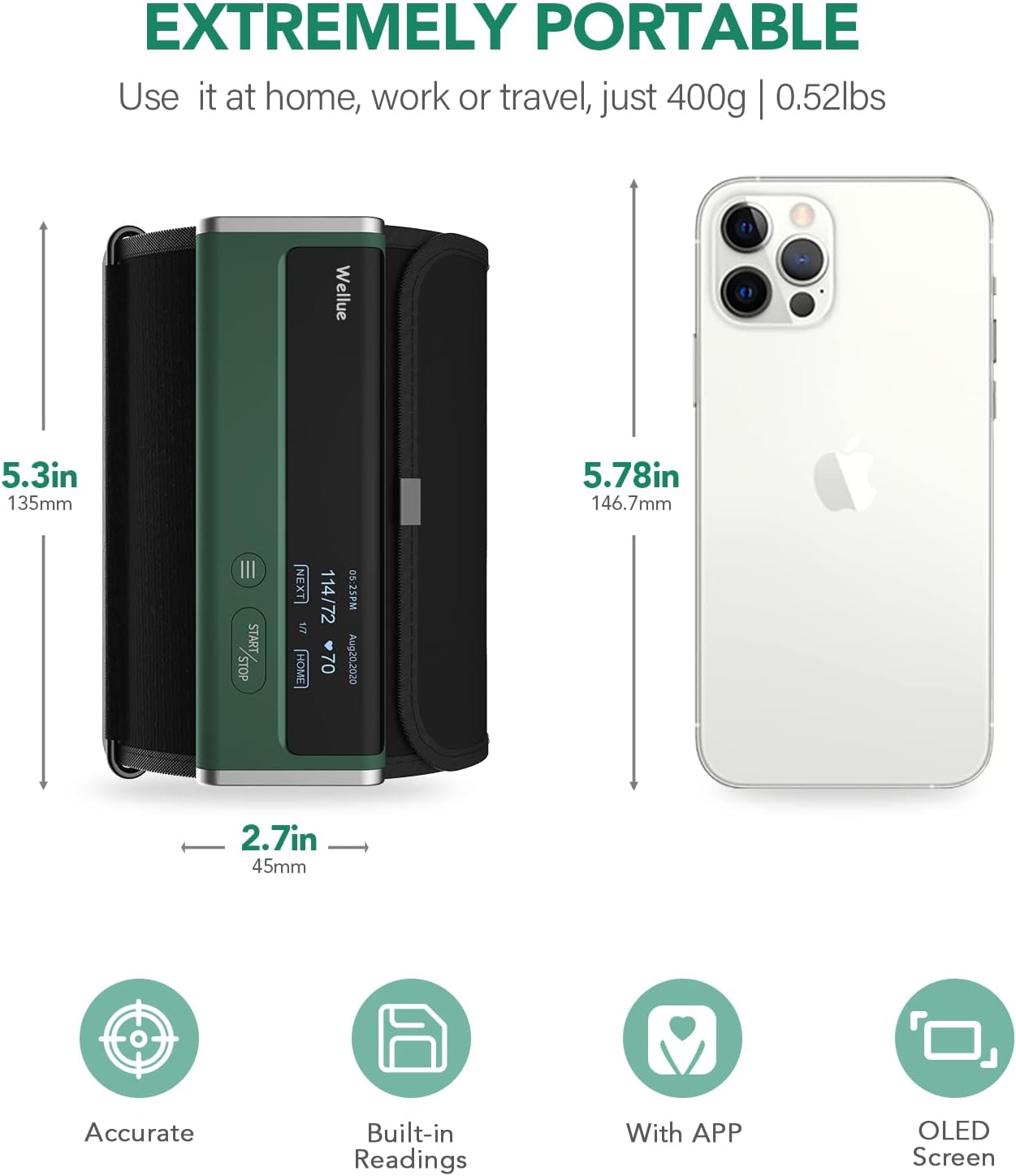
Figure 10: The compact size of the Wellue Blood Pressure Monitor, ideal for portability.

Figure 11: The monitor's portable and rechargeable design makes it suitable for use anywhere.
9. Garantia i Suport
9.1 Informació de la garantia
The Wellue Blood Pressure Monitor comes with a 1 anys de garantiaSi us plau, conserveu el comprovant de compra per a reclamacions de garantia.
9.2 Atenció al client
For any questions, technical support, or warranty inquiries, please contact our support team:
- Correu electrònic: support@getwellue.com
- Weblloc: www.getwellue.com
Our support team is dedicated to assisting you with any product-related concerns.