1. Introducció
This manual provides detailed instructions for the installation, operation, and maintenance of your Swann NVR16-8580T 16 Channel 4K Ultra HD Network Video Recorder. Please read this manual thoroughly before using the product to ensure proper setup and functionality.
2. Informació de seguretat
- Ensure the NVR is placed on a stable, level surface.
- Do not expose the NVR to water, moisture, or extreme temperatures.
- Utilitzeu només l'adaptador d'alimentació subministrat amb la unitat.
- Do not open the NVR casing; demaneu totes les tasques de manteniment a personal qualificat.
- Mantingueu les obertures de ventilació netes per evitar el sobreescalfament.
3. Contingut del paquet
Verifiqueu que tots els elements que s'enumeren a continuació siguin presents al vostre paquet:
- Swann NVR16-8580T 16 Channel NVR with 3TB Hard Drive
- Cat5e Ethernet Cable x 5 (3ft/1m x 1)
- Cable HDMI
- Adaptador d'alimentació
- Ratolí
- Guia d'inici ràpid
- Adhesius dissuasius contra el robatori
4. Producte acabatview
The Swann NVR16-8580T is a 16-channel Network Video Recorder designed for advanced surveillance. It supports 4K Ultra HD video recording and features a 3TB hard drive for extensive storage.
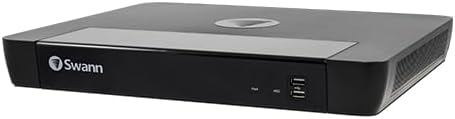
Figura 1: Davant view of the Swann NVR16-8580T Network Video Recorder. The front panel features the Swann logo on the left, status indicators, and two USB ports on the right.
4.1 Tauler frontal
- Swann Logo: Indica la marca.
- Indicadors d'estat: LEDs for power and HDD activity.
- Ports USB: For connecting a mouse, USB flash drive for backup, or other peripherals.
4.2 Rear Panel (Typical Connections)
The rear panel typically includes ports for power input, HDMI output, Ethernet (LAN), and multiple PoE (Power over Ethernet) ports for connecting cameras.
- Entrada d'alimentació: Es connecta a l'adaptador d'alimentació subministrat.
- Sortida HDMI: Connects to a monitor or TV for video display.
- Port Ethernet (LAN): Connects to your network router for internet access and remote viewing.
- PoE Camera Ports: 16 ports for connecting compatible Swann PoE cameras, providing both power and data over a single Ethernet cable.
5. Configuració
5.1 Connexió física
- Connectar un monitor: Connect the supplied HDMI cable from the NVR's HDMI output to an HDMI input on your monitor or TV.
- Connecteu el ratolí: Plug the USB mouse into one of the USB ports on the NVR's front panel.
- Connecteu-vos a la xarxa: Connecteu un cable Ethernet des del port LAN de l'NVR al vostre encaminador o commutador de xarxa.
- Connectar càmeres: Connect compatible Swann PoE cameras to the NVR's PoE ports using Ethernet cables. Ensure cameras are compatible (refer to Section 10: Compatibility).
- Connectar l'alimentació: Connecteu l'adaptador de corrent a l'entrada d'alimentació de l'NVR i després endolleu-lo a una presa de corrent. L'NVR s'encendrà automàticament.
5.2 Configuració inicial
Upon first power-on, the NVR will guide you through an initial setup wizard on the connected monitor. Follow the on-screen prompts to:
- Set up a secure password.
- Configura la configuració de data i hora.
- Adjust network settings (usually DHCP by default).
- Format the hard drive (if prompted).
5.3 Remote Access Setup (HomeSafe View aplicació)
A view les teves càmeres de forma remota en un telèfon intel·ligent o una tauleta:
- Descarrega'l gratis HomeSafe View app from your device's app store (iOS or Android).
- Open the app and follow the instructions to add your NVR by scanning the QR code displayed on your NVR's monitor (found in the network settings) or by manually entering the device ID.
- Enter the NVR's username and password when prompted.
6. Funcionament de l'enregistrador NVR
6.1 Viu View
After setup, the NVR will display a live view of all connected cameras on the monitor. You can switch between single-camera view i una graella multicàmera view utilitzant els controls en pantalla o el ratolí.
6.2 Enregistrament
L'NVR admet diversos modes d'enregistrament:
- Gravació contínua: Records 24/7. Configure schedules in the NVR settings.
- Gravació de detecció de moviment: Records only when motion is detected by the cameras. The NVR features True Detect thermal motion sensing for accurate detection of warm moving objects.
- Enregistrament programat: Registres durant moments específics del dia o de la setmana.
6.3 Reproducció
Per tornarview foo gravattage:
- Access the "Playback" menu from the NVR's main interface.
- Seleccioneu la(es) càmera(es) desitjada(es) i l'interval de data/hora.
- Use the playback controls (play, pause, fast forward, rewind) to navigate through the footage.
6.4 Funcions avançades
- 4K Video Analytics: The NVR supports advanced analytics such as Face Detection (with compatible cameras) to trigger recording and alerts.
- Dropbox Integration: Link your NVR to your Dropbox account to upload still images to the cloud, providing off-site evidence storage.
- Notificacions push: Receive instant alerts on your smartphone when motion or other events are detected.
7. Manteniment
7.1 Gestió del disc dur
The NVR's 3TB hard drive will automatically overwrite the oldest footage when full. You can configure recording settings to optimize storage usage. Regularly back up important footage to a USB drive or Dropbox.
7.2 actualitzacions de microprogramari
Revisa periòdicament el suport de Swann website for firmware updates. Keeping your NVR's firmware up-to-date ensures optimal performance and access to new features.
7.3 Neteja
Clean the exterior of the NVR with a soft, dry cloth. Do not use liquid cleaners or aerosols. Ensure ventilation openings are free from dust and debris.
8. Solució De Problemes
| Problema | Causa possible | Solució |
|---|---|---|
| No hi ha sortida de vídeo al monitor. | Loose HDMI cable, incorrect monitor input, NVR not powered on. | Check HDMI connection, select correct input on monitor, ensure NVR power adapter is connected. |
| Les càmeres no mostren el vídeo. | Loose Ethernet cable, camera not powered, incompatible camera, network issue. | Verify camera connections to PoE ports, ensure cameras are compatible, check network status. |
| No es pot accedir a l'NVR de forma remota. | NVR not connected to internet, incorrect app settings, firewall issues. | Check NVR's network connection, verify app settings and NVR device ID, consult your router's manual for port forwarding if necessary. |
| Hard drive full, no new recordings. | Hard drive has reached capacity. | The NVR is configured to overwrite oldest footage. If not, check recording settings. Back up important footage. |
9. Especificacions
| Característica | Detall |
|---|---|
| Número de model | SRNVR-168580T |
| Canals | 16 |
| Resolució de vídeo | 4K Ultra HD (8 Megapixels) |
| Capacitat del disc dur | 3 TB (Terabytes) |
| Connectivitat | Ethernet, HDMI |
| Dispositius compatibles | Swann PoE Cameras, Smartphones, Tablets |
| Sistema operatiu (aplicació) | Windows, Mac OS (for desktop client), iOS, Android (for mobile app) |
| Dimensions (L x A x A) | 12.2" x 9.25" x 2" (310 mm x 235 mm x 53 mm) |
| Pes | 7.98 lliures |
10. Compatibilitat
The Swann NVR16-8580T is designed to work exclusively with certain Swann PoE cameras. It will not work with analog BNC cameras. Please verify camera compatibility before purchasing or connecting.
Known compatible camera models include:
- SWNHD-865MSB
- SWNHD-885MSFB
- SWNHD-886MSD
- SWNHD-885MSB
- SWNHD-886MSD
- SWNHD-865MSB
Note: This list may not be exhaustive. For the most up-to-date compatibility information, please consult the Swann official website or contact Swann support.
11. Garantia i Suport
For warranty information, technical support, and further assistance, please visit the official Swann weblloc web o poseu-vos en contacte amb el seu departament d'atenció al client. Conserveu el rebut de compra com a comprovant de compra.


