1. Introducció
Thank you for choosing the Grundig MUSIC6500B Portable DAB+/Bluetooth Radio. This manual provides essential information for the safe and efficient operation of your device. Please read these instructions carefully before use and retain them for future reference.
The Grundig MUSIC6500B combines superior reception quality with a modern design, offering DAB+, FM RDS, and Bluetooth 5.0 connectivity. Enjoy your favorite radio stations or stream music wirelessly with ease.
2. Informació de seguretat
- Font d'alimentació: Use only the specified power adapter or appropriate batteries. Do not mix old and new batteries, or different types of batteries.
- Aigua i humitat: Do not expose the radio to rain, moisture, or dripping/splashing liquids. Keep it away from water sources like bathtubs, sinks, or swimming pools.
- Calor: Do not place the radio near heat sources such as radiators, heat registers, stoves, or other apparatus (including amplificadors) que produeixen calor.
- Ventilació: Assegureu-vos que hi hagi una ventilació adequada. No bloquegeu cap obertura de ventilació.
- Neteja: Unplug the radio from the power outlet before cleaning. Use a soft, dry cloth. Do not use liquid cleaners or aerosol cleaners.
- Manteniment: No intenteu atendre aquest producte vosaltres mateixos. Consulteu tots els serveis a personal de servei qualificat.
3. Contingut del paquet
Si us plau, comproveu que els següents elements estiguin inclosos al vostre paquet:
- Grundig MUSIC6500B Portable DAB+/Bluetooth Radio
- Power Adapter (if included, otherwise battery operation is assumed)
- Manual d'usuari (aquest document)
4. Producte acabatview
Familiarize yourself with the main components and controls of your Grundig MUSIC6500B radio.
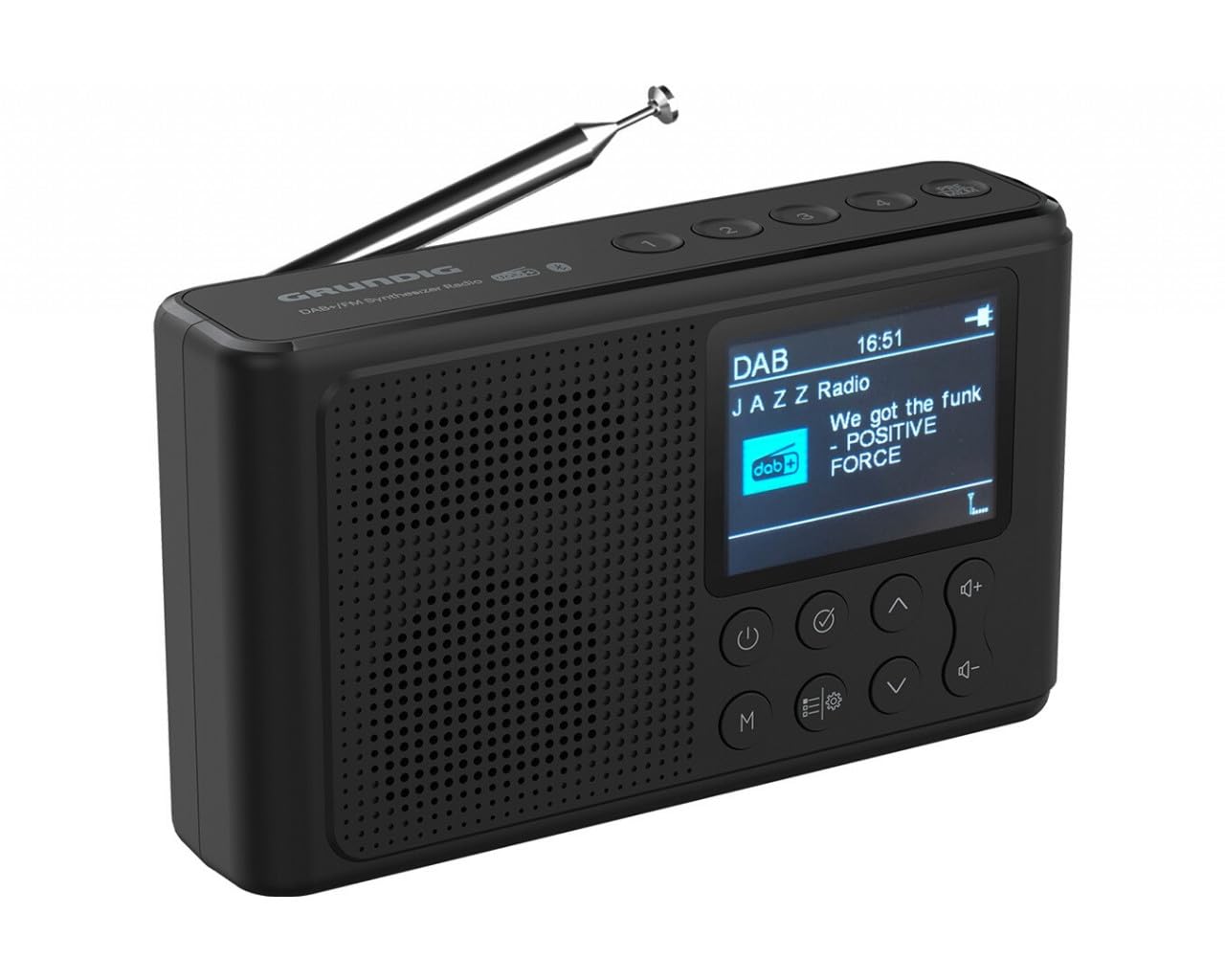
Figura 1: Frontal view of the Grundig MUSIC6500B radio. The speaker is on the left, the 2.4-inch LCD screen on the right, and control buttons are located below the screen.
Controls i característiques:
- Antena: Extendable telescopic antenna for optimal radio reception.
- Ponent: Integrated speaker with 2.5W output and passive bass radiator.
- Pantalla LCD: 2.4-inch screen with brightness adjustment for clear information display.
- Botó d'encesa: Encén/apaga la ràdio.
- Botó de mode (M): Switches between DAB+, FM, and Bluetooth modes.
- Botons de navegació: Up/Down arrows for tuning or menu navigation.
- Botó Selecciona/Intro: Confirma les seleccions.
- Botons de volum: Ajusta el volum d'àudio.
5. Configuració
5.1 Encès
The Grundig MUSIC6500B can be powered by an AC adapter or batteries.
- Alimentació CA: Connect the provided power adapter to the DC IN port on the radio and then to a wall outlet.
- Potència de la bateria: Open the battery compartment cover on the back of the radio. Insert the required number of AA batteries (not included), ensuring correct polarity (+/-). Close the cover securely.
5.2 Ajust de l'antena
For optimal radio reception, fully extend the telescopic antenna. Adjust its position for the best signal quality.
5.3 Initial Scan (DAB+ and FM)
- Premeu el botó Poder botó per encendre la ràdio.
- If this is the first time using the radio or after a factory reset, it will automatically perform a full scan for DAB+ stations. This may take a few minutes.
- Once the scan is complete, the radio will tune to the first available DAB+ station.
- To perform an FM scan, switch to FM mode using the Mode (M) button. Then, long-press the Seleccioneu/Enter button to initiate an auto-scan for FM stations.
6. Instruccions de funcionament
Mode de ràdio 6.1 DAB+
- Premeu el botó Mode (M) button until "DAB" appears on the display.
- Utilitza el Amunt/Avall navigation buttons to browse through the available DAB+ stations.
- Premeu el botó Seleccioneu/Enter per confirmar l'emissora que heu triat.
- To perform a new scan, long-press the Seleccioneu/Enter botó.
6.2 Mode de ràdio FM
- Premeu el botó Mode (M) fins que aparegui "FM" a la pantalla.
- Sintonització automàtica: Premeu llargament el botó Amunt/Avall navigation buttons to automatically scan for the next available station.
- Sintonització manual: Premeu breument Amunt/Avall navigation buttons to fine-tune the frequency step-by-step.
- The radio supports FM RDS, displaying station information where available.
6.3 Mode Bluetooth
Stream audio wirelessly from your Bluetooth-enabled device (e.g., smartphone, tablet).
- Premeu el botó Mode (M) button until "Bluetooth" appears on the display. The radio will enter pairing mode, indicated by a flashing Bluetooth icon.
- On your external device, enable Bluetooth and search for available devices.
- Select "Grundig MUSIC6500B" from the list of devices.
- Once paired, the Bluetooth icon on the radio's display will stop flashing, and you can begin playing audio from your device.
- The Bluetooth range is up to 30 meters (open field).
6.4 Control de volum
Utilitza el Puja el volum (+) i Baixar el volum (-) botons per ajustar el volum d'escolta.
6.5 Presets (Saving and Recalling Stations)
The radio supports 30 FM and 30 DAB+ station presets.
- Per desar una configuració predefinida:
- Tune to the desired DAB+ or FM station.
- Premeu llargament el botó Preestablert button (often labeled with a star or number).
- Utilitza el Amunt/Avall botons per seleccionar un número preestablert (1-30).
- Premeu Seleccioneu/Enter to save the station.
- Per recuperar un valor predefinit:
- Premeu breument Preestablert botó.
- Utilitza el Amunt/Avall buttons to navigate through your saved presets.
- Premeu Seleccioneu/Enter to tune to the selected preset station.
6.6 Configuració de la pantalla
The 2.4-inch LCD display features adjustable brightness. Refer to the radio's menu options (usually accessed via a 'Menu' or 'Settings' button, or long-pressing a navigation button) to find and adjust the display brightness to your preference.
7. Manteniment
- Neteja: Wipe the radio's surface with a soft, dry, lint-free cloth. Do not use abrasive cleaners, waxes, or solvents.
- Cura de la bateria: Si no heu d'utilitzar la ràdio durant un període prolongat, traieu-ne les piles per evitar fuites i corrosió.
- Emmagatzematge: Guardeu la ràdio en un lloc fresc i sec, allunyat de la llum solar directa i de temperatures extremes.
8. Solució De Problemes
| Problema | Causa possible | Solució |
|---|---|---|
| Sense poder | Adaptador de CA no connectat; piles esgotades o inserides incorrectament. | Ensure AC adapter is securely connected. Replace batteries or check polarity. |
| Mala recepció de ràdio | Antena no estesa; Zona de senyal feble; Interferències. | Fully extend and adjust the antenna. Try moving the radio to a different location. Avoid placing near other electronic devices. |
| El dispositiu Bluetooth no s'aparella | Radio not in pairing mode; Device too far; Bluetooth off on external device. | Ensure radio is in Bluetooth pairing mode. Move device closer. Enable Bluetooth on your external device. |
| Sense so | Volum massa baix; Silenciament activat; Mode incorrecte seleccionat. | Increase volume. Check if mute is active. Ensure correct mode (DAB+, FM, Bluetooth) is selected. |
9. Especificacions

Figure 2: Dimensions of the Grundig MUSIC6500B radio.
| Marca: | Grundig |
| Número de model: | GDB1090 (MUSIC6500B) |
| Color: | Black (Schwarz) |
| Tecnologia d'afinació: | DAB+, FM RDS |
| Bandes de ràdio admeses: | FM/MW (DAB+ also supported) |
| Tecnologia de connectivitat: | Bluetooth (V5.0) |
| Rang Bluetooth: | Fins a 30 metres |
| Característica especial: | Portàtil |
| Visualització: | 2.4-inch LCD with brightness adjustment |
| Sortida d'àudio: | 2.5 W (with integrated passive bass radiator) |
| Presets: | 30 FM stations, 30 DAB+ stations |
| Font d'alimentació: | AC adapter or Battery powered (AA batteries) |
| Dimensions (aprox.): | 15.1 cm (Length) x 8.8 cm (Height) x 3.9 cm (Depth) |
| Components inclosos: | Manual d'usuari |
| País d'origen: | Alemanya |
10. Garantia i Suport
For warranty information and customer support, please refer to the warranty card included with your product or visit the official Grundig weblloc web. Conserveu el comprovant de compra per a qualsevol reclamació de garantia.
If you encounter any issues not covered in this manual, please contact Grundig customer service for assistance.


