1. Introducció
Thank you for choosing the Cherub WST-680 Rechargeable Clip-on Guitar Tuner. This compact and versatile tuner is designed to provide accurate tuning for a variety of string instruments, including guitar, bass, and ukulele. Its rechargeable battery and clear LCD display make it an essential tool for musicians. Please read this manual carefully to ensure proper use and optimal performance of your new tuner.

Figura 1: Frontal view of the Cherub WST-680 Tuner, showing the display and clip mechanism.
2. Característiques clau
- Modes d'afinació: Chromatic, Guitar, Bass, Ukulele.
- Intuitive Power Control: Simply flip the tuner up to power it on, and push it down to turn it off.
- Bateria recarregable: Equipped with a Li-ion battery, providing up to 10 hours of continuous use.
- Alta precisió: Built-in high-sensitivity piezo sensors ensure ±1 cent accuracy.
- Large Colored LCD Display: Offers clear and easy-to-read tuning information.
3. Contingut del paquet
The Cherub WST-680 package includes:
- 1 x Cherub WST-680 Clip-on Tuner
- 1 x cable de càrrega USB-C
- 1 x Manual d'usuari (aquest document)
4. Configuració
4.1 Connectar l'afinador
The WST-680 features a robust clip designed for secure attachment to your instrument's headstock. Open the clip by pressing the levers, then position it firmly on the headstock. Ensure the tuner is stable and the display is visible from your playing position.
4.2 Engegada/apagada
The tuner utilizes a convenient flip mechanism for power control:
- Al poder ON, simply flip the display unit upwards.
- Al poder OFF, push the display unit downwards.
4.3 Ajust de Viewangle ing
The tuner's display head can rotate 360 degrees and pivot forwards and backwards, allowing you to adjust the viewing angle for optimal visibility. Gently rotate or pivot the display to your preferred position.
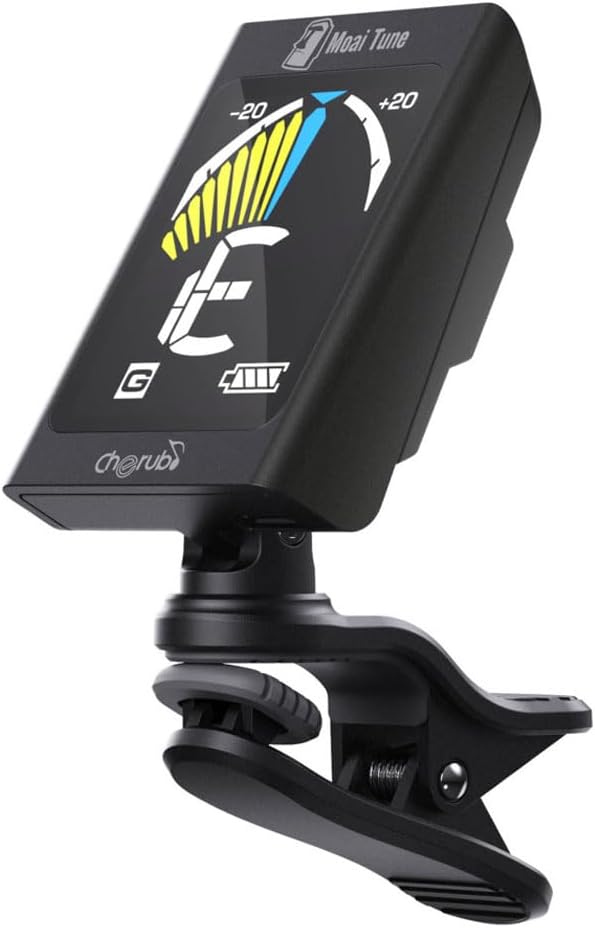
Figure 2: The tuner attached to a guitar headstock, demonstrating its compact size and adjustable angle.
5. Funcionament
5.1 Selecting Tuning Mode
After powering on the tuner, press the 'M' (Mode) button to cycle through the available tuning modes:
- C (Chromatic): Tunes all notes.
- G (Guitar): Standard guitar tuning.
- B (Bass): Standard bass guitar tuning.
- U (Ukulele): Standard ukulele tuning.
5.2 Afinar l'instrument
Once the desired mode is selected:
- Polsa una sola corda del teu instrument.
- The tuner's display will show the detected note and a needle/bar indicator.
- Adjust the tuning peg of the string until the needle/bar is centered and the display turns green. If the needle is to the left (red), the note is flat; if it's to the right (yellow), the note is sharp.
- Repeat for all strings.

Figure 3: The tuner display indicating a note being tuned, with the needle centered for accurate pitch.
6. Carregant la bateria
The Cherub WST-680 is equipped with a rechargeable Li-ion battery. To charge the tuner:
- Locate the USB-C charging port on the side of the tuner.
- Connect the provided USB-C cable to the tuner and the other end to a standard USB power source (e.g., computer, USB wall adapter).
- L'indicador de bateria a la pantalla mostrarà l'estat de càrrega.
- Una càrrega completa proporciona aproximadament 10 hores d'ús.

Figure 4: Close-up of the USB-C charging port on the tuner.
7. Manteniment
To ensure the longevity and performance of your Cherub WST-680 Tuner:
- Clean the tuner with a soft, dry cloth. Avoid using abrasive cleaners or solvents.
- Store the tuner in a cool, dry place away from direct sunlight and extreme temperatures.
- Eviteu deixar caure l'afinador o sotmetre'l a impactes forts.
8. Solució De Problemes
8.1 Tuner Not Powering On
- Ensure the tuner is flipped upwards to the ON position.
- Check the battery level. If low, charge the tuner using the provided USB-C cable.
8.2 Inaccurate Tuning
- Assegureu-vos que l'afinador estigui ben enganxat al capçal de l'instrument.
- Verify that the correct tuning mode (Chromatic, Guitar, Bass, Ukulele) is selected for your instrument.
- Tune in a quiet environment to minimize external vibrations.
8.3 Resetting the Tuner
If the tuner is unresponsive or behaving erratically, a reset may resolve the issue. Locate the small 'RESET' button on the back of the tuner (often a pinhole) and gently press it with a thin object like a paperclip.

Figure 5: Close-up of the back of the tuner, highlighting the 'RESET' button.
9. Especificacions
| Característica | Especificació |
|---|---|
| Número de model | WST-680 |
| Modes de sintonització | Cromàtica, Guitarra, Baix, Ukelele |
| Precisió | ± 1 cèntim |
| Tipus de bateria | Ió de liti recarregable |
| Durada de la bateria | Fins a 10 hores (aprox.) |
| Port de càrrega | USB-C |
| Pes de l'article | 1.17 unces |
| Dimensions del producte | 2.05 x 1.46 x 1.38 polzades |
10. Garantia i Suport
Cherub products are designed for reliability and performance. For warranty information, technical support, or any inquiries regarding your WST-680 tuner, please refer to the official Cherub weblloc web o poseu-vos en contacte amb el vostre distribuïdor local. Conserveu el rebut de compra com a comprovant de compra per a reclamacions de garantia.