1. Introducció
This manual provides detailed instructions for the installation, operation, and maintenance of your AWESAFE Android 10.0 Car Radio. Please read this manual thoroughly before using the product to ensure proper function and safety. Keep this manual for future reference.
2. Informació de seguretat
- Instal·lació professional recomanada: A causa de la complexitat dels sistemes elèctrics dels cotxes, es recomana la instal·lació professional per evitar danys a la unitat o al vehicle.
- Compatibilitat de vehicles: Ensure this unit is compatible with your Nissan Qashqai J10 (2006-2013) before installation. Incorrect fitment may cause issues.
- Font d'alimentació: Connecteu la unitat només a una font d'alimentació de 12 V CC amb un born negatiu a terra.
- Eviteu les distraccions: No utilitzeu la unitat o view vídeos mentre condueixes, ja que això pot provocar accidents.
- Temperatura: Eviteu exposar la unitat a temperatures extremes o a la llum solar directa durant períodes prolongats.
3. Producte acabatview
The AWESAFE Android 10.0 Car Radio features a 9-inch touchscreen display and is designed to integrate seamlessly into Nissan Qashqai J10 models from 2006 to 2013. It offers advanced connectivity and entertainment options.
Característiques principals:
- Sistema operatiu Android 10.0
- 9-inch Capacitive Touchscreen
- 2GB RAM + 32GB Internal Storage
- Integrated WiFi and GPS Navigation
- Bluetooth per a trucades de mans lliures i transmissió d'àudio
- DSP (Digital Signal Processor) for enhanced audio
- RDS (Radio Data System) for FM/AM Radio
- Connectivitat USB
- Support for MirrorLink, Wireless CarPlay, and Android Auto
- Compatibilitat amb el control del volant
- Parking Assistance (requires optional rear camera)

Imatge 3.1: acabatview of the AWESAFE 9-inch car radio and its main functionalities including 2GB+32GB memory, Android 10.0, GPS, FM/AM/RDS, parking assistance, CarPlay/Android Auto, Bluetooth, USB, WiFi, and steering wheel controls.
4. Instal·lació
This section provides general guidelines for installing your AWESAFE car radio. For specific wiring diagrams and detailed steps, refer to the separate installation guide provided with your unit or consult a professional installer.
4.1 Comprovació de compatibilitat
Ensure your vehicle is a Nissan Qashqai J10 manufactured between 2006 and 2013. The unit is designed to fit the dashboard of these specific models.

Image 4.1: Visual representation of the car radio installed in a Nissan Qashqai J10 dashboard, showing the fitment.
4.2 Pre-Installation and Post-Installation View
The images below illustrate the appearance of the dashboard before and after the installation of the AWESAFE car radio.

Image 4.2: A split image showing the original car radio in a Nissan Qashqai J10 dashboard (Before installation) and the new AWESAFE Android 10.0 unit installed (After installation).
4.3 General Installation Steps (Summary):
- Desconnecta la bateria: Abans d'arrencar, desconnecteu el terminal negatiu de la bateria del vehicle per evitar curtcircuits.
- Eliminar la unitat antiga: Traieu amb cura la ràdio del cotxe i el revestiment del tauler de control existents.
- Connecteu l'arnès de cablejat: Connect the provided wiring harness to the vehicle's factory harness. Ensure all connections are secure.
- Connecteu les antenes: Attach the GPS antenna, WiFi antenna, and radio antenna. Position the GPS antenna in a location with a clear view del cel.
- Instal·lar una unitat nova: Mount the AWESAFE car radio into the dashboard opening.
- Torneu a connectar la bateria: Reconnect the vehicle's battery and test the unit.
- Torneu a muntar: Reinstall any removed trim pieces.
5. Instruccions de funcionament
5.1 Encès/Apagat
- Encès: Turn on your vehicle's ignition. The unit should power on automatically. If not, press the power button on the unit.
- Apagar: Turn off your vehicle's ignition. The unit will power off automatically.
5.2 Interfície de pantalla tàctil
The unit features a responsive 9-inch touchscreen. Navigate through menus and applications by tapping, swiping, and pinching gestures, similar to a smartphone or tablet.
5.3 Configuració inicial
- Idioma: Select your preferred language from the settings menu.
- Data i hora: Estableix la data i l'hora correctes. Sovint això es pot sincronitzar automàticament mitjançant GPS o connexió de xarxa.
- Connexió WiFi: Connect to an available WiFi network to enable online features and software updates.
6. Característiques i funcions principals
6.1 Navegació GPS
The unit comes with built-in GPS navigation and pre-installed European maps. It supports both online and offline navigation applications.

Image 6.1: The GPS navigation interface displaying a map, with options to explore nearby, commute, save locations, and check for updates.
6.2 Connectivitat Bluetooth
Connecta el teu telèfon intel·ligent mitjançant Bluetooth per a trucades de mans lliures i transmissió d'àudio sense fil.
- Maridatge: Go to the Bluetooth settings on the unit and your phone. Cerca available devices and select the car radio. Confirm the pairing code if prompted.
- Trucades mans lliures: Make and receive calls directly from the car radio screen.
- Transmissió d'àudio: Reprodueix música del telèfon a través dels altaveus del cotxe.

Image 6.2: The Bluetooth interface on the car radio screen, showing a dial pad and call options, alongside icons for WiFi and Bluetooth connectivity.
6.3 WiFi / WLAN
Connect the car radio to a WiFi hotspot (e.g., from your smartphone or a dedicated car hotspot) to access online services, stream media, and download apps.
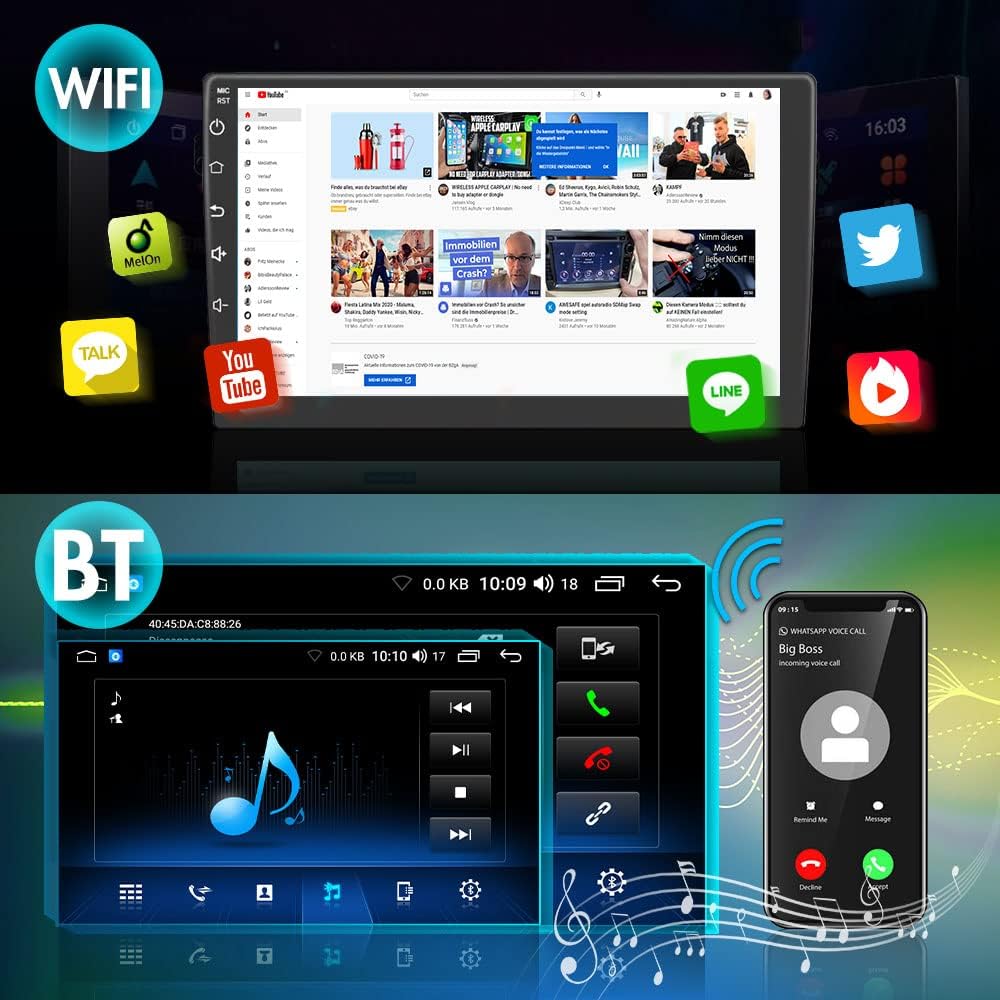
Image 6.3: The car radio display showing a web browser and various application icons, demonstrating WiFi connectivity for online content.
6.4 MirrorLink
MirrorLink allows you to display your smartphone's screen directly onto the car radio's display, enabling access to compatible apps and content.

Image 6.4: An illustration of the MirrorLink function, where a smartphone's display is duplicated on the car radio screen, showing a football match.
6.5 CarPlay sense fil i Android Auto
Enjoy seamless integration with your iPhone or Android device using Wireless CarPlay and Android Auto. These features support voice control (SIRI), real-time navigation, online music applications, phone calls, and screen mirroring.
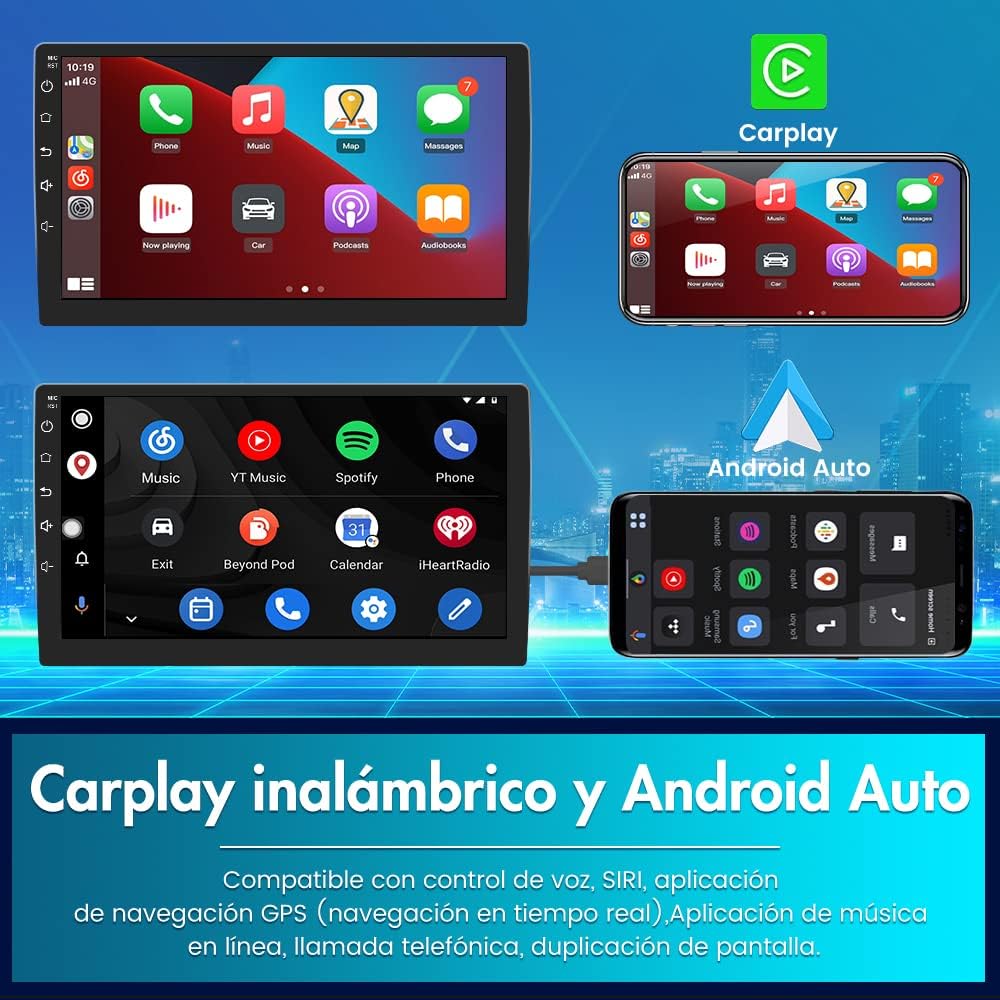
Image 6.5: Displays of both CarPlay and Android Auto interfaces on the car radio screen, along with a smartphone showing its mirrored content.
6.6 Comandaments al volant
The unit supports input from your vehicle's steering wheel controls, allowing you to manage the car radio's functions (e.g., volume, track change, answer/end calls) without taking your hands off the wheel.

Image 6.6: An illustration showing a vehicle's steering wheel with highlighted control buttons and their corresponding functions on the car radio display, such as call, hang up, previous track, next track, volume up, and volume down.
6.7 Parking Assistance
When a compatible rear camera (not included) is connected via an RCA connector, the unit will automatically display parking assistance lines on the screen when the vehicle is in reverse gear.

Image 6.7: The car radio screen showing a rear camera view of a parking garage with dynamic parking assistance lines overlaid.
6.8 DSP (Digital Signal Processor) and Multimedia
The integrated DSP allows for advanced audio customization, including equalizer settings, to optimize your listening experience. The unit supports various multimedia formats for audio and video playback.

Image 6.8: The car radio display showing an equalizer interface with various frequency bands and controls for sound adjustment, indicating DSP functionality.
7. Solució De Problemes
If you encounter issues with your AWESAFE car radio, refer to the following common problems and solutions:
| Problema | Causa possible | Solució |
|---|---|---|
| La unitat no s'encén. | Cablejat incorrecte; Fusible fundit; Problema amb la bateria del vehicle. | Check power connections and fuses. Ensure vehicle battery is charged. Consult a professional if unsure. |
| Sense so. | Cables d'altaveu desconnectats; Volum massa baix; Silenciament activat. | Check speaker connections. Increase volume. Deactivate mute function. |
| Senyal GPS perdut o inexacte. | Antena GPS obstruïda o mal col·locada. | Assegureu-vos que l'antena GPS tingui una visió clara view del cel. Comproveu la connexió de l'antena. |
| Problemes de connexió Bluetooth. | El dispositiu no està en mode d'emparellament; Interferències; Procés d'emparellament incorrecte. | Assegureu-vos que tots dos dispositius estiguin en mode d'emparellament. Suprimiu els emparellaments anteriors i torneu-ho a provar. Acosteu-vos a la unitat. |
| Els comandaments del volant no funcionen. | Incorrect wiring; Not configured in settings. | Verify wiring connections for steering wheel controls. Access the unit's settings to configure the controls. |
| Clock shows incorrect time. | Time zone incorrect; GPS time sync off. | Adjust time zone settings. Ensure GPS is active for automatic time synchronization. |
If the problem persists after attempting these solutions, please contact AWESAFE customer support for further assistance.
8. Especificacions
Technical specifications for the AWESAFE Android 10.0 Car Radio (Model B098L4YB1C):
- Marca: IMPRESSIONANT
- Sistema operatiu: Android 10.0
- Memòria: 2GB RAM + 32GB Internal Storage
- Mida de la pantalla: 9 polzades
- Tecnologia de connectivitat: Bluetooth, USB, Wi-Fi
- Mètode de control: Toca
- Dispositius compatibles: Smartphone
- Tipus de servei de vehicles: Car (Nissan Qashqai J10 2006-2013)
- Mapping Type: Europe (Pre-installed)
- Dimensions del paquet: 48.9 x 27.4 x 19.9 cm
- Pes de l'article: 2.46 kg
- ASIN: B098L4YB1C
- UPC: 792119548985
9. Manteniment
9.1 Neteja de la pantalla
To clean the touchscreen, gently wipe it with a soft, lint-free cloth. For stubborn smudges, slightly dampNetegeu el drap amb aigua o un netejador de pantalles. Eviteu productes químics agressius o materials abrasius.
9.2 Actualitzacions de programari
Periodically check for software updates via the unit's settings menu when connected to WiFi. Updates can improve performance, add new features, and fix bugs.
9.3 Atenció general
- Eviteu vessar líquids sobre la unitat.
- Do not expose the unit to extreme heat or cold.
- Protegiu la pantalla d'objectes punxeguts per evitar ratllades.
10. Garantia i Suport
AWESAFE products are designed for quality and reliability. For warranty information, please refer to the warranty card included with your product or visit the official AWESAFE website. For technical support or assistance with any issues not covered in this manual, please contact AWESAFE customer service.


