1. Introducció i finalview
The Swann Xtreem Wireless Security Camera is designed for comprehensive surveillance, offering 1080p Full HD video for both indoor and outdoor environments. It features a 110° wide-angle lens, True Detect™ thermal/heat-sensing motion detection, night vision, two-way audio, and smart alerts. The camera is powered by a rechargeable lithium battery and offers flexible storage options.
- High-Quality 1080p HD Video: Provides clear 1080p HD video with a 110° wide-angle lens for extensive coverage.
- Dependable Power & Easy Setup: Features a rechargeable 13,200mAh Lithium Battery and connects via 2.4GHz Wi-Fi (up to 65ft/20m range). Installation is simplified with a magnetic base.
- Innovative True Detect & Night Vision: Utilizes True Detect Heat & Motion-Sensing technology for accurate detection and reduced false alarms. Night vision extends up to 26ft/8m.
- Interactive Features & Siren: Includes two-way audio for communication and an integrated siren for deterrence.
- Convenient Storage & Smart Compatibility: Supports secure cloud storage and MicroSD card storage (16GB card included, expandable up to 64GB). Compatible with Hey Google & Alexa via the Swann Security App.
2. Què hi ha a la caixa
The Swann Xtreem Wireless Security Camera package includes the following components:
- Swann Xtreem Security Camera
- Suport de muntatge magnètic
- Targeta Micro SD de 16 GB
- Cable de càrrega USB a Micro USB
- Cargols i endolls de muntatge
- Instruccions de funcionament (Guia d'inici ràpid)
- Adhesius dissuasius contra el robatori
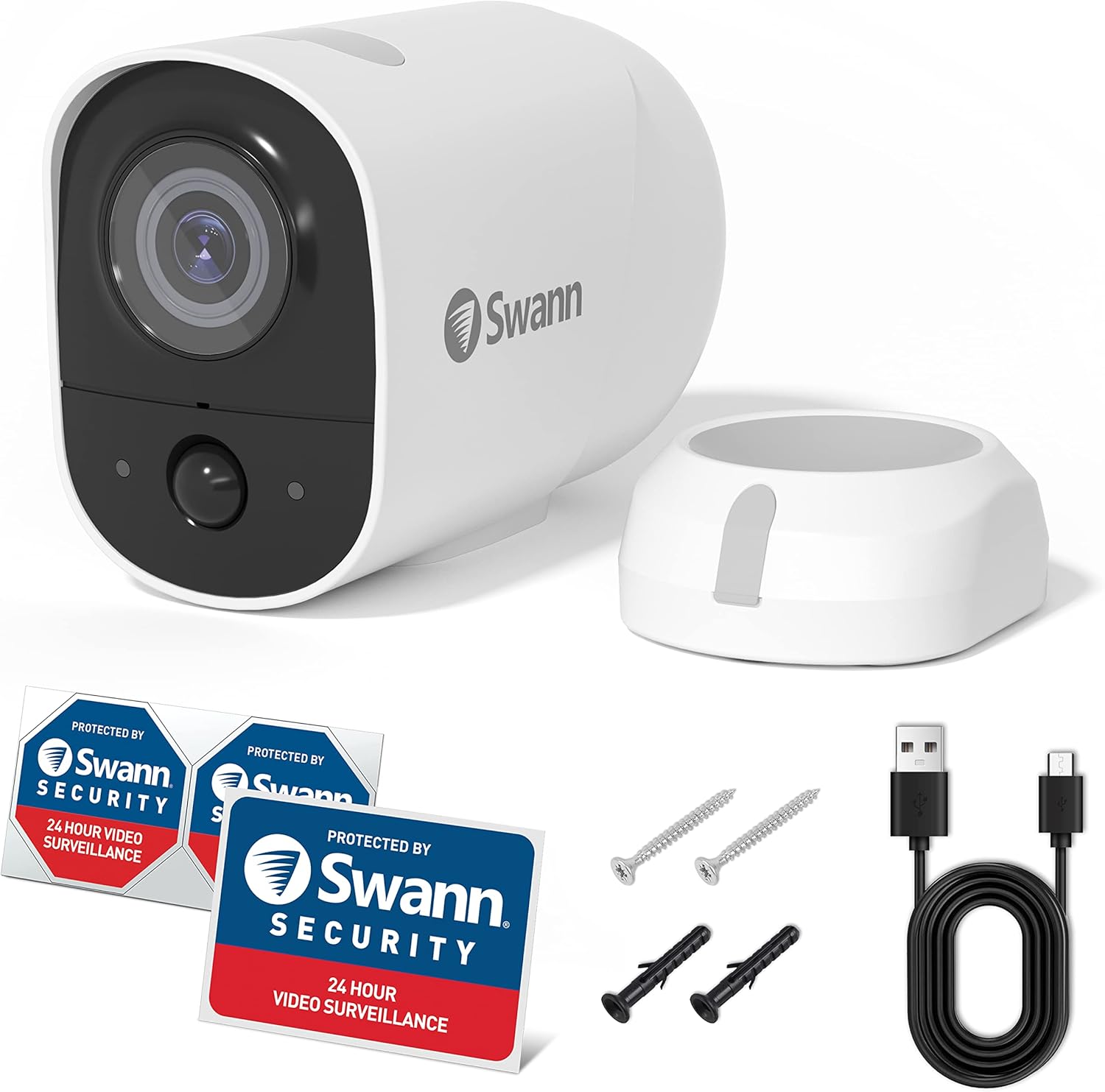
Image: Swann Xtreem Wireless Security Camera with its magnetic mounting stand, USB charging cable, and other accessories.
Vídeo: Aquest vídeo ofereix una visió detalladaview of the contents included in the Swann Xtreem Security Camera package, showing each item and its purpose.
3. Instruccions de configuració
Follow these steps to set up your Swann Xtreem Wireless Security Camera:
- Carregar la càmera: Before first use, fully charge the camera for at least 2 hours using the included USB to Micro USB charging cable. The LED indicator will turn solid blue during charging and turn off when fully charged. A 5V 2.1 Amp or higher DC power supply is recommended for fastest charging.
- Download the Swann Security App: Download the latest version of the "Swann Security" app from the Apple App Store (for iOS) or Google Play Store (for Android).
- Crea/Inicieu la sessió al compte: Launch the app and either register for a new account or sign in with an existing one.
- Connecta't a Wi-Fi: Ensure your smartphone is connected to a 2.4GHz Wi-Fi network. The camera is only compatible with 2.4GHz Wi-Fi networks.
- Vincular el dispositiu:
- In the app, tap the "Pair Device" icon.
- Follow the on-screen prompts. You may need to scan the QR code located on the camera.
- Verify if the camera's blue LED is slowly flashing, indicating it's in pairing mode. If not, press and hold the reset button with a paperclip to power off, then press the set button for about a second to reboot and enter pairing mode.
- The app will attempt to automatically connect to the camera's hotspot and then configure it to your home Wi-Fi network.
- Anomena el teu dispositiu: Give your camera a helpful name (e.g., "Front Door," "Backyard").
- Muntar la càmera:
- The camera can be placed on any flat surface or mounted to a wall using the included magnetic stand.
- For magnetic mounting, insert the provided 4x18mm screw and plug (if necessary) into your mounting surface, leaving a bit of the thread exposed. Align the keyhole on the magnetic stand and slide it down to secure.
- For a more permanent installation, remove the rubber pads from the magnetic stand to reveal screw holes. Insert the provided 2.8x21mm screws and secure it to the surface, using wall anchors if needed. Replace the rubber plugs.
- Align the camera with the mounting base and adjust for the best field of view.
Video: This video demonstrates the step-by-step setup process for the Swann Xtreem Security Camera, including charging, app installation, pairing, and mounting.

Image: A hand attaching the Swann Xtreem Wireless Security Camera to its magnetic wall mount, illustrating the wire-free installation.
4. Instruccions de funcionament
Once your Swann Xtreem camera is set up and connected, you can begin monitoring your property. The Swann Security App provides access to live viewing, recording, and playback features.
- Viu View: Access real-time video feed from your camera through the Swann Security App.
- 1080p Full HD Day & Night: The camera captures clear 1080p video during the day and utilizes infrared LEDs for night vision up to 26ft (8m).
- True Detect™ Heat & Motion-Sensing: The camera's advanced sensor detects heat and motion from significant objects like people and cars, triggering recordings and smart alerts to your phone. This reduces false alarms from minor movements.
- Àudio bidireccional: Use the built-in microphone and speaker to communicate with visitors or deter intruders directly through the app.
- Alertes intel·ligents: Receive push notifications on your smartphone when motion or heat is detected.
- Control de veu: The camera is compatible with Amazon Alexa and Hey Google, allowing for hands-free viewen pantalles intel·ligents compatibles.
- IFTTT Compatibility: Integrate your camera with other smart home devices using IFTTT (If This Then That) to create automated actions based on camera detections.

Image: The Swann Xtreem camera demonstrating its True Detect™ PIR Heat-Sensing Detection, identifying a person and a car in its field of view.
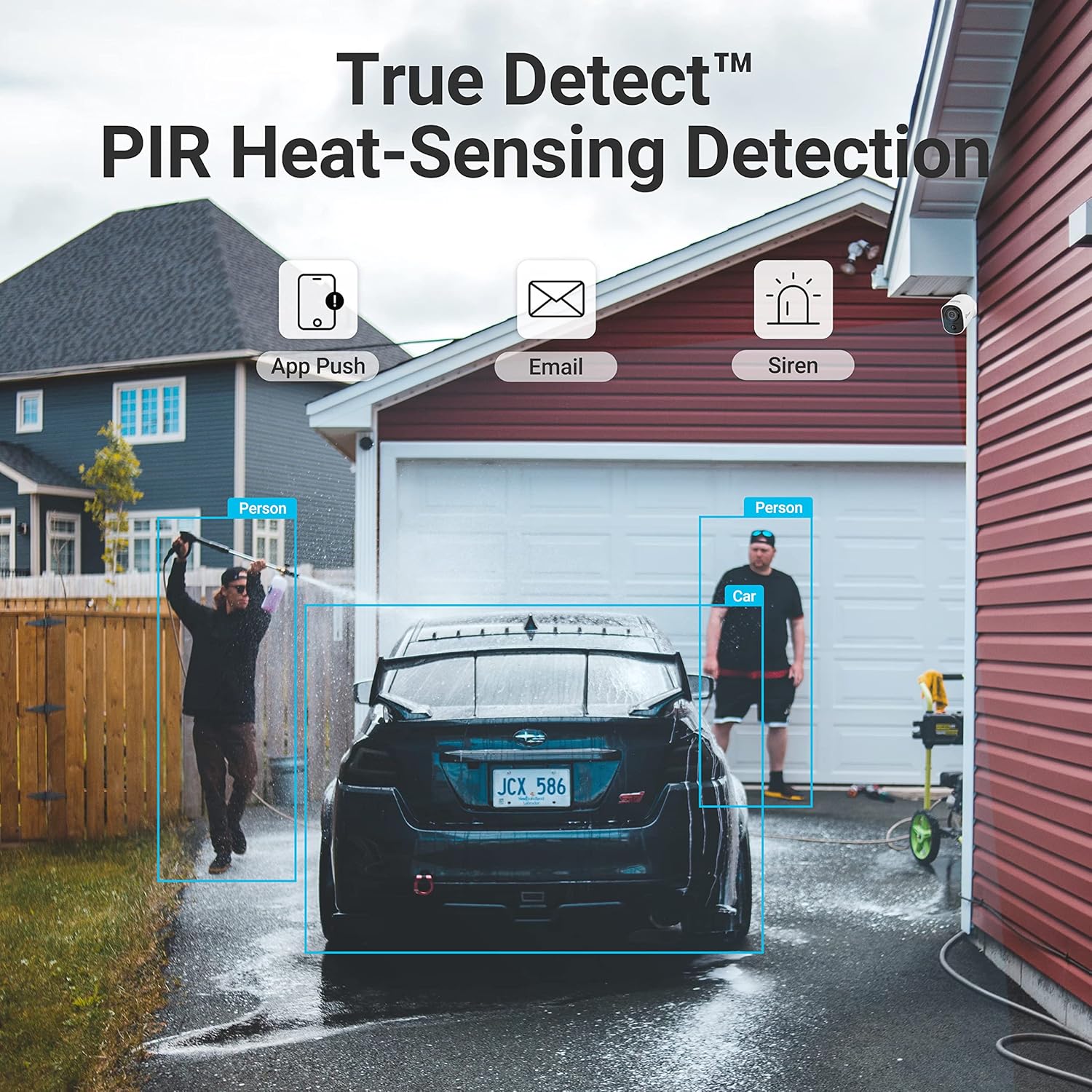
Image: A user interacting with a delivery person via the Swann Xtreem camera's two-way audio feature, visible on a smartphone screen.
Vídeo: Aquest vídeo ofereix una visió generalview of the Swann Xtreem camera's features, including its 1080p HD video, night vision, two-way talk, and smart home compatibility.
5. Manteniment
Proper maintenance ensures optimal performance and longevity of your Swann Xtreem Wireless Security Camera.
- Càrrega de la bateria: The camera is powered by a rechargeable 13,200mAh Lithium Battery. Charging times vary depending on the power supply. For fastest charging, a 5-volt 2.1 amp or higher DC power supply is recommended. After setup, you can track the charging status via the Swann Security App.
- Resistència a la intempèrie: The camera has an IP56 rating, making it suitable for indoor or outdoor use and capable of withstanding temperatures from 14ºF to 122ºF (-10ºC to 50ºC).
- Targeta MicroSD: The camera includes a 16GB MicroSD card and supports up to 64GB for local storage. Ensure the card is properly inserted and functioning.

Image: The Swann Xtreem camera is shown outdoors in the rain, highlighting its IP56 waterproof rating and suitability for various weather conditions.
Video: This video demonstrates the Swann Solar Charging Panel, an accessory for the Wire-Free Security Camera, showing how it can extend battery life and reduce the need for manual recharging.
6. Solució De Problemes
If you encounter issues with your Swann Xtreem Wireless Security Camera, consider the following common troubleshooting steps:
- Problemes de connectivitat: Ensure your camera is within range of your 2.4GHz Wi-Fi router. The closer the camera is to the router, the better the wireless connection quality. Avoid 5GHz networks as they are not supported.
- Viu View Not Loading: Si el viu view is not displaying, check your internet connection speed (minimum 1Mbps upload speed per camera is recommended). Restarting the camera or re-pairing it with the app might resolve the issue.
- Durada de la bateria: If the battery drains faster than expected, ensure the camera is placed in an area with optimal Wi-Fi reception to minimize power consumption from maintaining connection. Reduce the frequency of motion detection alerts if possible.
- Detecció de moviment: If motion detection is not working as expected, verify that True Detect™ is enabled in the app settings and that the camera's field of view està lliure d'obstacles.
- Funcionalitat de l'aplicació: Ensure your Swann Security App is updated to the latest version. If issues persist, try reinstalling the app.
7. Especificacions
| Característica | Detall |
|---|---|
| Qualitat de vídeo | 1080p Full HD (1920 x 1080 pixels) |
| Viewangle ing | Gran angular de 110 ° |
| Sensibilitat al moviment | True Detect™ Thermal / Heat-Sensing PIR |
| Heat Detection Range | Fins a 26 peus / 8 m |
| Distància de visió nocturna | Fins a 26 peus / 8 m |
| Memòria | Secure Cloud & MicroSD Card, 16GB card included (takes up to 64GB) |
| Font d'alimentació | Bateria de liti recarregable de 13,200 mAh |
| Àudio | 2 Way Audio – Microphone & Speaker/Siren |
| Interval d'àudio | Fins a 16 peus / 5 m |
| Dimensions | 50 mm x 105 mm x 70 mm |
| Pes | 0.77 lliures / 350 g |
| Temperatura de funcionament | 14ºF to 122ºF / -10ºC to 50ºC |
| Interior / Exterior | Interior o exterior |
| Classificació IP | IP56 |
| Freqüència Wi-Fi | 2.4GHz (wireless range up to 65ft/20m) |
| Requisits de l'aplicació | iOS (11.0 & above), Android™ (8.0 & above) |
| Número de model | SWIFI-XTRCM16G1PK-GL |
8. Garantia i Suport
The Swann Xtreem Wireless Security Camera comes with a 13-Year Manufacturer Warranty.
For further support, troubleshooting, and product information, please visit the official Swann Support Center:


