1. Introducció
Gràcies per la compraasing the Forty4 Wireless Game Controller. This versatile gamepad is designed to enhance your gaming experience across multiple platforms, offering both wired and 2.4G wireless connectivity. It features advanced functions such as programmable macro buttons, HD double vibration, continuous fire, and a JD-SWITCH function for optimized control. Please read this manual carefully to ensure proper use and maintenance of your controller.
2. Contingut del paquet
- Forty4 Wireless Game Controller
- Receptor USB 2.4G
- Cable de càrrega USB-C
- Manual d'usuari
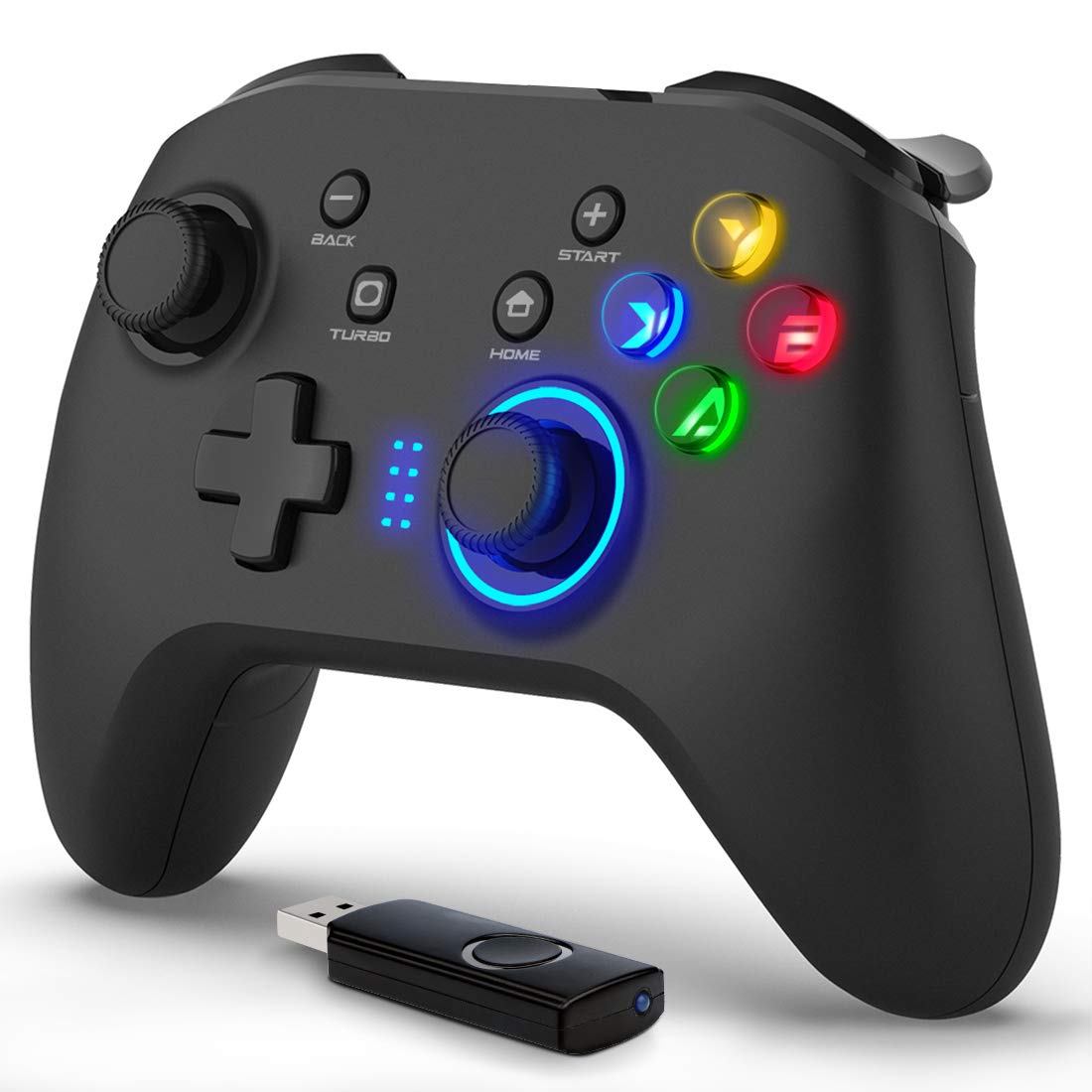
Image: The Forty4 Wireless Game Controller shown with its accompanying USB receiver.
3. Característiques clau
- Macro Button-Key Combination: Four programmable back buttons (M1-M4) allow for single-input assignments or complex key combinations.
- Connectivitat dual: Supports both 2.4GHz wireless connection via USB receiver and wired connection via USB-C cable.
- Enhanced Feedback: Features HD double vibration motors in the grips and triggers for immersive gameplay.
- Continuous Fire (Turbo) Function: Enables rapid, automatic input for specific buttons, reducing fatigue in action-intensive games.
- JD-SWITCH Function: Allows swapping functions between the cross key (D-pad) and the left analog stick for flexible control.
- Llarga vida útil de la bateria: Built-in 600 mAh battery provides approximately 8 hours of continuous wireless play on a full charge.
- Retroil·luminació LED: Integrated LED lighting for enhanced aesthetics and visibility.
- Àmplia compatibilitat: Supports Direct Input/X Input modes for broad compatibility with various gaming platforms.
4. Compatibilitat
Plataformes compatibles:
- PC (Windows 7/8/8.1/10/XP)
- Nintendo Switch
- Android devices (phones, tablets, TV boxes)
- PS3
No compatible amb:
- Xbox 360
- Xbox One
- Mac OS
- PlayStation 4 (PS4)
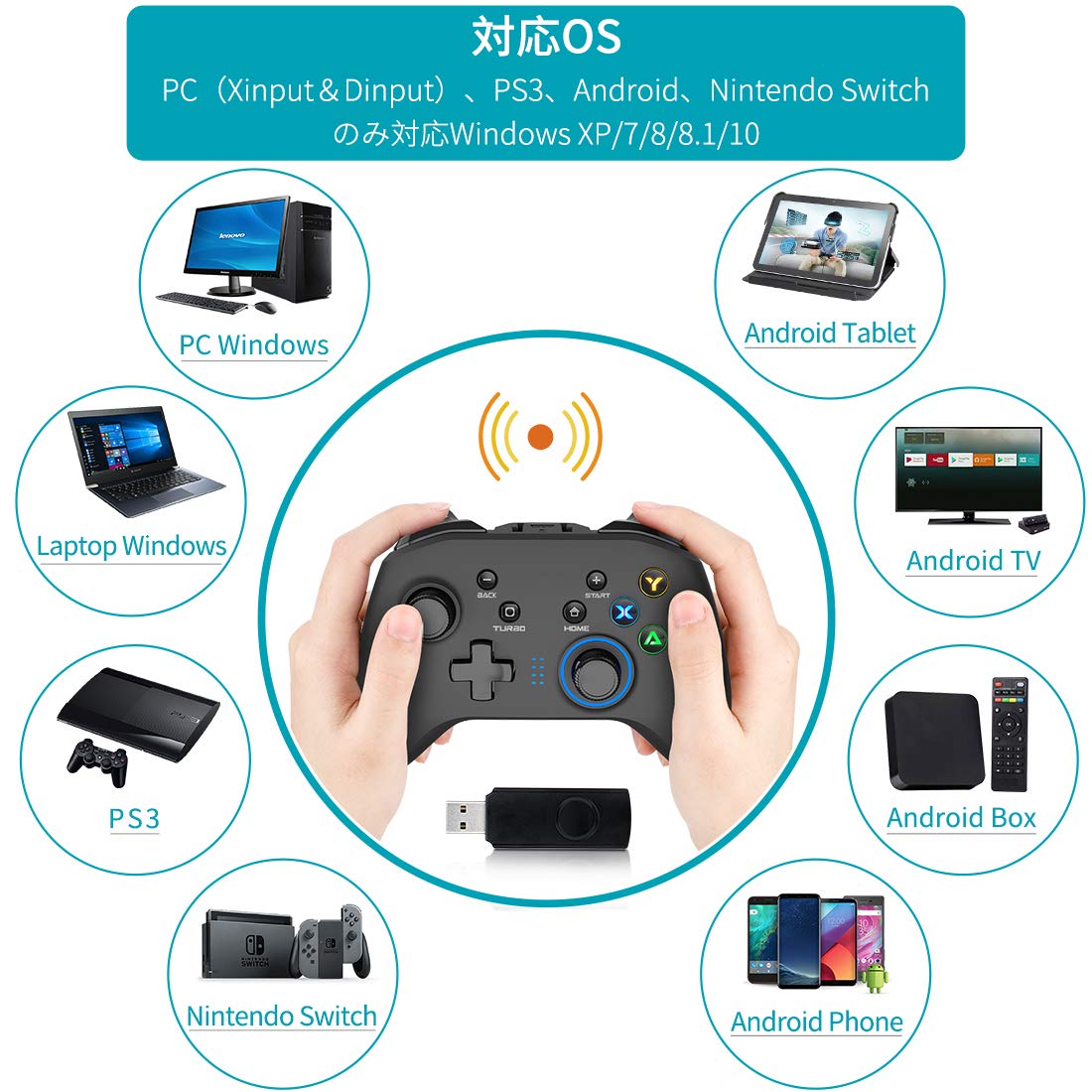
Image: Visual representation of compatible devices including PC, laptop, Android tablet, Android TV, Android Box, Android phone, PS3, and Nintendo Switch.
5. Configuració i connexió
5.1 Wireless Connection (PC)
- Insert the 2.4G USB receiver into an available USB port on your PC.
- Power on the Forty4 Wireless Game Controller. The controller will automatically pair with the receiver.
- Once connected, the LED indicator on the controller will stabilize, indicating a successful connection.
5.2 Wired Connection (PC/PS3)
- Connect one end of the USB-C charging cable to the controller's USB-C port.
- Connect the other end of the USB-C cable to an available USB port on your PC or PS3.
- El controlador canviarà automàticament al mode amb cable i estarà llest per al seu ús.
5.3 Wireless Connection (Nintendo Switch / Android)
For wireless connection to Nintendo Switch or Android devices, an OTG (On-The-Go) adapter (USB-A to USB-C or Micro-USB, depending on your device's connector) is required and not included with the controller.
- Connect the 2.4G USB receiver to the OTG adapter.
- Plug the OTG adapter into your Nintendo Switch or Android device's USB-C/Micro-USB port.
- Power on the Forty4 Wireless Game Controller. The controller will automatically pair.

Image: Depicts the flexibility of wired and wireless connection options for the controller, suitable for various devices like TVs, Windows PCs, and tablets.

Image: Illustrates the process of connecting the controller wirelessly to a Nintendo Switch and an Android phone using an OTG adapter.
6. Instruccions de funcionament
6.1 Macro Button-Key Combination (M1-M4)
The controller features four large programmable buttons on the back (M1, M2, M3, M4). These buttons can be assigned to a single input or a combination of multiple keys. Note: The Nintendo Switch platform does not support the macro function.
To Enable/Assign Back Buttons (M1-M4):
- M1: Hold M button + Press BACK button + Press M1
- M2: Hold M button + Press BACK button + Press M2
- M3: Hold M button + Press BACK button + Press M3
- M4: Hold M button + Press BACK button + Press M4
To Disable Back Buttons (M1-M4):
Hold the M button and press the "BACK" button again, then press the M button. (M-BACK-M)

Imatge: Primer pla view of the back of the controller, highlighting the M1, M2, M3, and M4 programmable buttons.
6.2 JD-SWITCH Function
In Xinput mode, the JD-SWITCH function allows you to swap the functionality of the cross key (D-pad) and the left analog stick. This can be useful for games that benefit from different control schemes.
To activate JD-SWITCH: Press and hold the TURBO and START buttons simultaneously.
6.3 Continuous Fire (TURBO) Function
The TURBO function enables continuous rapid input for a selected button, ideal for shooting games or actions requiring repeated presses. The Nintendo Switch also supports this function.
To activate TURBO: Press the button you wish to set for continuous fire, then press the TURBO button. The button will now continuously register input when held down.
To deactivate TURBO: Repeat the process (press the button, then press TURBO again).

Image: Illustrates the JD-SWITCH function (swapping D-pad and left stick) and the TURBO function (continuous fire) on the controller.
6.4 HD Double Vibration Function
The controller is equipped with vibration motors in both the left and right grips and trigger parts. These motors provide tactile feedback during gameplay, enhancing immersion. Vibration effects are automatically triggered by compatible games.
7. Càrrega i bateria
The Forty4 Wireless Game Controller features a built-in 600 mAh lithium-ion battery, providing approximately 8 hours of continuous wireless gameplay on a full charge.
Instruccions de càrrega:
- Connect the supplied USB-C charging cable to the controller's USB-C port.
- Connect the other end of the cable to a USB power source, such as a PC USB port, a mobile battery, or an AC adapter (5V/1A recommended).
- The LED indicator on the controller will show charging status. Charging typically takes 2-3 hours for a full charge.
- Once fully charged, the LED indicator will change or turn off, depending on the controller's design.
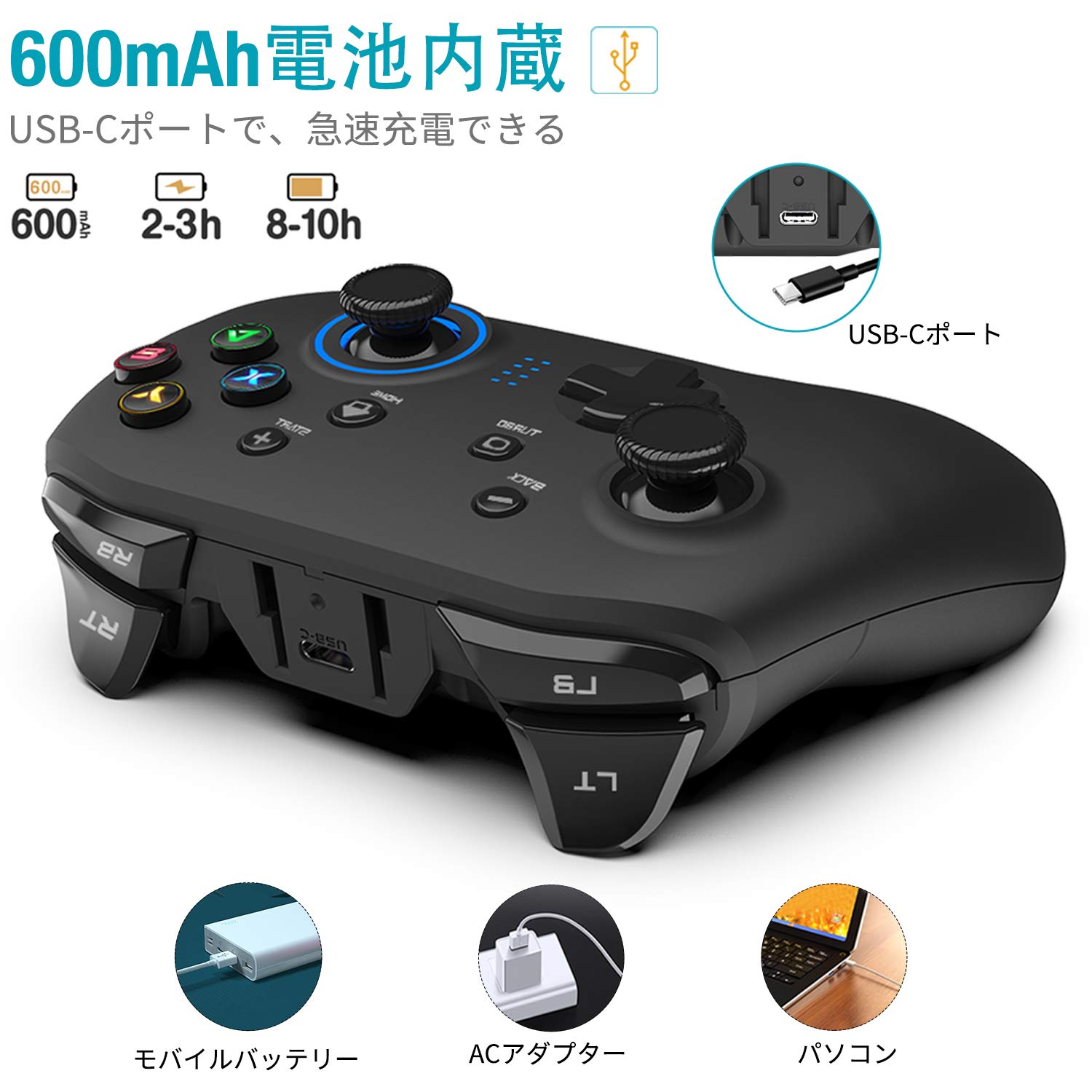
Image: Highlights the 600mAh built-in battery, USB-C charging port, and charging methods using a mobile battery, AC adapter, or PC.
8. Manteniment
- Keep the controller dry and away from moisture.
- Netegeu el controlador amb un drap suau i sec. No utilitzeu productes químics agressius ni materials abrasius.
- Eviteu exposar el controlador a temperatures extremes (calor o fred).
- Guardeu el controlador en un lloc segur quan no l'utilitzeu per evitar danys.
9. Solució De Problemes
9.1 Controller Not Connecting / Unresponsive
- Ensure the USB receiver is securely plugged into the device's USB port.
- Check if the controller's battery is charged. Connect it to a power source using the USB-C cable.
- Try restarting your PC or gaming device.
- If using wireless, try connecting the controller via the USB-C cable to confirm functionality.
- For Switch/Android, ensure the OTG adapter is functioning correctly and is compatible with your device.
9.2 La vibració no funciona
- Verifica que el joc al qual estàs jugant admeti la resposta per vibració.
- Check the in-game settings to ensure vibration is enabled.
- Ensure the controller's drivers are correctly installed on your PC (usually automatic).
9.3 Problemes de càrrega
- Ensure the USB-C cable is fully inserted into both the controller and the power source.
- Try using a different USB-C cable or a different USB power source.
- Check the controller's USB-C port for any debris or damage.
10. Especificacions
| Característica | Detall |
|---|---|
| Número de model | GC201JPF |
| Connectivitat | 2.4G Wireless, USB Wired (Type-C) |
| Tipus de bateria | 1 ió de liti (inclòs) |
| Capacitat de la bateria | 600 mAh |
| Approx. Usage Time | 8 hours (wireless) |
| Temps de càrrega | 2-3 hores |
| Dimensions del paquet | 16.4 x 11.8 x 7.2 cm |
| Pes de l'article | 340 g |
| Fabricant | QUARANTA4 |
11. Garantia i Suport
For warranty information, technical support, or any inquiries regarding your Forty4 Wireless Game Controller, please refer to the contact information provided with your purchase or visit the official Forty4 weblloc web. Conserveu el comprovant de compra per a reclamacions de garantia.