1. Introducció
Thank you for choosing the EDIS 40W Speakers, Model EA014. This manual provides essential information for the safe and efficient use of your new speaker system. Please read this manual thoroughly before installation and operation, and retain it for future reference.
2. Informació de seguretat
Per garantir un funcionament segur i evitar danys, observeu les precaucions següents:
- No exposeu els altaveus a l'aigua ni a la humitat.
- No bloquejar les obertures de ventilació.
- Place the speakers on a stable surface to prevent falling.
- Utilitzeu només l'adaptador d'alimentació subministrat amb la unitat.
- Mantenir fora de l'abast dels nens.
- Desconnecteu l'alimentació durant tempestes amb llamps o quan no es faci servir durant períodes prolongats.
3. Contingut del paquet
Si us plau, comproveu que tots els articles estiguin presents al vostre paquet:
- EDIS 40W Speakers (2 units)
- Control Remot per Infrarojos
- Cable d'alimentació
- Cables de connexió d'àudio
- Manual d'usuari (aquest document)
4. Producte acabatview
The EDIS 40W Speakers are designed to deliver clear audio. They feature a robust design with a steel grille for protection and offer multiple input options.
4.1 Unitats d'altaveus

Figura 1: Frontal view of the EDIS 40W Speakers. Each speaker unit features two drivers and a protective steel grille.
4.2 Control remot
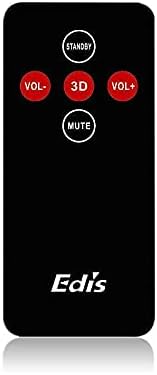
Figure 2: The infrared remote control for the EDIS 40W Speakers. It includes buttons for power, volume adjustment, 3D audio mode, and mute.
4.3 Media Player Panel

Figure 3: The integrated USB and SD Card Media Player panel. This panel allows direct playback from USB drives and SD/MMC memory cards.
5. Configuració
Follow these steps to set up your EDIS 40W Speakers:
- Col·locació: Position the speakers on a flat, stable surface or mount them securely to a wall. Ensure adequate space for ventilation.
- Connecta la font d'àudio: Connect your audio source (e.g., computer, TV, interactive whiteboard) to the speaker system using the appropriate audio cables.
- Connexió d'alimentació: Connect the power cable to the main speaker unit and then plug it into a standard electrical outlet.
- Encès: Press the power button on the main speaker unit or the 'STANDBY' button on the remote control to turn on the speakers.
6. Instruccions de funcionament
Your EDIS 40W Speakers can be operated using the integrated controls or the infrared remote control.
6.1 Ús del comandament a distància
- ESTÀNDUT: Press to turn the speakers on or off (standby mode).
- VOL+: Augmenta el volum.
- VOL-: Disminueix el volum.
- MUT: Silencia o activa la sortida d'àudio.
- 3D: Activate or deactivate the 3D audio effect.
6.2 Using the Media Player Panel
Insert a USB drive or SD/MMC card into the respective slot on the media player panel.
- Mode: Press to switch between input sources (e.g., AUX, USB, SD Card).
- PREVIOUS (◀◀): Saltar a la pista anterior.
- PLAY/PAUSE (►▌▌): Reprodueix o posa en pausa la pista actual.
- NEXT (►►): Saltar a la pista següent.
- LED: Indicates power status or playback activity.
7. Manteniment
Proper maintenance ensures the longevity of your speakers:
- Neteja: Feu servir un drap suau i sec per netejar les superfícies dels altaveus. No utilitzeu netejadors líquids ni materials abrasius.
- Emmagatzematge: Si guardeu els altaveus durant un període prolongat, desconnecteu-los de l'alimentació i guardeu-los en un lloc fresc i sec.
- Ventilació: Ensure that the speaker's ventilation openings are not obstructed to prevent overheating.
8. Solució De Problemes
If you encounter issues with your EDIS 40W Speakers, refer to the following common problems and solutions:
| Problema | Causa possible | Solució |
|---|---|---|
| Sense poder | Power cable not connected; power outlet not working | Comproveu la connexió del cable d'alimentació; proveu una presa de corrent diferent. |
| Sense so | Volume too low; incorrect input source; audio cable loose/faulty | Increase volume; press MODE to select correct input; check audio cable connections. |
| El comandament a distància no funciona | Batteries depleted; obstruction between remote and speaker; remote not pointed correctly | Replace remote batteries; remove obstructions; point remote directly at the speaker's IR receiver. |
| La targeta USB/SD no es reprodueix | Incorrecte file format; card/drive not inserted correctly; corrupted media | Assegureu-vos files are compatible (e.g., MP3); reinsert media; try a different USB drive/SD card. |
9. Especificacions
| Característica | Especificació |
|---|---|
| Marca | EDIS |
| Número de model | EA014 |
| Potència màxima de sortida de l'altaveu | 40 watts |
| Color | Gris |
| Pes de l'article | 8 kg |
| Mètode de control | Remot |
| Tecnologia de connectivitat | Amb cable |
| Font d'alimentació | Elèctric amb cable |
| Mode de sortida d'àudio | Envoltant |
| Tipus de muntatge | Terra de peu |
| Material | Fusta |
| Tipus d'altaveu | A l'aire lliure |
| Característiques especials | Ampmés viu |
| Dispositius compatibles | Tots els dispositius |
| Configuració del canal de so envoltant | 2 |
10. Garantia i Suport
Per obtenir informació sobre la garantia i assistència al client, consulteu la documentació proporcionada en el moment de la compra o poseu-vos en contacte amb el vostre distribuïdor. Conserveu el comprovant de compra per a qualsevol reclamació de garantia.


