1. Introducció
Gràcies per la compraasing the Tronsmart Element Mega Bluetooth Speaker. This manual provides detailed instructions on how to set up, operate, and maintain your speaker to ensure optimal performance and longevity. Please read this manual carefully before using the product and keep it for future reference.
2. Producte acabatview
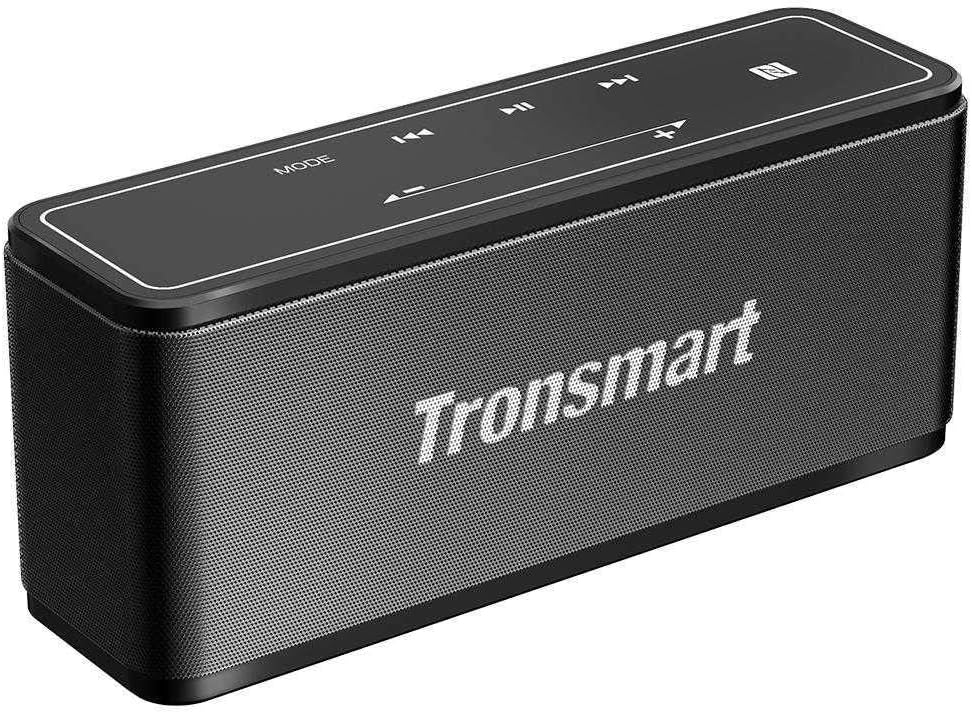
Descripció de la imatge: A black Tronsmart Element Mega Bluetooth Speaker shown from a slightly elevated angle. The top panel features touch-sensitive controls for 'MODE', volume down (-), previous track (◀◀), play/pause (▶▶), next track (▶▶), volume up (+), and an NFC icon. The front grille displays the 'Tronsmart' logo in white. The speaker has a rectangular shape with rounded edges.
Contingut del paquet:
- Tronsmart Element Mega Bluetooth Speaker
- Cable de càrrega USB
- Cable AUX
- Manual d'usuari
Controls i ports:
- Botó d'encesa: On/Off
- Botó de mode: Canvia entre Bluetooth, AUX i altres modes.
- Botons de volum (+/-): Ajustar el volum.
- Track Skip Buttons (◀◀/▶▶): Ves a la pista anterior / següent.
- Botó Reprodueix/Pausa (▶▶): Reprodueix o posa en pausa l'àudio.
- Port de càrrega USB-C: Per carregar l'altaveu.
- Port d'entrada AUX: Per a connexió d'àudio amb cable.
3. Característiques
- Marca: Tronsmart
- Forma: Rectangular
- Color: Negre
- Port Type: Wireless
- Nombre de peces: 1
- Speaker Type: Bluetooth Speakers
- Pes del producte: 662.3 grams
- Tecnologia de connectivitat: sense fils
- Compatible with: Smartphones
- Model Number: MEGA-BK
4. Especificacions
| Especificació | Detall |
|---|---|
| Nom de marca | Tronsmart |
| Número de model de l'article | MEGA-BK |
| ASIN | B098TVNFG6 |
| Color | Negre |
| Pes de l'article | 662.3 grams |
| Dimensions del paquet | 23 x 8.4 x 7.2 cm |
| Tecnologia de connectivitat | Sense fil |
| Potència màxima de sortida de l'altaveu | 30 watts |
| Mode de sortida d'àudio | estèreo |
| Tipus de muntatge | Taula |
| Tipus d'altaveu | Altaveu Bluetooth portàtil |
| Característiques especials | Sense fil, Bluetooth |
| Dispositius compatibles | Smartphone |
| Data de primera disponibilitat | 7 de juliol de 2021 |
5. Configuració
5.1 Càrrega de l'altaveu
- Connect the USB charging cable to the speaker's USB-C port.
- Connecteu l'altre extrem del cable USB a un adaptador de corrent USB compatible (no inclòs) o al port USB d'un ordinador.
- El llum indicador de càrrega s'il·luminarà. S'apagarà o canviarà de color un cop estigui completament carregat.
- Una càrrega completa sol trigar aproximadament 3-4 hores.
5.2 Engegada/apagada
- Per encendre: Press and hold the Power button for 2-3 seconds until you hear an audible prompt or see the indicator light turn on.
- Per apagar: Press and hold the Power button for 2-3 seconds until you hear an audible prompt or see the indicator light turn off.
5.3 Vinculació Bluetooth
- Ensure the speaker is powered on and in Bluetooth mode (the Bluetooth indicator light will be blinking). If not, press the 'MODE' button to switch to Bluetooth mode.
- Activeu el Bluetooth al vostre telèfon intel·ligent o a un altre dispositiu.
- Cerca available Bluetooth devices and select "Tronsmart Element Mega" from the list.
- Un cop emparellat, l'indicador lluminós de Bluetooth s'il·luminarà fixament i sentireu un so de confirmació.
- L'altaveu es tornarà a connectar automàticament al darrer dispositiu emparellat quan s'engegui, si el Bluetooth del dispositiu està actiu i dins del seu abast.
5.4 Connecting via AUX Cable
- Connecteu un extrem del cable AUX de 3.5 mm al port d'entrada AUX de l'altaveu.
- Connect the other end of the AUX cable to the audio output jack of your device (e.g., smartphone, MP3 player).
- The speaker will automatically switch to AUX mode, or you may need to press the 'MODE' button to select AUX mode.
6. Instruccions de funcionament
6.1 Reproducció de música
- Reproduir/pausa: Premeu el botó Reproduir/Pausa una vegada.
- Pujar el volum: Premeu el botó '+'.
- Baixar el volum: Premeu el botó '-'.
- Pista següent: Press the '▶▶' button once.
- Pista anterior: Press the '◀◀' button once.
6.2 Canvi de mode
- Press the 'MODE' button to cycle through available modes (e.g., Bluetooth, AUX).
6.3 Hands-Free Calling (if applicable)
- Respon a la trucada: Press the Play/Pause button once when an incoming call is received.
- Finalitzar la trucada: Premeu el botó Reprodueix/Pausa una vegada durant una trucada.
- Rebutja la trucada: Press and hold the Play/Pause button for 2 seconds when an incoming call is received.
7. Manteniment
- Neteja: Feu servir un drap suau i sec per netejar l'altaveu. No utilitzeu productes de neteja abrasius ni dissolvents.
- Emmagatzematge: Guardeu l'altaveu en un lloc fresc i sec, allunyat de la llum solar directa i de temperatures extremes.
- Cura de la bateria: To prolong battery life, fully charge the speaker before first use and at least once every three months if not used regularly. Avoid completely draining the battery.
- Resistència a l'aigua: Aquest altaveu no és impermeable. Eviteu l'exposició a l'aigua o a una humitat excessiva.
8. Solució De Problemes
| Problema | Possible solució |
|---|---|
| L'altaveu no s'encén. | Assegureu-vos que la bateria estigui carregada. Connecteu-la a una font d'alimentació i torneu-ho a provar. |
| No es pot emparellar amb un dispositiu Bluetooth. | Ensure the speaker is in Bluetooth pairing mode. Turn off and on Bluetooth on your device. Forget the speaker from your device's Bluetooth list and try pairing again. Move speaker closer to the device. |
| No hi ha so de l'altaveu. | Check volume levels on both the speaker and your connected device. Ensure the correct input mode (Bluetooth/AUX) is selected. Check AUX cable connection if applicable. |
| Mala qualitat de so. | Move the speaker closer to the Bluetooth device to avoid interference. Try a different audio source or file. |
| L'altaveu no carrega. | Ensure the charging cable is securely connected. Try a different USB port or power adapter. |
9. Garantia i Suport
Tronsmart products are designed to provide reliable performance. For warranty information, please refer to the warranty card included with your product or visit the official Tronsmart website. If you encounter any issues not covered in this manual, please contact Tronsmart customer support for assistance.
Weblloc: www.tronsmart.com
Correu electrònic: Refer to Tronsmart's official weblloc web per obtenir informació de contacte d'assistència.


