1. Introducció
This manual provides comprehensive instructions for the installation, operation, and maintenance of your FITNATE Smart Fingerprint Door Knob. Please read this manual thoroughly before installation and use to ensure proper function and safety.
2. Informació de seguretat
- No intenteu desmuntar ni reparar el pany vosaltres mateixos. Això podria anul·lar la garantia i causar danys.
- Use only specified batteries (4 x LR6 / 1.5V AA alkaline batteries). Incorrect battery installation can lead to malfunction.
- Keep mechanical keys in a safe place outside the premises.
- Avoid exposing the lock to direct sunlight or rain for prolonged periods.
- Ensure the door is properly aligned and closes smoothly before installation.
3. Contingut del paquet
Verifiqueu que tots els components siguin presents abans de començar la instal·lació:
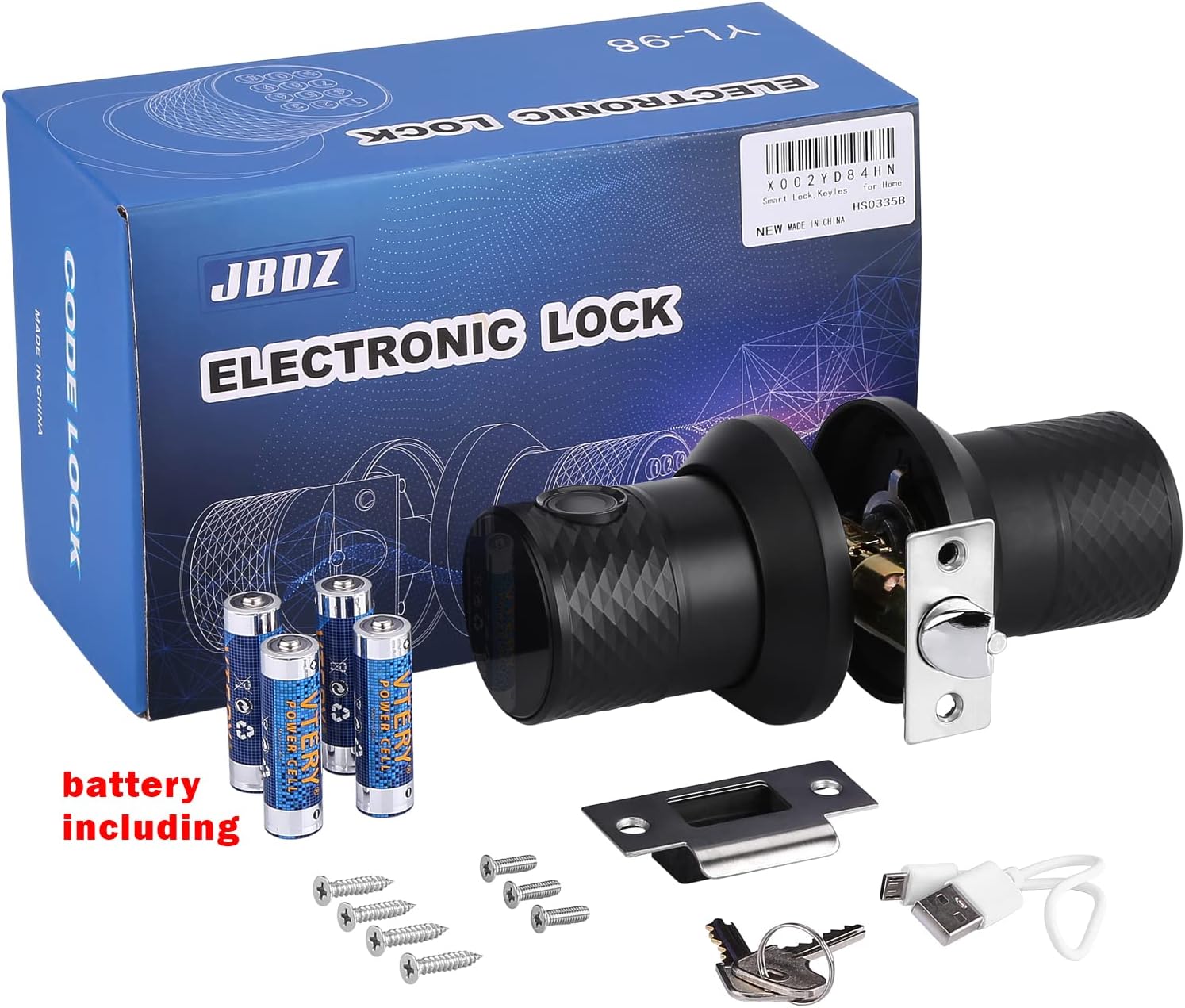
Descripció de la imatge: An image displaying the complete package contents of the FITNATE Smart Fingerprint Door Knob. This includes the main door knob unit with keypad and fingerprint sensor, the interior knob, a latch mechanism, mounting screws, two mechanical keys, and a USB charging cable for emergency power.
- Exterior Door Knob with Keypad and Fingerprint Sensor
- Pom interior de la porta
- Mecanisme de tancament
- Placa de vaga
- Cargols de muntatge
- Claus mecàniques (2)
- USB Emergency Power Cable
- Plantilla d'instal·lació
4. Producte acabatview
The FITNATE Smart Fingerprint Door Knob offers multiple access methods for enhanced security and convenience.
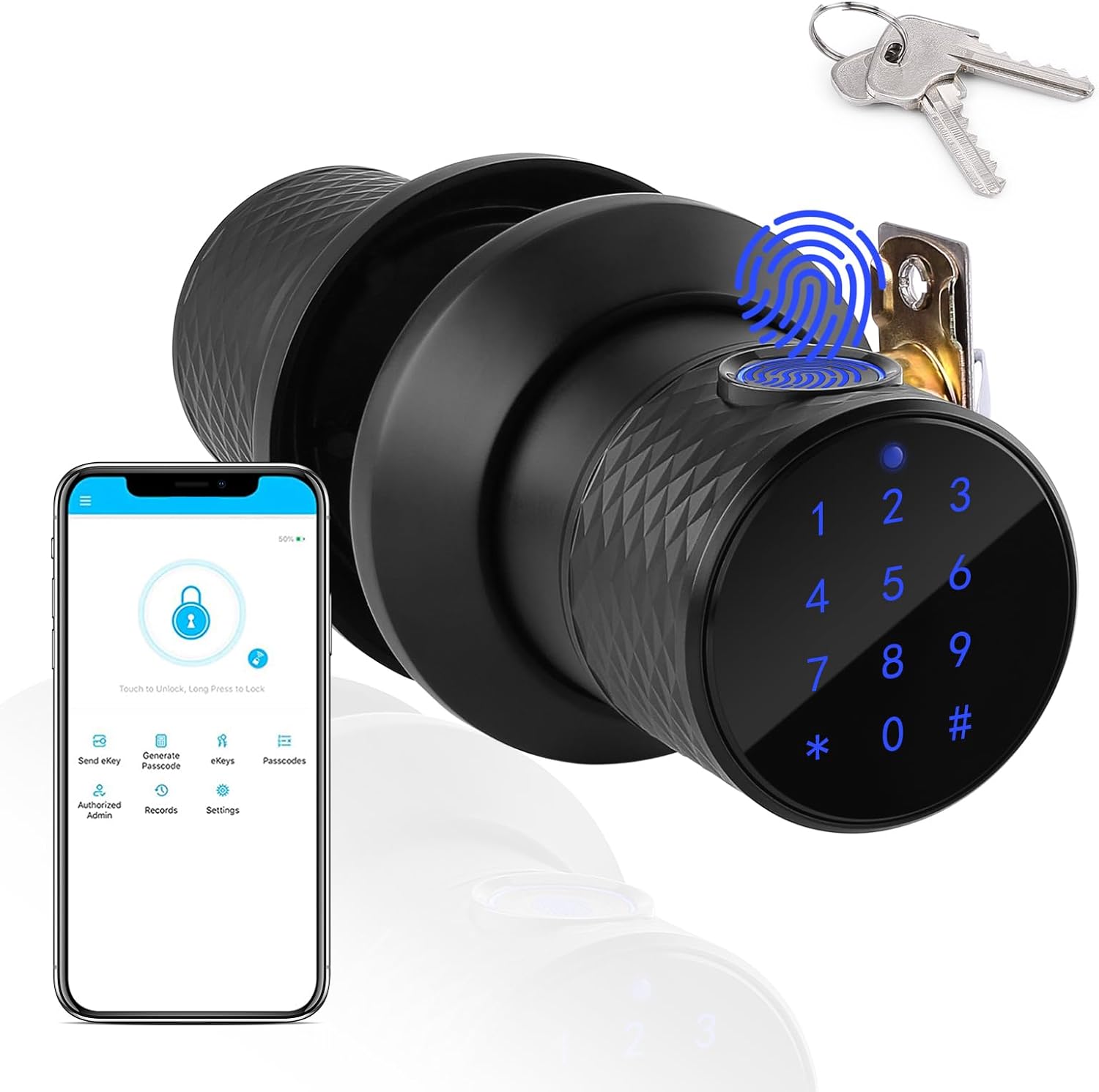
Descripció de la imatge: A black smart door knob with a digital keypad and fingerprint sensor, shown alongside a smartphone displaying the Tuya app interface and a set of mechanical keys. This illustrates the multiple unlocking methods available.
- Sensor d’empremta digital: For quick and secure biometric access.
- Teclat: For password entry. Features a touchable blue backlight for visibility in low light.
- Clau mecànica: Traditional backup access.
- Control de l'aplicació Tuya: Bluetooth connectivity for remote management, unlocking, and access record viewing.

Descripció de la imatge: A diagram showing the dimensions of the FITNATE Smart Fingerprint Door Knob. Key measurements include a knob diameter of 3.15 inches and suitability for door thicknesses between 1.26 to 1.89 inches.
5. Configuració i instal·lació
Follow these steps carefully for proper installation. A screwdriver is required.
Descripció del vídeo: An animated instructional video demonstrating the step-by-step installation process of the smart fingerprint door knob. It covers marking the door, drilling holes, installing the latch, and assembling the interior and exterior knob components, including battery installation.
5.1. Prepara la porta
- Mark Door: Using the provided template, mark the hole on both sides of the door at the required backset. Then, mark the latch hole on the door edge.
- Forats: Bore a 2.13-inch hole on the door face. Then drill a 0.98-inch hole in the door edge to intersect with the center of the 2.13-inch hole. Nota: Drill the 2.13-inch hole from both sides of the door to prevent wood splintering.
5.2. Instal·leu el pestell i la placa de cop
- Instal·leu el tancament: Insert the latch into the hole and mark a line around the edge of the latch plate. Remove the latch. Chisel approximately 0.12 inches deep or until the latch plate sits flush with the door edge. Re-insert the latch, then drill 0.08 x 0.12-inch holes for mounting screws and fasten the latch.
- Instal·la Strike: Close the door and mark the horizontal center of the latch on the door frame. Mark a vertical line where the door edge meets the frame and measure in half of the door thickness to find the vertical center. Extend both lines until they intersect and drill a 0.98-inch hole to 0.59 inches in depth. Position the strike plate and mark around its edge. Chisel the frame to approximately 0.06 inches in depth or until the strike sits flush. Drill 0.08 x 0.12-inch screw holes and fix the strike to the frame.
5.3. Assemble the Lock
- Install Outside Knob: Passeu el cable d'alimentació a través del pestell i guieu l'eix fins que la rosa exterior quedi a ras.
- Install Inside Knob: Feed the power cable through the hole in the knob and guide the spindle into the handle. Screw the inside knob to the outside knob using mounting screws.
- Instal·leu les bateries: Install 4 pieces of LR6 / 1.5V AA alkaline batteries into the battery box. Install the + / - batteries in strict accordance with the arrow shown in the figure. Incorrect battery installation will prevent the product from working and may cause damage.
- Connecteu el cable d'alimentació: Plug the power cord into the power socket. Recycle any excess power cord into the hole. Install the battery cover in the correct orientation and fasten with 2 mounting screws.
5.4. Initial Test
After installation, perform an initial test:
- Input the default password (e.g., 0123#) to prompt a sound and turn the knob to verify that the unlocking mechanism functions normally.
6. Instruccions de funcionament
6.1. Mètodes de desbloqueig
- Desbloqueig de les empremtes digitals: Place your registered finger on the sensor. The lock will unlock if the fingerprint is recognized.

Descripció de la imatge: A hand pressing a finger onto the fingerprint sensor of the smart door knob, indicating the biometric unlock feature.
- Desbloqueig de contrasenya: Enter your registered password on the backlit keypad followed by '#'.

Descripció de la imatge: A close-up of the smart door knob's digital keypad with a blue backlight, showing the numbers 1-9, 0, *, and #, ready for password input.
- Clau mecànica: Insert the mechanical key into the keyhole and turn to unlock. This is for emergency access.
- Control de l'aplicació Tuya: Use the Tuya Smart app on your smartphone to unlock the door via Bluetooth.

Descripció de la imatge: A smartphone displaying the Tuya app interface, showing options for voice control, app unlock, and one-time password generation, alongside images of an Amazon Echo and Echo Dot, indicating smart home integration.
6.2. User Management (via Tuya App)
The Tuya Smart app allows for comprehensive user management:

Descripció de la imatge: An illustration showing the smart door knob installed on a door, with dotted lines connecting it to four different user profiles (George, Paul, Elaine, Susan), indicating the ability to set up multiple user passwords.
- Afegeix empremtes digitals: Follow the in-app instructions to register new fingerprints. The lock can store up to 255 user fingerprints.
- Add Passwords: Create and manage passwords for different users. Maximum length is up to 10 digits.
- Generate Temporary Passcodes: Share temporary access with guests or service providers.
- View Registres d'accés: Monitor unlocking and wrong passcode attempts in real-time.
6.3. Bloqueig automàtic
The electronic door knob features an automatic locking retractor. It will automatically lock approximately 3 seconds after being opened.
7. Manteniment
- Substitució de la bateria: When the battery is low, the lock will alarm. Replace all four AA alkaline batteries promptly. Ensure correct polarity.

Descripció de la imatge: The smart door knob installed on a door, with an icon indicating a low battery alarm and a USB cable for emergency charging. Mechanical keys are also shown as a backup.
- Alimentació d'emergència: If batteries die completely, use the provided USB charging cable to temporarily power the lock for access.
- Neteja: Wipe the lock surface with a soft, dry cloth. Avoid abrasive cleaners or solvents.
8. Solució De Problemes
| Problema | Causa possible | Solució |
|---|---|---|
| El bloqueig no respon. | Bateries esgotades. | Replace batteries or use emergency USB power. |
| Empremta digital no reconeguda. | Finger is wet/dirty, or not properly registered. | Ensure finger is clean and dry. Re-register fingerprint if necessary. |
| La contrasenya no funciona. | Incorrect password entered, or password not registered. | Verify password. Re-register password via Tuya App. |
| Door does not lock/unlock smoothly. | Misalignment of lock components or door frame. | Check installation for proper alignment of latch and strike plate. |
9. Especificacions
| Característica | Detall |
|---|---|
| Marca | FITNATE |
| Nom del model | Door Knob (HS0335KSB) |
| Tipus de bloqueig | Combination Lock, Deadbolt, Keypad |
| Mètodes de desbloqueig | Fingerprint, Password, Mechanical Key, Tuya App (Bluetooth) |
| Material | Metal (Handle: Glass, Stainless Steel) |
| Color | Negre |
| Dimensions (L x A x A) | 8.7 x 5.5 x 4 polzades |
| Pes de l'article | 2.68 lliures |
| Compatibilitat del gruix de la porta | 1.26 ~ 1.89 polzades |
| Tipus de bateria | 4 x LR6 / 1.5V AA Alkaline Batteries (included) |
| Connectivitat | Bluetooth |
| Tipus de controlador | Amazon Alexa (via Tuya App integration) |
10. Garantia i Suport
For warranty information and technical support, please refer to the product packaging or contact FITNATE customer service directly. Keep your purchase receipt for warranty claims.
Online resources and FAQs may be available on the official FITNATE weblloc.


