1. Introducció
The D-Link DGS-105GL is a 5-Port Gigabit Unmanaged Desktop Switch designed to provide a simple and efficient solution for expanding network connectivity in small office/home office (SOHO) and small to medium-sized business (SMB) environments. This device offers plug-and-play functionality, requiring no complex configuration. Its fanless design ensures silent operation, and the metal housing provides durability. The DGS-105GL incorporates energy-efficient features, including IEEE 802.3az Energy-Efficient Ethernet, to reduce power consumption without compromising performance.
2. Contingut del paquet
Comproveu que el vostre paquet contingui els elements següents:
- D-Link DGS-105GL 5-Port Gigabit Unmanaged Desktop Switch
- Adaptador d'alimentació
If any items are missing or damaged, please contact your local D-Link reseller.
3. Producte acabatview
The DGS-105GL switch features a compact, low-profile design with a durable metal housing. It is equipped with five Gigabit Ethernet ports for high-speed network connections.
3.1 Tauler frontal

Imatge: Frontal view of the D-Link DGS-105GL switch, showing the D-Link logo, model number DGS-105GL, a power LED, five port status LEDs (1-5), and five RJ45 Gigabit Ethernet ports (1-5).
The front panel includes the following indicators and ports:
- LED d'alimentació: Indica l'estat d'alimentació de l'interruptor.
- LEDs de port (1-5): Each port has an LED that indicates link status and activity. A solid light indicates a successful connection, and a blinking light indicates data transmission.
- RJ45 Gigabit Ethernet Ports (1-5): These ports are used to connect network devices such as computers, servers, and other switches.
3.2 Panell posterior

Imatge: Part posterior view of the D-Link DGS-105GL switch, showing the power input port labeled '5V --- 1A'.
The rear panel contains the power input port, where the included power adapter is connected.
4. Configuració
The DGS-105GL is a plug-and-play device, making installation straightforward. Follow these steps to set up your switch:
- Connecteu l'adaptador de corrent: Plug the included power adapter into the power input port on the rear panel of the DGS-105GL switch. Then, plug the other end of the adapter into a standard electrical outlet. The Power LED on the front panel should illuminate.
- Connectar dispositius de xarxa: Connect your network devices (e.g., computers, network-attached storage, routers) to any of the five RJ45 Gigabit Ethernet ports on the front panel using standard Ethernet cables.
- Verifica les connexions: Once a device is connected and powered on, the corresponding Port LED on the switch's front panel should light up, indicating a successful link. If there is network activity, the LED will blink.

Image: The D-Link DGS-105GL switch placed on a desk in an office setting, connected to a laptop and other peripherals, demonstrating a typical setup.
5. Funcionament de l'interruptor
The DGS-105GL operates automatically once connected. It supports auto-negotiation for speed and duplex mode, and auto-MDI/MDIX, eliminating the need for crossover cables. The switch automatically detects the speed of the connected device (10/100/1000 Mbps) and adjusts accordingly.
5.1 Indicadors LED
The LEDs provide visual feedback on the switch's status:
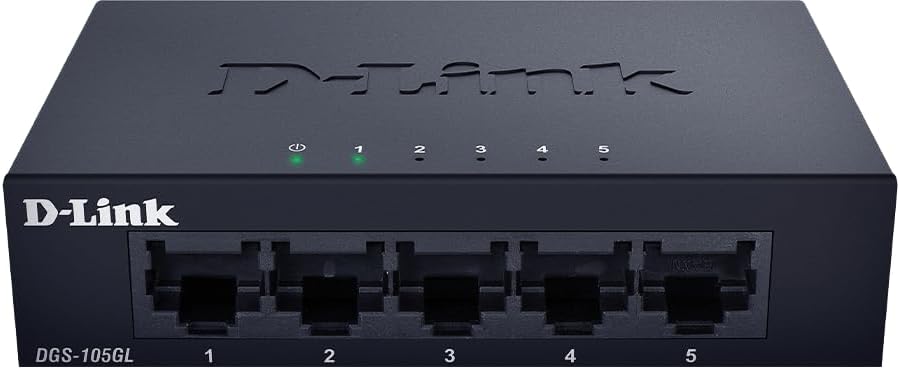
Imatge: Frontal view of the D-Link DGS-105GL switch with the green power LED and green port LEDs 1-5 illuminated, indicating active connections.
| LED | Estat | Descripció |
|---|---|---|
| Poder | Verd sòlid | L'interruptor està engegat. |
| Poder | Apagat | L'interruptor no rep energia. |
| Port (1-5) | Verd sòlid | A device is successfully connected to the port. |
| Port (1-5) | Verd parpellejant | Les dades s'estan transmetent o rebent a través del port. |
| Port (1-5) | Apagat | No device is connected to the port, or the connected device is powered off. |
6. Manteniment
To ensure optimal performance and longevity of your DGS-105GL switch, consider the following maintenance guidelines:
- Neteja: Periodically clean the exterior of the switch with a soft, dry cloth. Avoid using liquid or aerosol cleaners directly on the device.
- Condicions ambientals: Ensure the switch is placed in a well-ventilated area, away from direct sunlight, heat sources, and excessive moisture. Maintain operating temperatures within the specified range (refer to specifications).
- Gestió de cables: Keep network cables neatly organized to prevent strain on ports and improve airflow around the device.
- Cicle de potència: If you experience network issues, a simple power cycle (unplugging the power adapter, waiting 10 seconds, and plugging it back in) can often resolve minor problems.
7. Solució De Problemes
If you encounter issues with your DGS-105GL switch, refer to the following common troubleshooting steps:
- Sense LED d'alimentació:
- Assegureu-vos que l'adaptador de corrent estigui connectat correctament tant a l'interruptor com a una presa de corrent que funcioni.
- Verifiqueu que la presa de corrent funciona connectant-hi un altre dispositiu.
- No Link LED for a Connected Device:
- Comproveu que el cable Ethernet estigui ben connectat tant al port del commutador com al dispositiu de xarxa.
- Assegureu-vos que el dispositiu de xarxa connectat estigui encès i funcioni correctament.
- Prova un cable Ethernet diferent per descartar un cable defectuós.
- Proveu de connectar el dispositiu a un port diferent de l'interruptor.
- Velocitat de xarxa lenta:
- Ensure all connected devices and cables support Gigabit Ethernet (Cat5e or higher).
- Comproveu si hi ha trànsit de xarxa excessiu o aplicacions que consumeixen molta amplada de banda i que s'executen en dispositius connectats.
- Perform a power cycle on the switch and connected devices.
8. Especificacions
Key technical specifications for the D-Link DGS-105GL switch:
| Característica | Especificació |
|---|---|
| Número de model | DGS-105GL |
| Nombre de Ports | 5 x Gigabit Ethernet (RJ45) |
| Velocitat de transferència de dades | 1 Gbps per port |
| Tipus d'interfície | RJ45 |
| Material de la caixa | Metall |
| Disseny sense ventiladors | Sí |
| Eficiència energètica | IEEE 802.3az Ethernet d'eficiència energètica (EEE) |
| Entrada de potència | 5 Volts (DC), 1 Amps |
| Pes de l'article | 160 grams (5.6 unces) |
| Dimensions del producte | 39.37 cm de llargada x 25.2 cm d'amplada x 0.94 cm d'alçada (aproximat) |
| UPC | 790069458606 |
9. Garantia i suport tècnic
D-Link products are backed by a limited warranty. For specific warranty terms and conditions, please refer to the warranty information included with your product or visit the official D-Link weblloc.
For technical assistance, product documentation, or to download the latest software and firmware updates, please visit the D-Link support portal or contact D-Link technical support directly. Contact information can typically be found on the D-Link weblloc per a la vostra regió.


