Introducció
This manual provides essential instructions for the proper setup, operation, and maintenance of your White Shark GH-2044 Wolf Gaming Headset. Please read this guide thoroughly before using the product to ensure optimal performance and longevity. Keep this manual for future reference.
Producte acabatview
The White Shark GH-2044 Wolf is a wired over-ear gaming headset designed for immersive audio experiences. It features a built-in microphone for communication and a USB connection for compatibility with multiple devices.
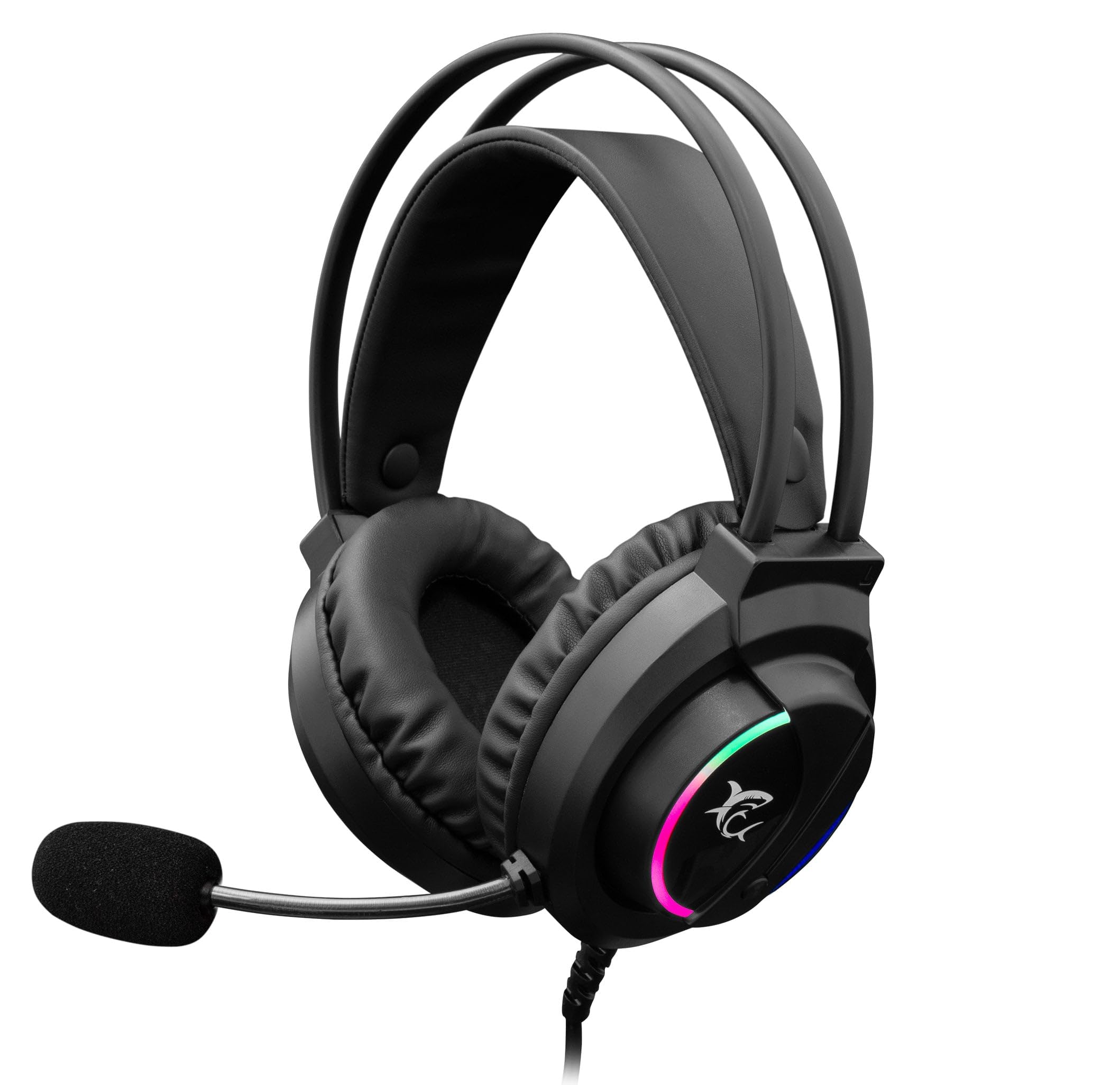
Image: The White Shark GH-2044 Wolf Gaming Headset packaging box, displaying the headset and key features.

Image: The White Shark GH-2044 Wolf Gaming Headset, showcasing its illuminated earcups and flexible microphone.

Imatge: Un primer pla view of the earcup on the White Shark GH-2044 Wolf Gaming Headset, highlighting the integrated volume control wheel.

Image: A detailed close-up of the flexible microphone, showing its foam cover for clear voice capture.
Instruccions de configuració
- Connecteu els auriculars: Plug the USB connector of the GH-2044 Wolf Gaming Headset into an available USB port on your computer, gaming console, or other compatible device.
- Instal·lació del controlador (si cal): For most operating systems, the headset will be recognized automatically, and standard drivers will be installed. If prompted, follow the on-screen instructions to complete any driver installation.
- Audio Output/Input Selection: Navigate to your device's sound settings. Select the White Shark GH-2044 Wolf as your primary audio output device (for sound) and as your primary audio input device (for the microphone).
- Ajustar el volum: Use the volume control wheel located on the headset's earcup to adjust the audio level to your preference.
Instruccions de funcionament
- Control de volum: The headset features an integrated volume control wheel on the left earcup. Rotate the wheel up to increase volume and down to decrease volume.
- Ús del micròfon: The flexible microphone can be adjusted to your desired position for optimal voice pickup. Ensure the microphone is positioned close to your mouth for clear communication.
- Silència del micròfon: (Information not explicitly provided in product data, assume software control or inline control if present.) If an inline mute button is present on the cable, press it to mute/unmute the microphone. Otherwise, use your device's software settings to control microphone mute.
- Il·luminació LED: The earcups feature spectrum LED lighting. This lighting is typically powered by the USB connection and operates automatically.
Manteniment
- Neteja: Use a soft, dry cloth to clean the headset. Do not use liquid cleaners or abrasive materials, as these can damage the finish and internal components.
- Emmagatzematge: Guardeu els auriculars en un lloc fresc i sec, allunyat de la llum solar directa i de temperatures extremes. Eviteu col·locar objectes pesats a sobre dels auriculars.
- Cura del cable: Avoid sharp bends or excessive pulling on the USB cable to prevent internal damage.
- Coixinets per a les orelles: Periodically check ear cushions for wear and tear. Replacement cushions may be available from the manufacturer or authorized retailers.
Resolució de problemes
- Sense so:
- Assegureu-vos que el connector USB estigui completament inserit al port.
- Check your device's sound settings to confirm the White Shark GH-2044 Wolf is selected as the output device.
- Verify the volume control wheel on the headset is turned up.
- Prova els auriculars en un altre dispositiu per descartar un problema específic del dispositiu.
- El micròfon no funciona:
- Ensure the microphone is not muted (check inline control or software settings).
- Confirm the White Shark GH-2044 Wolf is selected as the input device in your device's sound settings.
- Adjust microphone sensitivity in your device's sound settings.
- Prova el micròfon amb una altra aplicació o dispositiu.
- Àudio distorsionat:
- Lower the volume on both the headset and your device.
- Assegureu-vos que la font d'àudio no estigui distorsionada.
- Proveu de connectar-vos a un port USB diferent.
Especificacions
| Característica | Especificació |
|---|---|
| Marca | Tauró blanc |
| Número de model | GH-2044 Wolf |
| Tecnologia de connectivitat | USB per cable |
| Tipus d’auriculars | Sobre l'orella |
| Micròfon inclòs | Sí |
| Control de soroll | Cap |
| Dispositius compatibles | Múltiples |
| Tipus de control | Control de volum |
| Material | Leather (ear cushions) |
| Usos recomanats | Jocs |
| Dimensions del producte | 20 x 10 x 24.5 cm |
| Pes | 300 grams |
| Color | Negre |
| Components inclosos | Headband, Ear Cushions |
Garantia i Suport
For warranty information and technical support, please refer to the documentation provided with your purchase or contact your retailer. Specific warranty terms may vary by region and retailer.


