Introducció
This manual provides detailed instructions for the setup, operation, and maintenance of your Ipega PG-9089 Wireless Bluetooth Game Controller. Please read this manual carefully before use to ensure proper functionality and extend the product's lifespan. The Ipega PG-9089 is a versatile game controller designed for multi-platform compatibility, offering an enhanced gaming experience across various devices.
Producte acabatview
The Ipega PG-9089 is a wireless Bluetooth game controller featuring an ergonomic design and broad compatibility. It includes an integrated extendable phone holder, making it convenient for mobile gaming on the go.
Característiques principals:
- Wireless Bluetooth connectivity for seamless gaming.
- Compatible with Android, iOS, and PC devices.
- Integrated extendable phone holder for smartphones up to 6.2 inches.
- High sensitivity and accuracy buttons for precise control.
- Ergonomic design for comfortable extended gameplay sessions.

Figura 1: Davant view of the Ipega PG-9089 Wireless Bluetooth Game Controller, showcasing its black and red design with dual analog sticks and face buttons.
Contingut del paquet
Si us plau, verifiqueu que el vostre paquet contingui els elements següents:
- 1 x Ipega PG-9089 Wireless Bluetooth Game Controller
- 1 x cable de càrrega USB
- 1 x Manual d'usuari
Configuració i connexió
Carregant el controlador
Before initial use, ensure the controller is fully charged. Connect the supplied USB charging cable to the controller's charging port and the other end to a standard USB power source (e.g., PC USB port, USB wall adapter). The charging indicator light will illuminate during charging and turn off once the battery is full.
Emparellament Bluetooth
The PG-9089 supports various connection modes. Select the appropriate mode for your device.
Connexió de dispositius Android:
- Assegureu-vos que el controlador estigui apagat.
- Manteniu premut el botó Un botó + Botó HOME simultaneously until the indicator light flashes rapidly. This signifies Android standard pairing mode.
- On your Android device, navigate to Bluetooth settings and search for available devices.
- Select "PG-9089" from the list to pair. The indicator light will become solid once connected.
Connexió del dispositiu iOS:
- Assegureu-vos que el controlador estigui apagat.
- Manteniu premut el botó Botó Y + Botó HOME simultaneously until the indicator light flashes rapidly. This signifies iOS standard pairing mode.
- On your iOS device, navigate to Bluetooth settings and search for available devices.
- Select "PG-9089" from the list to pair. The indicator light will become solid once connected.
PC (Windows) Connection:
El controlador es pot connectar a un PC mitjançant Bluetooth o cable USB.
Bluetooth Connection (PC):
- Assegureu-vos que el controlador estigui apagat.
- Manteniu premut el botó botó X + Botó HOME simultaneously until the indicator light flashes rapidly. This puts the controller into PC X-Input mode.
- On your PC, go to Bluetooth settings and add a new device.
- Select "PG-9089" from the list to pair. The indicator light will become solid once connected.
Wired Connection (PC):
- Connecteu el controlador al vostre PC amb el cable USB subministrat.
- The controller should be automatically recognized as a game controller.
Instruccions de funcionament
Disseny de botons
Familiarize yourself with the controller's button layout for optimal gameplay and function access.

Figura 2: Diagram illustrating the button layout of the Ipega PG-9089, including D-Pad, A/B/X/Y buttons, L1/L2, R1/R2, Home, Select, Start, Turbo, and analog sticks with L3/R3 functions.
Suport mòbil integrat
The controller features an extendable holder designed to securely mount your smartphone for mobile gaming.
- Gently pull the top part of the holder upwards to extend it.
- Carefully place your smartphone into the holder, ensuring it is securely seated. The holder supports phones up to 6.2 inches.

Figura 3: lateral view of the Ipega PG-9089 demonstrating the integrated extendable phone holder in use, securely holding a smartphone.
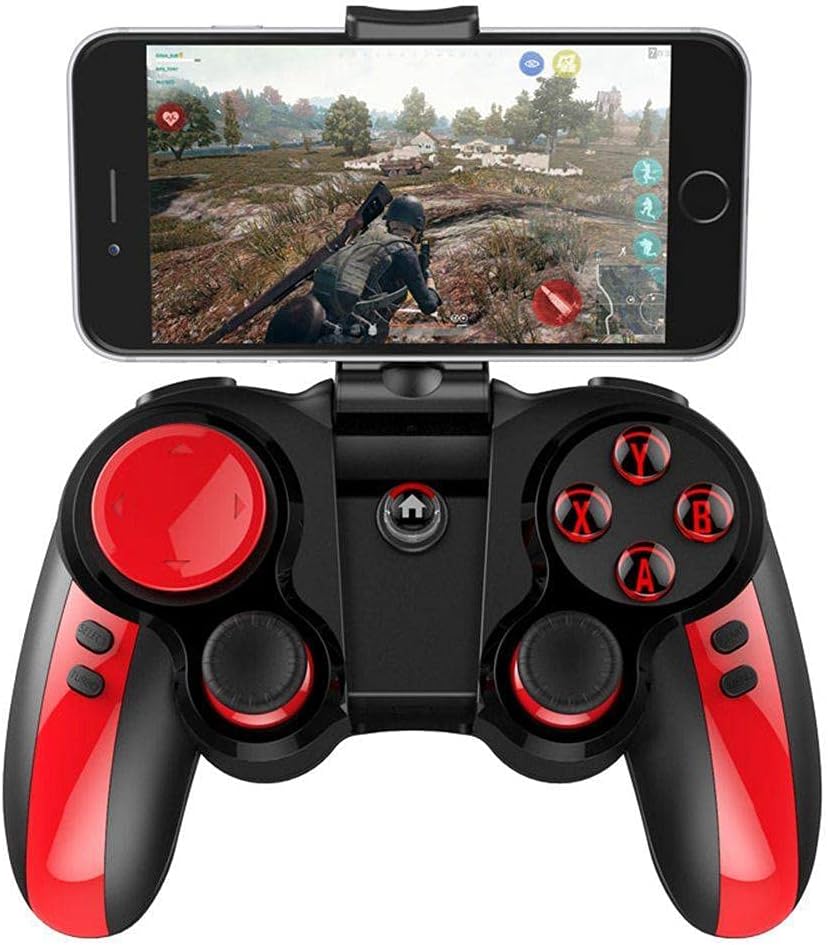
Figura 4: The Ipega PG-9089 controller with a smartphone mounted in its holder, displaying a game in progress, illustrating its practical application.
Funció TURBO
The TURBO function allows for rapid, continuous input of a button press, which can be beneficial in games requiring fast, repeated actions.
- Press the button you wish to set to TURBO (e.g., A, B, X, Y, L1, R1, L2, R2).
- While holding that button, press the Botó TURBO once. The selected button will now continuously input as long as it is held down.
- To cancel the TURBO function for a specific button, repeat the process: press the button and then press the Botó TURBO de nou.
Manteniment
- Clean the controller regularly with a soft, dry cloth. Do not use harsh chemicals or abrasive cleaners.
- Avoid exposing the controller to extreme temperatures, direct sunlight, or high humidity.
- Guardeu el controlador en un lloc fresc i sec quan no l'utilitzeu.
- Do not attempt to disassemble or repair the controller yourself, as this may void the warranty and cause damage.
Resolució de problemes
Controller not connecting via Bluetooth:
- Assegureu-vos que el controlador estigui completament carregat.
- Comproveu que el Bluetooth estigui habilitat al vostre dispositiu.
- Make sure the controller is in the correct pairing mode for your device (Android, iOS, or PC).
- Try forgetting the device on your Bluetooth settings and re-pairing.
- Reinicieu tant el controlador com el dispositiu.
Botons que no responen:
- Comproveu si el controlador està connectat correctament.
- Ensure the game or application supports game controllers.
- Try resetting the controller (if a reset button is available, otherwise power cycle).
- Recharge the controller.
El telèfon no cap al suport:
- The holder supports phones up to 6.2 inches. Ensure your phone's size is within this limit.
- Remove any bulky phone cases that might prevent proper fitting.
Especificacions
| Característica | Detall |
|---|---|
| Model | PG-9089 |
| Connectivitat | Bluetooth, USB Wired |
| Compatibilitat | Android, iOS, PC (Windows, Macintosh) |
| Phone Holder Support | Fins a 6.2 polzades |
| Color | Negre, vermell |
| Fabricant | IPEGA |
| Dimensions del paquet | 16.4 x 14 x 7 cm |
| Pes | 280 g |
Garantia i Suport
For warranty information and technical support, please refer to the warranty card included with your product or visit the official Ipega weblloc web. Conserveu el rebut de compra com a comprovant de compra per a qualsevol reclamació de garantia.
Fabricant: IPEGA
Model: PG-9089
ASIN: B0997F4ZZH


