Introducció
This manual provides comprehensive instructions for the FANTECH GP12 Revolver USB Gaming Controller. Please read this manual carefully before using the product to ensure proper operation and to maximize your gaming experience.
Producte acabatview
The FANTECH GP12 Revolver is a wired gaming controller designed for an immersive gaming experience on PC and PS3. It features a familiar console-like layout and dual vibration feedback motors.
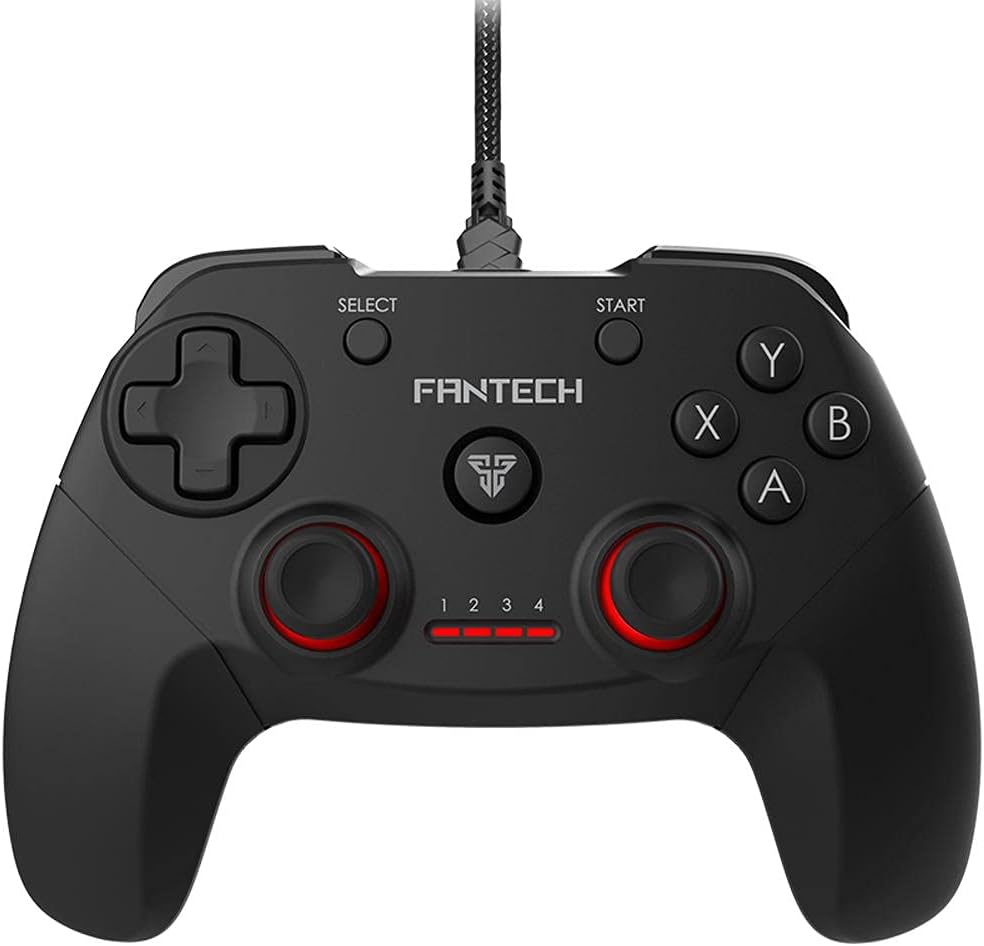
Imatge: Frontal view of the FANTECH GP12 Revolver USB Gaming Controller, showcasinel seu disseny ergonòmic i la disposició dels botons.
Característiques principals:
- Familiar Console-Like Layout: Designed for intuitive control, allowing users to pick up and play without a steep learning curve. The controller's shape and button placement mimic traditional console gamepads.
- Dual Vibration Feedback Motors: Provides tactile feedback for in-game actions, enhancing immersion with every hit, crash, and explosion. The motors are strategically placed to deliver realistic sensations.
- Wide Game Compatibility: Compatible with thousands of games on PC and PS3, offering full control across various genres. Simply plug and play to enjoy your favorite titles.
- Empunyadura ergonòmica: Crafted for comfortable long-term gaming sessions, reducing hand fatigue.
- 17 Botons: Comprehensive button layout for versatile control, including action buttons, directional pad, analog sticks, and shoulder buttons.
- Connectivitat per cable: Reliable USB connection with a 1.8-meter cable, ensuring stable and lag-free gameplay.

Image: A user's hands comfortably gripping the FANTECH GP12 Revolver controller, demonstrating its ergonomic design for extended gameplay.

Image: The FANTECH GP12 Revolver controller with visual representations of vibration waves emanating from its sides, illustrating the dual vibration feedback feature.

Image: A person using the FANTECH GP12 Revolver controller while gaming on a PC setup, highlighting its compatibility with various gaming platforms.
Configuració
Connexió del controlador:
- Locate an available USB port on your PC or PlayStation 3 console.
- Insert the USB connector of the FANTECH GP12 Revolver controller firmly into the USB port.
- The system will automatically detect and install the necessary drivers. This process may take a few moments.
- Once installed, the controller's indicator lights will illuminate, signifying it is ready for use.
Note: For optimal performance, ensure your operating system (Windows 7, Windows 10, or PS3) is up to date.
Instruccions de funcionament
Controls bàsics:
The GP12 Revolver features a standard gamepad layout. Familiarize yourself with the button assignments for your specific game.
- Coixinet direccional (D-Pad): S'utilitza per a una entrada direccional precisa, normalment per al moviment o la navegació per menús.
- Manets analògics: Provide 360-degree movement and camera control. Pressing them down often activates additional functions (L3/R3).
- Botons d'acció (A, B, X, Y): Primary interaction buttons for in-game actions such as jumping, attacking, or confirming selections.
- Botons d'espatlla (L1, R1) i gallets (L2, R2): Located on the top of the controller, used for various actions like aiming, firing, or special abilities.
- Botó INICI: Typically used to pause games or access in-game menus.
- Botó SELECCIÓ: Often used for map access, inventory, or other secondary functions.
Feedback de vibració:
The dual vibration motors provide immersive feedback during gameplay. This feature is automatically activated in games that support vibration. You will feel vibrations during impacts, explosions, and other significant in-game events.
Manteniment
- Mantingueu el controlador net netejant-lo amb un drap suau i sec.
- Eviteu exposar el controlador a temperatures extremes, humitat o llum solar directa.
- No utilitzeu productes de neteja abrasius ni dissolvents al controlador.
- Store the controller in a safe place when not in use to prevent damage to the cable or buttons.
Resolució de problemes
El controlador no respon:
- Assegureu-vos que el cable USB estigui connectat correctament tant al controlador com al dispositiu (PC/PS3).
- Prova de connectar el controlador a un port USB diferent.
- Reinicia el teu PC o PS3.
- Verify that the game you are playing supports gamepad input.
La vibració no funciona:
- Confirma que el joc al qual estàs jugant admet la retroalimentació per vibració.
- Revisa la configuració del joc per assegurar-te que la vibració estigui activada.
- Assegureu-vos que el controlador estigui connectat correctament.
Botons que no funcionen correctament:
- Assegureu-vos que no hi hagi restes enganxades sota els botons.
- Test the controller with another game or on a different device to isolate the issue.
Especificacions
Detailed technical specifications for the FANTECH GP12 Revolver USB Gaming Controller:

Image: Diagram showing the dimensions (154mm x 113mm x 58mm) and key technical specifications of the FANTECH GP12 Revolver controller.
| Característica | Detall |
|---|---|
| Marca | Fantech |
| Model | GP12 Revolver |
| Tipus | Gamepad per cable |
| Connectivitat | USB |
| Botons | 17 unitats |
| Feedback de vibracions | Sí (motors duals) |
| Longitud del cable | 1.8 metres |
| Dimensions (L x A x A) | 154 x 113 x 58 mm (aprox.) |
| Pes | 170 grams (aprox.) |
| Color | Negre / Gris |
| Plataformes compatibles | PC, PlayStation 3 (PS3) |
| Sistemes operatius | Windows 7, Windows 10, PS3 |
Garantia i suport
Per obtenir informació sobre la garantia i assistència tècnica, consulteu la targeta de garantia inclosa amb el producte o visiteu el lloc web oficial de Fantech. weblloc web. Conserveu el comprovant de compra per a reclamacions de garantia.
If you encounter any issues not covered in this manual, please contact Fantech customer support for assistance.


