1. Introducció
This manual provides essential information for setting up, operating, and maintaining your Amazon Fire 7 tablet (12th Generation). Please read this guide thoroughly to ensure optimal use of your device.

Image 1.1: The Amazon Fire 7 tablet, showcasing its display with various applications and content options.
2. Característiques clau
- Visualització: 7-inch touchscreen with 1024 x 600 resolution at 171 ppi, featuring IPS technology for wide viewangles d'ajust.
- Emmagatzematge: Available in 16 GB or 32 GB internal storage options, expandable up to 1 TB via microSD card.
- Durada de la bateria: Up to 10 hours for reading, web browsing, video playback, and music listening.
- Rendiment: Enhanced quad-core 2.0 GHz processor with 2 GB of RAM.
- Content Access: Access to Netflix, Facebook, Hulu, Instagram, TikTok, and more via Amazon’s Appstore.
- Comunicació: Supports Zoom and Alexa for video calls and voice commands.
- Controls parentals: Amazon Kids offers easy-to-use parental controls and access to curated content with Amazon Kids+.
3. Introducció (Configuració)
3.1 Desembalatge i càrrega inicial
Upon unboxing, locate the Fire 7 tablet, USB-C cable, and 5W power adapter. Connect the USB-C cable to the tablet and the power adapter, then plug it into a wall outlet. A full charge takes approximately 4 hours.
3.2 Engegada/apagada
- Per encendre: Premeu i manteniu premut el botó d'engegada situat al lateral de la tauleta fins que aparegui el logotip d'Amazon.
- Per apagar: Press and hold the power button, then select 'Power Off' from the on-screen options.
3.3 Assistent de configuració inicial
Seguiu les instruccions que apareixen a la pantalla per completar la configuració inicial, que inclou:
- Selecció d'idioma: Trieu el vostre idioma preferit.
- Connexió Wi-Fi: Select your Wi-Fi network and enter the password. The tablet supports dual-band 802.11a/b/g/n Wi-Fi.
- Amazon Account Registration: Sign in with your existing Amazon account or create a new one. This is necessary to access Amazon services and the Appstore.
- Time Zone and Date: Set your local time and date.
4. Operating Your Fire 7 Tablet
4.1 Navegació per la interfície
The Fire 7 tablet uses a touch-based interface. Swipe, tap, and pinch gestures are used for navigation. The home screen displays your installed apps and content.
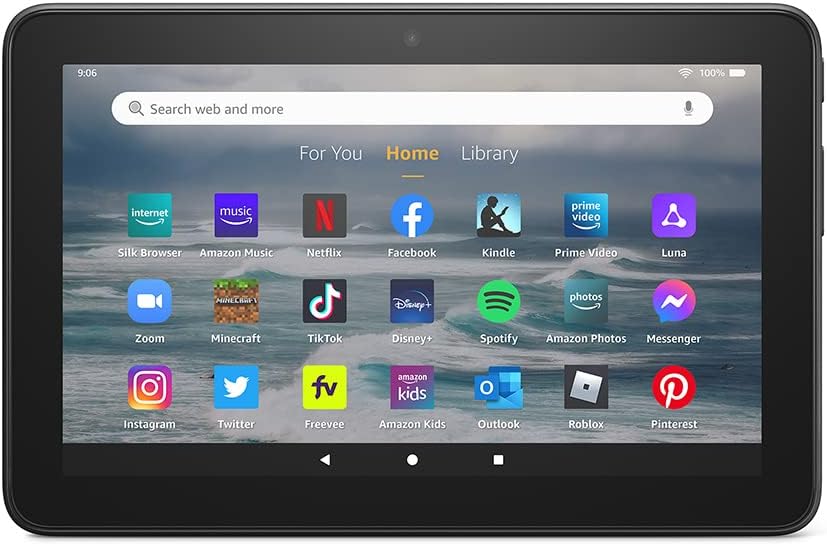
Image 4.1: The Fire 7 tablet's home screen, showing a grid of application icons for quick access.
4.2 Installing and Managing Apps
Applications can be downloaded from the Amazon Appstore. Google Play Store is not supported.
- To Install Apps: Open the 'Appstore' app, browse or search for desired applications, and tap 'Get' or the price to download and install.
- To Uninstall Apps: Vés a Settings > Apps & Notifications > Manage All Applications, seleccioneu l'aplicació i toqueu "Desinstal·la".
4.3 Media Consumption
The Fire 7 tablet is designed for reading, watching videos, and listening to music.
- Lectura: Use the Kindle app to access e-books.
- Vídeos: Stream content from Prime Video, Netflix, Hulu, Disney+, and other supported apps.
- Música: Listen to music via Amazon Music, Spotify, or other music streaming services.

Image 4.2: A user engaging with video content on the Fire 7 tablet, demonstrating its media playback capabilities.

Image 4.3: The Fire 7 tablet showcasing an e-book cover, highlighting its function as a reading device.
4.4 Ús d'Alexa
Your Fire 7 tablet includes Alexa. You can activate Alexa by saying "Alexa" or by tapping the Alexa icon.
- Comandaments de veu: Ask Alexa to play music, check the weather, set reminders, or update shopping lists.
- Videotrucades: Use Alexa to make video calls to friends and family via Zoom or other compatible services.

Image 4.4: A user engaged in a video call on the Fire 7 tablet, demonstrating its communication features.
4.5 Parental Controls with Amazon Kids
Amazon Kids provides parental controls to manage content access and screen time for children.
- Configuració: Access Amazon Kids settings to create child profiles, set age filters, and manage app permissions.
- Amazon Kids+: Subscribe to Amazon Kids+ for access to a curated library of books, apps, games, videos, and Audible books suitable for children.

Image 4.5: The Fire 7 tablet displaying the Amazon Kids interface, illustrating its parental control features.
5. Storage and Connectivity
5.1 Internal and Expandable Storage
The Fire 7 tablet comes with either 16 GB or 32 GB of internal storage. You can expand this storage by up to 1 TB using a microSD card. Insert the microSD card into the designated slot on the tablet.
Connectivitat Wi-Fi 5.2
The device supports single-antenna dual-band Wi-Fi (802.11a, 802.11b, 802.11g, 802.11n) with WEP, WPA, and WPA2 security. Wi-Fi 6 (802.11ax) is not supported.
5.3 Ports and Audio
- Port USB-C: Used for charging and connecting to a computer.
- microSD Slot: For external storage expansion.
- 3.5 mm Stereo Jack: Per connectar auriculars o altaveus externs.
- Altaveu integrat: Per a la sortida d'àudio.
6. Manteniment
6.1 Cura de la bateria
To maximize battery life, avoid extreme temperatures and fully discharge the battery occasionally before recharging. Battery life varies based on usage and settings.
6.2 Actualitzacions de programari
Ensure your tablet is connected to Wi-Fi to receive automatic software security updates. You can check for updates manually in Settings > Device Options > System Updates.
7. Solució De Problemes
If you encounter issues with your Fire 7 tablet, consider the following steps:
- El dispositiu no respon: Premeu i manteniu premut el botó d'engegada durant 20 segons per forçar un reinici.
- Problemes de connexió Wi-Fi: Verifiqueu la contrasenya del Wi-Fi, reinicieu l'encaminador o proveu de connectar-vos a una xarxa diferent.
- L'aplicació no funciona: Prova d'esborrar la memòria cau de l'aplicació (Settings > Apps & Notifications > Manage All Applications > [App Name] > Storage > Clear Cache) o reinstal·lant l'aplicació.
- Rendiment lent: Close unused apps, clear cache, or consider adding a microSD card for more storage.
- Esgotament ràpid de la bateria: Reduce screen brightness, disable Wi-Fi when not in use, or close background apps.
8. Especificacions
| Característica | Descripció |
|---|---|
| Mostra | 7’’ touchscreen, 1024 x 600 resolution at 171 ppi, SD video playback, IPS technology. |
| Mida | 7.11’’ x 4.63’’ x 0.38’’ (180.68 mm x 117.59 mm x 9.67 mm). |
| Pes | 9.9 unces (282 grams). |
| CPU i RAM | Quad-Core 2.0 GHz with 2 GB of RAM. |
| Emmagatzematge | 16 GB or 32 GB internal storage, expandable up to 1 TB via microSD card. |
| Durada de la bateria | Fins a 10 hores. |
| Temps de càrrega | Approximately 4 hours with included 5W power adapter. |
| Connectivitat Wi-Fi | Single-antenna dual-band Wi-Fi (802.11a/b/g/n). Wi-Fi 6 (802.11ax) not supported. |
| Ports | USB-C, microSD slot, 3.5 mm stereo jack. |
| Àudio | 3.5 mm stereo jack and integrated speaker. |
| Sensors | Acceleròmetre. |
| Especificacions de la càmera | Càmeres frontal i posterior de 2 MP amb gravació de vídeo HD de 720p. |
| Serveis de localització | Location-based services via Wi-Fi. |
| Característiques addicionals | External volume controls, built-in Bluetooth with A2DP support. |
| Generació | 12a generació - llançament 2022. |
9. Garantia i Suport
The Amazon Fire 7 tablet (12th Generation) includes a 1-year limited warranty and service. For detailed warranty information and support, please refer to the official Amazon support website or the documentation included with your device.
This device receives the same limited warranty as a new device, even if purchased as a 'Like-New' Amazon device.


