Introducció
This manual provides detailed instructions for the installation, operation, and maintenance of your XTRONS HD111D 10.1-inch Dual Car Headrest DVD Player. Please read this manual thoroughly before using the product to ensure proper function and safety. Keep this manual for future reference.
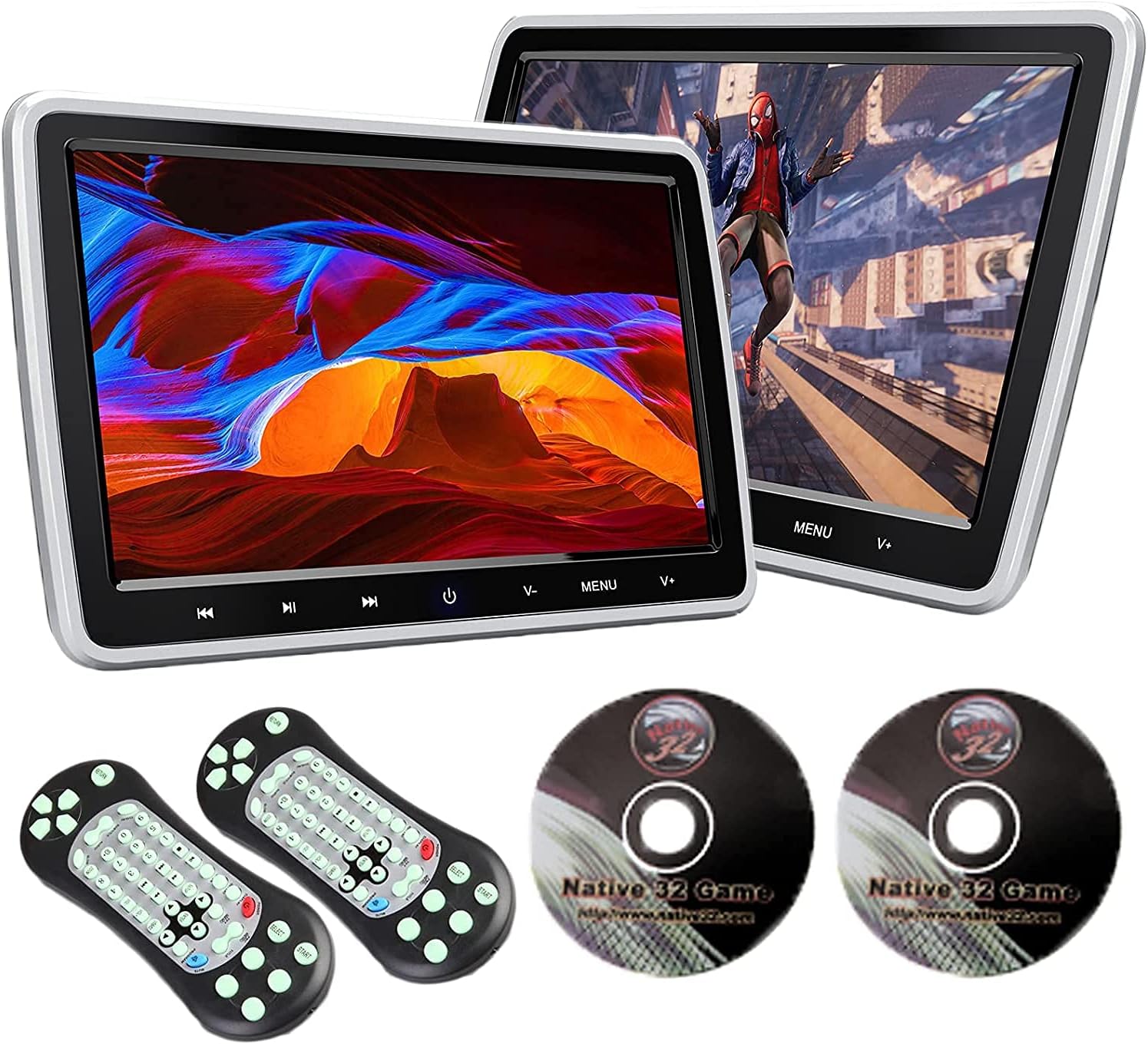
Figure 1: XTRONS HD111D Dual Car Headrest DVD Player with accessories.
Informació de seguretat
- Do not attempt to disassemble or modify the unit. Unauthorized modifications can lead to electric shock, fire, or damage to the product.
- Ensure all connections are secure and correctly made before powering on the device.
- Eviteu exposar la unitat a temperatures extremes, a la llum solar directa durant períodes prolongats o a una humitat excessiva.
- Keep small objects and liquids away from the unit to prevent damage or malfunction.
- Always operate the vehicle safely. Do not allow the use of the DVD player to distract the driver.
Contingut del paquet
Verifiqueu que tots els elements que s'enumeren a continuació s'inclouen al vostre paquet:
- 2 x XTRONS 10.1-inch Headrest DVD Players
- 2 x ISO Wiring Harnesses
- 2 x ISO Adapter Cables
- 2 x Brackets de muntatge
- 2 x Sets of Plastic Drivepipes
- 2 x comandaments a distància
- 2 x Cigarette Lighter Adapters
- 2 x Game Discs
- 2 x Cigarette Lighter Adapter Fuses
- 2 cargols fixos
- 1 x Manual d'usuari

Figura 2: Dimensions del producte i accessoris inclosos.
Producte acabatview
Característiques
- Pantalla TFT d'10.1 polzades: High-quality display for clear visuals.
- Reproductor de DVD sense regió: Compatible with various disc formats including AVI, DVD, CD, and JPEG.
- Integrated USB/SD Card Slot: Supports media playback (AVI, 3GP, VOB, MP4, FLV, MP3, WMA, AAC, JPG) up to 32GB.
- Entrada HDMI: Connect external devices like game consoles or smartphones.
- AV Input/Output: Share content with other car entertainment systems.
- Built-in IR Transmitter: For wireless headphone connectivity.
- 32-bit Games Support: Enjoy pre-loaded games with included game discs and remote controls.
- Intuitive Touch Keys: Easy navigation and control.

Figure 3: 10.1-inch TFT screen with intuitive touch keys.
Ports i connexions
The unit features a variety of ports for versatile connectivity:
- HD Input: For high-definition video sources.
- Port USB: Per a la reproducció de contingut multimèdia des d'unitats USB.
- Ranura per a targeta SD: For media playback from SD cards.
- AV Input/Output: RCA connections for audio and video.
- Conector d'auriculars: Per a escolta privada amb auriculars amb cable.
- Entrada d'alimentació: Per connectar-lo a la xarxa elèctrica del vehicle.

Figura 4: lateral view mostrant els ports de connectivitat.
Configuració i instal·lació
The XTRONS HD111D is designed for easy installation. Follow these steps to mount the player securely:
- Choose Drivepipes: Select the appropriate set of drivepipes that fit your headrest poles and insert them into the poles.
- Col·loqueu el suport de muntatge: Compress the two spring clips on the mounting bracket and place it onto the headrest poles, then release the clips to secure it.
- Install Headrest Player: Slide the headrest DVD player onto the mounting bracket until it clicks into place.
- Adjust and Fix: Adjust the distance of the player for optimal viewing and tighten the fixed screw to secure its position.
- Gestió de cables: Hide the power and signal cables by inserting the ISO wiring harness from the bottom of the headrest. Guide the cables under the seat to a suitable power supply.

Figura 5: Guia d'instal·lació pas a pas.
Opcions de connexió d'alimentació
You can power the unit using the provided cigarette lighter adapter or by hardwiring it to your vehicle's fuse box. An extra adapter may be required for certain power outlets.

Figure 6: Power connection methods.
Instruccions de funcionament
Playing DVDs/CDs
Insert a compatible DVD or CD into the disc slot. The player will automatically detect the disc and begin playback. Use the on-screen menu or remote control to navigate chapters, adjust volume, and control playback.

Figure 7: Region-free DVD player in use.
Reproducció de targetes USB/SD
Insert a USB drive or SD card (up to 32GB) into the respective slot. The unit will display a menu allowing you to select music, video, or photo files for playback. Navigate using the touch keys or remote control.
Connectivitat HDMI
Connect an external device (e.g., game console, smartphone) to the HDMI input port using an HDMI cable. Select the HDMI input source from the unit's menu to display content from the connected device.
AV Input/Output
Use the AV input to connect external video sources. The AV output allows you to share the current content playing on the XTRONS unit with other monitors or car entertainment systems that have RCA input capabilities.
Playing 32-bit Games
Insert a game disc into the DVD slot. Use the provided remote controls to navigate the game menu and play the included 32-bit games.

Figure 8: Enjoying 32-bit games.
Screen Mirroring (Optional)
The unit supports screen mirroring from Android and iOS devices. This feature may require optional accessories (XTRONS HDTV05 for wireless, XTRONS HDTV04 for wired connection) which are sold separately. Refer to the accessory manual for detailed setup.

Figure 9: Screen mirroring functionality.
Connecting a Digital TV Receiver (Optional)
You can connect an optional XTRONS digital TV receiver to the unit via HDMI to watch TV shows. Compatible models include HDMI01, HDMI02, HDMI03, FV011, FV014, FV012DE, and FV015DE. These are sold separately.

Figure 10: Connecting to a digital TV receiver.
Manteniment
- Neteja: Feu servir un drap suau i sec per netejar la pantalla i l'exterior de la unitat. No utilitzeu productes de neteja abrasius ni dissolvents.
- Cura del disc: Manipuleu els discs per les vores. Manteniu-los nets i sense ratllades per garantir una reproducció òptima.
- Emmagatzematge: Si guardeu la unitat durant un període prolongat, desconnecteu-la de l'alimentació i guardeu-la en un lloc fresc i sec.
Resolució de problemes
| Problema | Causa possible | Solució |
|---|---|---|
| Sense poder | Loose power connection; Blown fuse; Vehicle power issue. | Check power cable connection; Replace fuse in cigarette lighter adapter; Consult vehicle manual or technician. |
| Sense imatge/so | Incorrect source selected; Loose AV/HDMI cable; Damaged disc/file. | Select correct input source; Ensure cables are securely connected; Try a different disc/file. |
| El disc no es reprodueix | Incompatible disc format; Disc is dirty or scratched; Disc inserted incorrectly. | Ensure disc is compatible (AVI, DVD, CD, JPEG); Clean or replace disc; Insert disc correctly with label facing up. |
| El comandament a distància no funciona | Piles esgotades; Obstrucció entre el comandament a distància i la unitat; Sensor del comandament a distància bloquejat. | Replace batteries; Remove any obstructions; Ensure remote is pointed at the unit's IR sensor. |
If you encounter issues not listed here, please contact XTRONS customer support.
Especificacions
- Marca: XTRONS
- Model: HD111D
- Mida de la pantalla: 10.1 polzades
- Tipus de visualització: TFT
- Tipus de suports admesos: CD-RW, DVD+R, DVD+RW, DVD-R, DVD-RW, SD, USB (AVI, 3GP, VOB, MP4, FLV, MP3, WMA, AAC, JPG)
- Max USB/SD Capacity: 32 GB
- Tecnologia de connectivitat: USB, HDMI, AV (RCA)
- Pes de l'article: 3.6 quilos
- Dimensions del paquet: 43.9 x 31.3 x 15.6 cm
- Bateries: Not included, Not required for main unit operation.
Garantia i Suport
XTRONS proporciona una 1 any de garantia for this headrest DVD player. This warranty covers manufacturing defects and ensures professional technical support.
For technical assistance, warranty claims, or any inquiries, please contact XTRONS customer support through the Amazon platform. We are committed to responding promptly and safeguarding your rights and interests.


