Introducció
Gràcies per la compraasing the Dreamegg DG-L03 Smart Night Light. This manual provides essential information for the safe and efficient use of your device. Please read it thoroughly before operation and retain it for future reference.
Informació de seguretat
- Assegureu-vos que la font d'alimentació voltage coincideix amb els requisits del producte.
- No desmunteu, repareu o modifiqueu el dispositiu.
- Keep the device away from water, high temperatures, and direct sunlight.
- Use only the provided USB cable for power.
- Aquest producte només és per a ús interior.
- Mantenir fora de l'abast dels nens.
Contingut del paquet
Si us plau, comproveu que tots els elements siguin presents i en bon estat:
- Dreamegg DG-L03 Smart Night Light
- Cable d'alimentació USB
- Manual d'usuari
Producte acabatview
The Dreamegg DG-L03 is a versatile smart night light offering various lighting modes and control options. Its compact, simple design integrates seamlessly into any interior.

Image: The Dreamegg DG-L03 Smart Night Light in a bedroom setting, demonstrating its use with smart home devices.
Configuració
1. Connexió d'alimentació
Connect the provided USB power cable to the night light and plug the other end into a compatible USB power adapter (not included) or a USB port. The light will power on.
2. Instal·lació i emparellament d'aplicacions
To unlock all smart features, download the "Smart Life" app from your smartphone's app store (iOS or Android).
- Download and install the "Smart Life" app.
- Registreu-vos o inicieu sessió al vostre compte.
- Ensure your smartphone is connected to a 2.4GHz Wi-Fi network. (5GHz networks are not supported for initial pairing).
- Open the app and tap "+" to add a device.
- Follow the in-app instructions to pair the DG-L03 night light. This typically involves putting the device into pairing mode (refer to app for specific steps, usually a long press on the device button).

Image: The Smart Life app interface displaying various light control options, including RGB color selection and brightness adjustment.
3. Integració de l'assistent de veu (Alexa/Google Home)
The DG-L03 is compatible with Amazon Alexa and Google Assistant for convenient voice control.
- Ensure your DG-L03 is successfully paired with the Smart Life app.
- Obre l'aplicació Amazon Alexa o Google Home.
- Navegueu fins a la secció "Habilitats" o "Funciona amb Google".
- Cerca and enable the "Smart Life" skill/service.
- Link your Smart Life account when prompted.
- Discover devices. Your DG-L03 will appear as "Smart Mood Light" by default (this name can be changed in the Smart Life app).
You can now control your light using voice commands such as: "Alexa, turn on Smart Mood Light" or "Hey Google, set Smart Mood Light to blue."
Instruccions de funcionament
1. Control manual
The DG-L03 features a touch-sensitive control on its back for basic operations:
- Girar: Adjust brightness (stepless dimming).
- Premsa: Change lighting modes.

Image: A hand demonstrating the touch and rotate functions on the back of the night light for manual brightness and mode adjustments.
2. Control d'aplicacions
The Smart Life app provides comprehensive control over your night light:
- Encès/apagat: Toggle the light on or off.
- Ajust de brillantor: Regulació continua de la intensitat del 0% al 100%.
- Selecció de color: Choose from 16 million RGB colors and various white light temperatures.
- Modes d'escena: Select from a variety of preset mood lighting scenes (e.g., Aurora, Sun, Ocean, Rainbow, Campfire, Neon, Breathing, Grassland, Night).
- Escenes personalitzades: Crea i desa els teus propis efectes d'il·luminació personalitzats.

Image: The Smart Life app displaying advanced control options for the night light, including a color picker and various lighting effects.
3. Funcions del temporitzador
The app allows you to set schedules and timers for automated operation:
- Schedule Timer: Set specific ON/OFF times down to the second, minute, or day of the week.
- Wake-up Light ("Sunrise" Mode): Gradually brightens the light to simulate a sunrise, promoting a gentle awakening.
- Sleep Aid Light ("Sunset" Mode): Gradually dims the light to simulate a sunset, aiding in relaxation and sleep.
- Flashing Alert: A mode designed to attract attention.
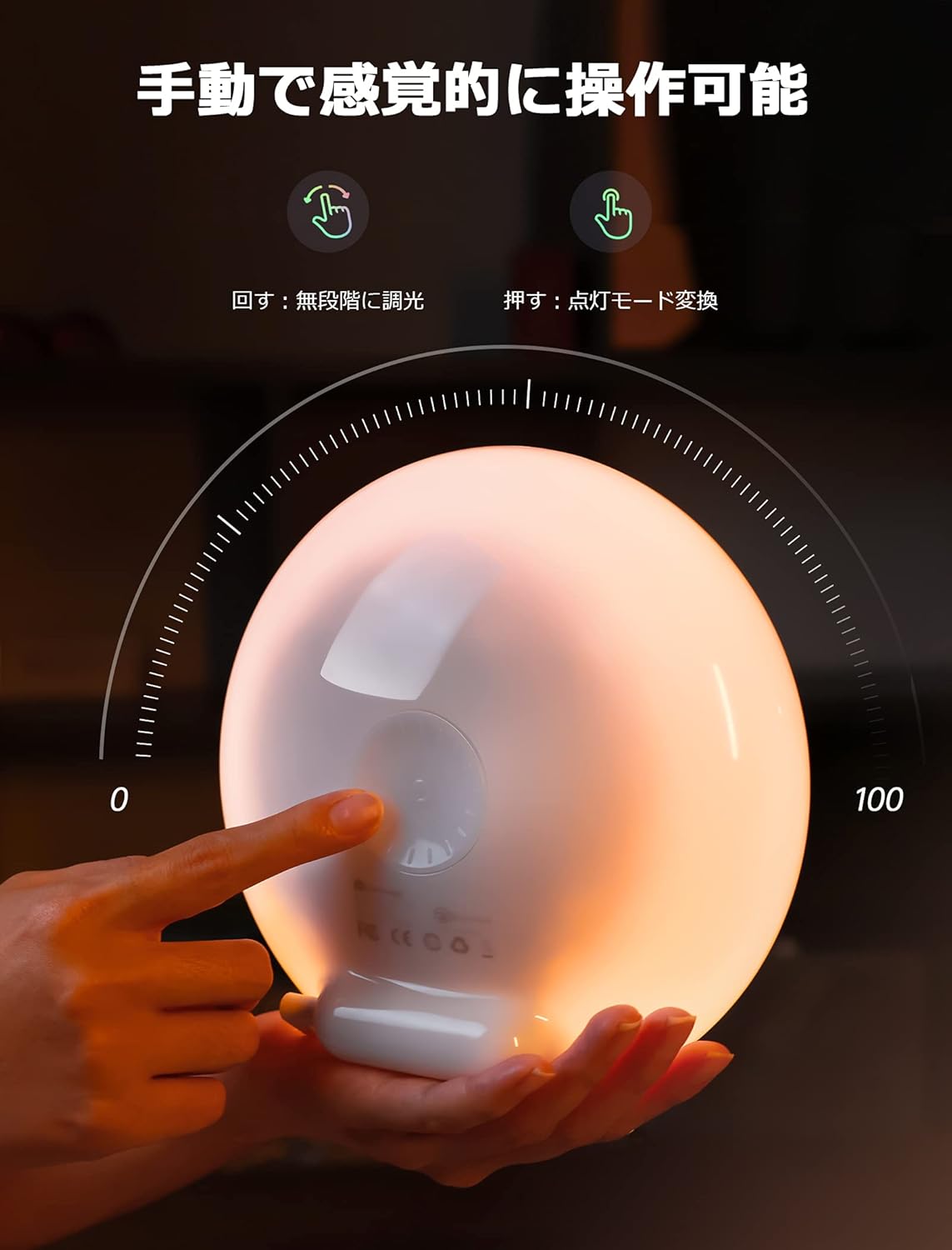
Image: Illustrations of the wake-up light function (gradual brightening) and sleep aid function (gradual dimming) for improved sleep cycles.
Special Features and Modes
The DG-L03 offers a variety of beautiful atmospheric lighting modes to suit any occasion:
- Aurora: Dynamic, flowing colors.
- Sol: Warm, bright light.
- Oceà: Calming blue and green hues.
- Arc de Sant Martí: A spectrum of vibrant colors.
- Campfoc: Flickering warm tones.
- Neon: Bright, electric colors.
- Respiració: Gentle pulsing light.
- Grassland: Soft, natural greens.
- Nit: Dim, soothing light.

Image: Visual representation of nine distinct atmospheric lighting modes available on the Dreamegg DG-L03.
Manteniment
- To clean the device, wipe it with a soft, dry cloth.
- No utilitzeu netejadors abrasius ni dissolvents.
- Assegureu-vos que el dispositiu estigui desconnectat abans de netejar-lo.
Resolució de problemes
| Problema | Causa possible | Solució |
|---|---|---|
| La llum no s’encén. | Sense connexió elèctrica. | Check if the USB cable is securely connected and the power adapter is working. |
| No es pot connectar a la Wi-Fi. | Incorrect Wi-Fi band (2.4GHz required). Device not in pairing mode. | Ensure your router is broadcasting a 2.4GHz network. Put the device into pairing mode as per app instructions. |
| El control per veu no funciona. | Smart Life skill not enabled or account not linked. Incorrect device name. | Verify the Smart Life skill is enabled and linked in your Alexa/Google Home app. Use the correct device name (e.g., "Smart Mood Light"). |
| Light is unstable or falls easily. | Unstable placement. | Place the light on a flat, stable surface. |
Especificacions
- Número de model: DG-L03JP
- Dimensions del producte: 8.8 x 18 x 18 cm
- Pes: 620 g
- Tipus d'acabat: Polit
- Lamp Tipus: Llum nocturna
- Color de l'ombra: Bulb Color (Warm White)
- Tipus d'interruptor: Toca
- Connectivitat: Wi-Fi (2.4 GHz), Bluetooth
- Opcions de color: 16 Million RGB Colors + Warm White
- Control: Smartphone App (Smart Life), Voice Control (Alexa, Google Home), Manual Touch
Garantia i Suport
Dreamegg products come with a maximum 18-month warranty, with an additional 6-month free extension available. We also provide long-term customer support. For any inquiries before or after purchase, please contact our customer service team. We are committed to providing sincere and dedicated assistance.
Per obtenir ajuda, visiteu el Botiga Dreamegg a Amazon o contactar directament amb el venedor.


